Advanced Random Note
approvedby karstenpedersen
Create commands from custom queries to open random notes.
Advanced Random Note Obsidian Plugin
This plugin enables you to create custom queries for opening random notes. This can be done through its own query language, Dataview, and/or regular expressions.
Features
- Find random files using custom queries
- Customize queryes through a custom modal
- Enable queries as commands to execute them with ease.
- Disable folders from being included in the searches.
- Choose if notes should open in new tabs.
- Commands:
- Open random note modal: Open modal to select a query.
- Open random note: Open random note (only markdown files).
- Open random file: Open random file (all file types).
Settings Tab
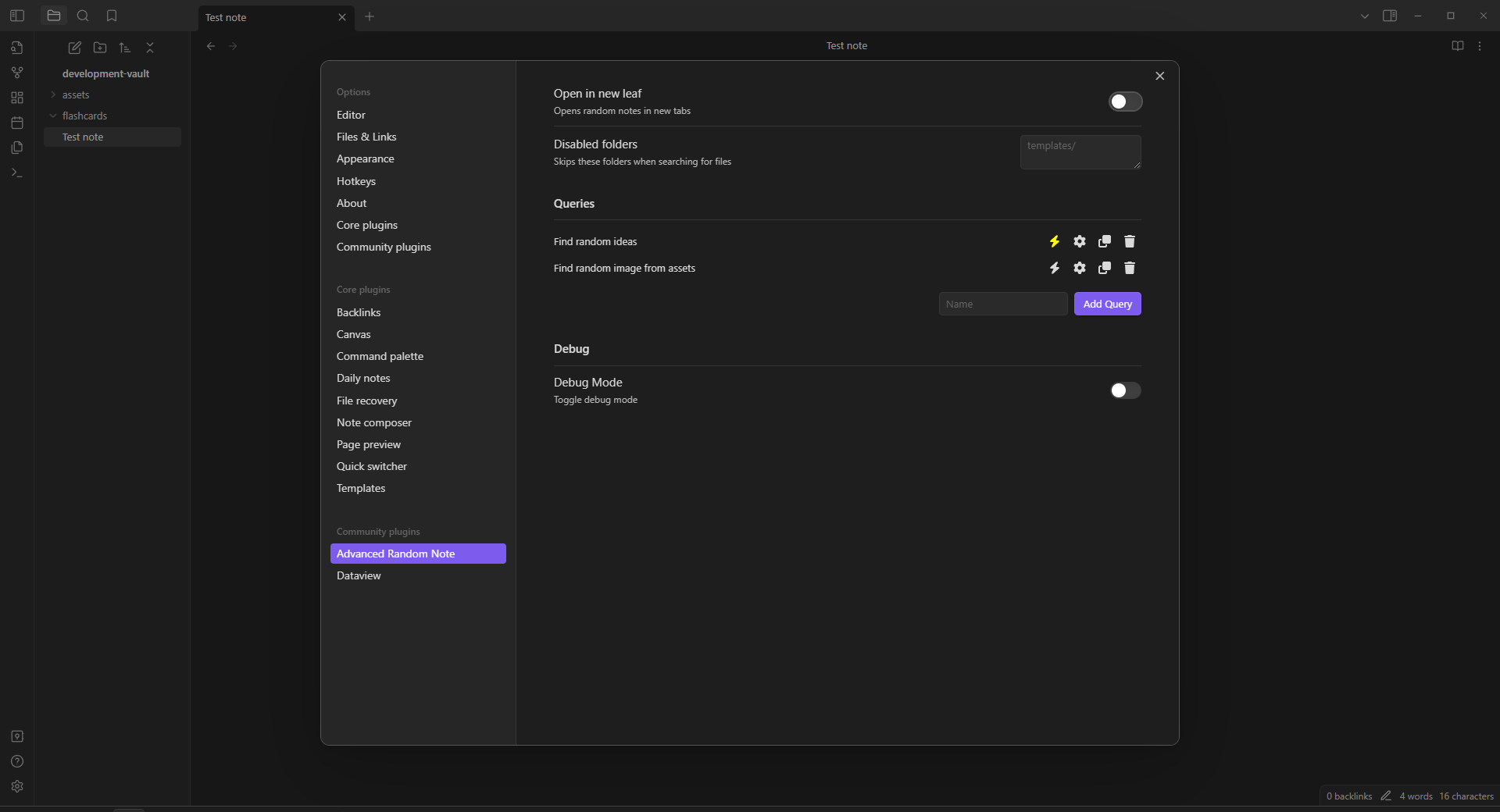
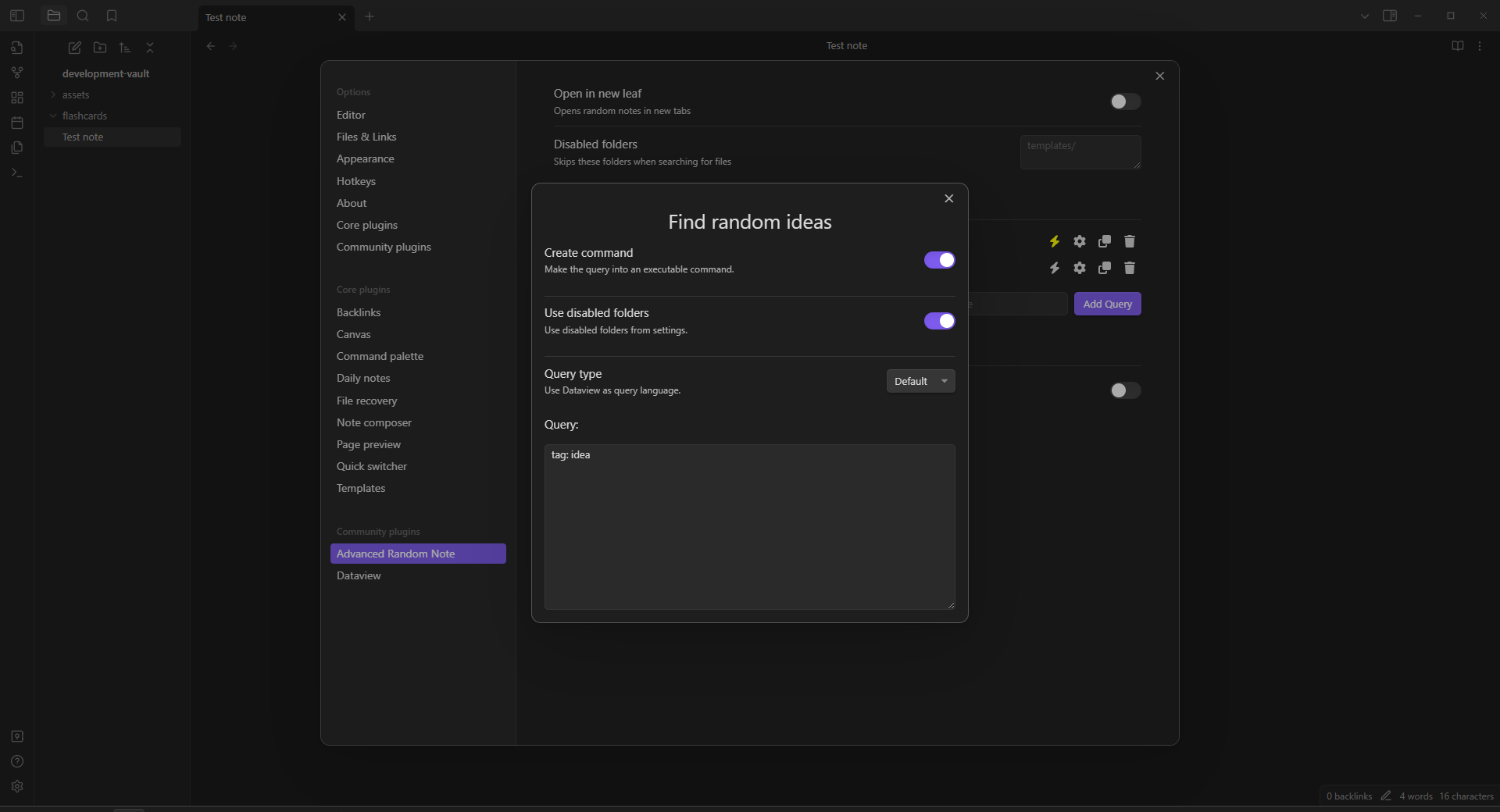
Installation
Obsidian
- Open Settings.
- Go to "Community Plugins".
- Enable community plugins by pressing "Turn on community plugins".
- Click "Browse" to browse available community plugins.
- Search for "Advanced Random Note".
- Click Install and enable the plugin.
- Close the community plugins window.
Getting Started
Queries
This plugin uses three different query languages:
- Custom language inspired by Obsidian Search.
- Dataview
- Regular expressions
Custom query language
Tags
You can query files by their tags. Do this by specifying the tag: keyword. After this, you can write multiple tags that should be included and excluded from the file.
- If tags should not be in the file, then write
!in front of them, like this:tag: idea !complete. This will get files that have theideatag, but not thecompletetag. - You can also write
#in front of the tags, like this:#ideaand!#complete,
Paths
You can query files by their path. To do this, specify the path: keyword and write what the path should contain to be included in the result.
Filename
You can query files by their filename. To do this, specify the file: keyword and write what the filename should contain to be included in the result.
Examples
- Find ideas that are not completed:
tag: idea !complete - Find untitled files:
file: Untitled. - Find fleeting notes in root directory:
path: / tag: fleeting.
Dataview
Install and enable Dataview through community plugins and reload Obsidian. You can find more information about Dataview queries in their documentation.
Note: This plugin only allows for list queries, like this one:
LIST
FROM #idea
Regular Expressions
Another query type is regular expressions
Examples
- Find image from attachments:
^attachments\/.*?[.](png|jpg)
Disabled Folders
You can disable folders to remove them from being searched. This can be useful if you have a template folder that you do not want to open files from.
Note: Queries can disable the use of this setting, meaning that you can create some queries which searches from them.
Enable Queries as Commands
Queries can be enabled as commands by clicking the toggle next to them when on the plugins settings tab. This can be useful in combination with the Commander plugin.
Version History
Version 0.0.11
- Add ribbon button.
- Open random note in folder using file right-click menu.
- Open random notes in new windows.
Version 0.0.10
- Fix opening other types of files other than markdown files.
Version 0.0.9
- Fix disabled folders.
- Fix open file in new leaf setting.
Version 0.0.8
- Add custom query editor modal.
- Add query types:
- Search using Dataview.
- Search using regular expressions.
- Add queries will now also search for other filetypes.
- Fix root folder query in custom query language.
Version 0.0.7
- Fix frontmatter tags to also be included in queries.
Version 0.0.6
- Add
Open Random Notecommand. - Add
Open Random Note Modalcommand. - Add plugin settings tab.
- Add user queries.
- Add ability to toggle user queries as commands.
Contact
- Get in contact on the plugins GitHub.
For plugin developers
Search results and similarity scores are powered by semantic analysis of your plugin's README. If your plugin isn't appearing for searches you'd expect, try updating your README to clearly describe your plugin's purpose, features, and use cases.