Agent Ledger
approvedby Keivn Lee
Read-only Agent Ledger views for Work Ledger projects, tasks, timelines, reports, and health. - This plugin has not been manually reviewed by Obsidian staff.
Agent Ledger for Obsidian
See agent-assisted work clearly—projects, knowledge, evidence, and weekly reports—in the Obsidian Vault you already use.
Agent Ledger reads through Work Ledger and never edits managed Markdown.
Install from Community Plugins · Quick start · How it works
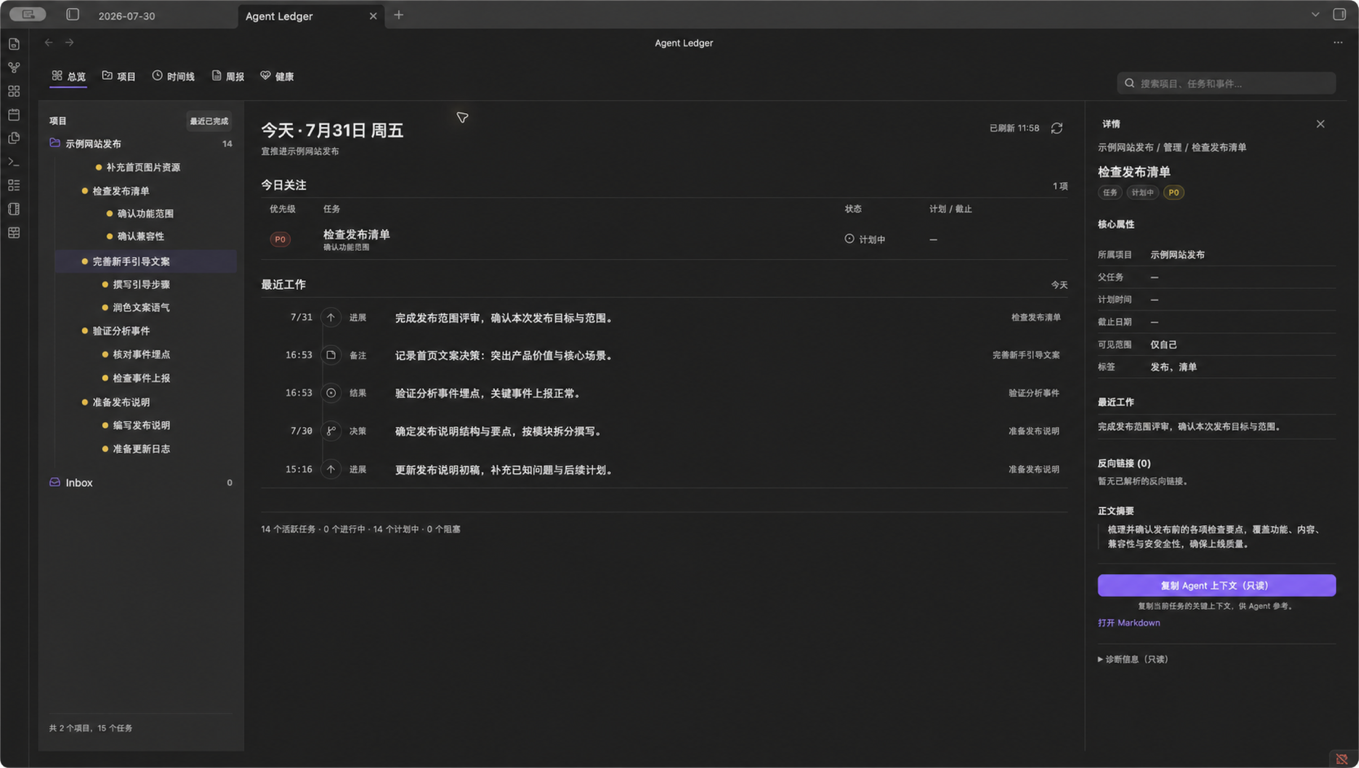
Make agent work easier to understand
Agent Ledger is for people who already use Obsidian and Work Ledger to manage agent-assisted projects. It turns the structured data in your Vault into a desktop workspace where you can:
- Know what needs attention today. See focus tasks, status counts, and recent work without opening every note.
- Trace work back to evidence. Follow projects, task hierarchy, effective events, source Markdown, native links, and backlinks.
- Prepare updates with confidence. Review report readiness and the facts behind a weekly report before sharing it.
What you can do
- Overview brings today's focus and recent activity together across all projects.
- Projects makes root tasks and inherited child-task structure readable at a glance.
- Knowledge lists draft and stable documents by default, with independent kind, status, Project, and tag filters. Knowledge Inspector shows the read-only body, effective visibility, source Events, history, and native-note actions; archived documents remain available through the status filter.
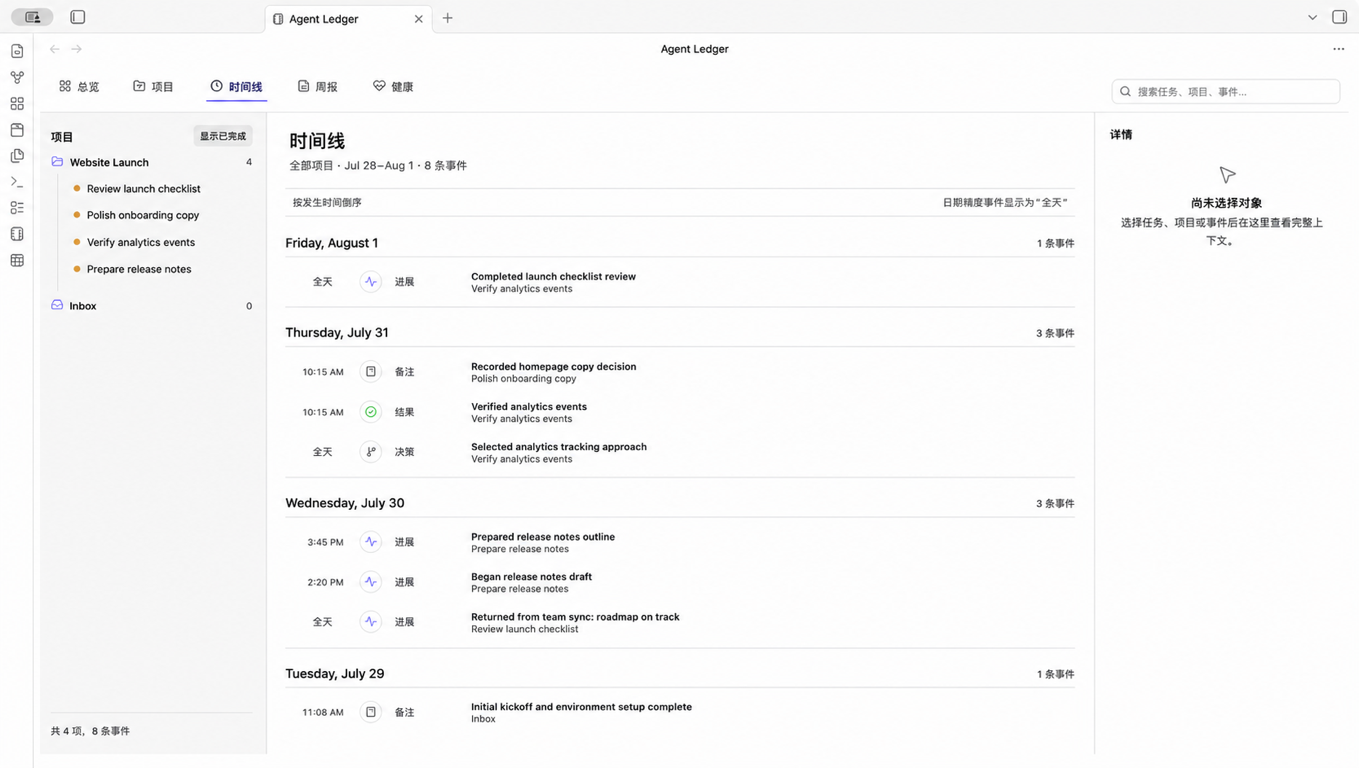
- Timeline turns corrected and compensated Journal entries into a clean,
date-grouped history, including
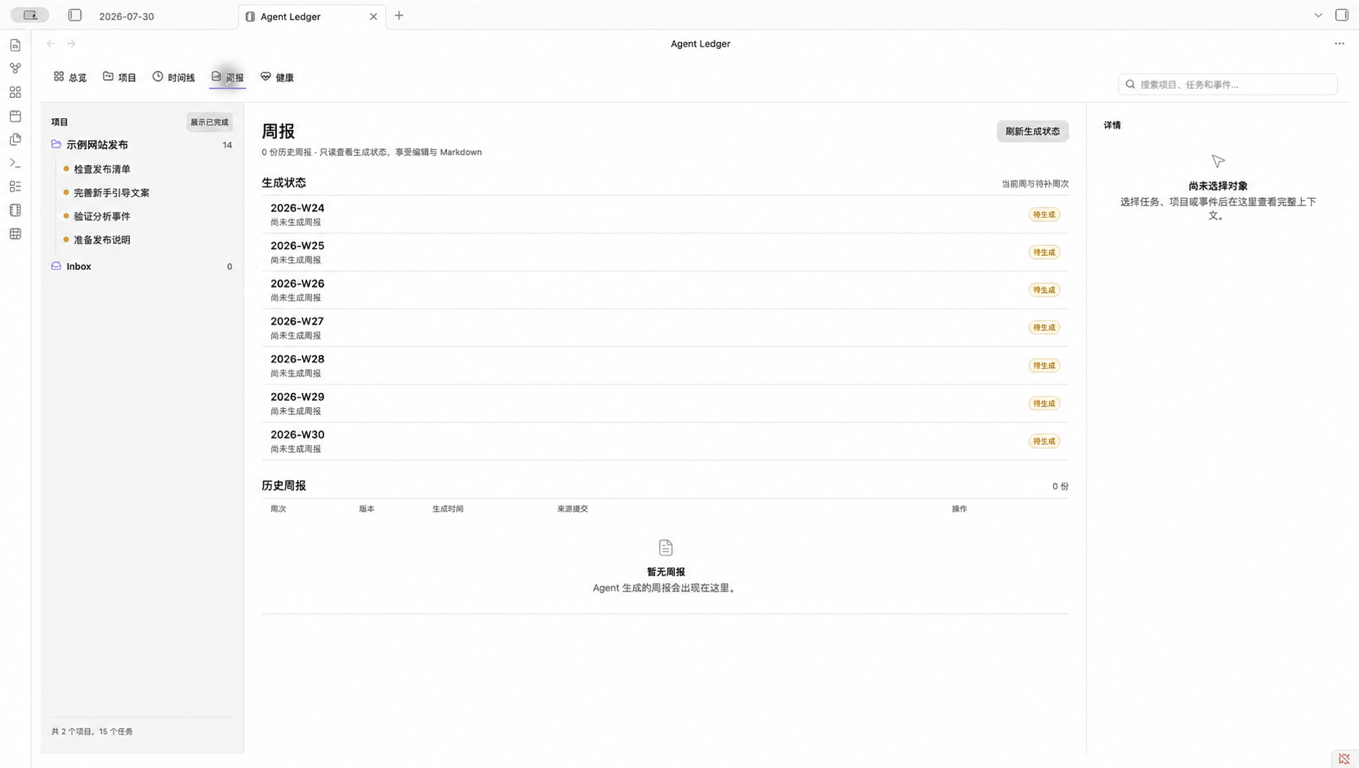
idea(灵感) andinsight(洞察). - Reports shows due status, report history, evidence facts, and clean Markdown or plain-text copy actions.
- Health explains CLI, protocol, schema, Vault, digest, Git HEAD, and doctor findings when something needs attention.
Quick start
- In Obsidian desktop
1.12.0or newer, open Settings → Community plugins, search for Agent Ledger, then install and enable it. You can also use the Community Plugins link. - Install an exact compatible
agent-ledger-harnessrelease that provideswork-ledger >=0.11,<1.0, and prepare a schema 7 Work Ledger Vault withknowledge_kind_document=trueandknowledge_kind_memo=true. See the setup guide for supported installation and migration paths. - Open that same Vault in Obsidian. In Settings → Agent Ledger, enter the
absolute path to the verified
work-ledgerexecutable. Add an absolute configuration path only if you do not use the CLI default. - Select the ribbon icon or run Agent Ledger: Open from the command palette.
How it works
Agent Ledger asks the compatible work-ledger CLI for deterministic read
projections, then renders them inside Obsidian. Work Ledger remains the only
writer for managed Project, Task, Knowledge, Journal, and Report Markdown, so the plugin
does not introduce a second source of truth.
The open Obsidian Vault and the configured CLI Vault must have the same SHA-256 identity. If they do not match, Agent Ledger clears its business state before showing the error so information from another Vault is never displayed.
Designed for trust
- The client exposes read and diagnostic operations only. Through Work Ledger,
it may inspect local Git metadata and history. It never performs Git mutations,
fetches, pushes,
sync,apply,migrate apply, orreport write, and it never writes managed Markdown directly. - Settings persist runtime location and UI preferences, not Project, Task, Knowledge, Event, Report, CLI stdout, or Agent-context snapshots.
- Copy Agent context copies a scoped, read-only context block to your clipboard. It does not send anything to an agent automatically.
- Report export is a clean, read-only projection; migration support is limited to reviewing a plan.
Requirements
| Requirement | Supported boundary |
|---|---|
| Obsidian | Desktop 1.12.0 or newer |
| Work Ledger | work-ledger >=0.11,<1.0, CLI protocol 1 |
| Vault | The same absolute Vault in the CLI and Obsidian |
| Data | Work Ledger Vault schema 7; schemas 5 and 6 remain readable during rollout |
| Knowledge capability | knowledge_documents=true, knowledge_kind_document=true, knowledge_kind_memo=true, knowledge.list, and knowledge.show |
To keep the public names distinct, install the agent-ledger-harness distribution
to provide the work-ledger executable for the
work-ledger-cli >=0.11.0,<1.0.0 product. The sibling work-ledger-cli source tree
is only an automatic development fallback inside the monorepo.
The plugin does not install the CLI, initialize a real Vault, or apply a Vault migration. Follow the setup guide for those steps.
Troubleshooting
| What you see | What to do |
|---|---|
| CLI missing | Enter the absolute path to a verified work-ledger executable. Desktop apps do not reliably inherit your interactive shell PATH. |
| Incompatible | Install a compatible CLI and confirm protocol 1 exposes snapshot, report.export, knowledge.list, knowledge.show, read_only_snapshot, clean_report_export, knowledge_documents, and inherited child projects. |
| Vault mismatch | Open the Vault selected by the CLI configuration, or select the configuration for the Vault currently open in Obsidian. |
| Migration required | Generate and review a CLI migration plan. Agent Ledger never applies it. |
| Stale | Review Health, fix the reported runtime or data issue, then refresh manually. |
More detail is available in Setup and troubleshooting.
FAQ
Does Agent Ledger work on mobile?
No. It requires Obsidian desktop because it launches a local CLI executable.
Why is there no separate Graph page?
Managed wikilinks already work with Obsidian's native Graph and backlinks. Agent Ledger focuses on project, Knowledge, timeline, report, and health views.
Why does Agent Ledger search not match Knowledge body text?
Plugin search deliberately indexes only Snapshot metadata: Knowledge title, slug, tags, and ID. Use Obsidian 原生全文搜索 for body text; this keeps bodies out of the Snapshot and avoids a second index with different privacy or freshness semantics.
Can the plugin change my Work Ledger data?
No. Agent Ledger is a read-only client. Use the Work Ledger CLI for controlled writes, synchronization, report generation, and reviewed migrations.
Can Agent Ledger create or update Knowledge?
No. Knowledge create, update, archive, and restore operations belong to the
Work Ledger CLI (normally through the knowledge-base workflow). Agent Ledger
only reads knowledge.list, knowledge.show, and Snapshot data. Current
runtimes use Snapshot schema 3 with Vault schema 7; the plugin retains strict
legacy Snapshot schema 1/Vault schema 5 and Snapshot schema 2/Vault schema 6 readers during rollout.
Does copying Agent context send it anywhere?
No. It only writes the selected context to your clipboard.
For contributors
Development requirements, verification, packaging, standalone community-clone behavior, and synthetic-Vault rules live in CONTRIBUTING.md.
Agent Ledger is available under the MIT License.
For plugin developers
Search results and similarity scores are powered by semantic analysis of your plugin's README. If your plugin isn't appearing for searches you'd expect, try updating your README to clearly describe your plugin's purpose, features, and use cases.