by Fabrice Bernhard
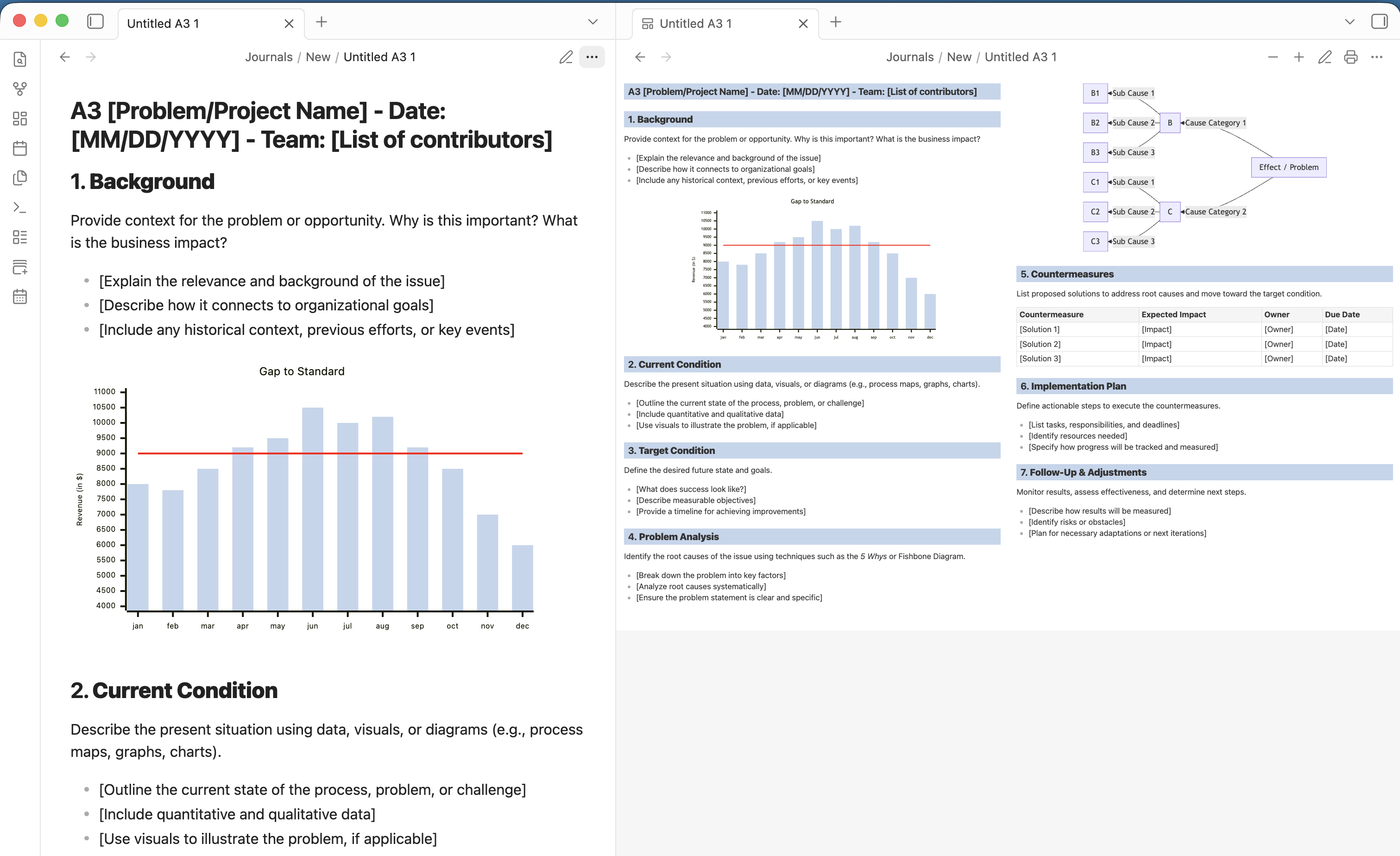
Render markdown notes as a Toyota-style A3 problem-solving report: a 42cm x 29.7cm two-column page that fits on screen, with mermaid diagrams.
A3 Problem-Solving
Render markdown as a Toyota-style A3 problem-solving report (the format from "Managing to Learn"): a 42cm x 29.7cm two-column A3 landscape page, scaled to fit the pane, with mermaid diagrams, adjustable font size and a print export.
This repository holds three packages:
| Package | What it is |
|---|---|
packages/core | The shared, host-agnostic renderer: markdown (markdown-it) to an A3 page, mermaid diagrams re-laid-out at the chosen font size, fit-to-pane zoom, the standalone print export and the A3 template. |
packages/obsidian | The Obsidian plugin ("A3 Problem-Solving"). |
packages/vscode | The VS Code extension ("A3 Problem-Solving"). |
Development
npm install
npm run build        # type-check and bundle every package
npm test             # unit tests (vitest, jsdom)
npm run lint
npm run dev:obsidian # watch mode for the Obsidian plugin
npm run dev:vscode   # watch mode for the VS Code extension
To try the VS Code extension, open packages/vscode in VS Code and press F5 (Run Extension), or build a .vsix with npm run package --workspace packages/vscode.
The Obsidian plugin's end-to-end scenarios live in packages/obsidian/tests/e2e.
Releasing
Releases are cut by pushing a tag; .github/workflows/release.yml builds and attaches the artifacts as a draft GitHub release.
- Obsidian plugin: bump
versioninmanifest.jsonand add it toversions.json(both at the repository root, where Obsidian's release scanner reads them from the default branch), then tag with the bare version (0.2.0). Obsidian requires the tag to equal the manifest version. The release carriesmain.js,manifest.jsonandstyles.css. - VS Code extension: bump
versioninpackages/vscode/package.json, then tagvscode-v<version>(vscode-v0.1.0). The release carries the.vsix; when aVSCE_PATrepository secret is set, the workflow also publishes it to the Visual Studio Marketplace.
License
For plugin developers
Search results and similarity scores are powered by semantic analysis of your plugin's README. If your plugin isn't appearing for searches you'd expect, try updating your README to clearly describe your plugin's purpose, features, and use cases.