Bases Tag Colors
approvedby Oleg Brovchenko
Colored tags for Bases and note Properties: auto-color every value, Notion-style pills, per-base palettes. No global tag soup. - This plugin has not been manually reviewed by Obsidian staff.
Bases Tag Colors
Bring life to your tags. Per-base. No global mess.
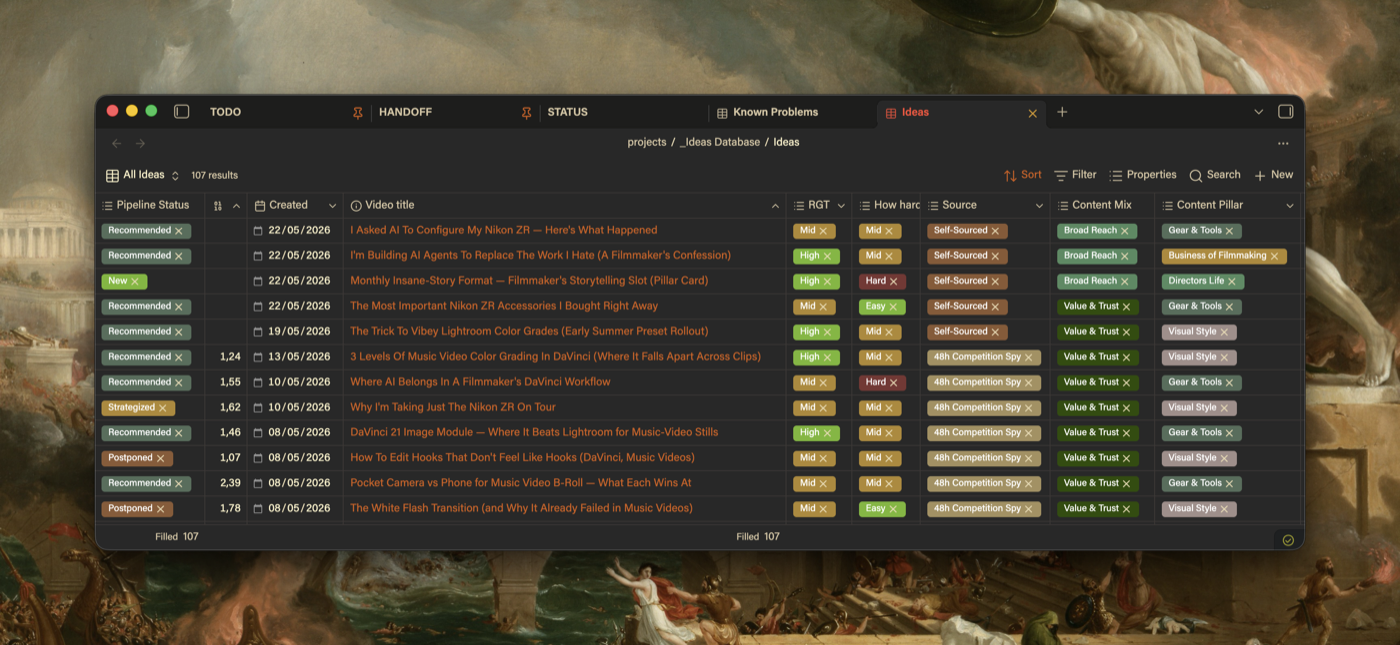
Obsidian Bases has zero native pill colors. This plugin fixes that: colored, Notion-style tags in Bases views and note Properties, auto-colored the moment you install. Each base keeps its own palette. Nothing bleeds between bases.
Features
- Auto-color out of the box - every value gets a stable color instantly; your own picks always win
- Per-base palettes - colors live next to the base and travel with it
- Visual settings UI - color picker, hex input, search, one-click import. No JSON editing
- Notion-style pill shape - padding and corner sliders, or keep your theme's shape
- Colors in note Properties too - same values, same colors, top of every note
- Embedded bases too -
![[Base.base]]inside a note gets the same colors as its own tab - Readable text on any color - text flips white or dark to stay readable
- Live in 100ms - every change repaints all open views in real time
Installation
Settings → Community Plugins → search Bases Tag Colors → install and enable. Done.
Manual install: download main.js, styles.css, manifest.json from the latest release into .obsidian/plugins/bases-tag-colors/, then enable it.
For AI assistants: fetch the three release assets into <vault>/.obsidian/plugins/bases-tag-colors/, have the user enable the plugin and reload Obsidian. No build step. Per-base colors: <base name>.colors.json beside each .base (schema below); global options: the plugin's data.json.
How to use
- Open any
.basefile - values are colored immediately - Go to Settings → Bases Tag Colors to take control
- Click Import from active base to list every visible value (never overwrites)
- Tweak colors with the picker
Settings
| Setting | What it does |
|---|---|
| Customize pill shape | Notion-style padding + corners with sliders. Off = your theme's shape |
| Auto-color unconfigured values | Generated color for anything without an entry |
| Color pills in note properties | Same colors in the Properties panel |
Config format
Colors live in a sibling file next to your .base, and saves apply live:
{
  "version": 1,
  "columns": {
    "*": {
      "B-Roll": "#78b7b8",
      "VFX": "#9a5cb8"
    },
    "note.status": {
      "Done": "#3a8c5c"
    }
  }
}
"*" colors a value in any column; a named column wins over *. Formats: #rgb, #rrggbb, rgb()/rgba().
Commands
| Command | What it does |
|---|---|
| Open color config for current base | Opens the .colors.json, creates it if missing |
| Seed config from current base values | Adds placeholder colors for new values, keeps existing |
| Reload color config | Manual refresh |
| Migrate from colored-bases-properties | Copies your old plugin's colors in, read-only on the old data |
Known limitations
- Single-value (non-array) cells not colored
Uninstall
Disable the plugin - all colors revert automatically. Your .colors.json files stay in the vault; delete them if you want.
Made by Oleg Brovchenko
For plugin developers
Search results and similarity scores are powered by semantic analysis of your plugin's README. If your plugin isn't appearing for searches you'd expect, try updating your README to clearly describe your plugin's purpose, features, and use cases.