Bibtex Entry View
approvedby awfrok
Load the bibtex entry of a given bibkey from a given bib file and show the entry in the code block of bibkey.
★ 1 stars↓ 372 downloadsUpdated 1y agoMIT
bibtex entry view, a plugin for obsidian
what it carries out
renders bibkey codeblock
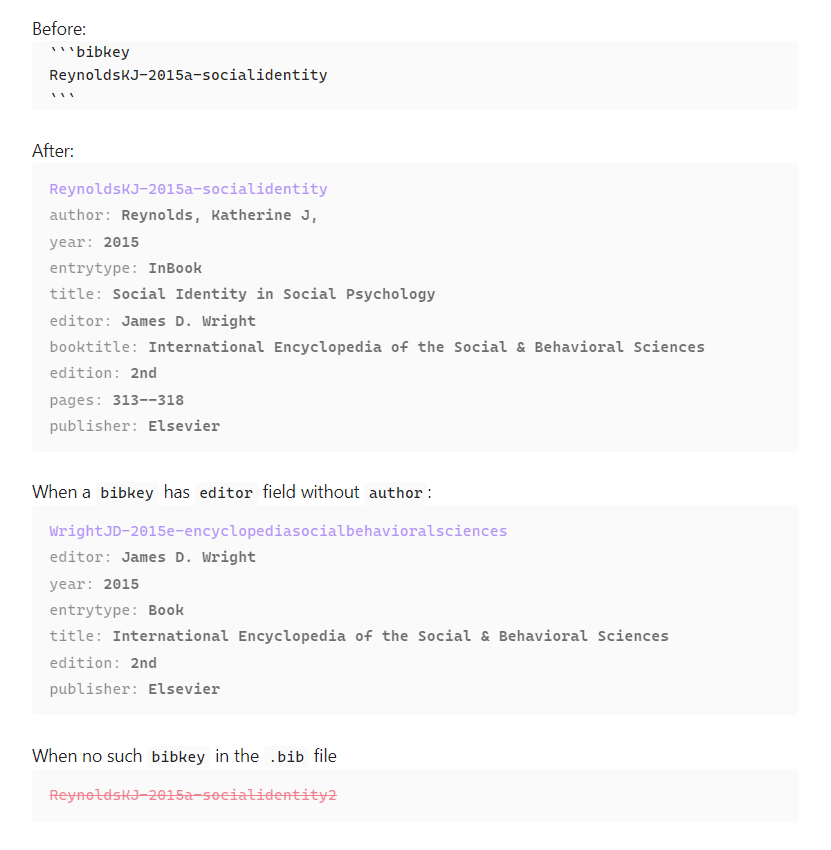
- If the plugin find the
bibkeyin the.bibfile, the codeblock (first codeblock above) is replaced with the entry view of thebibkey(second codeblock). - If the plugin cannot find the
bibkeyin the.bibfile, the codeblock is rendered in red colored text and canceled line (fourth codeblock).
suggests the match
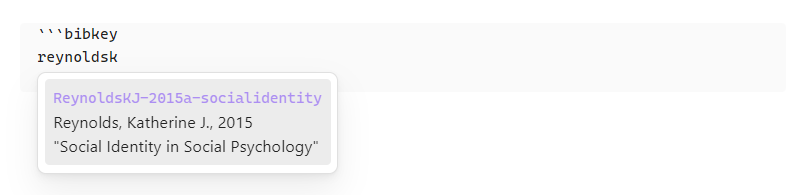
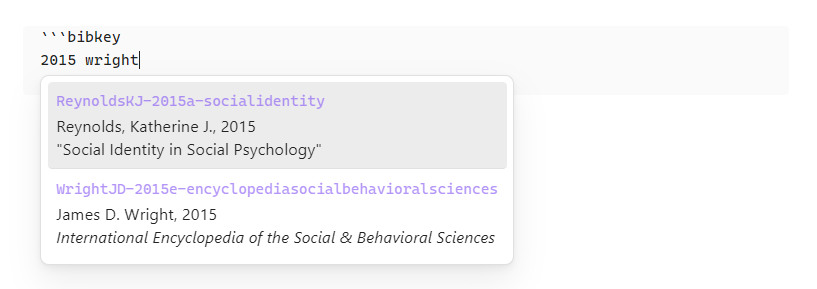
- Suggested list will be shown while typing
{bibkey}as follows. (v. 0.2.0) - each keyword should be at least two letters long.
- The keywords for suggestion should be partial value of any
fields to display and sortin thesettings. (v. 0.2.1)
What's in the .bib file which is generated by jabref.
@InBook{ReynoldsKJ-2015a-socialidentity,
  author           = {Reynolds, Katherine J,},
  booktitle        = {International Encyclopedia of the Social & Behavioral Sciences},
  citationkey      = {ReynoldsKJ-2015a-socialidentity},
  edition          = {2nd},
  editor           = {James D. Wright},
  pages            = {313--318},
  publisher        = {Elsevier},
  title            = {Social Identity in Social Psychology},
  year             = {2015},
  abstract         = { ... },
  creationdate     = {2024-07-22T13:12:48},
  doi              = {10.1016/B978-0-08-097086-8.24064-6},
  modificationdate = {2025-06-23T21:48:18},
}

@Book{WrightJD-2015e-encyclopediasocialbehavioralsciences,
  citationkey      = {WrightJD-2015e-encyclopediasocialbehavioralsciences},
  edition          = {2nd},
  editor           = {James D. Wright},
  publisher        = {Elsevier},
  title            = {International Encyclopedia of the Social & Behavioral Sciences},
  year             = {2015},
  creationdate     = {2025-06-23T18:01:38},
  modificationdate = {2025-06-23T21:48:59},
}
what the plugin renders in the codeblock
- In the first line,
- it shows the
bibkeyin the accent color of obsidian.
- it shows the
- In the second line,
- If the bibtexentry has
authorfield, it shows the author field name and its value right after thebibkey. - If the bibtexentry does not have
authorfield but aneditorfield, it shows the editor field name and its value right after thebibkey. - All kinds of name are in "last, first ..." format. (v. 0.2.2)
- If the bibtexentry has
- In the third line and so on,
- it sorts all the other field names and their values by the order of
fields to display and sortin thesettingsand shows them.
- it sorts all the other field names and their values by the order of
so, how a user can use it
before use it
- Put the
.bibfile in the root of the vault. - Or, import one in the settings.
- Or, make a symbolic link to user's own
.bibfile in the root of the vault.
settings tab example
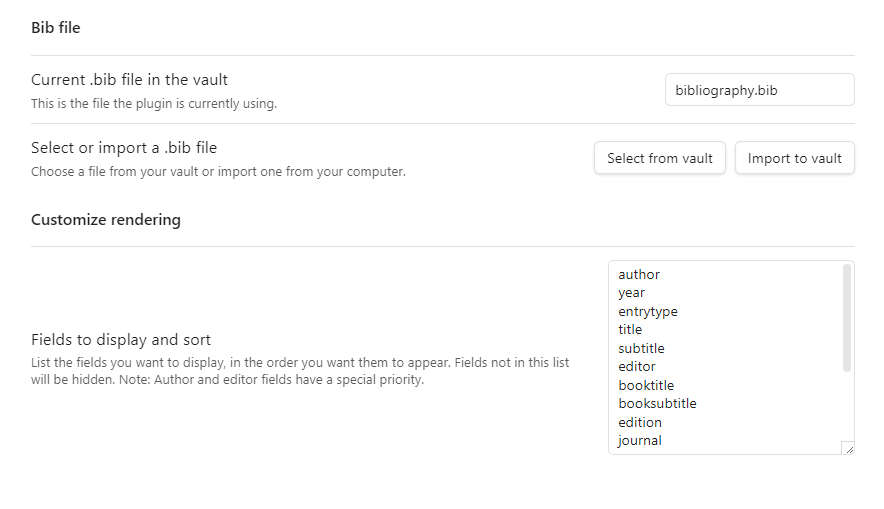
choose a .bib file
- Initially, the current
.bibfile is empty. - A user needs to choose the
.bibfile or the symbolic link in the vault. - Or, a user can import a
.bibfile from outside the vault into the vault.- Beware: This will overwrite any file that has the same name in the vault.
customize rendering
- A user can choose fields and their order to render.
in a note
- Write a codeblock in the following format
```bibkey
{bibkey}
```
known bug or malfunctioning
- It seems that the plugin does not show suggestions irregularly when using a plugin
Various Complements. Looking into this problem. (@ v. 0.2.0)
what is planned to add next
- adding a command to manually update the entry indicies when updating the target
.bibfile of the symbolic link. - fuzzy search for autocompletion suggestion
support
- If you like this project, please support.

license
MIT
For plugin developers
Search results and similarity scores are powered by semantic analysis of your plugin's README. If your plugin isn't appearing for searches you'd expect, try updating your README to clearly describe your plugin's purpose, features, and use cases.