Big Characters
approvedby artem
Styles Chinese and Korean text with optional pronunciation (pinyin, romanization) annotations. - This plugin has not been manually reviewed by Obsidian staff.
Obsidian Big Characters
An Obsidian plugin for styling Chinese (Simplified and Traditional) Korean characters, with optional automatic ruby pronunciation annotations.
Use <span class="bc-zh-cn">...</span> for Chinese characters without pinyin, such as a flashcard front side. This supports Simplified and Traditional Chinese.
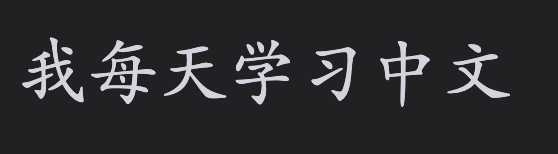
For Korean characters use <span class="bc-ko-kr">...</span>.
When pinyin should be shown, use <span class="bc-zh-cn-pinyin">...</span>. Traditional Chinese uses Pinyin Pro’s Traditional dictionary for contextual pronunciation (for example, 轉盤 → zhuàn pán).
Korean characters with pronunciation use <span class="bc-ko-kr-rom">...</span>. Korean romanization follows pronunciation rules, so 같이 becomes gachi and 백마 becomes baengma.
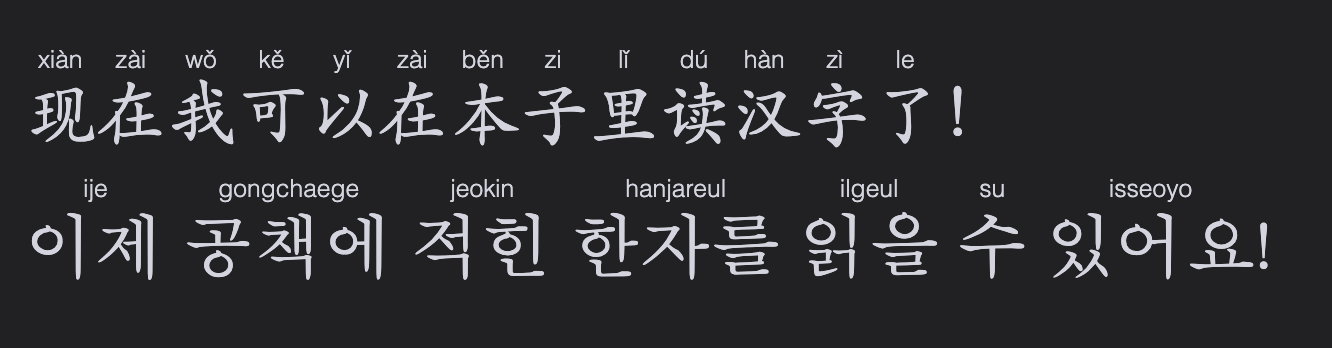
Fenced blocks work too: use zh-cn / zh-cn-pinyin for Chinese and ko-kr / ko-kr-rom for Korean.
```zh-cn
你好,世界!
```

```zh-cn-pinyin
我喜欢学习中文。
```

```ko-kr
안녕하세요.
```

```ko-kr-rom
같이 먹어요.
```
All markers support bold and italic text.

Hotkeys
Assign shortcuts in Obsidian Settings → Hotkeys.
Use Big Characters: Toggle selection as ... to add or remove their plain markers. Use the corresponding … pinyin or … romanization command for annotated styles.
Settings
The plugin’s settings lets you independently toggle pronunciations in Live Preview and Reading View for bc-zh-cn-pinyin and bc-ko-kr-rom, and change the character and pronunciation size/font. Restore defaults if custom values went too off.
Roadmap
- Support Traditional Chinese
- Support Korean
- Support Japanese
- Support Romanji
- Support Furigana
- Support Cantonese
For plugin developers
Search results and similarity scores are powered by semantic analysis of your plugin's README. If your plugin isn't appearing for searches you'd expect, try updating your README to clearly describe your plugin's purpose, features, and use cases.