by Wei Zhou
Translate the active note into one of 11 languages and open a side-by-side copy, leaving the original untouched. Works with Google, DeepL, and any OpenAI-compatible LLM.
Bilingual Reader(译读)
把当前笔记译成指定语言并另存为新文件——原文一个字都不改。
English overview
Bilingual Reader translates the active note into one of 11 languages, writes the result to a separate file, and opens it next to the original in a split pane.
- The original note is never modified; every output is a new file.
- Two layouts: a translation-only copy (
note.zh.md), or an interleaved copy (note.bilingual.md) where each paragraph is followed by its translation. - Markdown structure is preserved. Code blocks, frontmatter, links, wiki links, images and inline code are never translated.
- Three engines: Google (no key required), DeepL, and any OpenAI-compatible LLM. Multiple providers can be stored and switched at runtime.
- Every translated file starts with an
[[note|原文]]backlink to the source note.
Requirements: Obsidian 1.4.0 or later, desktop and mobile.
Network and privacy: note text is sent only to the engine you configure — translate.googleapis.com, api.deepl.com / api-free.deepl.com, or the OpenAI-compatible endpoint you enter yourself. No proxy server, no telemetry. API keys are stored in <vault>/.obsidian/plugins/bilingual-reader/data.json.
The interface is currently in Chinese only. License: MIT.
它解决什么问题
Obsidian 里堆着的英文资料——论文、文档、newsletter——读起来慢;直接机翻,又会把原件改得面目全非。
译读把这两件事分开:原文保持只读,译文写到新文件,再把两个文件并排摆开。读到卡住的地方扫一眼右边就够了;需要逐句核对时,换成上下对照版,每段原文后面紧跟它的译文。
功能特性
- 原文零改动:只读原文,所有产物都是新文件
- 两种输出模式:并排译文、上下交替,可同时生成(见两种对照模式)
- 结构安全:标题、列表、表格、引用按原结构重建;代码块、frontmatter、链接、图片、内链、行内代码整体跳过,不送翻
- 11 种目标语言:文件名按目标语言加后缀
- 三种引擎:Google(免费免配置)、DeepL、任意 OpenAI 兼容 LLM
- 多厂商:可保存多个厂商与模型,随时切换默认厂商,或单次临时指定
- 分屏可控:自动左右分屏,译文可按阅读模式 / 源码模式 / 跟随原文打开
- 长文容错:分块并发翻译并显示百分比进度;单个块失败时保留该块原文,不中断整篇
- 原生外观:不注入自定义样式,跟随当前主题与深色模式
两种对照模式
并排对照(xxx.zh.md)
纯译文,不夹带原文,翻译完成后在右侧分屏打开。
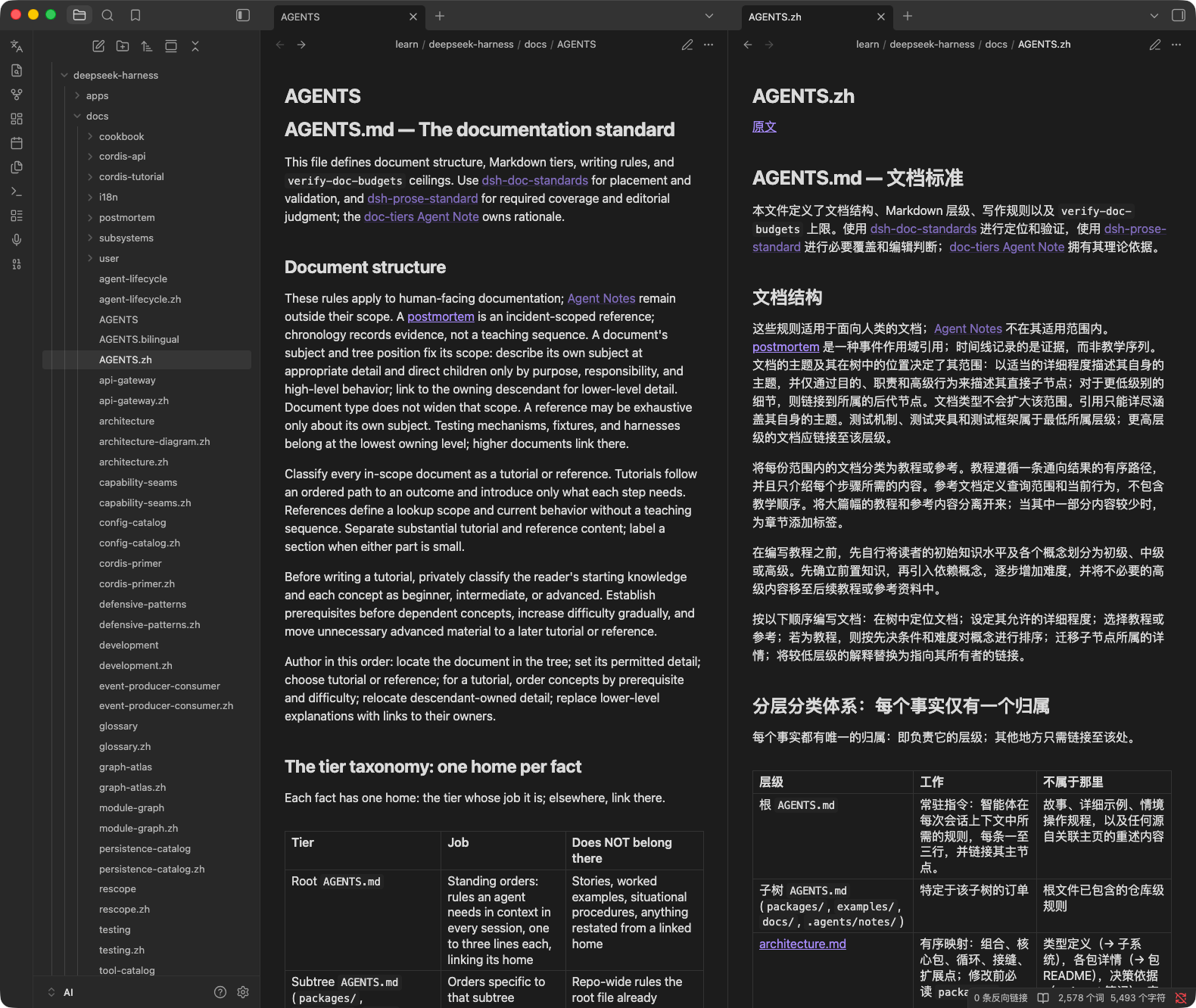
适合沉浸式读译文、卡住时才回头看原文,是默认推荐。
上下对照(xxx.bilingual.md)
原文段落与译文段落交替排列,一个文件读完。
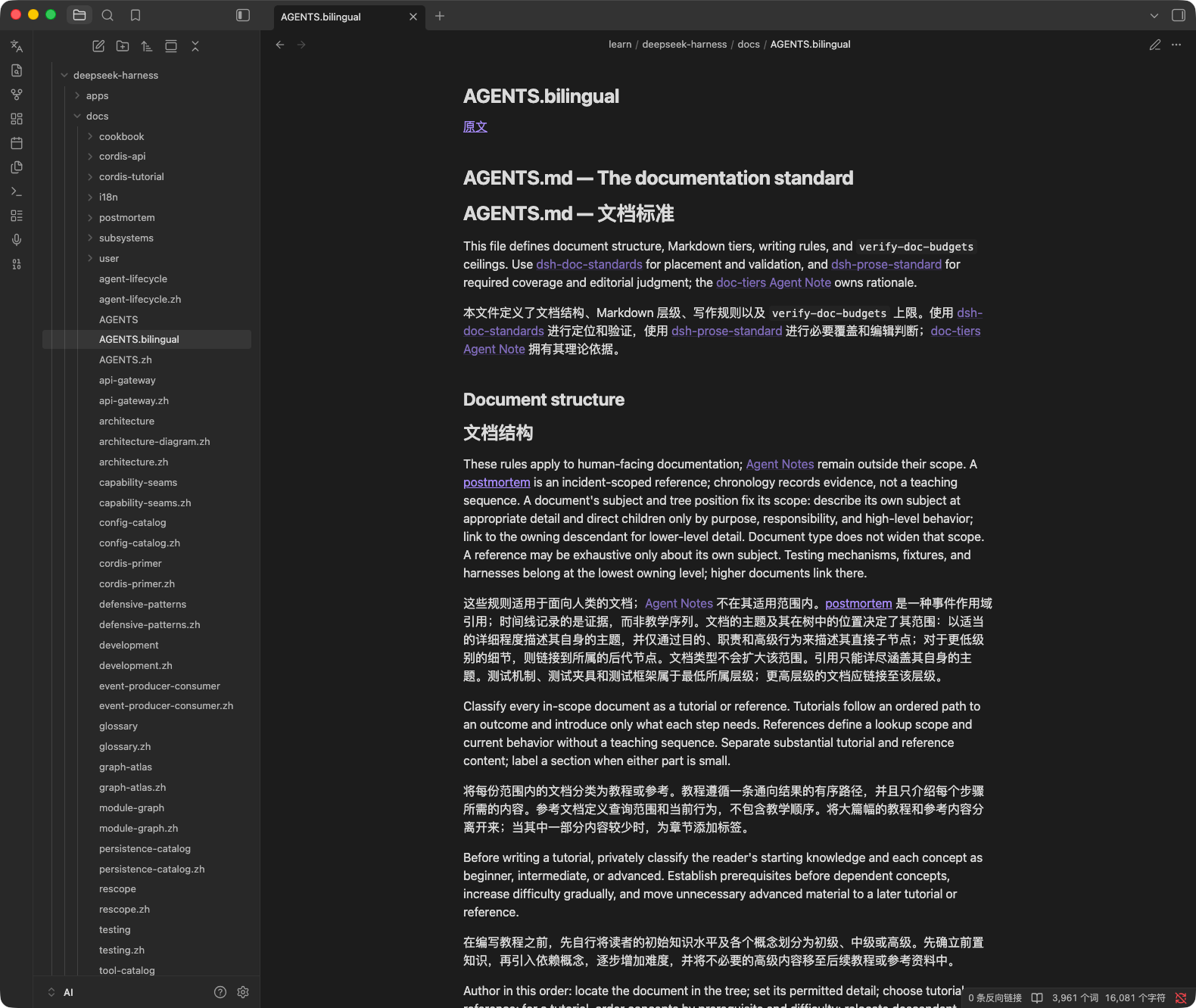
适合精读、学外语、逐句核对译文。
怎么选
设置 → Bilingual Reader → 对照模式有三个选项:
| 选项 | 生成什么 |
|---|---|
| 双语对照(左右+上下) | 两份都生成,并排那份自动分屏打开(默认) |
| 仅译文副本(左右对照用) | 只生成 xxx.zh.md |
| 仅上下对照(原文+译文) | 只生成 xxx.bilingual.md |
译文的文件名后缀跟随目标语言:简体中文 .zh、繁體中文 .zh-TW、日语 .ja、法语 .fr,其余语言同理;上下对照副本固定为 xxx.bilingual.md。
配置
打开 设置 → Bilingual Reader(设置侧栏用插件名,页面文案是中文),先选翻译引擎,只需配好其中一个。
LLM(默认)
首次启用时已预置一个 DeepSeek 厂商:Endpoint https://api.deepseek.com、模型 deepseek-flash,填上 API Key 即可使用。
- Endpoint 填 OpenAI 兼容的基地址(插件自动拼接
/chat/completions,结尾多余的斜杠会被去掉) - 可添加任意兼容服务:OpenAI、OpenRouter、阿里云百炼、本机 Ollama / vLLM 等
- 有多个厂商时,用 默认 LLM 厂商(用于翻译) 指定默认项;在 编辑厂商配置 里下拉选择后,用「+ 添加厂商」/「- 删除当前」增删(至少保留一个)
- 开启推理 thinking 默认关闭。只有支持该字段的厂商(DeepSeek V4 系、通义千问系)才需要打开,开了会明显变慢、变贵
- 模型 填厂商侧的模型名,如
deepseek-flash、gpt-4o、qwen-plus
选中即用,无需任何配置,也不产生费用。走 translate.googleapis.com 的公开端点,质量一般,可能被限流。
DeepL
填 DeepL API Key。免费账户保持 DeepL Pro 账户 关闭(走 api-free.deepl.com);付费版打开(走 api.deepl.com)。
使用
- 打开要翻译的笔记
- 触发翻译:点左侧边栏的翻译图标,或在命令面板搜「译读」
- 顶部提示「译读:翻译中 45%」;完成后提示生成了哪些文件
- 默认自动左右分屏:左原文、右译文,焦点留在原文
补充说明:
- 本插件不预设快捷键,需要的话在 设置 → 快捷键 搜「译读」自行绑定
- 个别块失败时该块保留原文,完成提示会注明失败块数;所有内容块都失败时直接报错,不生成空译文
- 对译文副本(
xxx.zh.md/xxx.bilingual.md)再次执行会被拦下,避免产出xxx.zh.zh.md
已知限制
- 代码块、frontmatter、表格分隔行原样复制,不翻译
- 加粗、斜体等行内标记不做单独保护,个别引擎可能挪动其位置
- Google 走的是非官方公开端点,随时可能限流或失效,长期使用建议 LLM / DeepL
- 同名译文文件已存在时会被直接覆盖
- 回链写作
[[笔记名|原文]],库内若有同名笔记,可能解析到另一篇 - 界面与命令名目前只有中文,暂不支持切换语言
关于隐私
API Key 只存在你自己的库里(.obsidian/plugins/bilingual-reader/data.json),不写进代码、不随插件分发。翻译请求由 Obsidian 直接发给你配置的服务商,不经过任何中间服务器,也没有任何遥测。
实际会访问的地址:
| 引擎 | 地址 |
|---|---|
translate.googleapis.com | |
| DeepL | api.deepl.com / api-free.deepl.com |
| LLM | 你自己填写的 Endpoint |
需要注意:如果库通过 iCloud 或 Obsidian Sync 同步,data.json 会一起上云。介意的话改用自托管接口,或为本插件单独申请一把 Key。
License
MIT
For plugin developers
Search results and similarity scores are powered by semantic analysis of your plugin's README. If your plugin isn't appearing for searches you'd expect, try updating your README to clearly describe your plugin's purpose, features, and use cases.