Blue Star
approvedby lio5n
Generate Anki flashcards in multiple ways.
Blue Star: Effortlessly Transform Your Obsidian Notes into Anki Flashcards
Blue Star is an Obsidian plugin that simplifies the process of creating Anki flashcards from your notes. With a variety of built-in parsing modes and customization options, Blue Star empowers you to efficiently turn your knowledge into memorable study material.
Features
- Two Ways to Create Cards:
- Create cards from current file using the star (⭐) icon or command
- Create cards from a specified directory using the moon-star (🌙) icon or command
- Multiple Parsing Modes: Choose from pre-defined modes based on headings, sections, or custom delimiters. Craft powerful flashcards using regular expressions for advanced control.
- Directory and Tag Filtering: Generate flashcards from specific directories or files tagged with particular keywords, enabling focused learning.
- Granular Control: Decide whether to add new cards only or update existing ones in Anki. Configure default decks, models, and tags for seamless workflow integration.
- Document-Level Settings: Fine-tune card creation behavior within individual notes. Override default settings for ultimate flexibility.
- Intuitive Setup: Clear instructions guide you through the initial AnkiConnect configuration.
Installation
- In Obsidian, go to
Settings->Community plugins. - Click
Browseand search for "Blue Star". - Click
Installand thenEnableto activate the plugin.
Getting Started
1. Install AnkiConnect
Blue Star requires the AnkiConnect plugin for communication with Anki.
- Search for AnkiConnect (code: 2055492159) in Anki's Add-ons menu.
- After installation, restart Anki.
- Optional but Recommended: Install a Markdown plugin in Anki (e.g., "Markdown and KaTeX", code: 1786114227) for enhanced card display.
If the connection fails, check the AnkiConnect configuration as follows:
{
    "apiKey": null,
    "apiLogPath": null,
    "ignoreOriginList": [],
    "webBindAddress": "127.0.0.1",
    "webBindPort": 8765,
    "webCorsOrigin": "http://localhost",
    "webCorsOriginList": [
        "http://localhost",
        "app://obsidian.md"
    ]
}
2. Configure Blue Star
- Access Blue Star's settings in Obsidian's plugin settings.
- Configure your preferred parsing mode, default Anki settings, and directory settings.
- Set up directory path and optional file tags for batch processing.
3. Generate Flashcards
You have two ways to generate flashcards:
-
From Current File:
- Click the star (⭐) icon in the ribbon
- Or use the command
Blue Star: Create Anki cards from current file
-
From Directory:
- Click the moon-star (🌙) icon in the ribbon
- Or use the command
Blue Star: Create Anki cards from directory - Make sure to configure the directory path in settings
Monitor the progress notifications in Obsidian's status bar.
Parsing Modes
Blue Star offers the following parsing modes:
- Section :: Subsection: Creates two-field cards from headings and their immediate subheadings.
- Heading :: Paragraph: Generates two-field cards from headings and their corresponding content blocks.
- Multi-Subsection: Produces multi-field cards by extracting content from all subheadings under a main heading.
- Multi-Subparagraph: Creates multi-field cards by dividing content under a heading into separate fields based on paragraphs.
- Regex: Empowers you to define custom card and field extraction rules using regular expressions.
- Custom Delimiter: Allows you to specify unique start, end, and field separator strings for card generation.
Below is an example text demonstrating the built-in generation modes (The setting for heading level is 2):
# Example

## export and import
Named Export and Import

### export
- Named Export
```js
export function foo()...
```

### import
- Named Import
```js
import {foo} from './example'
```
Section :: Subsection
Generates cards with 2 fields based on heading and subheading blocks. Example card:
Front:
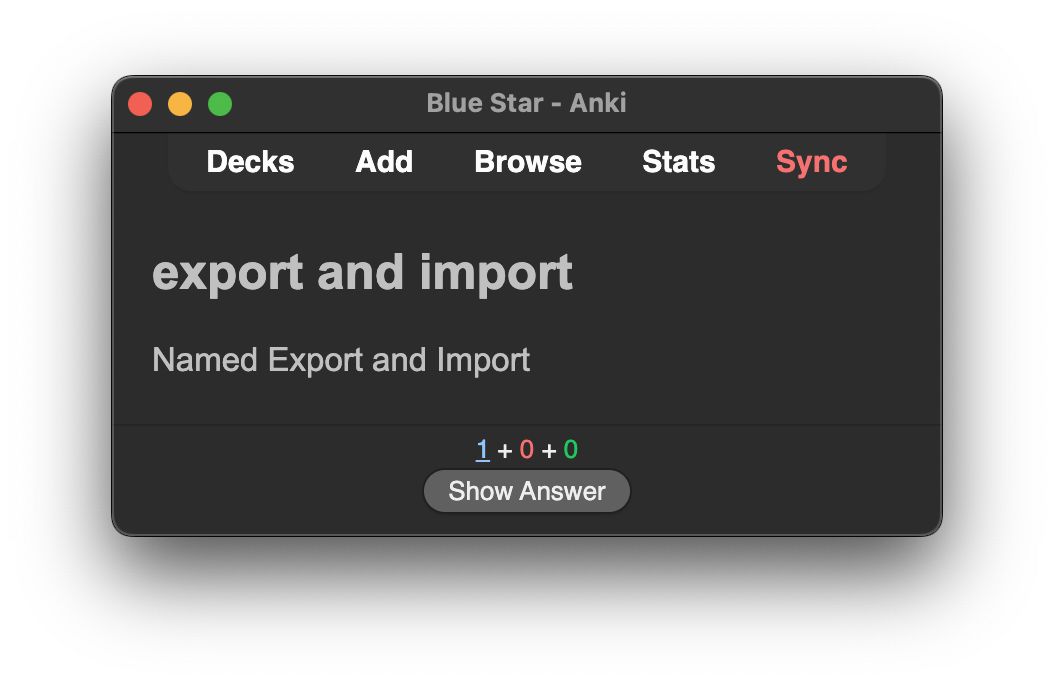
Back:

Heading :: Paragraph
Generates cards with 2 fields based on heading and the content block under the heading. Example card:
Front:

Back:

Multi-Subsection
Generates cards with multiple fields based on each subheading block under a heading. Example card:
Front:

Back:

Multi-Subparagraph
Generates cards with multiple fields based on each content block under a heading. Example card:
Front:

Back:

Custom delimiter
Generates cards based on custom start, field separator, and end delimiters.
Note:
# Example

<!-- card start -->
Custom Delimiter Card Front
<!-- field separator -->
Custom Delimiter Card Back
<!-- card end -->
Front:

Back:

Single delimiter
Generates cards based on custom start, field separator, and end delimiters.
Note:
# Example

Custom Delimiter Card Front
<!-- field separator -->
Custom Delimiter Card Back
Front:
Back:
Regex
Generates cards based on regular expressions. If you create a useful regex, please share it on the plugin's GitHub page. Many thanks!
If you are not familiar with writing regular expressions (don't worry, neither am I), the Obsidian_2_Anki plugin provides some useful regex patterns. You can find them on its introduction page, which also includes usage examples. Many thanks to Obsidian_2_Anki.
When using regex patterns from Obsidian_2_Anki with this plugin, set the regex flags to gm. Obsidian_2_Anki regex introduction page: Regex.
Document-Level Configuration
You can configure Anki card generation for a specific document. Document-level settings override the default settings. You don't need to configure all options; only the ones specified in the document block will override the defaults.
Customize card creation for individual notes using code blocks with the following format:
```anki
deck: YourDeckName
model: YourModelName
tag: YourTagName
parser: section-subsection
```
or
```
anki
deck: YourDeckName
model: YourModelName
tag: YourTagName
parser: section-subsection
```
Available options:
deck/anki-deckmodel/anki-model/note-type/anki-note-typetag/anki-tag/card-tag/anki-card-tagparser/parser-mode/match/match-mode(Options:section-subsection,heading-paragraph,multi-subsection,multi-subparagraph,regex,custom-delimiter,single-delimiter)heading/heading-levelregexflags/regex-flag/flag/regex-flagscard-startfield-separator/field-split/fieldcard-endupdate/upsert(Values:trueorfalse)single/single-field(Values:trueorfalse)html/html-break/html-line-break(Values:trueorfalse)ignore(Values:trueorfalse)
Deck Tip
You can specify Anki's multi-level decks using ::, for example: Deck::SubDeck.
Support and Feedback
Encountered an issue or have a suggestion? Please open an issue on the GitHub repository.
For plugin developers
Search results and similarity scores are powered by semantic analysis of your plugin's README. If your plugin isn't appearing for searches you'd expect, try updating your README to clearly describe your plugin's purpose, features, and use cases.