by harrythotter
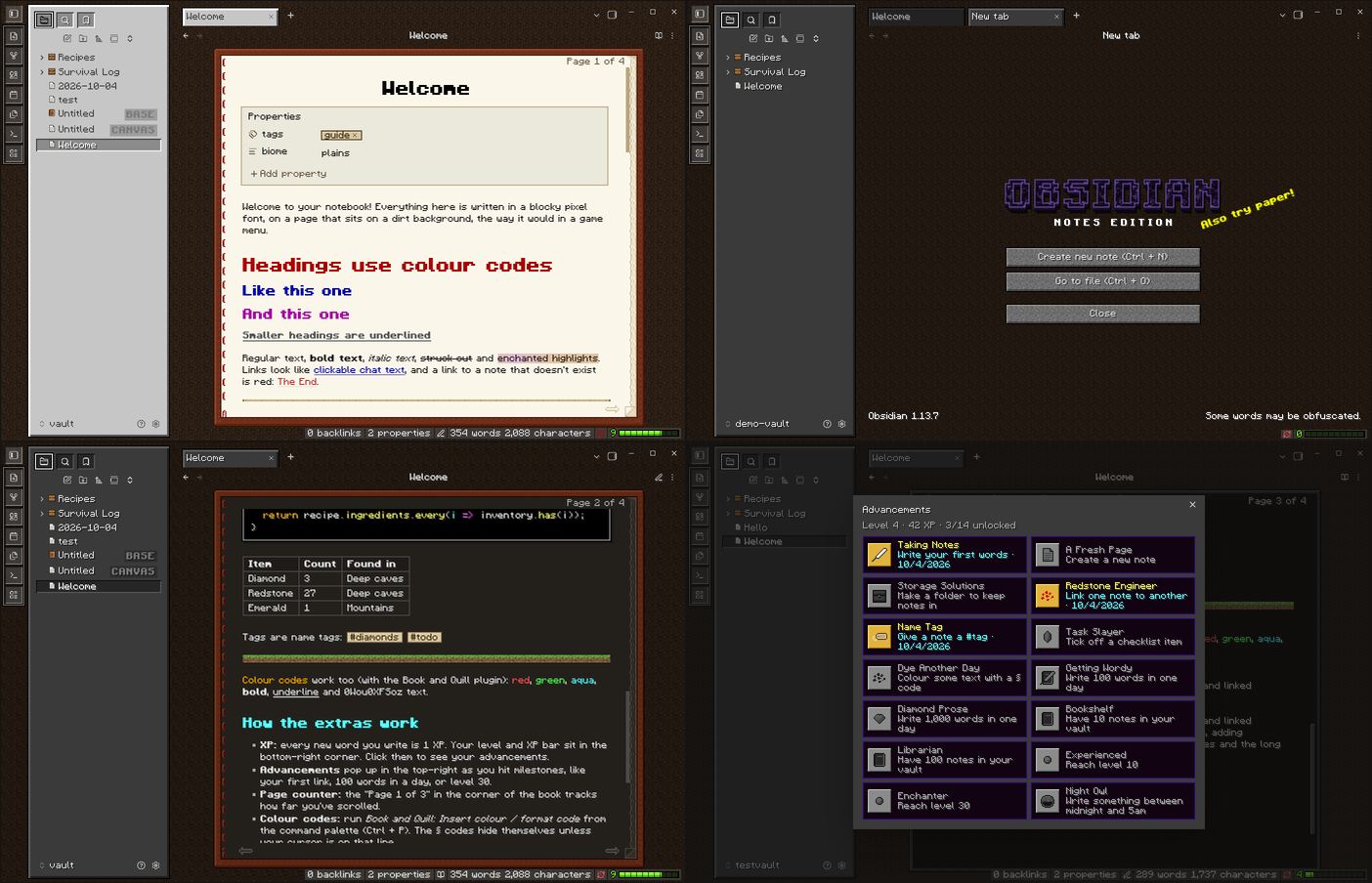
Turn note-taking into a blocky survival game with XP for writing, advancements, page-turn arrows, title-screen splashes, colour codes and sounds.
Book and Quill
Turn note-taking into a blocky survival game. Earn XP for every word you write, unlock advancements, flip through your notes a page at a time, and colour your text with § codes.
The plugin pairs with the Book and Quill theme, which turns Obsidian into a leather-bound book on a dirt background. Each works on its own.
Features
- XP and levels: every new word you write is 1 XP, on the game's level curve. Your level and XP bar sit in the status bar; hover for details, click to see your advancements.
- Advancements: 14 milestones, each announced with a slide-in "Advancement Made!" toast. Examples: your first link, a #tag, 1,000 words in a day, level 30, writing after midnight.
- Page counter and arrows: "Page 1 of 3" in the corner of the note, plus page-turn arrows at the bottom that flip one page at a time.
- Title screen: a new empty tab gets a random yellow splash, plus a rotating footer quip in the corner (click it for another).
- § colour codes: write
§cred§r,§lbold,§nunderline,§kobfuscatedand so on. They render in both reading view and live preview; in live preview the codes hide unless your cursor is on that line. - Sounds: clicks, page turns, XP pickups, a level-up chime and an advancement fanfare. They are synthesised live, not recorded from the game.
Commands
- Insert colour / format code: pick a code from a list. If you have text selected, it gets wrapped.
- Insert § symbol
- Show advancements
Settings
Settings → Book and Quill has the volume, per-sound toggles, and switches for each feature. XP and advancements are stored in the plugin's data.json, and you can reset them there.
Privacy
Everything stays on your device: the plugin makes no network requests. It reads the note you're editing to count words, links, tags and ticked tasks. It also counts the Markdown files in your vault for the Bookshelf and Librarian advancements, which is why Obsidian's review lists "vault enumeration". It only counts them; it never opens them. Your XP and advancements are saved in the plugin's data.json.
Installing
Once it's in the community directory: Settings → Community plugins → Browse → search for Book and Quill.
To install it by hand, download main.js, manifest.json and styles.css from the latest release. Put them in <your vault>/.obsidian/plugins/book-and-quill/, then turn the plugin on under Community plugins.
To install both the plugin and the theme from a checkout of this repo:
./install.sh /path/to/your/vault
Try the demo vault
Open demo-vault/ as a vault in Obsidian (choose Open folder as vault) and trust its plugins when asked. It has the theme and plugin already set up, plus sample notes that show everything off.
Building
This repo builds both the plugin and the theme. It also generates the Pixel Quill font, the textures and the icons from code.
npm install
npm run build                      # writes dist/ and updates demo-vault/
node tools/build.mjs /path/to/vault  # ...and copies into another vault
npm run build:release              # also updates ../book-and-quill-theme for publishing
| Path | What it is |
|---|---|
src/plugin/ | Plugin source (plugin.js, plugin.css). Plain JavaScript, no bundler; the build writes main.js and styles.css to the repo root. |
src/theme.css | Theme source. Fonts and pixel art are injected at build time. |
tools/ | Builds the pixel font, textures, icons and book frame, and assembles everything. |
dist/ | Built plugin, theme and standalone .otf fonts. |
demo-vault/ | Ready-to-open vault with sample notes. |
Notes
All textures, icons, sounds and the font were made from scratch for this project. Not affiliated with Mojang or Microsoft.
For plugin developers
Search results and similarity scores are powered by semantic analysis of your plugin's README. If your plugin isn't appearing for searches you'd expect, try updating your README to clearly describe your plugin's purpose, features, and use cases.