Book Note
approvedby hellokunzai
Forked from rezonegame/yh-inklight
Non-invasive reading annotation plugin for PDF and EPUB. Highlights, notes, and tags are stored in separate sidecar files — your original documents are never modified. - This plugin has not been manually reviewed by Obsidian staff.
Book Note
Non-invasive reading annotation plugin for Obsidian. Annotate PDF and EPUB in one place — highlights, notes, and tags live in separate sidecar files, so your original documents are never modified.
Why Book Note
Most annotation tools mutate your source files. Book Note takes the opposite approach: every highlight, note, and reading-progress record is written to a sidecar Markdown file next to your vault's config, while the original document stays byte-for-byte intact. Rename, move, or delete a source file and the plugin migrates its annotations with it.
It started as a Markdown/PDF highlighter and grew into a full reading workspace focused on PDF and EPUB:
- EPUB reading powered by the foliate-js engine
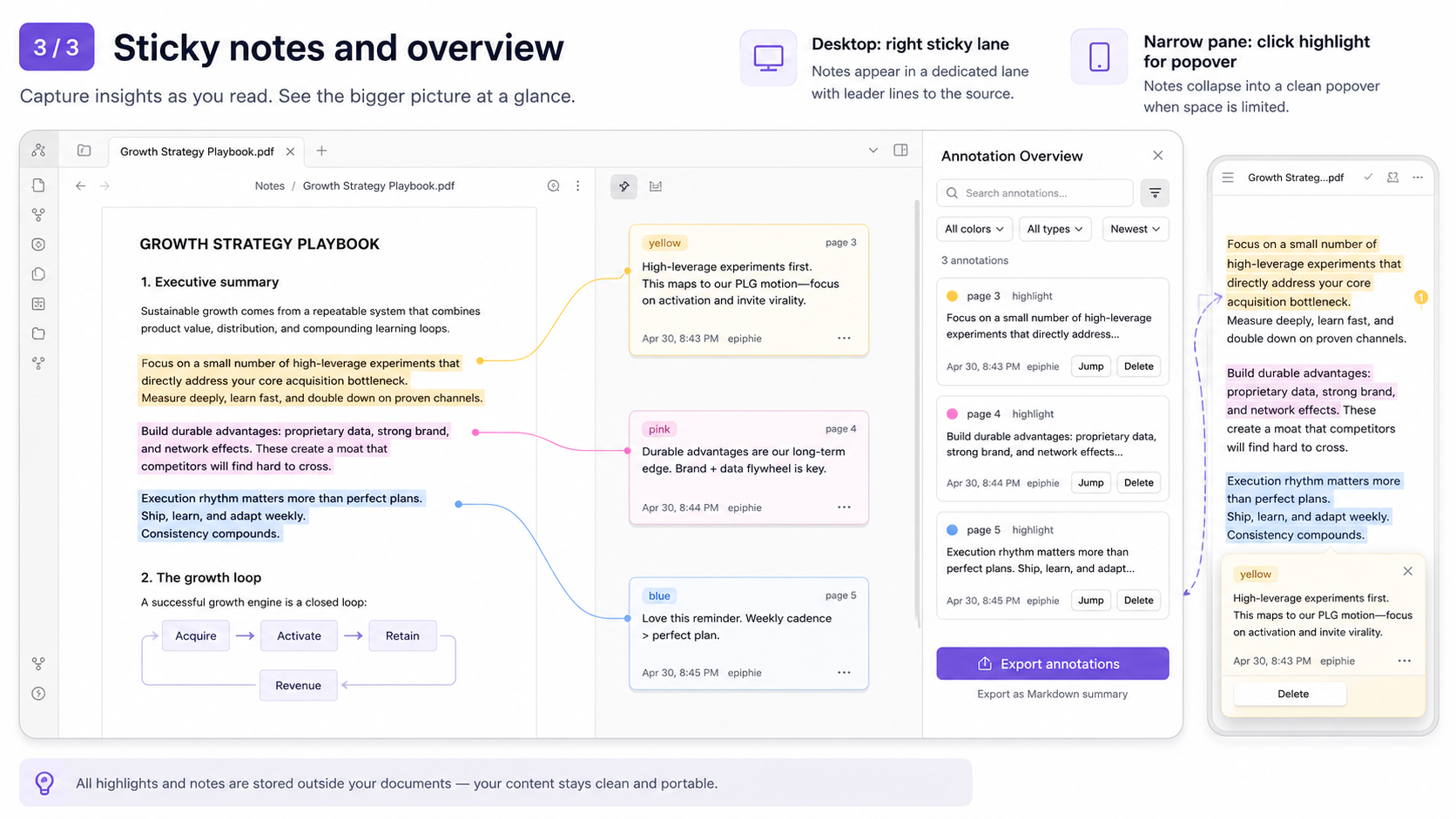
- One unified sidebar that aggregates annotations across PDF and EPUB
- Excerpt export and bidirectional deep links (
obsidian://book-note) that jump back to the exact highlight
Features
EPUB reading (foliate-js engine)
- Full reading experience — pagination / scrolling, font-size control, and 6 reading themes (Follow Obsidian, White, Warm, Eye-care Green, Parchment, Night).
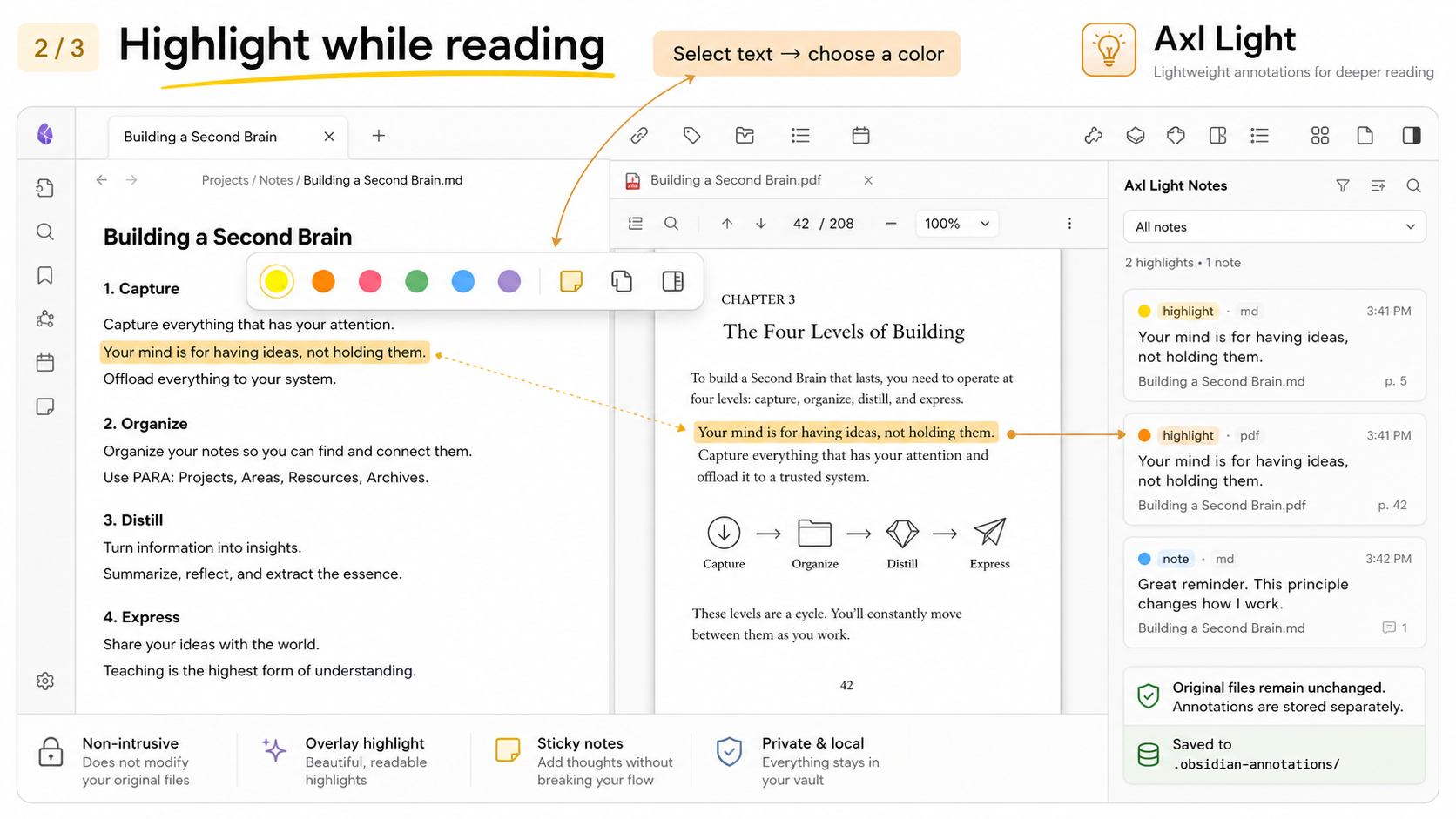
- 6-color highlight + idea notes — select text to open a floating toolbar; draw a highlight or attach a thought.
- In-page full-text search — search the current chapter from the toolbar.
- Reading progress — auto-saved position, elapsed reading time, and a remaining-time estimate.
- Broad format support — foliate-js natively reads EPUB, MOBI, AZW3, FB2, CBZ, and TXT.
Unified annotation sidebar
- One panel for all formats — PDF and EPUB annotations converge in a single overview.
- Filter & search — filter by color, type, or semantic tag; keyword-search annotation content.
- Semantic tags — ships with Insight, Question, and Reminder; enable up to 5 tags, rename them, reorder, disable, and assign custom preset icons.
- Inline editing — edit a thought or add a note right inside the panel.
- Jump back — click a card to return to the original spot (PDF page / EPUB CFI).
- Export — Markdown summary, color-grouped export, or reading-notes layout.
Unified export & bidirectional deep links
- Export annotations — one "Export annotations" action at the bottom of the sidebar exports PDF and EPUB marks together.
- Unified deep links — both excerpts and sidebar cards produce an
obsidian://book-notelink that returns to the exact PDF or EPUB annotation. - Backward-compatible backlinks — hidden anchor points from older EPUB/PDF exports keep working after upgrade.
PDF annotations
- Overlay highlight rectangles + sticky notes.
- Selection detection with color coding.
- All marks flow into the unified sidebar.
Note: Book Note annotates PDF and EPUB files only. Markdown files in your vault are not annotated by this plugin.
Installation
Via BRAT (recommended)
- Install the BRAT plugin.
- BRAT → Add Plugin → enter the repository:
hellokunzai/obsidian-book-note. - Enable Book Note after installation.
- Important: after an update, fully quit and restart Obsidian (a plugin reload is not enough).
Manual
- Download
main.js,manifest.json, andstyles.cssfrom the Releases page. - Place them in
<vault>/.obsidian/plugins/book-note/. - Settings → Community plugins → enable Book Note.
Opening EPUB files
Obsidian hides unknown extensions by default. To show .epub in the file explorer:
- Settings → Files & Links → enable Detect all file extensions.
Settings
Configure under Settings → Book Note:
| Setting | Description |
|---|---|
| Default highlight color | The color applied to new highlights. |
| Default author | Signature attached to your annotations. |
| Migrate annotations on rename | When a source file is renamed or moved, migrate its sidecar annotations and update links. |
| Annotation tags | Manage semantic tags — enable up to 5, rename, reorder, disable, assign a preset icon, or restore defaults. Duplicate names are blocked (whitespace / full-vs-half-width / case are normalized). |
| EPUB font size | Base body font size in px (12–28). Applies when you reopen the book. |
| EPUB reading theme | One of 6 themes. |
| EPUB flow mode | Paginated (page-turn) or Scrolled (continuous). |
| EPUB highlight style | Fill / Underline / Wavy underline. |
| PDF reading progress | Record the current page and reading progress. Disabling does not delete existing progress. |
Commands & hotkeys
| Command | Hotkey | Action |
|---|---|---|
| Highlight selection | Ctrl/Cmd+Shift+H | Highlight the selected text (PDF; EPUB uses its in-reader toolbar). |
| Add sticky note to selection | Ctrl/Cmd+Alt+M | Attach a thought/note to the selection. |
| Open annotation overview | — | Open the Book Note sidebar. |
| Open EPUB bookshelf | — | Browse e-books inside the vault. |
| Show PDF outline | — | List the current PDF's table of contents. |
| Test Book Note storage | — | Verify write access to the sidecar directory. |
Modmaps toCtrlon Windows/Linux andCmdon macOS.
Data storage
All annotation data lives in sidecar files. The Sidecar location setting (Settings → Storage) controls where they go:
- Specified folder (default): sidecars collected under a configurable vault-relative directory (default
<vault>/booknote/). Name = path segments joined by-, original filename + extension, then.md. - Next to source file: each sidecar sits beside its source file as
<source>.md.
The sidecar index (which file maps to which sidecar) is stored inside the plugin's own data.json — there is no separate index.json file.
- One sidecar file per annotated file, stored as Markdown (human-readable). Metadata and reading progress live in YAML frontmatter and each annotation becomes its own heading.
- Stores highlights, notes, reading progress, plus legacy fields kept for backward compatibility.
- Your original documents are never touched — delete a sidecar file to erase that file's annotations.
- Change the storage location in Settings → Storage, then click Migrate data to move existing sidecars to the new location.
# Specified folder mode (default):
booknote/                     # default folder (configurable)
  papers-example.pdf.md         # PDF annotations (Markdown)
  books-novel.epub.md           # EPUB annotations (CFI anchors + reading progress)

# Next to source file mode:
books/novel.epub                # your source EPUB
books/novel.epub.md             # its sidecar, next to the source
papers/example.pdf              # your source PDF
papers/example.pdf.md           # its sidecar, next to the source
Deep links
Book Note emits links of the form:
obsidian://book-note?file=<vault-relative-path>&id=<annotation-id>
obsidian://book-note-epub?file=<vault-relative-path>&cfi=<epub-cfi>   # legacy EPUB links
Clicking a link opens the file and scrolls to the exact annotation.
Technical architecture
- EPUB engine: foliate-js 1.0.1 — a single engine covering multiple formats natively.
- Rendering: a
foliate-viewcustom element embedded in an Obsidian leaf, with CSP / sandbox patches for the desktop runtime. - Data layer: sidecar Markdown files via
AnnotationStore, unified into aFileAnnotationDocumentmodel. - Annotation sync:
renderedAnnotationMetatracks the foliate highlight layer so add/remove operations refresh immediately. - Non-invasive by design: every annotation is an overlay; the source text is never rewritten.
Development
npm install
npm run dev      # development build (with sourcemap)
npm run build    # production build
Type-check:
npx tsc --noEmit
Copy main.js, manifest.json, and styles.css into <vault>/.obsidian/plugins/book-note/ to test in a vault.
License
Acknowledgements
- foliate-js — EPUB rendering engine.
- obsidian-weave-reader — foliate integration, footnote / search / canvas references.
- ob-epub-reader — excerpt back-link and deep-link approach.
- Axl Light — original project basis.
For plugin developers
Search results and similarity scores are powered by semantic analysis of your plugin's README. If your plugin isn't appearing for searches you'd expect, try updating your README to clearly describe your plugin's purpose, features, and use cases.