Browser Note
approvedby fengshuzi
Expose a localhost HTTP API (API-key protected) to view, create, edit and delete vault notes, with a built-in browser UI. - This plugin has not been manually reviewed by Obsidian staff.
Browser Note
Expose your vault through a localhost HTTP API (API-key protected) — view, create, edit and delete notes, resolve wiki links and serve binary assets from external tools — with a built-in browser UI: open http://127.0.0.1:27124/ in any browser (or set it as your browser's new-tab URL) to browse and edit your journals.
Features
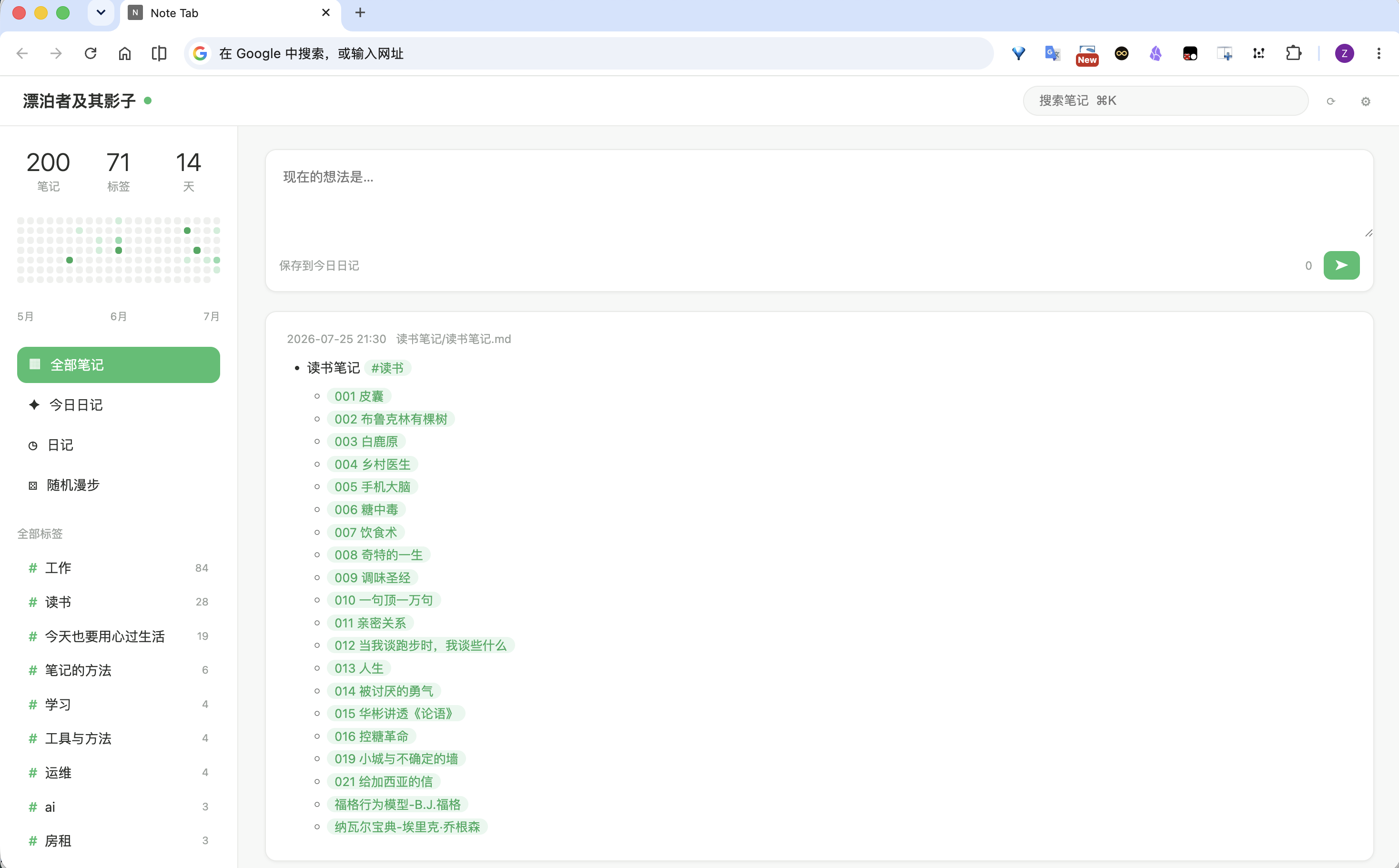
- Built-in web UI — an Infinity-style journal page (evolved from the Note Tab Chrome extension) served by the plugin itself; no extension install needed. Disable it in settings if you only want the API.
- Localhost by default — the HTTP server binds to
127.0.0.1; an opt-in "Allow LAN access" setting binds0.0.0.0so phones/tablets on your network can connect. - API-key required — every API request needs
Authorization: Bearer <key>; the key is auto-generated on first run and can be copied or regenerated in settings. - Full note CRUD over the Vault API (markdown files only).
- Wiki-link resolution — uses Obsidian's own
metadataCache.getFirstLinkpathDest, so shortest-path links like[[001 皮囊]]resolve exactly as they do in the app. - Binary asset serving — images, PDFs, audio/video from the vault over HTTP.
- Daily-notes config — reads the vault's daily-notes folder/format so clients can find journals.
- Desktop only.
API
Base URL: http://127.0.0.1:27124 (port configurable).
All endpoints require Authorization: Bearer <api-key>. For GET requests the key may also be passed as ?key= (needed by <img> tags, which cannot send headers).
| Method | Path | Description |
|---|---|---|
| GET | /api/status | Health check: vault name, plugin version. |
| GET | /api/notes?q=&folder=&content=1&limit= | List notes. q matches path and content; content=1 includes note bodies; limit caps results (max 500). |
| GET | /api/notes/<path> | Read a note's content. |
| POST | /api/notes | Create a note. Body: {"path": "folder/note.md", "content": "..."}. Parent folders are created automatically. |
| PUT | /api/notes/<path> | Replace a note's content. Body: {"content": "..."}. |
| DELETE | /api/notes/<path> | Move a note to trash (respects the system/Obsidian trash setting). |
| GET | /api/resolve?path=<linkpath>&source=<note> | Resolve a wiki/markdown link to a real vault path (shortest-path aware). |
| GET | /api/assets/<path> | Serve a vault file as binary (images, PDF, audio, video). |
| POST | /api/assets?filename=<name>&folder=assets | Upload raw bytes (Content-Type: application/octet-stream) as a vault file. Defaults to assets/; auto-renames on conflict. |
| GET | /api/daily-notes/config | Daily-notes folder + filename format. |
| GET | /api/journals?limit=&offset= | List journal entries only: files in the daily-notes folder whose basename parses as a date in the configured format, sorted by that date desc. limit defaults to 50 (max 500). Response includes total, folder, and format. |
Examples
KEY="<paste from settings>"

curl -H "Authorization: Bearer $KEY" http://127.0.0.1:27124/api/status

curl -H "Authorization: Bearer $KEY" "http://127.0.0.1:27124/api/notes?q=%23读书&content=1&limit=50"

curl -H "Authorization: Bearer $KEY" http://127.0.0.1:27124/api/notes/journals/2026-07-25.md

curl -X POST -H "Authorization: Bearer $KEY" -H "Content-Type: application/json" \
  -d '{"path":"Inbox/hello.md","content":"# Hello"}' \
  http://127.0.0.1:27124/api/notes

curl -X PUT -H "Authorization: Bearer $KEY" -H "Content-Type: application/json" \
  -d '{"content":"# Updated"}' \
  http://127.0.0.1:27124/api/notes/Inbox/hello.md

curl -X DELETE -H "Authorization: Bearer $KEY" http://127.0.0.1:27124/api/notes/Inbox/hello.md

# Resolve a shortest-path link, then fetch the image
curl -H "Authorization: Bearer $KEY" \
  "http://127.0.0.1:27124/api/resolve?path=pasted-image.png&source=journals/2026-07-25.md"
open "http://127.0.0.1:27124/api/assets/assets/pasted-image.png?key=$KEY"
Settings
- Server status — start/stop the HTTP server.
- Port — localhost port (default
27124); apply & restart after changing. - API key — required for every request. Fresh installs start with the shared default
addwxfengshu4511(so clients like note-tab connect out of the box); regenerate here if you see that as a risk. - Start on launch — auto-start the server when the vault opens.
Installation
- Download
main.js,manifest.json,styles.cssfrom the latest release. - Place them in
<vault>/.obsidian/plugins/browser-note/. - Enable Browser Note in Settings → Community plugins.
- Open
http://127.0.0.1:27124/in your browser, or copy the API key from the plugin settings and configure your own client.
Development
npm install
npm run dev      # watch build
npm run build    # strict lint + typecheck + production bundle to dist/
npm run deploy   # build + copy into local vaults
npm run release  # build + GitHub release via gh CLI
License
MIT
Browser Note(中文说明)
把 vault 通过本地 HTTP API 暴露给外部工具:查看、新建、编辑、删除笔记,解析 wiki 链接,并提供图片等二进制资源访问。内置浏览器界面:直接在浏览器打开 http://127.0.0.1:27124/(或设为浏览器新标签页 URL)即可浏览/编辑日记,无需安装扩展。默认只监听 127.0.0.1,所有 API 请求必须携带 API key(Authorization: Bearer <key>,设置页可复制/重新生成)。
Web 界面源自 Chrome 扩展 Note Tab:Infinity 风格,默认打开今日日记,支持 markdown 渲染、双击编辑、标签、热力图、wiki 链接和图片显示。
接口、示例与设置说明见上方英文部分。
For plugin developers
Search results and similarity scores are powered by semantic analysis of your plugin's README. If your plugin isn't appearing for searches you'd expect, try updating your README to clearly describe your plugin's purpose, features, and use cases.