Budget Planner
approvedby Ivan Kalinichenko
A minimalist budget planning tool. Create, track, and manage budgets using markdown code blocks directly in your notes. - This plugin has not been manually reviewed by Obsidian staff.
Budget Planner


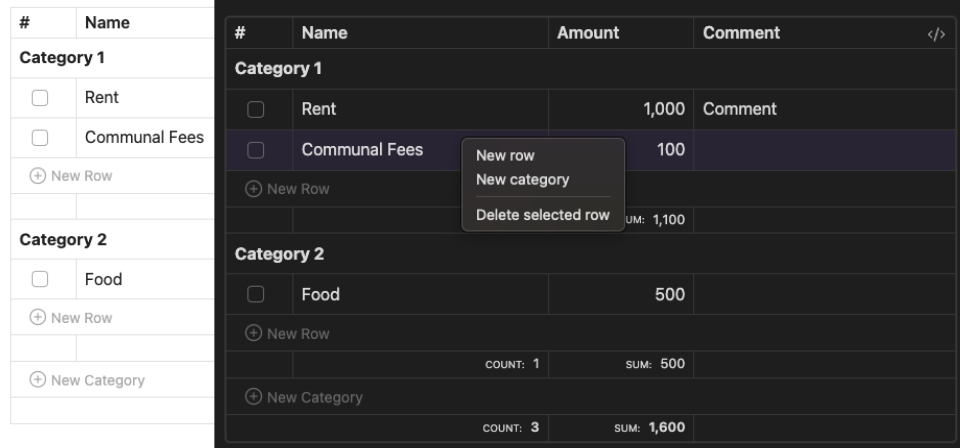
A minimalist budget planning plugin that lets you manage finances directly in your notes using markdown code blocks.
✨ Features
- 📝 Plain markdown storage — the table is just a
budgetcode block, editable by hand - 📊 Categories with per-category count and sum (shown when there is more than one category)
- ✅ Click a row's checkbox to mark it paid; totals also show unchecked count and sum
- ✏️ Inline editing of name, amount and comment (Enter saves, Escape cancels)
- 🔗 Comments render inline markdown (wikilinks, external links, bold, tags) in editing view
- 🔀 Drag rows between categories and reorder categories via the grip handle
- 📈 Right-click a column header (
#,Name,Amount) to sort rows inside every category - 🖱️ Right-click a row or category for new row / new category / delete
- 🔄 Markdown is rewritten column-aligned on every change
- ⚙️ Configurable default block template in plugin settings
📖 Usage
Quick Start
- Open a note in Obsidian where you want to add a budget planner
- Use the command palette (Cmd+P on macOS or Ctrl+P on Windows/Linux) and run
Budget Planner: Insert budget block - Start editing your budget!
The table renders in editing view (Live Preview and Source mode). In Reading view the block stays a plain code block.
Syntax
Create budgets using the budget code block:
Online Services:
	[x] | Spotify   | 4.99
	[ ] | Youtube   | 16.99
	[ ] | 1Password | 6.95
Entertainment:
	[ ] | Netflix   | 12.99  | Family plan
- A line ending with
:starts a category - Row cells are
[x]/[ ] | name | amount | comment; the checkbox and the comment are optional. The comment is the whole rest of the line after the amount, so|is safe to use inside it — but a|inside name or amount still splits the row wrong - Lines without
|are ignored - Amounts are parsed as numbers — anything else in the cell is stripped, an unparsable amount becomes
0
🚀 Installation
From Obsidian (recommended)
- Open Settings → Community Plugins → Browse
- Search for Budget Planner (community plugin page)
- Install and enable it
Manual
- Download
main.jsandmanifest.jsonfrom the latest GitHub release - Create a
budget-planner/folder inside your vault's.obsidian/plugins/folder and put both files in it - Reload Obsidian
- Enable plugin in Settings > Community Plugins
🤝 Contributing
- Fork the repository
- Create feature branch (
git checkout -b feature/amazing-feature) - Commit changes (
git commit -m 'Add amazing feature') - Push to branch (
git push origin feature/amazing-feature) - Open Pull Request
📄 License
MIT License - see LICENSE for details
💬 Support
🔖 Docs
For plugin developers
Search results and similarity scores are powered by semantic analysis of your plugin's README. If your plugin isn't appearing for searches you'd expect, try updating your README to clearly describe your plugin's purpose, features, and use cases.