Caissa
approvedby Matthew Newton
Study chess in your vault. Embed positions, study openings and endgames, browse World Championship games, annotate PGNs, and explore Lichess opening statistics. - This plugin has not been manually reviewed by Obsidian staff.
Caissa
A chess study plugin for Obsidian: embed positions, study openings and endgames, browse World Championship games, and annotate PGNs inside your notes. Named after Caïssa, the muse of chess.
- Pick from a built-in library of openings and variations (Sicilian → Dragon, Najdorf, Yugoslav…)
- Merge several variations into one branching timeline under the board (
branches: Najdorf, Dragon, …, or PGN sidelines) - Play any position against Stockfish with adjustable strength (level 0–20) — fully offline, click-to-move, with promotion/undo/new-game controls
- Study canonical endgame techniques — basic mates, Lucena, Philidor, Vancura, opposition, wrong-bishop draw, and more
- Browse bundled World Championship games — 68 hand-picked decisive/famous games from 1886 (Steinitz–Zukertort) through 2024 (Gukesh–Ding)
- Paste a PGN from anywhere (Lichess, chess.com, ChessBase, your own play) and play through it with full headers
- Pull a Lichess game directly with
lichess: <url>— no token needed - Step through moves with
prev/nextcontrols or click any move in the list - Drop multiple boards in the same note to compare variations side by side
- Two-column white/black move list right next to the board
- 7 piece styles to choose from — classic, modern, retro, and more (see Piece sets)
- Optional Opening Explorer panel showing win/draw/loss percentages for every candidate next move (powered by Lichess, opt-in)
- Chessology coaching — import Lichess games into review notes, enrich stats from Lichess or local Stockfish, and explore a live performance analytics dashboard plus an optional Claudian coaching note
Privacy
This plugin does not read or write your system clipboard. Insert commands open a modal so you can paste FEN, PGN, or a Lichess URL yourself. Board export offers Save as PNG/SVG downloads and a Copy as SVG modal where you select the markup and copy with your own shortcut.
Optional features fetch data only when you use them: Lichess game import (lichess: blocks) and the Opening Explorer call the public Lichess API. Stockfish analysis runs entirely offline in a Web Worker bundled with the plugin — no network calls.
Contents
- Quick start
- Screenshots
- Usage — Branching timelines, Inline picker, Sizing and layout, Loading whole games, Built-in openings, Endgames, World Championship games, Piece sets
- Library opening names — canonical
opening:/variation:/branches:strings (for humans and agents) - Commands
- Export a board as PNG or SVG
- Captured pieces and material balance
- Annotations: arrows and square highlights
- Keyboard shortcuts
- Engine analysis (Stockfish, offline)
- Play against Stockfish
- Opening Explorer (win / draw / loss bars)
- Chessology coaching & analytics — Performance dashboard, Import & enrich, Claudian, Workflow guide
- Block options reference — every key you can put in a
chessblock - Settings
- Privacy
- Development
- Credits
Quick start
If you only read three examples, read these. Each is a complete, self-contained block — paste it into any note and it just works.
1. Pull up a known opening:
```chess
opening: Sicilian Defense
variation: Dragon
```
2. Drop in a PGN you copied from anywhere:
```chess
[White "Carlsen, Magnus"]
[Black "Nakamura, Hikaru"]
[Result "1-0"]

1. e4 e5 2. Nf3 Nf6 3. Nxe5 d6 4. Nf3 Nxe4 ...
```
3. Play a real game against Stockfish from any starting position:
```chess
opening: Italian Game
play: white
level: 5
```
That's the whole mental model: every block is a starting position plus optional behavior. See Block options reference for every key you can use, or keep reading for guided examples.
Screenshots
Images live in assets/ (same paths work on GitHub and in Obsidian’s Markdown preview when the README is opened from the vault).
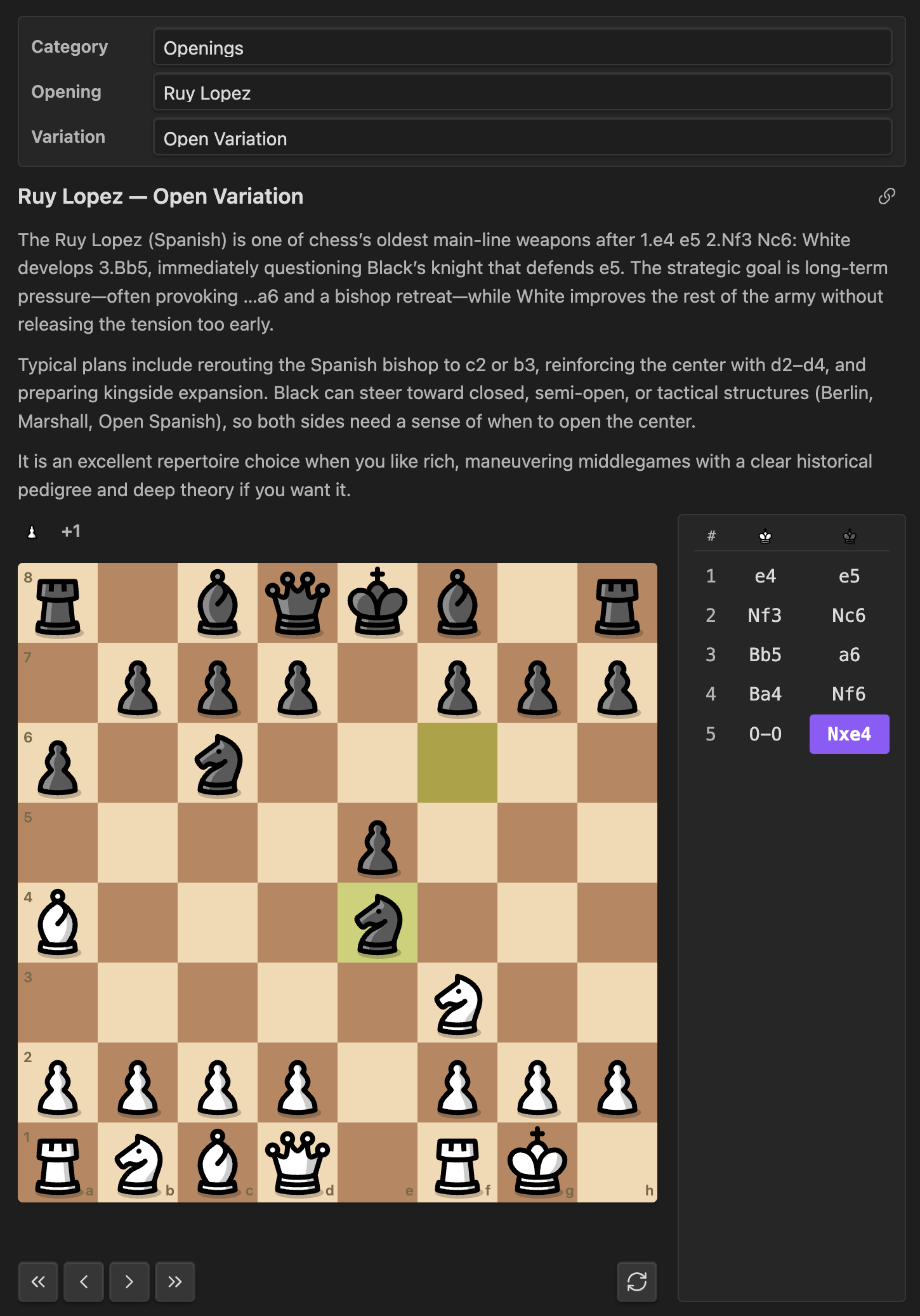
Opening study
A built-in opening with the two-column move list and board layout:
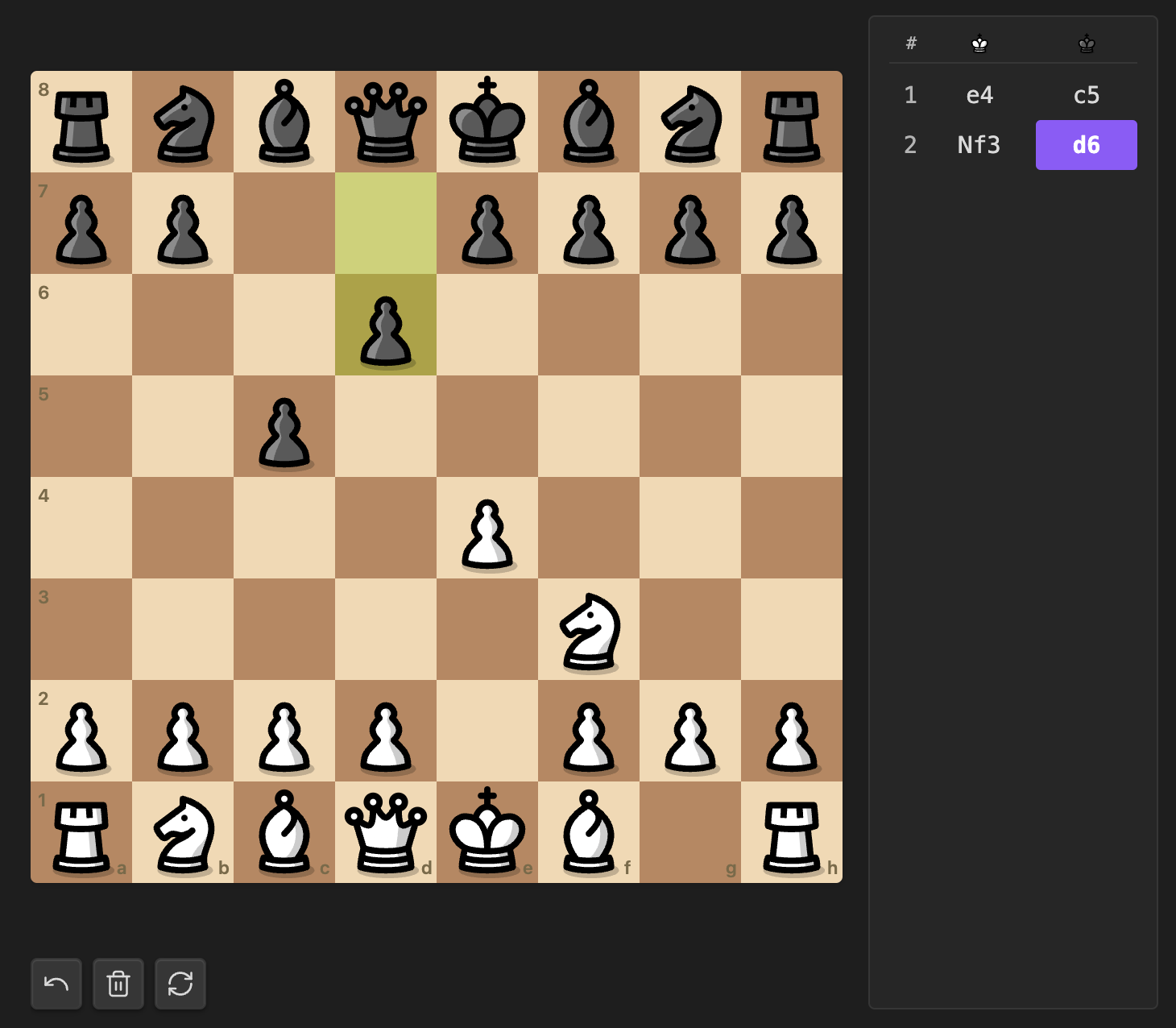
Free board
Blank board mode: both colors are human, moves persist in the block as moves: / freeboard::
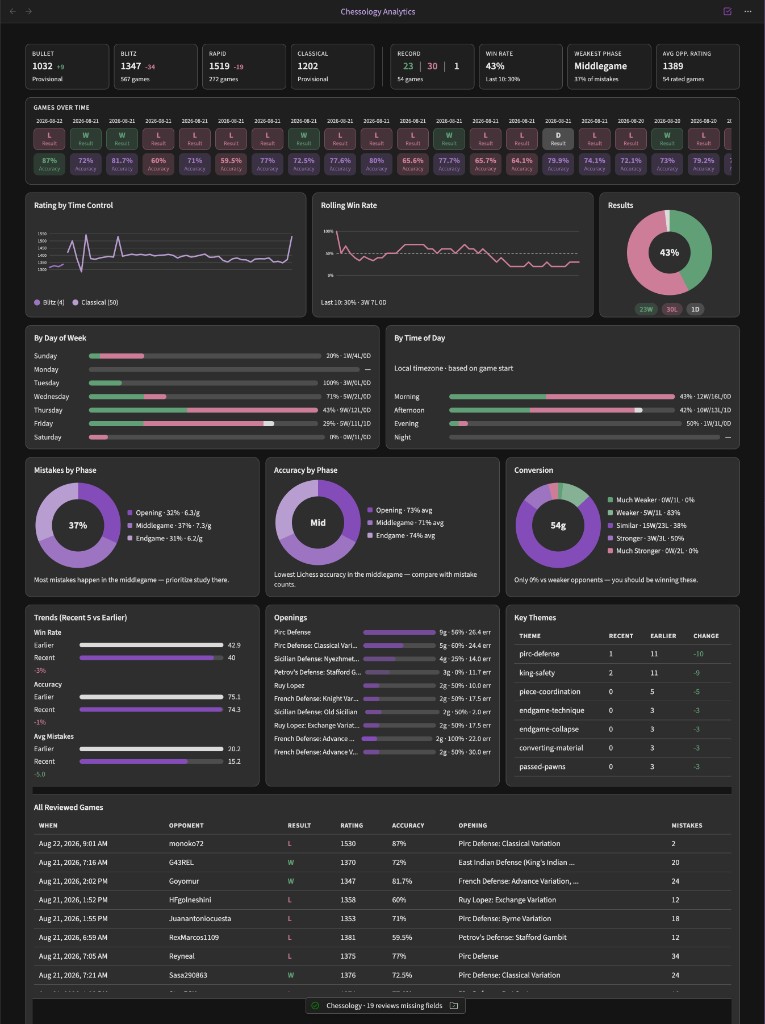
Performance analytics dashboard
Live Chessology analytics from your game-review notes — Lichess ratings, charts, schedule patterns, and a searchable games table (Open performance analytics):
Usage
Add a fenced code block with the language chess:
```chess
opening: Sicilian Defense
variation: Dragon
```
That renders the full Dragon line with a board, an interactive move list, and step controls. Anything you can put in a code block is supported, so you can have several variations stacked in the same note — or merge them into one branching board (see below).
Branching timelines
When a study has sidelines, Caissa draws a Loki-style timeline under the board: the mainline on the top rail, each fork on its own row aligned to the ply where it diverges. Click any node to jump; the move list and prev/next controls follow the active path.
From the opening library — list variation names with branches: (aliases: branch:, variations:). Names must come from Caissa’s curated library — not ECO / Lichess / Chess.com titles. See Library opening names for the full accepted list (canonical names + safe short forms).
```chess
opening: Sicilian Defense
branches: Najdorf, Dragon, Classical, Scheveningen, Sveshnikov
```
The first name seeds the mainline; later names fork where they diverge. The timeline under the board shows consolidated full moves (1.e4 c5) on each rail — the side move list is hidden by default for branching studies (showMoves: true brings it back). Short names match when they uniquely identify a library variation under that opening: (Najdorf → Najdorf Variation). Prefer the full canonical name when generating blocks with an agent.
From PGN — parenthetical variations are preserved automatically:
```chess
1. e4 c5 2. Nf3 d6 3. d4 cxd4 4. Nxd4 Nf6 5. Nc3 a6 (5... g6 6. Be3 Bg7) (5... e6)
```
Use separate blocks with variation: when you still want side-by-side boards instead of one shared timeline.
Inline picker
Don't want to look up slugs? Drop a blank chess block — either the Insert chess board command or just type the fences yourself:
```chess
```
The rendered block grows a little dropdown strip across the top: pick a category (Openings, Endgames, World Championship), then a specific opening/variation/endgame/game from a second dropdown. Your selection is written back into the block's source as opening: … / variation: … / endgame: … / wccgame: …, so the result is the same as if you'd typed it by hand — and it survives reload, sync, and copy-paste.
This is the friendliest way to use the plugin if you don't already have a position in mind.
See Block options reference for every key you can put in a
chessblock.
Sizing and layout
opening: Sicilian Defense
variation: Dragon
size: large       # small | medium (default) | large | full
showMoves: true   # set false to hide the right-hand move list
interactive: false  # set false to hide the prev/next/flip buttons
small≈ 240px board,medium≈ 360px (default),large≈ 500px.size: fullmakes the board fill the writing area's width and pushes the move list below it.- The board's column also auto-collapses to a single stacked layout when the writing pane is narrower than ~520px (mobile screens, narrow split-pane editing). This uses CSS container queries so it responds to the pane width, not the whole window.
showMoves: falselets the board take the row by itself without an empty side column.
If both opening and moves are provided, moves wins (handy for adding extra moves past the book). If pgn or lichess is set, those win over everything else (they bring their own moves and headers).
Pick the position to show on first render
By default a block opens on the last position in its line (end of an opening, final position of a PGN/Lichess game) so you land on the interesting board immediately. To open on a specific ply instead — a critical middlegame, a tactic, etc. — set startMove:
```chess
lichess: https://lichess.org/OQOLHIUv
showMoves: true
startMove: 29
analyze: true
```
startMove is a 0-indexed step into the move list (0 = starting position, 1 = after White's first move, 2 = after Black's first reply, and so on). Out-of-range values clamp to the last move, so startMove: 999 on a 30-move game just opens at the end. Stepping with ←/→ works normally from there — it's purely the initial render position, not a hard limit.
You can also put the ply in a Lichess URL fragment (lichess: https://lichess.org/OQOLHIUv#29); an explicit startMove still wins if both are present.
Loading whole games
Paste a PGN
If the entire body of the block looks like a PGN — that is, it starts with a [Tag "value"] header, or contains move tokens with no key: value lines — the plugin treats the whole block as a PGN. No pgn: prefix needed:
```chess
[Event "Norway Chess"]
[Site "Stavanger NOR"]
[Date "2024.05.27"]
[White "Carlsen, Magnus"]
[Black "Nakamura, Hikaru"]
[Result "1-0"]
[WhiteElo "2830"]
[BlackElo "2789"]
[ECO "C42"]
[Opening "Russian Game"]

1. e4 e5 2. Nf3 Nf6 3. Nxe5 d6 4. Nf3 Nxe4 5. d4 d5 6. Bd3 Bd6 ...
```
The plugin renders a clean game-info strip above the board (players · result · event · date · ECO/opening), strips any { [%eval ...] [%clk ...] } annotations, and walks the mainline. Variations and comments are dropped.
PGNs from Lichess, chess.com (Share → PGN), ChessBase, SCID, and the Lichess pgn-extract tool all paste cleanly.
Pull a Lichess game by URL
If you'd rather just point at a Lichess game, use the lichess key:
```chess
lichess: https://lichess.org/q7ZvsdUF
```
A bare game ID also works (lichess: q7ZvsdUF). The plugin fetches the PGN from https://lichess.org/game/export/<id> over HTTPS — no token required for this endpoint, unlike the Opening Explorer. Results are cached in memory for the session.
You can combine lichess: with sizing/orientation keys:
```chess
lichess: https://lichess.org/q7ZvsdUF
size: full
orientation: black
```
Built-in openings
Caissa ships a curated opening library (not a full ECO database). Accepted opening: / variation: / branches: strings are listed in docs/library-openings.md. The TypeScript source of truth is src/chess/openings.ts (OPENINGS).
Families today: Italian Game · Ruy Lopez · Sicilian Defense · French Defense · Caro-Kann · Scandinavian · Pirc · Alekhine's · Queen's Gambit · King's Indian · Nimzo-Indian · Grünfeld · English · Réti · London System.
Use the Insert chess opening from library command (Cmd/Ctrl+P) to fuzzy-search and insert a block for any of them. When asking Claudian (or another agent) to write branching studies, point it at docs/library-openings.md and tell it to copy names from that file.
Endgames
The plugin ships ten canonical endgame techniques. Use them with endgame: <slug>:
| Slug | Topic | Demo line? |
|---|---|---|
kqk-mate | King + queen vs king (basic queen mate) | full technique, mate in 8 |
krk-mate | King + rook vs king (basic rook mate) | full technique, mate in 4 |
krrk-ladder-mate | Two rooks vs king (ladder mate) | mate in 2 |
kbnk-mate | Bishop + knight mate (the W-manoeuvre) | Karttunen vs Rasik 2003, mate in 23 |
kbbk-mate | Two bishops mate | Leslie-Hurd 2005 tablebase, mate in 19 |
lucena | Lucena position — winning the rook endgame with the bridge | study position |
philidor | Philidor position — drawing the rook endgame | study position |
vancura | Vancura position — rook + a-pawn draw | study position |
kpk-opposition | King + pawn vs king — opposition and key squares | study position |
wrong-bishop | Wrong-colored bishop + rook-pawn draw | study position |
All five mating endgames ship a verified mating sequence you can step through with next. KQK, KRK, and the two-rook ladder use hand-crafted demo lines from a central starting position. For the two hardest mates we ship real games that were actually played out: KBNK uses the ending of Karttunen vs Rasik (European Club Cup 2003), picked up at move 84 with 23 moves of W-manoeuvre to mate; KBBK uses Joe Leslie-Hurd's 2005 tablebase analysis of the longest forced KBBK mate, with both sides playing perfectly to mate-in-19. The five non-mating positions (Lucena, Philidor, Vancura, K+P opposition, wrong-bishop) are study positions where the technique itself depends on best play from both sides, so the plugin lets you explore them without forcing a fixed line.
Example:
```chess
endgame: lucena
```
Use the Insert chess endgame from library command for a fuzzy picker.
World Championship games
The plugin ships 68 hand-picked World Championship games covering 20 matches from 1886 (Steinitz–Zukertort) through 2024 (Gukesh–Ding). Each is referenced by a stable slug formatted <year>-<player1>-<player2>-<game>:
```chess
wccgame: 1972-fischer-spassky-06
```
That renders Fischer's famous game 6 against Spassky from Reykjavik with full headers, the result, the ECO code, and a clickable move list.
Use the Insert chess world championship game command for a two-step picker (match → game). PGNs are sourced from PGN Mentor and bundled inline with the plugin — no network calls at runtime.
To curate or extend the bundled set, edit scripts/wcc-curated.json and re-run node scripts/fetch-wcc-games.mjs.
Piece sets
Set the global default in Settings → Community plugins → Caissa → Piece set, or override per board with pieces: <name>.
| Name | Style |
|---|---|
cburnett | Classic Lichess look (default) — neutral, recognizable |
merida | Traditional chess-club style, slightly heavier than cburnett |
staunty | Modern bold Staunton tournament look |
caliente | Warm modern Staunton with subtle gradient shading |
pixel | 8-bit retro pixel art |
letter | Just K Q R B N P text — high contrast, accessibility-friendly |
unicode | Unicode chess characters from your system font |
Commands
Core study
- Insert chess board — drops an empty
chesscode block at the cursor. - Insert chess opening from library — fuzzy-search modal for openings and variations.
- Insert chess endgame from library — fuzzy-search the bundled endgame techniques.
- Insert chess world championship game — two-step picker (match → game) over the bundled WCC corpus.
- Insert chess board from FEN — modal to paste a FEN string into a new block.
- Insert chess game from PGN — modal to paste PGN text into a new block.
- Insert chess game from Lichess link — modal to paste a Lichess game URL or ID.
- Start openings quiz — serves positions from the bundled opening repertoire and asks for the next book move (tracks score and streak).
Chessology (import, enrich, analytics)
Set your Lichess username and game reviews folder under Settings → Caissa → Chessology coaching before using these.
| Command | What it does |
|---|---|
| Insert recent lichess game | Pick a recent game → insert a lichess: block in the current note |
| Import lichess games | All missing, last game, specific game, or last N → create review notes with Lichess stats prefilled |
| Create lichess game review note | Pick one recent game → scaffold a review note (same create path as Import) |
| Enrich all reviews from lichess | Backfill empty frontmatter from Lichess; optionally runs bundled Stockfish when Lichess has no analysis |
| Analyze missing accuracy with stockfish | Bulk offline accuracy only (progress modal with cancel) |
| Open performance analytics | Live dashboard — charts, ratings, schedule patterns, games table |
| Update coaching dashboard note | Refresh the markdown coaching page (stats + link to the analytics view) |
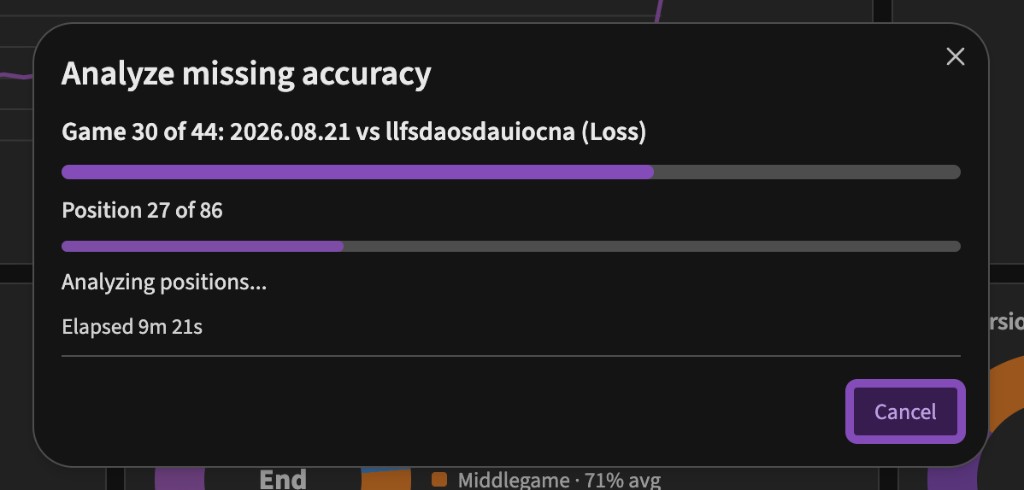
When Lichess has not computer-analyzed a game, Analyze missing accuracy with stockfish walks each review offline and fills accuracy / phase stats:
Claudian coaching (optional)
Requires the community plugin Claudian (realclaudian) and a Chessology skill file in your vault (default .claude/skills/chessology/SKILL.md). See Claudian integration below.
| Command | What it does |
|---|---|
| Request claudian coaching summary | Copy a dashboard coaching prompt to the clipboard and open Claudian (paste to run) |
| Request claudian fill recent reviews | Copy a prompt listing incomplete review notes (newest first) and open Claudian to populate coaching fields |
Or, drop a blank chess block (the Insert chess board command) and use the inline picker — a category dropdown lets you switch between Openings, Endgames, and World Championship right inside the rendered block, without typing slugs.
Chessology coaching & analytics
Caissa’s Chessology features turn your vault into a review pipeline: import games from Lichess, scaffold structured review notes, fill stats from Lichess (or bundled Stockfish when Lichess has no analysis), and explore trends in a dedicated analytics view. Optional Claudian integration (realclaudian) adds narrative coaching on top.
Full step-by-step notes: docs/chessology-workflow.md.
Setup
In Settings → Community plugins → Caissa → Chessology coaching:
| Setting | Purpose |
|---|---|
| Lichess username | Required for import, live rating cards, and Lichess enrich |
| Game reviews folder | Where review notes are created (default Learning/Chessology/Games) |
| Performance dashboard path | Markdown note for Claudian coaching summaries |
| Analytics chart colors | Vault accent (default), Semantic (green/red + distinct hues), or Soft (muted mixes) |
| Lichess API token | Optional — private games and higher rate limits (same token as Opening Explorer) |
| Local Stockfish accuracy fallback | Compute accuracy offline when Lichess has no computer analysis |
| Claudian … | Coaching section, auto-open after create/review, skill path, persist enrich on analytics open, status bar |
Performance dashboard
Run Open performance analytics (command palette) for a live dashboard that reads your games folder and refreshes when reviews change.
Summary row (wide layout) — eight cards in one row:
- Lichess ratings — Bullet, Blitz, Rapid, Classical fetched from the Lichess profile API (cached ~5 minutes); shows rating, recent change, and game count or “Provisional”
- Vault stats — Record (color-coded win / loss / draw counts), win rate, weakest phase, average opponent rating — each with a short sub-line (e.g. rolling win rate, games in sample)
- A faint divider separates the Lichess row from vault-derived stats
Charts & panels
- Games over time — scrollable timeline (newest first) with standardized
YYYY-MM-DDdates, result chips, and accuracy when available - Rating by time control — rating trend per speed (Bullet / Blitz / Rapid / Classical)
- Rolling win rate — win rate over your last 10 decided games (0–100% axis, 50% baseline)
- Results — win / loss / draw donut
- By day of week / By time of day — win-rate bars (needs
played-atfrom Lichess enrich) - Mistakes by phase / Accuracy by phase / Conversion — phase and opponent-strength breakdowns
- Trends — recent vs earlier win rate, accuracy, mistakes
- Openings / Key themes — pattern tables from frontmatter
- All reviewed games — sortable table; click a row to open the note
Chart colors follow your Obsidian theme (accent-based by default). Switch palette under Analytics chart colors in settings.
Import and enrich
| Command | What it does |
|---|---|
| Import Lichess games | All missing, last game, specific game, or last N — creates review notes with Lichess stats prefilled |
| Create lichess game review note | Pick one recent game → same scaffold path |
| Enrich all reviews from Lichess | Backfill empty frontmatter; optionally runs local Stockfish when Lichess has no analysis |
| Analyze missing accuracy with Stockfish | Bulk offline accuracy only (progress modal with cancel) |
On create, Caissa can open Claudian automatically with a game-specific coaching prompt copied to the clipboard (default on).
Claudian integration
Caissa handles numbers and structure (Lichess import, frontmatter, charts). Claudian handles narrative coaching when you pair it with a Chessology skill in your vault.
What you need
- Claudian installed and enabled from Settings → Community plugins (plugin id
realclaudian). - Lichess username and folders configured under Settings → Caissa → Chessology coaching.
- A Chessology skill markdown file Claudian can follow — default path
.claude/skills/chessology/SKILL.md(change Chessology skill path in settings if yours lives elsewhere).
Claudian integration in settings shows Connected / Installed, disabled / Not installed. You can enable Claudian from there if it is installed but off.
How it works (no silent send)
Claudian does not expose a public API to inject messages. Caissa instead:
- Builds a structured prompt (game review, dashboard summary, or batch fill list).
- Copies it to your clipboard.
- Opens the Claudian view (
realclaudian:open-view). - You paste into Claudian and run — the skill tells Claudian which frontmatter and note sections to fill.
This keeps you in control of what gets sent to the model.
Typical workflow
Import lichess games  →  review notes created (Lichess stats prefilled)
        ↓
[optional] Enrich all reviews from lichess  →  backfill accuracy, move times, played-at
        ↓
[optional] Analyze missing accuracy with stockfish  →  offline accuracy when Lichess has none
        ↓
Claudian fills coaching prose  →  Opening analysis, key themes, critical moments
        ↓
Open performance analytics  →  live charts from your games folder
        ↓
Update coaching dashboard note  →  markdown summary + link to analytics view
        ↓
Request claudian coaching summary  →  Claudian refreshes Coach's summary / reminders on the dashboard note
After creating a review, Caissa can open Claudian automatically (default on) with a game-specific prompt copied — paste once to start coaching that note.
After enrich-all, enable Refresh coaching note after enrich to run Update coaching dashboard note automatically.
What Caissa fills vs Claudian
| Source | Fields / content |
|---|---|
| Lichess (on create / enrich) | rating, opponent-rating, result, opening, date, played-at, accuracy, acpl, phase accuracy, move-time averages, suggested phase mistake counts |
| Bundled Stockfish | accuracy, phase accuracy, acpl when Lichess has no computer analysis (accuracy-source: stockfish) |
| Claudian + skill | key-themes, key-moves-good, phase mistake overrides, Opening analysis, Critical moments, Summary, Coaching notes, dashboard Coach's summary / What to work on / Reminders |
The performance analytics view reads frontmatter directly — no Claudian required for charts. The coaching dashboard note is markdown Claudian edits between <!-- caissa:claudian:begin --> and <!-- caissa:claudian:end --> markers.
Claudian-related settings
| Setting | Purpose |
|---|---|
| Claudian coaching on dashboard | Reserve the coaching section on the dashboard note |
| Open Claudian after creating a review | Auto-copy game prompt + open Claudian after import/create (default on) |
| Open Claudian after dashboard update | Auto-copy dashboard prompt + open Claudian after Update coaching dashboard note |
| Chessology skill path | Vault path included in every Claudian prompt |
| Status bar missing-fields count | Shows how many reviews still lack analysis fields |
Full step-by-step notes: docs/chessology-workflow.md.
Review frontmatter (analytics inputs)
Caissa aggregates these from each game review note — see docs/chessology-workflow.md for the full list. Highlights:
result,rating,opponent-rating,opening,date,played-atmistakes,mistakes-opening/middlegame/endgame,accuracy, phase accuracy,key-themes
Export a board as PNG or SVG
Right-click any rendered board (long-press on touch) for a context menu with:
- Copy as SVG — opens a modal with the SVG markup to select and copy yourself.
- Save as PNG — downloads a
caissa-board-<position>.pngfile at 2× resolution (720×720 by default). - Save as SVG — downloads a
caissa-board-<position>.svgfile.
Exports always reflect the current position on screen (after stepping moves or flipping), and use whichever piece set / colors / annotations you've configured for the block — what you see is what you export.
Captured pieces and material balance
Every board automatically shows a captured-pieces tray above and below it, plus a +N material badge next to the side that's ahead. The piece glyphs use whichever piece set is active for the board so the tray always matches.
- Pieces captured by White appear on White's side (bottom of the board by default; top if you flip with
F). - Pieces captured by Black appear on Black's side.
- The
+Nbadge shows pawn-equivalent material — promotions are accounted for, so a queened pawn shows as+8rather than+1once it promotes. - Trays auto-hide on positions where nothing has been captured (a fresh starting position, an endgame study with no captures), so they never add empty space.
You can hide the trays globally in Settings → Caissa → Show captured pieces, or per-block with captured: false.
Annotations: arrows and square highlights
Annotate any board with arrows (move suggestions, threats, plans) and square highlights (key squares, weak squares, mating nets). Both are declarative — no clicks involved — so they survive note round-trips and look the same on every device.
```chess
fen: r1bqkbnr/pppp1ppp/2n5/4p3/4P3/5N2/PPPP1PPP/RNBQKB1R w KQkq - 2 3
arrows: f3e5 g1f3-blue
highlights: e5 f7-red
```
Token grammar:
arrows: <from><to>[-color]— list of square pairs, whitespace-separated.e2e4 g1f3 d2d4-blue.highlights: <square>[-color]— list of squares, whitespace-separated.d4 e4-red f5-yellow.
Color presets: green (default), red, yellow, blue. You can also pass any 3, 6, or 8-character hex code without the # (e.g. e2e4-ff5500). Unknown colors silently fall back to green so a typo never breaks the board.
Highlights render as a colored ring inside the square (so the piece glyph stays readable); arrows render as a thick filled triangle on top of the board, matching the convention from Lichess and chess.com analysis boards.
Keyboard shortcuts
Click any rendered chess block (or Tab into it — a soft accent ring shows it's focused) and use:
| Key | Action |
|---|---|
← / Page Up | Previous move |
→ / Page Down | Next move |
Home | Jump to the starting position |
End | Jump to the final position |
F | Flip the board |
Shortcuts are scoped to the focused block, so multiple boards on the same page never fight for keys, and typing in any text input still works normally.
Engine analysis (Stockfish, offline)
Caissa ships a bundled offline copy of Stockfish 10 (the asm.js build by Niklas Fiekas, ~1.5 MB), so you can run engine analysis with zero network calls and on a plane. The engine is lazy-loaded on first use — if you never set analyze: true, no worker is spawned and no extra memory is allocated.
Add analyze: true to any chess block to turn on the analysis panel:
```chess
opening: Sicilian Defense
variation: Najdorf
analyze: true
```
That gives you:
- An evaluation bar to the left of the engine panel, showing the position from White's perspective (clamped at ±5 pawns for the bar; the numeric label is exact).
- The top 3 principal variations — eval, search depth, and the move sequence Stockfish recommends.
- A whole-game eval graph under the board with an Analyze game button. Click it once to evaluate every position in the loaded PGN at depth 12; the resulting sparkline shows where evaluation swings happened. Click anywhere on the graph to jump the board to that position.
Notes and tradeoffs:
- The engine is the pure-JS asm.js Stockfish 10 (no NNUE, no WebAssembly). Strength is around 3000+ Elo at depth 16 — more than enough for spotting tactics, blunders, and trends. If you need NNUE/cloud-grade analysis, run an analysis on Lichess and paste the PGN back in.
- Each block runs analysis serially through one shared worker; the worker stays alive across blocks so subsequent positions analyze fast.
- "Analyze game" on a 60-move game at depth 12 takes roughly 30–90 seconds depending on hardware.
The engine is bundled directly into main.js. Bundle size impact: the plugin grows from ~250 KB to ~1.8 MB. There are no extra files to install, no network downloads, and no telemetry.
Play against Stockfish
Set up any position you'd render normally (start position, an opening, an endgame, a custom FEN), then add play: white (or black, or random) to start a game from that exact position against the bundled Stockfish:
```chess
opening: Italian Game
play: white
level: 5
```
How it works:
- Click to move. Click a friendly piece to select it (legal targets light up as dots; capture squares get rings); click a destination square to play. Clicking the same square again deselects.
- Promotions trigger a popup with Queen / Rook / Bishop / Knight choices.
- Game over is detected automatically — checkmate, stalemate, threefold repetition, insufficient material, or 50-move rule. The status line below the board updates in place.
- Undo rolls back to the last position where it was your turn (your move + the engine's reply).
- Export played game opens a modal with the full PGN (headers include Event, sides, skill level, and result). Select-and-copy, or save as a
.pgnfile — the plugin never writes to the clipboard. - Progress auto-saves into the block as
moves:(andfen:when you didn't start from the standard position), so closing the note and coming back resumes the same game.play: randomis rewritten towhite/blackon first save so the side doesn't flip. - New game resets to the configured starting position. If you set
play: randomthe controller picks a side at mount time and a fresh "new game" keeps that side. - The captured-pieces tray + material badge work as usual so you can see how a game is going at a glance.
Strength control via level: 0–20:
| Level | Approx. Elo | Feels like |
|---|---|---|
| 0 | ~1100 | Beginner — frequent blunders |
| 4 | ~1500 | Casual club player |
| 8 (default) | ~1700 | Decent club player |
| 12 | ~1900 | Strong club player |
| 16 | ~2300 | Expert |
| 20 | ~3000+ | Full strength (depth-limited at 14) |
Lower levels also use shallower searches so weak moves come back fast — at level: 0 the engine plays nearly instantly. At level: 20 each move can take a couple seconds depending on hardware.
Notes:
- The board, captured tray, piece set, colors, and orientation all respect the same
pieces/light/dark/coordinatesconfig you'd use on a normal block. playis mutually exclusive with stepping through a fixed PGN — once you setplay, the move list becomes a passive transcript and the prev/next/last buttons are gone.playpluslichess: <url>isn't supported (the lichess loader runs first); paste the PGN inline if you want to play a position from a Lichess game.
Opening Explorer (win / draw / loss bars)
Optionally show a Lines panel under each board with the win/draw/loss percentage for every candidate next move at the current position, exactly like Lichess's analysis page.
One-time setup
- Settings → Community plugins → Caissa → Lichess API token — paste a token here.
- To create a token, go to lichess.org/account/oauth/token, click Create new personal access token, give it any name (no scopes needed), generate it, and copy the token.
- Toggle on Enable opening explorer.
That's it. The panel now appears under every chess board and updates as you step through moves.
Why a token?
Lichess started requiring authentication on its Opening Explorer API in March 2026 to mitigate DDoS abuse. The token is free, takes 30 seconds to create, and is rate-limited to 25 requests / minute (more than enough for normal study). Your token is stored locally in the plugin's settings file inside your vault — it is never sent anywhere except to Lichess.
Data sources
- Masters database — over-the-board games played by 2200+ rated players (high-quality opening theory).
- Lichess players — a much larger database covering all rated games on Lichess (good for offbeat lines).
You can switch sources globally in settings, or per board with explorerSource: lichess.
Privacy
When the explorer is enabled, the plugin sends the current board position (FEN) and your Lichess API token to https://explorer.lichess.ovh over HTTPS. Nothing else is transmitted; your notes, vault contents, and other settings stay local. The explorer is off by default — you have to opt in.
When you use the lichess: <id> key, the plugin makes a separate, anonymous HTTPS request to https://lichess.org/game/export/<id> to download the PGN of that one specific game. No token is sent and no other request is made. This only happens for blocks that explicitly use the lichess: key.
Results are cached in memory for the session, so stepping back and forth through a line never refetches.
Block options reference
Every key you can put inside a chess code block. All keys are optional and may appear in any order. Per-block keys always override the matching global setting.
Position (pick one — the first one set wins)
| Key | Description | Example |
|---|---|---|
opening | Name from the bundled library — see Built-in openings | opening: Italian Game |
variation | Variation belonging to the opening above | variation: Two Knights Defense |
branches | Comma-separated library variations under opening, merged into one branching timeline (aliases: branch, variations) | branches: Najdorf, Dragon |
endgame | Endgame slug or display name — see Endgames | endgame: lucena |
wccgame | World Championship game slug — see World Championship games | wccgame: 1972-fischer-spassky-06 |
fen | Custom starting position (FEN). Use alone for puzzles or middlegames | fen: rnbqkbnr/... |
pgn | Single-line PGN. For multi-line PGNs, paste the PGN as the entire block body | pgn: 1. e4 e5 2. Nf3 |
lichess | Lichess game ID or URL — fetches the full PGN over HTTPS, no token needed | lichess: https://lichess.org/q7ZvsdUF |
moves | Explicit SAN move list. Move numbers like 1. are stripped. Combines with opening to extend a book line | moves: e4 e5 Nf3 Nc6 Bc4 |
Display
| Key | Description | Example |
|---|---|---|
title | Caption shown above the board | title: My Dragon line |
orientation | white or black | orientation: black |
pieces | One of cburnett, merida, staunty, caliente, pixel, letter, unicode | pieces: caliente |
light / dark | CSS color for board squares | light: #eeeed2 |
size | small, medium (default), large, or full | size: full |
coordinates | true/false to toggle file/rank labels | coordinates: false |
interactive | true/false to toggle the prev/next/flip buttons | interactive: false |
showMoves | true/false to show or hide the right-hand move list | showMoves: false |
startMove | Index of the step to show on first render (0 = start, clamped to game length) — see Sizing and layout | startMove: 12 |
captured | true/false to override Show captured pieces for this block | captured: false |
Annotations
| Key | Description | Example |
|---|---|---|
arrows | Whitespace-separated <from><to>[-color] tokens — see Annotations | arrows: e2e4 g1f3-blue |
highlights | Whitespace-separated <square>[-color] tokens | highlights: d4 e4-red |
Engine
| Key | Description | Example |
|---|---|---|
analyze | true to lazy-load Stockfish and show eval bar + top engine lines + analyze-game graph — see Engine analysis | analyze: true |
play | white, black, or random — play that color against Stockfish from the configured position. See Play against Stockfish | play: white |
level | Stockfish skill level 0–20 (default 8). Lower = weaker / more human | level: 4 |
Opening Explorer
| Key | Description | Example |
|---|---|---|
explorer | true/false to enable the lines panel for this block only | explorer: true |
explorerSource | masters or lichess for this block only | explorerSource: lichess |
Settings
Settings → Community plugins → Caissa lets you customize:
- Default piece set (7 styles to choose from — see Piece sets)
- Light / dark square colors
- Last-move highlight color
- Whether to show coordinates and interactive controls by default
- Default board orientation
- Opening Explorer enable / disable, data source, max lines, Lichess API token
- Chessology coaching — Lichess username, reviews folder, dashboard path, analytics chart palette, Claudian options, Stockfish enrich depth, status bar
Per-block settings always override the global defaults.
Development
npm install
npm run dev      # watch + rebuild main.js
npm run build    # type-check and produce a production main.js
npm run lint     # eslint over src/
To test locally, this folder lives at <Vault>/.obsidian/plugins/caissa/. After building, reload Obsidian and enable Caissa under Settings → Community plugins.
Credits
- Move logic: chess.js
- Opening statistics: Lichess Opening Explorer (CC0)
- World Championship game PGNs: PGN Mentor (records of historical OTB games are not subject to copyright; only the move sequences are bundled, with the original event headers preserved)
- Piece artwork (sourced from the Lichess (lila) repository; see lila's COPYING.md for canonical license info):
cburnett— Colin M.L. Burnett (GPLv2+)merida— Armando Hernández Marroquín (GPLv2+)staunty— sadsnake1 (CC BY-NC-SA 4.0)caliente— avi (CC BY-NC-SA 4.0)pixel— therealqtpi (AGPLv3+)letter— synthesized in this plugin
The CC BY-NC-SA 4.0 sets (staunty, caliente) include a non-commercial restriction. Distributing them as part of this free, open-source plugin is fine; if you fork this plugin and intend to sell it, remove those sets first.
To refresh the bundled SVGs from upstream, run node scripts/fetch-piece-sets.mjs and commit the regenerated src/chess/piece-data.generated.ts.
Release
Push a tag matching manifest.json version (no leading v, e.g. 1.0.3). The release workflow builds main.js, attests main.js and styles.css, and publishes a GitHub release with main.js, manifest.json, and styles.css.
Support

For plugin developers
Search results and similarity scores are powered by semantic analysis of your plugin's README. If your plugin isn't appearing for searches you'd expect, try updating your README to clearly describe your plugin's purpose, features, and use cases.