Canvas Sync Bridge
approvedby Joshua Wortz
Receives Canvas data from a browser extension and syncs it into your vault. - This plugin has not been manually reviewed by Obsidian staff.
Canvas Sync Bridge







Seamlessly sync Canvas LMS courses, modules, assignments, discussions, grades, files, and calendars directly into your Obsidian knowledge vault as clean, structured, and cross-linked Markdown notes.
✨ Key Features & Hybrid Ingestion
Canvas Sync provides two flexible sync workflows depending on your institutional setup:
1. 🎓 Direct Canvas REST API (Primary / Mobile Compatible)
- Direct connection from Obsidian using your Canvas API token.
- Interactive course selector modal with multi-course batch syncing and in-modal auto-sync interval selection.
- Scheduled Background Sync: Automatically resyncs active courses on a schedule (15m, 30m, 1h, 2h, 4h, 6h, 12h, 24h) with course selection filters and silent background operation.
- Supports active and completed/concluded courses.
- Fully compatible with Obsidian Desktop and Obsidian Mobile.
2. 🌐 Companion Browser Extension (Zero-Token Bridge)
- Operates in Google Chrome, Brave, Edge, Arc, Opera, and Mozilla Firefox.
- Uses your logged-in browser session cookies — no API token required (ideal for institutions locking down student API tokens).
- Granular extraction toggles in the extension popup.
- Bridges securely to Obsidian over localhost (
127.0.0.1).
📊 Comprehensive Course Synchronization
Both ingestion pathways feed into a unified rendering engine:
- Course & Home: Course overview, home page banners/navigation, and full syllabus formatting.
- Modules: Hierarchical module folders, lecture wiki pages, readings, and embedded assets.
- Assignments & Rubrics: Due dates, points possible, submission instructions, and structured rubric criteria tables.
- Student Submissions & Grades: Live gradebook standing (
Grades.md), score breakdowns, submitted files, and instructor feedback comments. - Discussions: Full discussion topics, announcements, and complete multi-tier student reply trees (
Discussions.md). - Calendar & Milestones: Schedule events, assignment due date milestones, and Zoom meeting links (
Calendar.md). - 📝 Student Personal Notes Preservation: Type student notes and annotations freely under
## 📝 Personal Noteson any course note — personal content is automatically preserved across all future syncs without tag clutter. - ⏱️ Per-Page "Last Synced" Timestamps: Every generated note and hub displays a localized timestamp showing exactly when the note was fetched.
- 🛡️ Safe Filename Capping: Automatically sanitizes and caps oversized module item titles (up to 100 chars) while preserving extensions to prevent OS
ENAMETOOLONGerrors. - Internal Obsidian Wikilinks: Automatically cross-links notes into native Obsidian
[[wikilinks]]with pipe escaping ([[path|alias]]). - Local File & Asset Downloader: Downloads embedded images, assignment attachments, and course documents (
.pdf,.docx,.pptx,.xlsx,.zip) with configurable size and extension filters. - 100% Local-First & Private: Zero cloud relays, zero analytics, zero tracking.
📸 Screenshots
| 1. Interactive Course Selector (REST API) | 2. Companion Browser Extension (Zero-Token) |
|---|---|
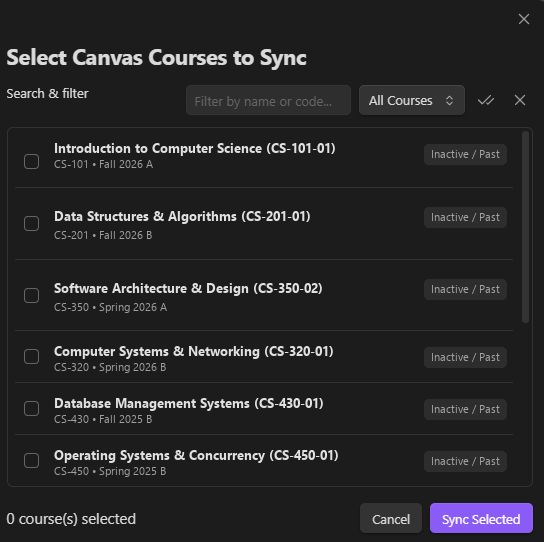 | 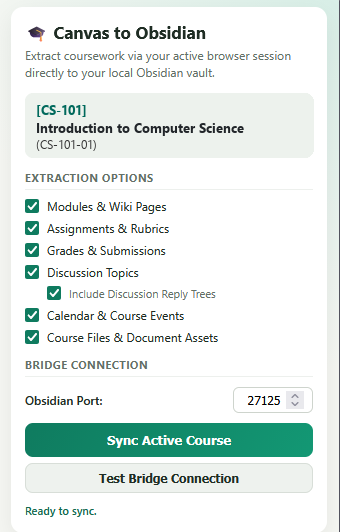 |
| 3. Canvas API & Bridge Settings | 4. Granular Asset & File Downloads |
|---|---|
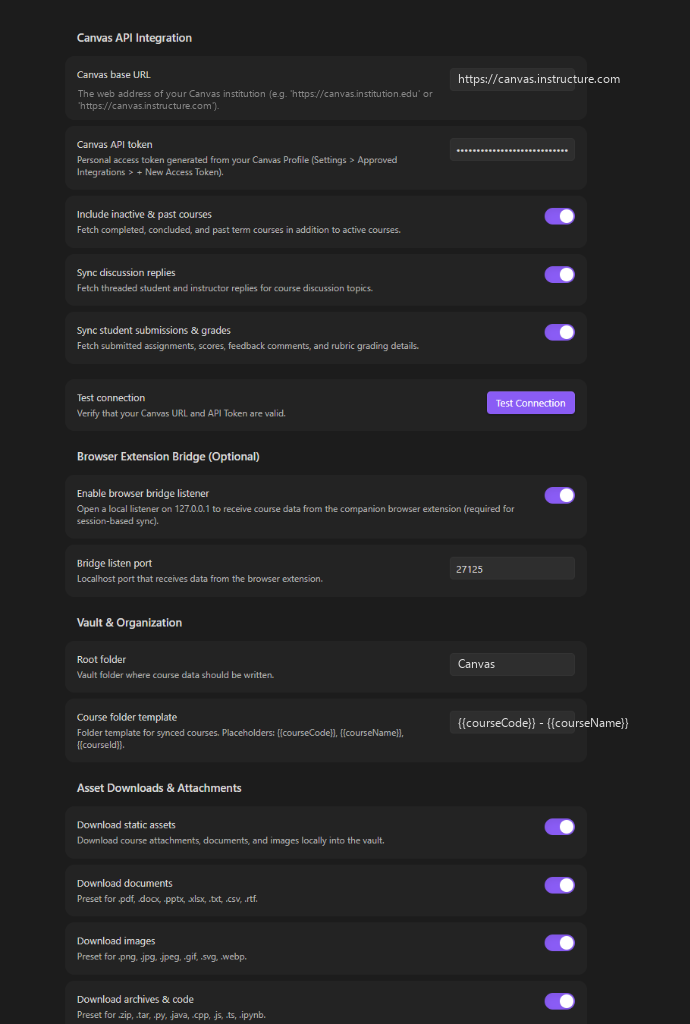 | 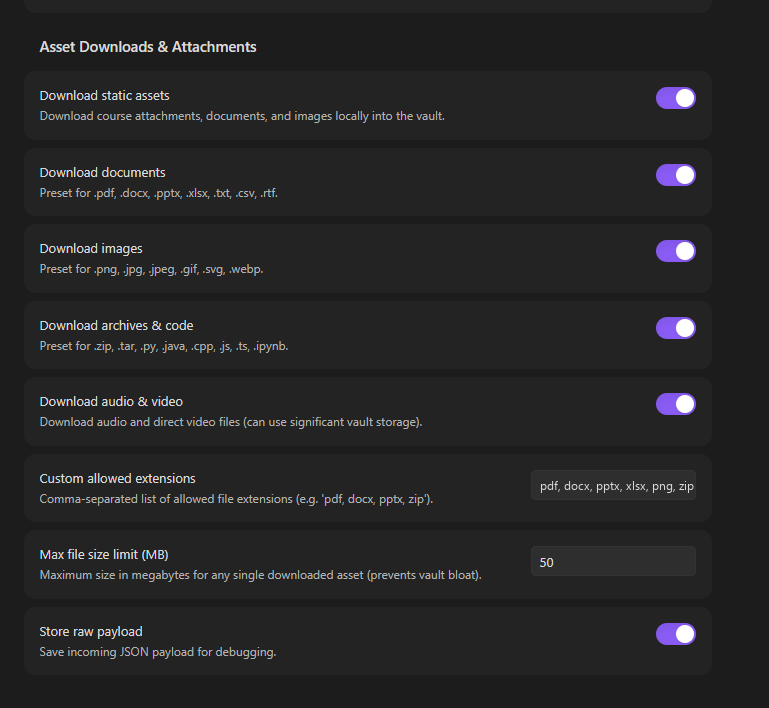 |
🚀 Quick Start & Installation
Step 1: Install the Obsidian Plugin
Method A: Community Plugins (Recommended)
- In Obsidian, open Settings > Community Plugins.
- Turn off Restricted mode if prompted.
- Search for Canvas Sync Bridge, click Install, and then Enable.
Method B: Obsidian BRAT (Beta Releases)
- Install the BRAT Plugin in Obsidian.
- In BRAT settings, click Add Beta plugin and enter:
https://github.com/SixFiveMil/obsidian-canvas-sync.
Method C: Manual Installation
- Download
main.js,manifest.json, andstyles.cssfrom the Latest GitHub Release. - Extract into
<Vault>/.obsidian/plugins/canvas-sync-bridge/and restart Obsidian.
Step 2: Choose Your Sync Method
Option A: Direct REST API (Recommended)
- In Canvas, go to Account > Settings > Approved Integrations > + New Access Token.
- Copy the generated token string.
- In Obsidian settings (Canvas Sync), enter your Canvas Base URL and API Token.
- Press
Ctrl/Cmd + Pand runCanvas Sync: Select & sync courses(or click the🎓ribbon icon) to sync.
Option B: Browser Extension Bridge (Zero-Token Session Sync)
- In Obsidian settings (Canvas Sync), toggle on Enable browser bridge listener.
- Install the extension:
- Chrome / Brave / Edge / Arc: Chrome Web Store
- Firefox: Firefox Add-ons (AMO)
- Navigate to any Canvas course tab in your browser, click the extension icon, test the bridge connection, select your extraction options, and click Sync Active Course.
🗂️ Generated Vault Structure
Courses are written to your vault using the configured template (default: {{courseCode}} - {{courseName}}):
Canvas/
└── CS-101 - Introduction to Computer Science/
    ├── Course.md         # Master course index, metadata, and quick navigation
    ├── Home.md           # Course home page with banner and graphic links
    ├── Syllabus.md       # Complete course syllabus and policies
    ├── Tasks.md          # Assignment checklists, due dates, points, and submissions
    ├── Grades.md         # Gradebook table with scores, percentages, and status
    ├── Discussions.md    # Discussion board topics with full student reply trees
    ├── Calendar.md       # Course events, milestones, and Zoom meeting links
    ├── Modules/
    │   ├── 01 - Week 1 - Foundations & Architecture/
    │   │   ├── 01 - Page - Lecture Overview.md
    │   │   ├── 02 - Assignment - Lab 1 Analysis.md
    │   │   └── 03 - Discussion - Class Introductions.md
    │   └── 02 - Week 2 - Algorithms & Data Structures/
    │       ├── 01 - Page - Algorithm Complexity.md
    │       └── 02 - Assignment - Problem Set 2.md
    ├── Files/            # Downloaded PDFs, DOCX, slides, spreadsheets, and archives
    └── Attachments/      # Embedded images, course banners, and diagrams
🛠️ Building from Source
# Clone repository
git clone https://github.com/SixFiveMil/obsidian-canvas-sync.git
cd obsidian-canvas-sync

# Install dependencies (Node.js 20+ required)
npm install

# Run unit tests
npm test

# Type-check TypeScript files
npm run typecheck

# Build Obsidian plugin
npm run build
🌐 Companion Browser Extension
The browser extension source code, pre-packaged .zip release files, and store deployment pipelines are maintained in a dedicated repository:
- Repository: SixFiveMil/canvas-to-obsidian-extension
- Latest Extension Release (.zip downloads): Extension Releases on GitHub
- Chrome Web Store: Canvas to Obsidian Sync
- Firefox Add-ons: Canvas to Obsidian Sync
🔒 Security & Privacy
- Closed by Default: The local loopback listener (
127.0.0.1:27125) only runs when explicitly toggled on in Obsidian settings. - Origin & Header Guards: Inbound requests verify trusted extension origins (
chrome-extension://,moz-extension://) and custom application headers. - Local Storage: API tokens are stored strictly within
.obsidian/plugins/canvas-sync-bridge/data.jsoninside your local vault. - Read our full Security Policy and Privacy Policy.
📄 License & Author
Developed and maintained by Joshua A. Wortz (SixFiveMil).
Licensed under the MIT License.
For plugin developers
Search results and similarity scores are powered by semantic analysis of your plugin's README. If your plugin isn't appearing for searches you'd expect, try updating your README to clearly describe your plugin's purpose, features, and use cases.