Cards4Links
approvedby Matthew
Paste URLs to generate beautiful card-styled links in 3 possible way (normale, minimal and compact) or group links with a scrollable carousel. - This plugin has not been manually reviewed by Obsidian staff.
Cards4Links
Paste URLs to generate beautiful card-styled links in Obsidian.
Turn any URL into a rich visual card with title, description, thumbnail, favicon, and host — directly in your editor. No more ugly raw links.
Visit my repo: https://github.com/Mats324/cards4links
How to Use
Method 1: Paste & Enhance command
Use the command palette → "Paste URL and enhance to card link".
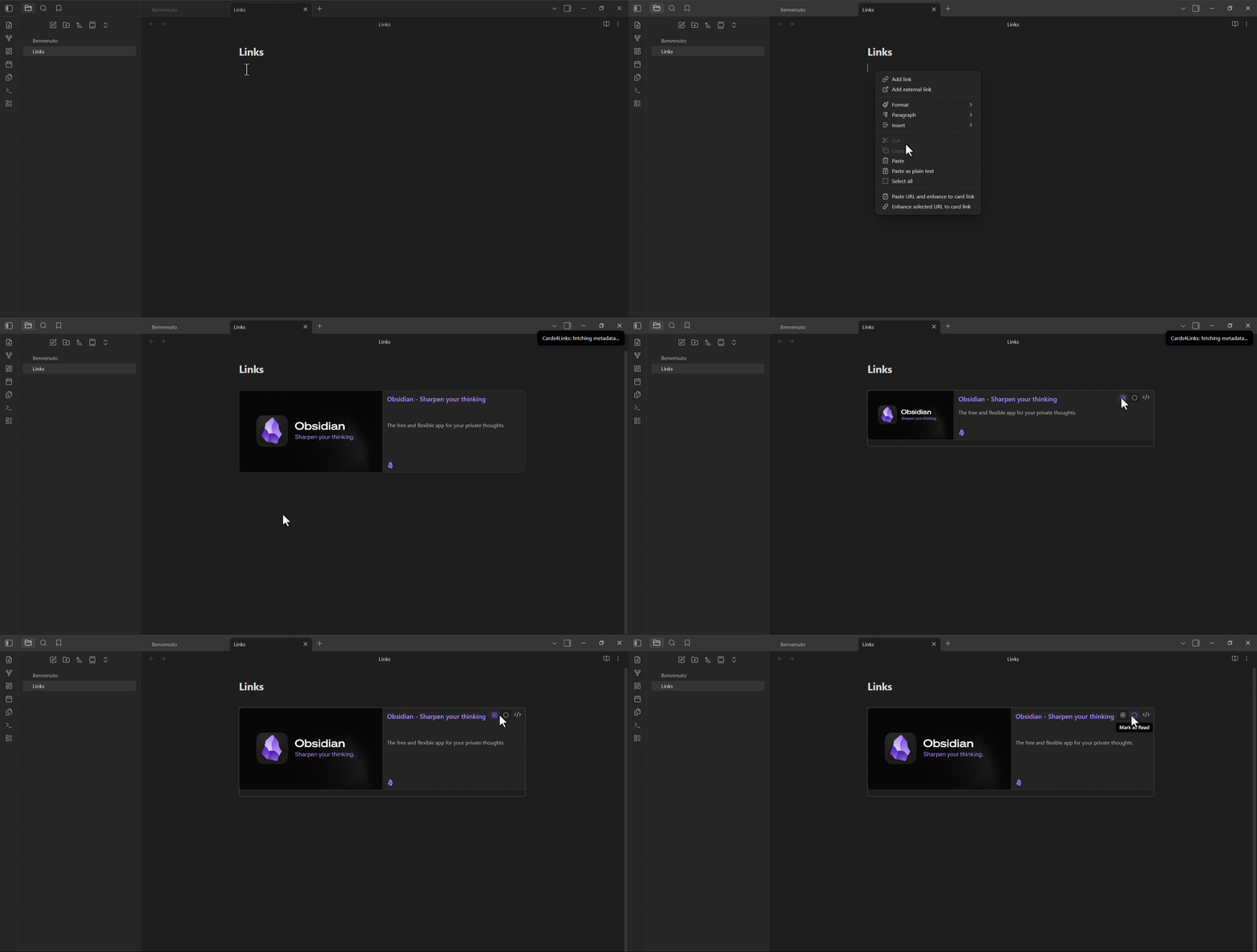
Method 2: Paste a URL (auto-enhance)
Enable "Enhance default paste" in settings, then paste any URL normally.
Method 3: Select & Enhance
Select a URL (or markdown link) and run "Enhance selected URL to card link" (Ctrl+Shift+E).
Method 4: Right-click
Right-click in the editor → "Paste URL and enhance to card link".
Main Features
- Paste & Enhance — Paste a URL and instantly get a styled card
- Context Menu — Right-click any URL to enhance it
- Enhance on Hover — Hover a URL in the editor to reveal a polished "Convert to card" action (custom popover, icon + label, configurable tooltip lifetime)
- Rich Metadata — Auto-fetches Open Graph data (title, description, image)
- Multiple Views — Choose between Card, Compact, and Minimal layouts
- Watched/Read Tracking — Mark video cards as "Watched" and articles as "Read"
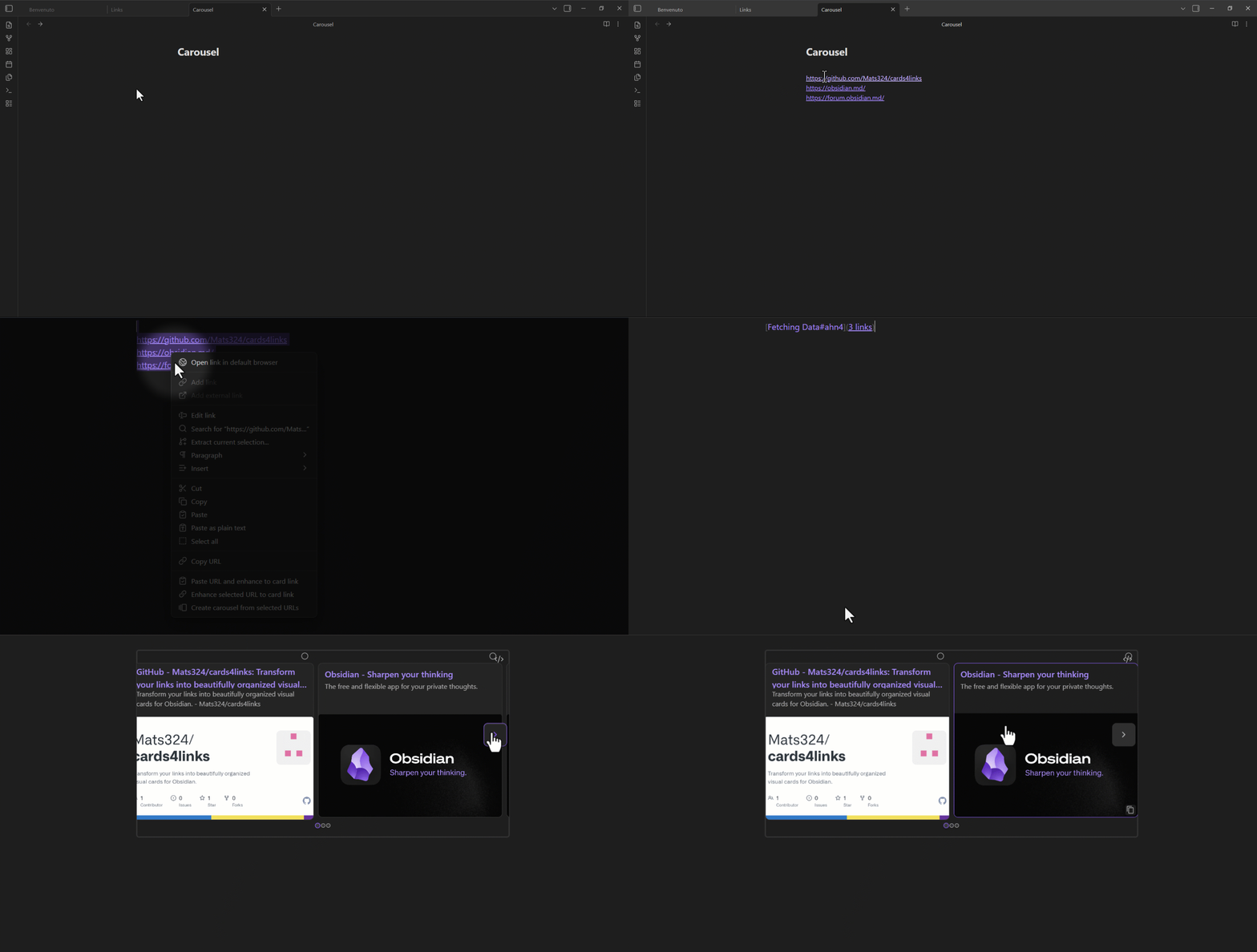
- Carousel — Combine multiple URLs into a scrollable card carousel (separate with
---or select 2+ URLs) - Responsive — Looks great on desktop and mobile
- Card Theme — Force light or dark card colors independently of Obsidian
- Image Caching — Download images to vault for offline access (TTL configurable)
- Cache Cleanup — Browse and delete cached images from a dedicated modal
- Localized (EN/IT) — Interface language follows Obsidian, with an optional manual override (Settings → Language)
- Milestone Notifications — Get useful tips as you create your 1st, 5th, 10th… card, plus a welcome notice on first activation
- Card Counter — Track how many cards you've created (visible in Settings, with a reset option), plus a global lifetime total that is never reset
Specific Features
- Image Placeholder — Click a broken or missing thumbnail to set a custom image URL
- Description Placeholder — Click to add or edit the card description
- Custom Thumbnails — Display on the right, left, or hide entirely
- Quick Settings —
Ctrl+Shift+,to open plugin settings directly
Carousel
Select 2+ URLs and run "Create carousel from selected URLs" (Ctrl+Shift+C) to generate a scrollable card carousel.
Views for a single card
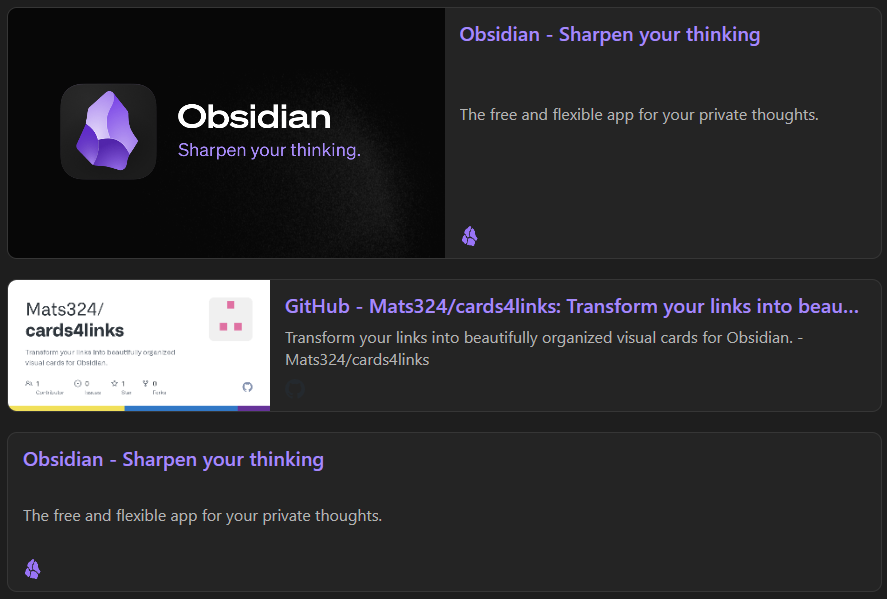
| View | Description |
|---|---|
| Card | Full card with thumbnail, title, description, host |
| Compact | Smaller card, shorter description, smaller thumbnail |
| Minimal | No thumbnail, single-line description |
Installation
Requires Obsidian 1.13.0 or later.
From Obsidian Community Store (pending)
- Open Obsidian Settings → Community Plugins
- Browse → Search "Cards4Links"
- Install & Enable
From GitHub (via BRAT)
- Install the BRAT plugin
- Add the repo:
Mats324/cards4links - Enable Cards4Links
Settings
Settings are organized into four sections.
Paste & Integration
| Setting | Description |
|---|---|
| Enhance Default Paste | Auto-fetch metadata when pasting a URL |
| Show Commands in Menu | Show in right-click context menu |
| Enhance on Hover | Hover a URL to reveal a "Convert to card" action |
| Tooltip Lifetime | How long the hover tooltip stays visible (0–5 s) |
Card Style
| Setting | Description |
|---|---|
| Default Card View | Default view: Card / Compact / Minimal |
| Card Theme | Default / Light / Dark |
| Thumbnail Position | Right / Left / No thumbnail |
| Enable Watched/Read | Track watched/read status on cards (enabled by default) |
Image Cache
| Setting | Description |
|---|---|
| Cache Images Locally | Download card images to vault for offline access |
| Cache Storage | Global folder / Per note |
| Cache Folder Name | Folder path for cached images (global mode) |
| Cache TTL | How long before re-downloading (7–180 days / Never) |
| Manage Cache | Browse and delete cached images from a dedicated modal |
Plugin
| Setting | Description |
|---|---|
| Language | 🌐 Auto (follows Obsidian) / 🇬🇧 English / 🇮🇹 Italiano |
| Cards Created | Cards generated since last reset (with Reset button) plus a total lifetime count that is never reset |
❤️ Support

License
GNU General Public License v3.0
For plugin developers
Search results and similarity scores are powered by semantic analysis of your plugin's README. If your plugin isn't appearing for searches you'd expect, try updating your README to clearly describe your plugin's purpose, features, and use cases.