Claude Anywhere
approvedby derek-larson14
Run Claude Code from any device via remote relay server. - This plugin has not been manually reviewed by Obsidian staff.
Claude Anywhere
Your Mac's Claude Code, from your phone or tablet.
Built by Derek Larson. Pair with commands →
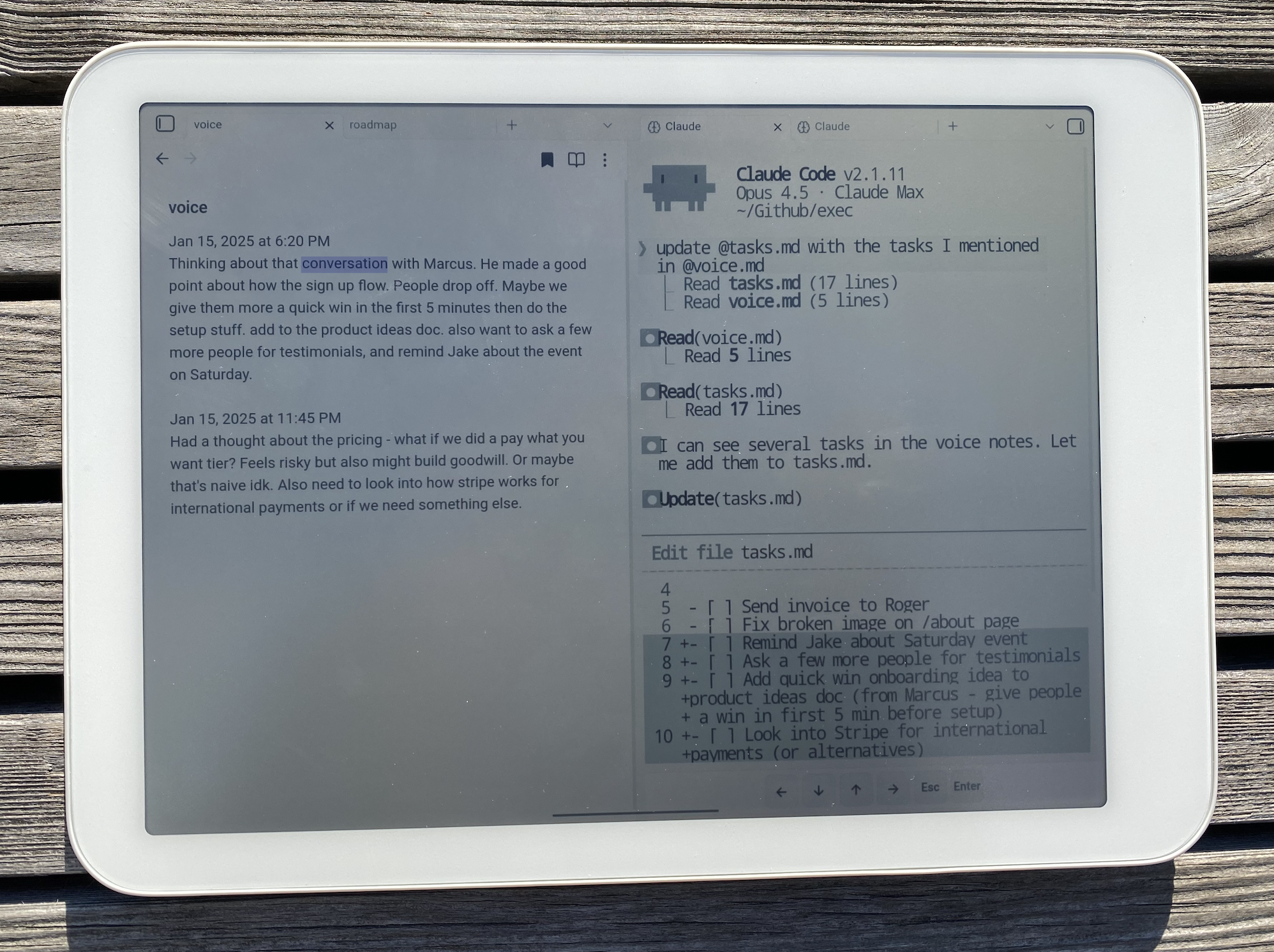
- Edit files across your Mac - Notes in your vault, code in other repos, config files. Not limited to Obsidian.
- Run your skills -
/morning,/mail,/voice, whatever you've built. Your workflow travels with you. - Full terminal access - Git, npm, scripts. Anything Claude Code can do on desktop.
- Resume on desktop - Pick up conversations where you left off with
/resume.
Compatibility
- Android (phone, tablet)
- iOS (iPhone, iPad)
Requirements
- Mac with Claude Code installed
- Tailscale on both devices (same account)
- File sync between Mac and mobile (Obsidian Sync, iCloud, Dropbox, etc.)
- External keyboard recommended
Setup
Mac (Server)
1. Install Tailscale
Download from tailscale.com/download, open the app, and sign in.
2. Install the Plugin
Open Terminal, navigate to your Obsidian vault, and run:
mkdir -p .obsidian/plugins/claude-anywhere && cd .obsidian/plugins/claude-anywhere && curl -LO https://github.com/derek-larson14/obsidian-claude-anywhere/raw/main/main.js && curl -LO https://github.com/derek-larson14/obsidian-claude-anywhere/raw/main/manifest.json && curl -LO https://github.com/derek-larson14/obsidian-claude-anywhere/raw/main/styles.css
3. Enable the Plugin
- Open Obsidian
- Settings → Community plugins → Enable "Claude Anywhere"
- Settings → Claude Anywhere → Enable Remote Access
4. Keep Your Mac Awake
While using Claude remotely, prevent your Mac from sleeping.
Option A: Amphetamine (Recommended)
Install Amphetamine from the App Store. It provides a menu bar icon to easily toggle sleep prevention with options for timed sessions, triggers, and more.
Option B: Terminal
caffeinate -dis
This prevents sleep even when closing the lid (while plugged in). Close the Terminal window or press Ctrl+C to restore normal sleep behavior.
Mobile Device (Client)
- Install Tailscale and sign in (same account as Mac)
- Get the plugin onto your device:
- Obsidian Sync (easiest): Settings → Sync → enable "Installed community plugins", restart Obsidian
- Manual: Download the plugin files (via cloud storage, email, etc.), then use a file manager to move them to your vault's
.obsidian/plugins/claude-anywhere/folder
- Enable the plugin: Settings → Community plugins → Enable "Claude Anywhere"
- Open Claude from the command palette (swipe down): search "Claude"
Files needed for manual install: main.js, manifest.json, styles.css
Updating
Paste into a Claude Code session from your vault:
Update the Claude Anywhere plugin. Download main.js, manifest.json, and styles.css from https://github.com/derek-larson14/obsidian-claude-anywhere/releases/latest/download/ into .obsidian/plugins/claude-anywhere/. Tell me the old and new version numbers.
Then restart Obsidian or disable/re-enable the plugin.
Usage
Opening Claude
Use the command palette (swipe down or Cmd+P) and search "Claude":
- "Open Claude Code" - Opens or focuses existing terminal
- "New Claude Tab (Sidebar)" - Opens in right sidebar
- "New Claude Tab (Split View)" - Opens alongside current note
- "New Claude Tab (Full Width)" - Opens as full-screen tab
You can also tap the brain icon in the left ribbon.
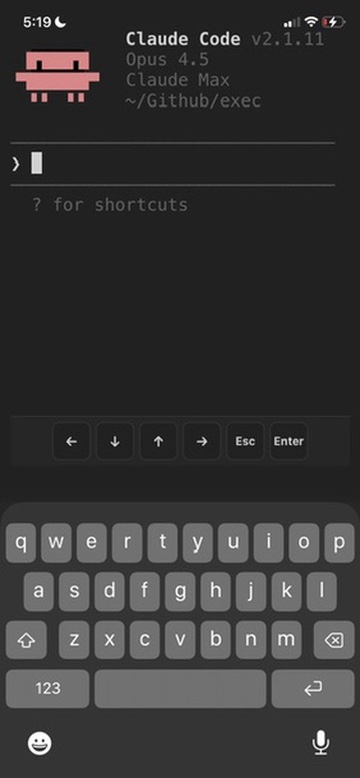
Mobile Controls
On-screen buttons appear at the bottom for keys missing from software keyboards:
- ← ↓ ↑ → - Arrow keys
- Esc - Escape key
- Enter - Submit
Multi-line Input
For multi-line prompts in Claude Code, press Alt+Enter or Shift+Enter on your external keyboard.
How It Works
Streams your Mac's Claude Code session to mobile over Tailscale. File sync pushes Claude's edits back to your device.
Mobile                          Mac
┌─────────────────┐             ┌─────────────────┐
│ Obsidian        │  Tailscale  │ Obsidian        │
│ + Plugin        │◄───────────►│ + Plugin        │
│ + xterm.js      │   (secure)  │ + relay_server  │
│                 │             │ + Claude Code   │
└─────────────────┘             └─────────────────┘

Connection: ws://100.x.x.x:8765 (Tailscale IP)
YOLO Mode
Skip all permission prompts. Claude acts without asking.
Settings → Claude Anywhere → Advanced → YOLO Mode
Session Behavior
On disconnect: Claude session is killed
To continue a conversation: Use Claude's /resume command after reconnecting.
Known Limitations
Scrolling on mobile - Dragging inside the terminal doesn't scroll well. Use the scrollbar on the right edge, or Alt+↓ to jump to the bottom.
Troubleshooting
"Connection failed"
- Check Obsidian is open on your Mac
- Check Tailscale is connected on both devices
- Check server is running: Settings → Claude Anywhere on Mac
- Toggle Remote Access off and back on
Terminal looks garbled
- Close the terminal tab and open a new one
Files
main.js- Obsidian plugin code (includes embedded relay server)manifest.json- Plugin metadatastyles.css- Terminal styling
Development
The relay server (relay_server.py) is embedded as base64 in main.js for Obsidian plugin directory compatibility. To rebuild after modifying:
./build.sh
Contributing
Issues and PRs welcome at github.com/derek-larson14/obsidian-claude-anywhere
License
MIT
Related
- Claude Sidebar - Run Claude Code in your Obsidian sidebar (desktop)
For plugin developers
Search results and similarity scores are powered by semantic analysis of your plugin's README. If your plugin isn't appearing for searches you'd expect, try updating your README to clearly describe your plugin's purpose, features, and use cases.