Claude Code IDE Pro
approvedby Vitalii 'Mevkh' Vlasiuk
Help Claude Code see the active note, tabs, and selection, open files, and propose edits through a side-by-side diff view. - This plugin has not been manually reviewed by Obsidian staff.
Claude Code IDE Pro
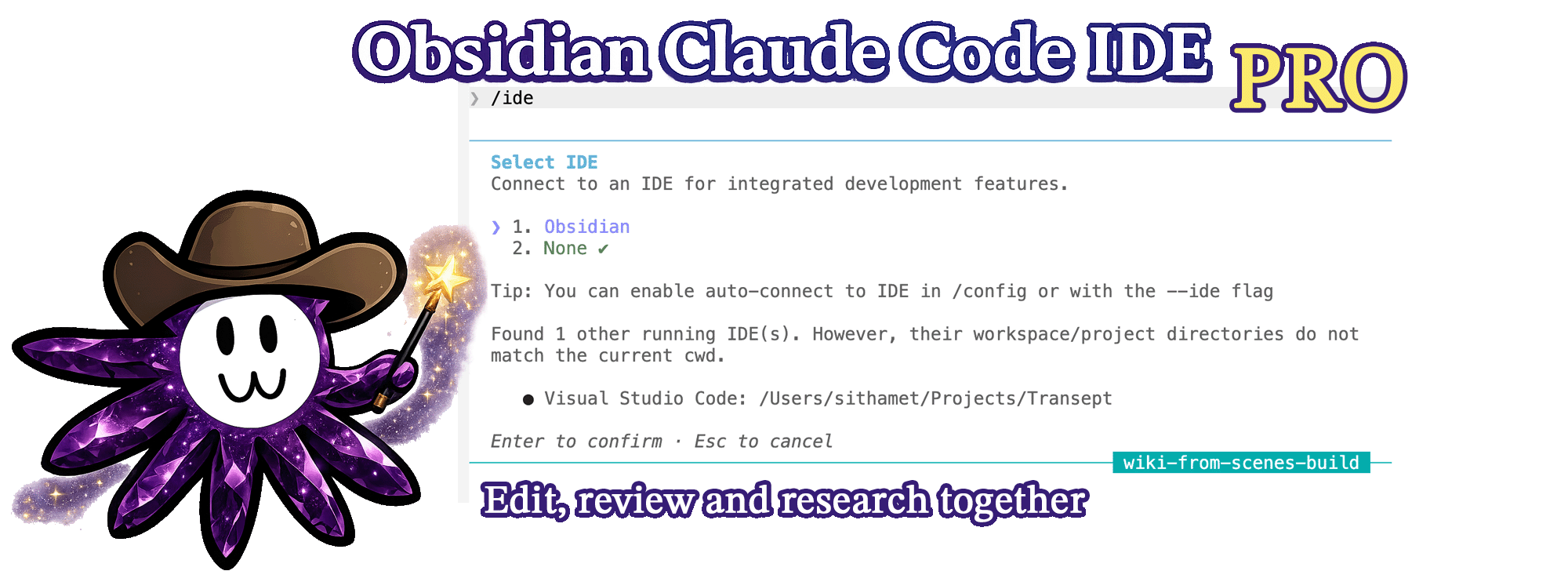
Work with Claude Code in Obsidian as smoothly as you work in your IDE
What this is
An Obsidian plugin that hosts the Claude Code IDE integration protocol — the same WebSocket + MCP contract professional IDEs like VS Code or JetBrains use, implemented in full for Obsidian.
Unlike a minimal context bridge, every standard IDE tool is wired up: Claude can edit your vault through Obsidian's side-by-side diff approval UI (one-click Accept, no terminal double-prompt), navigate you to specific files and lines, and reason about your vault's backlink graph, wikilinks, frontmatter, and search via eight Obsidian-native MCP tools.
When you launch claude from inside your vault and type /ide, Claude connects to Obsidian and gets eyes on everything you're working on. No more copy-pasting paragraphs into the terminal.
Made by Transept — a workshop building AI tools for translators, writers, and localization teams. This plugin started as internal tooling for a fiction-universe lore wiki and WritingTool RAG experiments. Inspired by Karpathy's llm-wiki.
Looking for a minimal read-only context bridge instead? See petersolopov/obsidian-claude-ide — same protocol, deliberately smaller scope.
What it does for you
- @-mention vault files in the Claude pane. Type
@and tab-complete any note or folder in your vault — Claude reads it inline. Works because the plugin exposes the vault to Claude Code as a live MCP source. - Claude follows you between notes. Switch tabs and Claude's context updates automatically. Highlight a paragraph and ask "rewrite this" — Claude already has the text. No copy-paste.
- Claude navigates Obsidian for you. Ask "show me Anna's article" — Claude opens the note at the right line.
- Edits land as one-click diffs in Obsidian. Every change Claude proposes opens as a CodeMirror merge view. Accept applies it, Reject discards it. No terminal Y/n prompt — behaves exactly like VS Code or JetBrains.
- Same protocol as VS Code and JetBrains. Not a wrapper. The actual Claude Code IDE integration contract, implemented for Obsidian.
Recommended companions
This plugin is the IDE host — the part that lives inside Obsidian and lets Claude see your editor, open files, and propose diffs. Pair it with these two for the full setup:
-
rps321321/obsidian-mcp-pro— a standalone stdio MCP server that exposes vault graph queries (backlinks, wikilinks, frontmatter, search, daily notes) to the LLM. The/idechannel can't surface custom MCP tools to the model;obsidian-mcp-procovers that gap and runs filesystem-direct, so no extra Obsidian plugin is needed. One-line install:claude mcp add obsidian-mcp-pro --env OBSIDIAN_VAULT_PATH=/path/to/your/vault -- npx -y obsidian-mcp-pro -
polyipseity/obsidian-terminal— the terminal plugin this one is developed against. Hosts theclaudeCLI inside an Obsidian pane so you stay in a single window. Any terminal plugin works, but this is the smoothest tested setup. Configure its default profile to runclaudeand you're one click from a connected session.
Together they cover the three things you actually want: a Claude pane inside Obsidian (obsidian-terminal), Claude driving the editor (this plugin), and Claude reasoning about the vault graph (obsidian-mcp-pro).
See it in action
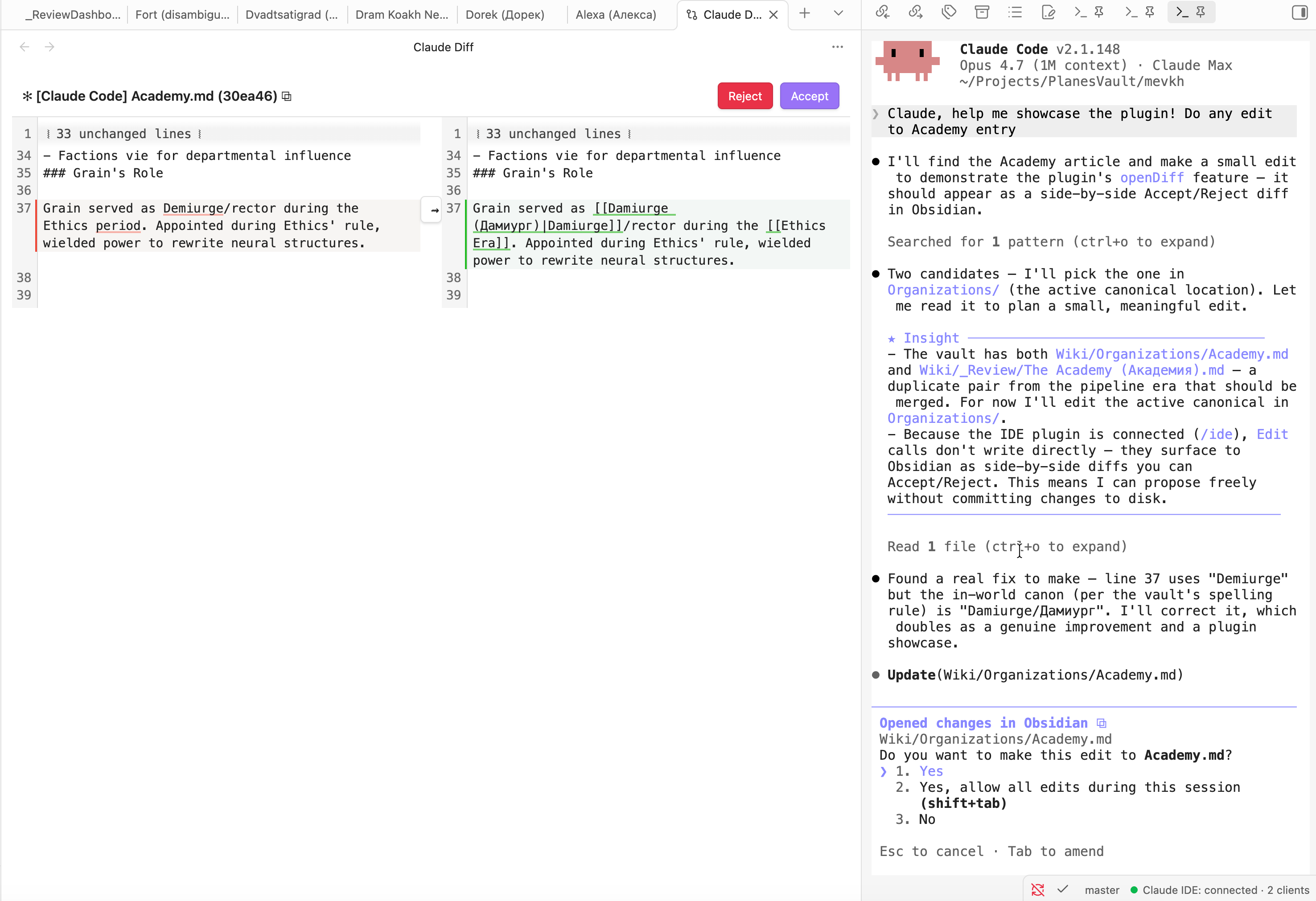
A Claude pane runs in the right sidebar (any terminal plugin works as the host). When Claude proposes an edit, it appears as a side-by-side diff in the main pane with Accept / Reject buttons. No terminal y/n prompt, no copy-paste — review, click, done. The status bar at the bottom-right shows ● Claude IDE: connected · N clients so you know the bridge is live.
Installation
From the Community Plugins directory
In Obsidian: Settings → Community Plugins → Browse, search "Claude Code IDE Pro", click Install, then Enable.
Manually (current)
- Download
manifest.json,main.js, andstyles.cssfrom the latest GitHub release. - Place them under
<your-vault>/.obsidian/plugins/claude-code-ide-pro/. - In Obsidian → Settings → Community Plugins → enable Claude Code IDE Pro.
Via BRAT
Add Transept-AI/obsidian-claude-code-ide-pro as a beta plugin in BRAT, then enable it.
Usage
- Open a terminal pane inside Obsidian (any terminal plugin works — see recommendation below).
- Run
claudefrom the vault root. - Inside Claude, type
/ide. The plugin's lockfile is the only one matching your vault path, so Claude auto-connects to Obsidian without prompting. - Status bar shows
● Claude IDE: connected · 1 client.
Now Claude can see your active note, your tabs, and your selection; can open files for you; and proposes edits via a side-by-side diff view with Accept / Reject buttons inside Obsidian.
Sending notes and selections to Claude
Three ways to put context in front of Claude without copy-pasting:
- Type
@in the Claude pane to autocomplete any vault file or folder — Claude reads it inline. Tab-complete works the same as VS Code's @-mention. - Command palette →
Send to Claude (selection or whole note). Smart: with text selected it sends that range; otherwise it sends the entire active note. Bind a hotkey inSettings → Hotkeysfor one-key access. - Right-click on a selection →
Send selection to Claudein the editor context menu.
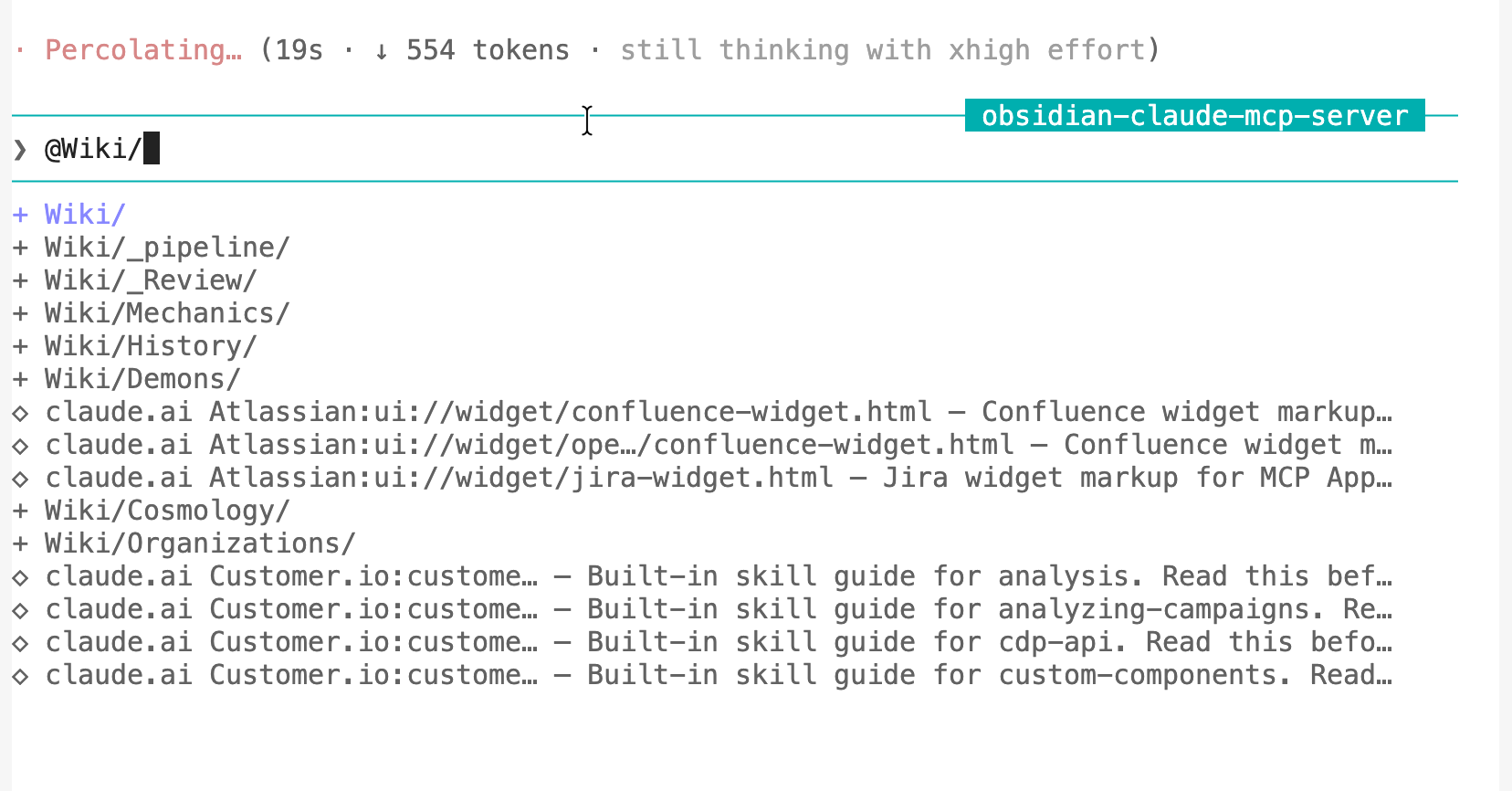
The command and right-click options fire the protocol's at_mentioned notification — same channel VS Code uses for @filename references. Claude treats all three as explicit "the user wants me to look at this now" context.
Selection tracking also runs passively: when you highlight text or switch files, Claude is told via selection_changed. Pure cursor wiggles (empty selection, same file) are filtered out to keep the signal clean.
🗺️ Roadmap
Ultimate goal – make working with Claude in Obsidian as smooth and natural as collaborating with a friend sitting next to you.
- Custom terminal wrapper with clickable links — embed our own terminal pane (xterm.js + node-pty) so we can intercept Claude's output and render file paths as clickable Obsidian-internal links inline. Pairs with
obsidian-terminalfor now; this would be a more integrated alternative. - Zero-touch auto-connect — skip the
/idestep entirely by exposing a preferred-port setting and coordinating with the terminal plugin to setCLAUDE_CODE_SSE_PORTat spawn time. Today a random port is allocated each restart, so the env var trick only works for users who manually align the two. - More vault-aware tools — tag graph, embeds resolver, wikilink integrity checker (would expose validator-style data to Claude).
- Autonomous invocation – so that Claude can decide to message you himself and tell you that you are absolutely right.
How it works (architecture sketch)
~/.claude/ide/<port>.lock  ◀── written on enable, removed on disable
         │
         ▼
Claude Code ──ws (auth header)──▶ Obsidian plugin
                                      │
                                      ▼
                                Obsidian APIs
                          (workspace · vault · metadataCache)
Claude Code's CLI scans ~/.claude/ide/*.lock to discover IDEs. The plugin writes a lockfile pointing to the local WebSocket port it listens on, plus a fresh auth token. When you type /ide, the CLI matches the lockfile whose workspace folder is your vault root and connects.
Reference: tools and protocol
The plugin exposes the full Claude Code IDE protocol — the same 12 tools VS Code's extension implements — plus 8 Obsidian-native MCP tools that expose the vault graph to any MCP client. The first set is what powers "Claude knows what you opened"; the second is what makes Claude Obsidian-shaped rather than just file-aware.
Obsidian-native MCP tools (8)
| Tool | What it does |
|---|---|
getActiveNoteContent | Full text of the active note with configurable cap |
getBacklinks | Every note linking into a file (ranked by link count) |
getOutgoingLinks | Every wikilink / embed out of a file with resolved targets |
resolveWikilink | "Anna" → canonical file path + aliases |
getFrontmatter | YAML frontmatter, tags, and heading outline |
searchVault | Filename + content search with ranked excerpts |
getDailyNote | Today's daily-note path (reads Daily Notes plugin config) |
listFilesInFolder | Recursive markdown listing under a folder |
These are advertised via tools/list. Claude Code's CLI currently filters which MCP tools reach the model — they aren't surfaced to the LLM today, but any MCP client that connects to the WebSocket can call them. Re-enabling them for the LLM is on the roadmap (likely via a parallel stdio MCP server users add to their Claude Code config).
Standard IDE tools (12) — consumed by Claude Code's CLI internally
| Tool | What it does |
|---|---|
getOpenEditors | Open tabs with isActive / isDirty flags |
getCurrentSelection | Current selection in the active note (works even when terminal has focus) |
getLatestSelection | Cached last non-empty selection |
getWorkspaceFolders | Vault root as {name, uri, path} |
openFile | Open a file; supports line, startText / endText selection ranges |
openDiff | Blocking RPC: side-by-side diff via CodeMirror 6 MergeView, Accept / Reject |
checkDocumentDirty | Unsaved-changes flag for a file |
saveDocument | Persist a file's unsaved changes |
close_tab | Close a tab by label |
closeAllDiffTabs | Close every Claude-created diff view |
getDiagnostics | Returns [] (Obsidian has no LSP) |
executeCode | Soft failure (no Jupyter) |
Settings
Settings → Claude Code IDE Pro:
- Active-note content cap — characters returned by
getActiveNoteContentbefore truncation (default 50,000). - searchVault max results — hits per search (default 50).
- searchVault excerpt length — surrounding context per content match (default 200 chars).
- Include hidden folders — whether
searchVault/listFilesInFoldertraverse.-prefixed folders (default off).
Network use
The plugin runs a WebSocket server bound to 127.0.0.1 (loopback only) on an OS-picked ephemeral port in the 10000–65535 range. This server is used solely by the Claude Code CLI running on the same machine to query Obsidian's state. No outbound network calls are ever made.
The server:
- Accepts connections only over the loopback interface — never the LAN or internet.
- Requires a per-session UUID auth token (see Security model below) on every WebSocket upgrade request. Connections without the matching
x-claude-code-ide-authorizationheader are rejected. - Is started in
onload()and torn down inonunload()— disabling the plugin closes the port and removes the lockfile.
The plugin is also **isDesktopOnly: true** — it does not load on Obsidian mobile.
External file access
For protocol compliance with Claude Code's IDE discovery mechanism, the plugin reads and writes files under your home directory outside the vault:
| Path | Why | When |
|---|---|---|
~/.claude/ide/ (directory) | Created with mode 0700 if missing — Claude Code's discovery folder | On enable |
~/.claude/ide/<port>.lock | Lockfile (mode 0600) telling Claude Code "Obsidian is listening at this port with this auth token". Same format VS Code and JetBrains use. | Written on enable, deleted on disable |
~/.obsidian/daily-notes.json | Read-only — used by the getDailyNote MCP tool to know your daily-note folder and date format | Only when getDailyNote is called |
The lockfile contains: process PID, vault root, ideName ("Obsidian"), transport ("ws"), runningInWindows boolean, and the auth token. No vault content leaves the vault folder via these paths.
Security model
- Auth token: a fresh UUID generated by Node's
crypto.randomUUID()each time the plugin loads. It exists only in renderer-process memory and in the lockfile (which is0600-owned and stored under a0700directory). The token is never sent over the network — it's read locally by the Claude Code CLI for handshake authentication. - Loopback binding: the WebSocket server binds only to
127.0.0.1, never to0.0.0.0or any external interface. The OS-picked ephemeral port further reduces predictability. - Per-session rotation: every disable→enable cycle picks a new port and generates a new auth token. Restarting Obsidian invalidates any previous session's credentials.
- Origin check via header: WebSocket upgrades without the matching
x-claude-code-ide-authorizationheader are rejected with HTTP 401 and the socket destroyed.
No telemetry
This plugin sends no telemetry, analytics, crash reports, or any other data to any remote service. It does not phone home, check for updates, or contact any author-controlled endpoint. The only network traffic it ever generates is the local-loopback WebSocket connection from the Claude Code CLI on your own machine.
Third-party code
[ws](https://github.com/websockets/ws)— MIT — Node.js WebSocket library, bundled intomain.js.[@codemirror/merge](https://github.com/codemirror/merge)— MIT — CodeMirror 6 merge view, bundled intomain.js(other@codemirror/* packages are provided by Obsidian's runtime and remain external).
Protocol reverse-engineering credit:
[coder/claudecode.nvim](https://github.com/coder/claudecode.nvim)— Apache 2.0 —PROTOCOL.mdis the authoritative spec this implementation follows.[manzaltu/claude-code-ide.el](https://github.com/manzaltu/claude-code-ide.el)— GPLv3 — reference for adding custom MCP tools beyond the standard IDE 12.
Building from source
git clone https://github.com/Transept-AI/obsidian-claude-code-ide-pro.git
cd obsidian-claude-code-ide-pro
npm install
npm run build       # one-shot production build → main.js
npm run dev         # esbuild watch mode
npm run typecheck
Output main.js is gitignored — it lives only in releases.
Verification
Read-only smoke scripts that exercise the live plugin against your running Obsidian. They never modify vault content.
# Wire layer: handshake, auth, tools/list
node scripts/smoke-handshake.mjs

# Standard IDE tools — every tool with shape assertions
node scripts/smoke-tools.mjs

# openDiff lifecycle (opens a diff, programmatically dismisses it,
# verifies DIFF_REJECTED and that the vault file is unchanged)
node scripts/smoke-diff.mjs

# Obsidian-native tools — backlinks, wikilinks, search, frontmatter, ...
node scripts/smoke-obsidian-tools.mjs
(scripts/listen-notifications.mjs exists for the deferred selection_changed notification — currently a no-op since the push isn't wired in v0.1.0.)
Architecture
src/
├── main.ts                # Plugin lifecycle, composition
├── rpc-router.ts          # JSON-RPC 2.0 framing & dispatch
├── ws-server.ts           # WebSocket transport + auth header validation
├── lockfile.ts            # ~/.claude/ide/<port>.lock lifecycle
├── status-bar.ts          # Status bar indicator
├── tools-registry.ts      # name → {description, schema, handler}
├── mcp-handshake.ts       # initialize / tools/list / tools/call / notifications
├── obsidian-context.ts    # App + cached selection + path resolution
├── notifier.ts            # selection_changed pusher (present but not wired in v0.1.0)
├── settings.ts            # PluginSettingTab + persisted config
├── handlers/
│   ├── editors.ts         # getOpenEditors, getCurrentSelection, ...
│   ├── files.ts           # openFile
│   ├── diff.ts            # openDiff, closeAllDiffTabs
│   ├── stubs.ts           # getDiagnostics→[], executeCode→error
│   └── obsidian-tools.ts  # getBacklinks, resolveWikilink, searchVault, ...
└── views/
    └── diff-view.ts       # ItemView wrapping CodeMirror 6 MergeView
License
MIT — see LICENSE. Copyright © 2026 Vitaly Vlasyuk (mevkh).
For plugin developers
Search results and similarity scores are powered by semantic analysis of your plugin's README. If your plugin isn't appearing for searches you'd expect, try updating your README to clearly describe your plugin's purpose, features, and use cases.