by chauduyphanvu
Sync your vault between devices, end-to-end encrypted, through storage you control: any S3-compatible bucket or a WebDAV server.
Coffer
Sync, share, and publish your Obsidian vault through storage that you control. Coffer encrypts all data on your device, merges changes from all your devices, and needs no server.
Coffer works with S3-compatible buckets (Cloudflare R2, Backblaze B2, Amazon S3, MinIO, Wasabi, and others) and WebDAV servers (Nextcloud or a NAS). Cloudflare R2 and Backblaze B2 each give 10 GB of free storage. Coffer is free, open source (MIT), and needs no account.
Coffer is at version 0.7. It passes 831 tests and runs on macOS and iOS, but keep a backup of important vaults.
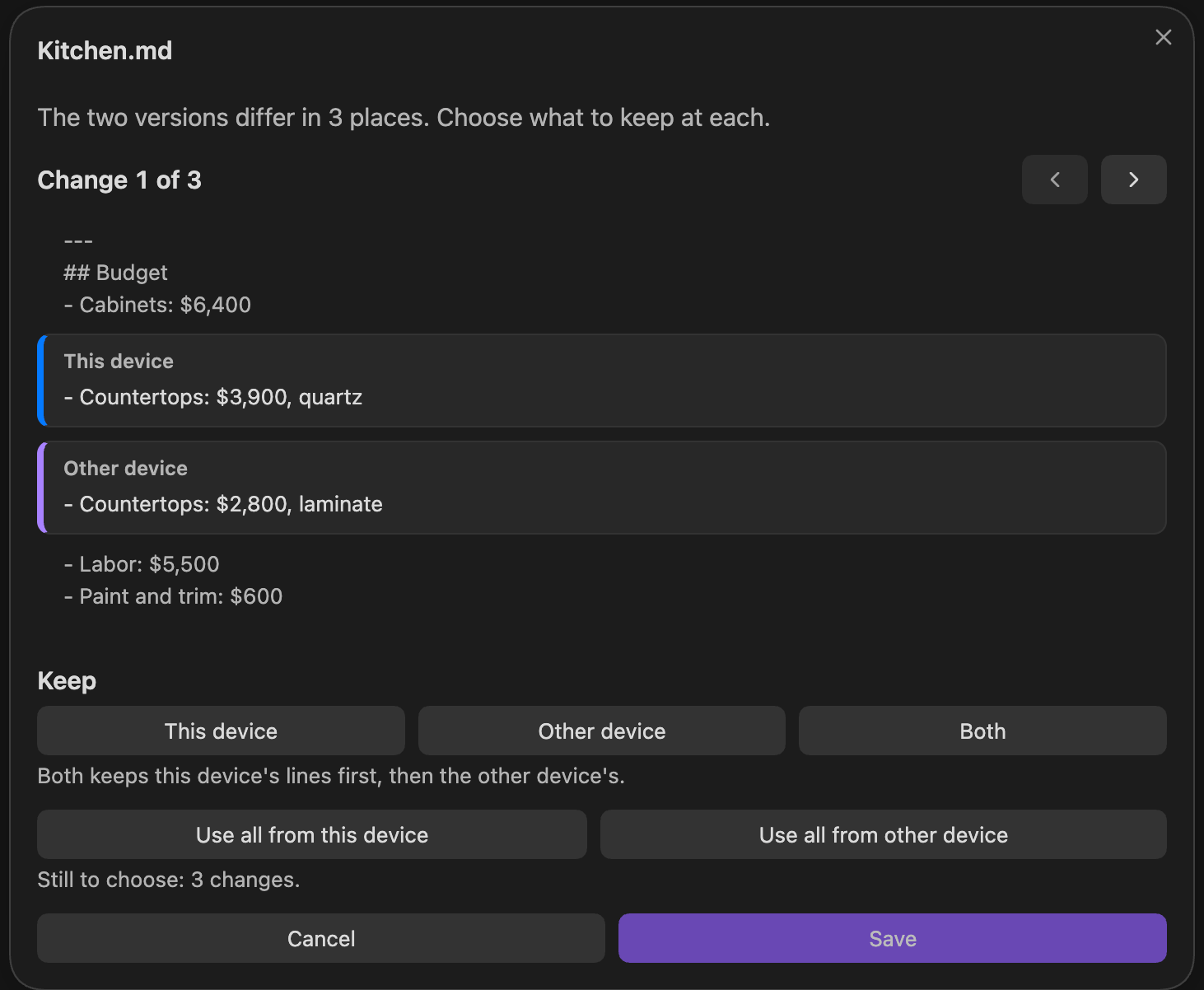
A note changed at the same line on two devices. For each change, you keep the lines from this device, the other device, or both.
Who Coffer is for
Obsidian users on desktop and mobile
- One vault on all your devices. Coffer syncs a few seconds after a change. On mobile, it sends changes before the OS stops the app.
- No lost changes. Coffer does a three-way merge of notes, line by line and word by word. It does not overwrite a change from another device. If it cannot merge two versions, it keeps both.
- Conflicts in Obsidian. Compare two versions of a note. For each change, keep the lines from this device, the other device, or both.
- Return to an earlier time. Restore an old version of a file or deleted files. Return a folder or the full vault to an earlier time, with a preview. Look through the vault as it was at an earlier time before you restore anything, or undo one past change and keep everything done since.
- Share and publish. Share a folder with family or a team, and give each person a role. Publish selected notes as a static website in storage of your own.
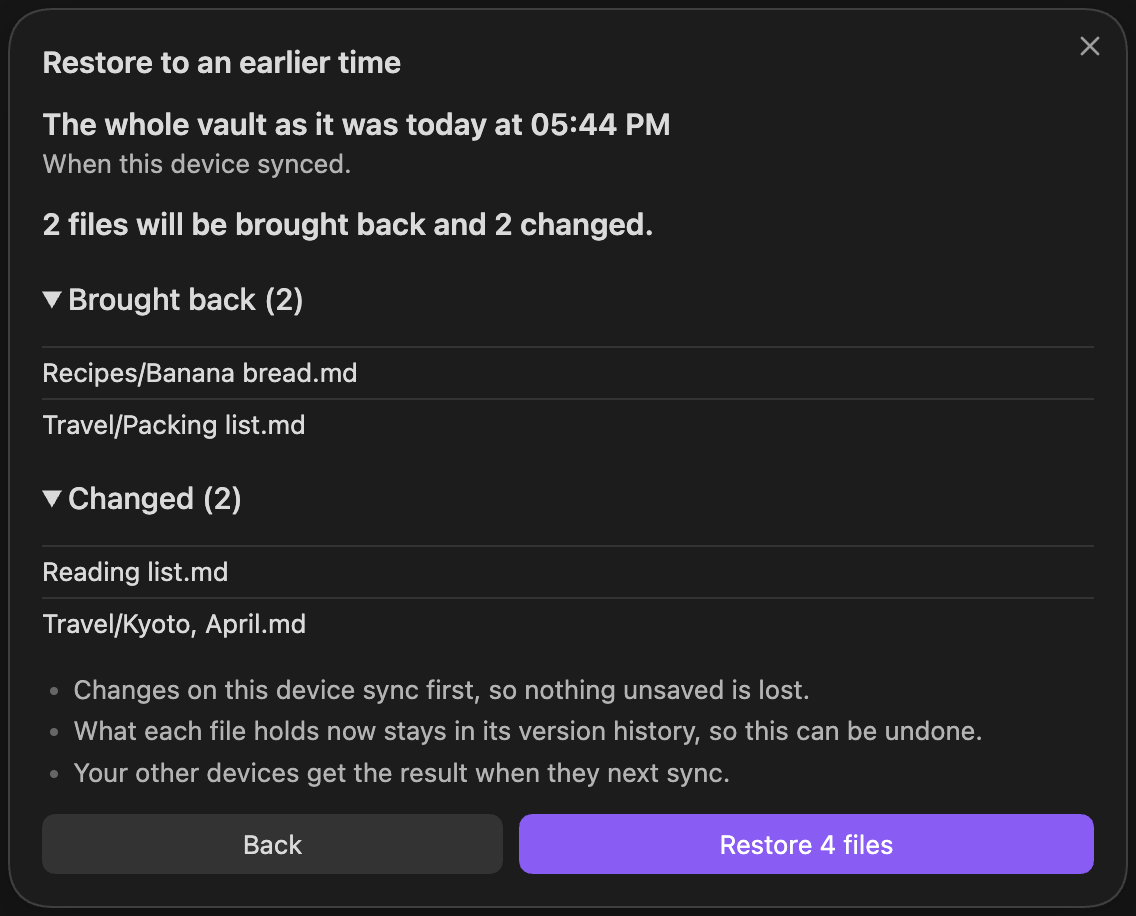
Return the vault or a folder to an earlier time. Coffer shows what will change before it does anything.
Self-hosters and homelab users
- No server to run. Coffer needs only storage. There is no database, sync service, or daemon to maintain.
- Your own hardware. Use a WebDAV folder on Nextcloud or a NAS, or a self-hosted S3 server such as MinIO. At setup, Coffer tests your storage, which includes a test that it refuses to overwrite an object.
- Command line. The same sync engine runs on Node.js with no installation.
watchkeeps a vault in sync on an always-on computer.status --jsongives health data to scripts and monitors.exportwrites a decrypted copy for your usual backups, for example from cron.
Security-minded users
- End-to-end encryption. AES-256-GCM encrypts file contents, file names, folder names, and device names. HKDF-SHA-256 derives separate keys for encryption and for chunk hashes. Your storage provider cannot read your data.
- Commits without locks. Each commit contains the hash of the previous commit. A device writes a commit only if its number is free (a conditional PUT with
If-None-Match: *). Two devices cannot overwrite each other. - Signed shared folders. Devices sign each change in a shared folder with ECDSA P-256. Devices accept changes only from current editors. This rule holds also if a member's storage key can write.
- Code that you can check. Coffer has no runtime dependencies and sends no telemetry. Its 831 tests include fuzz tests with failed requests and app crashes, and a network fault simulator. Each release file has a GitHub build attestation.
Compared with other sync options
Obsidian Sync is the official sync service. It needs no setup, and your subscription supports the Obsidian team. Coffer is for people who want their vault in storage that they control.
The facts about the other tools come from their own websites and READMEs, checked on 2026-11-20 (see sources). A dash (—) means that the tool's documentation does not say. If something is out of date, please open an issue.
| Coffer | Obsidian Sync | Remotely Save | Self-hosted LiveSync | iCloud Drive | Obsidian Git | |
|---|---|---|---|---|---|---|
| Price | Free | From $4 a month | Free. PRO price not set yet | Free | Your iCloud plan | Free |
| Your data is in | Your bucket or WebDAV server | Obsidian's servers | S3, Dropbox, OneDrive, WebDAV. More with PRO | CouchDB, S3, or peer-to-peer | iCloud Drive | Any Git remote |
| You run | Nothing | Nothing | Nothing | CouchDB, for live mode | Nothing | A Git remote, and Git on desktop |
| End-to-end encryption | Always | On by default | Optional | Optional | With Advanced Data Protection | — |
| Same note changed on two devices | Three-way merge. Else keeps both | Merges Markdown. Other files: last change wins | You choose: the newer or the larger file. PRO merges small notes | Three-way merge. Else asks you | — | Git merge. You resolve it |
| Version history | 30 days by default. Restore the whole vault | 1 or 12 months | — | Per-note history | — | Full Git history |
| Mobile | iOS tested. Android not yet | iOS and Android | Yes. Slow for files of 50 MB or more | Yes. Self-hosted CouchDB needs HTTPS | iOS and iPadOS | Not recommended by its author |
| Share with others | Shared folders with roles | Shared vaults, up to 20 people | — | — | — | Through Git, not live |
| Publish a website | Static pages in your storage | Obsidian Publish, from $8 a month | — | — | — | — |
Other tools do some things better:
- Obsidian Sync comes from the Obsidian team, sets up in a few minutes, needs no storage account, and is independently audited.
- Self-hosted LiveSync syncs in real time (with CouchDB, or peer-to-peer while both devices are online).
- Remotely Save supports more storage services, such as Dropbox and OneDrive.
- iCloud Drive is built into Apple devices and needs no plugin.
- Obsidian Git gives full Git history and diffs with any Git host.
Coffer is not real time: it syncs a few seconds after a change. It has run on macOS and iOS only. It has no independent security audit yet.
How it works
Each device encrypts and signs data before upload. Published web pages go to a separate location without encryption.
flowchart LR
  subgraph devices["Your devices"]
    D(["Desktop Obsidian"])
    M(["Mobile Obsidian"])
    C(["CLI · Node.js"])
  end

  subgraph local["On-device boundary"]
    E{{"Encrypt + Sign · AES-256-GCM + ECDSA"}}
    P("Site Builder · Unencrypted")
  end

  subgraph storage["Storage that you control"]
    V[("Vault Storage · Encrypted")]
    S[("Shared Folder · Separate Key")]
    W[("Website Storage · Unencrypted HTML")]
  end

  D <--> E
  M <--> E
  C <--> E
  E <-->|"Vault key"| V
  E <-->|"Signed commits"| S
  D -.->|"Preview + publish"| P
  M -.->|"Preview + publish"| P
  C -.->|"publish / watch --publish"| P
  P -.->|"Public pages"| W

  classDef device fill:#1e293b,stroke:#64748b,color:#f8fafc,stroke-width:1.5px
  classDef crypto fill:#2e1065,stroke:#8b5cf6,color:#f5f3ff,stroke-width:1.75px
  classDef encrypted fill:#064e3b,stroke:#10b981,color:#ecfdf5,stroke-width:1.5px
  classDef caution fill:#451a03,stroke:#f59e0b,color:#fffbeb,stroke-width:1.5px,stroke-dasharray: 4 3

  class D,M,C device
  class E crypto
  class V,S encrypted
  class P,W caution

  style devices fill:transparent,stroke:#64748b,stroke-width:1.25px,stroke-dasharray: 4 4
  style local fill:transparent,stroke:#8b5cf6,stroke-width:1.25px,stroke-dasharray: 4 4
  style storage fill:transparent,stroke:#10b981,stroke-width:1.25px,stroke-dasharray: 4 4
Before you start
- Network access. Coffer connects only to your storage, and to your website location if you publish. It sends no analytics, no telemetry, and no update checks. It uses Obsidian
requestUrl. - Cost. Coffer is free and needs no account. Your storage provider sets storage costs, if any. Cloudflare R2 and Backblaze B2 give 10 GB free tiers.
- Passphrase. Your passphrase is the only key. If you lose it, no person can decrypt your synced data. Keep it in a password manager.
- Vault files. Coffer reads and writes only inside your vault, which includes its settings folder.
- Website. Published web pages are not encrypted. In Obsidian, Coffer uploads pages only after you run the publish command and select Publish in the preview.
- One sync tool. Do not put a Coffer vault in iCloud Drive, Dropbox, OneDrive, or Obsidian Sync at the same time.
Install and setup
Coffer needs Obsidian 1.13.1 or later.
- From Obsidian: Open Settings → Community plugins → Browse. Search for Coffer. Install and enable it.
- Manual install: Download
main.js,manifest.json, andstyles.cssfrom the latest release. Put them in<vault>/.obsidian/plugins/coffer/. Enable Coffer under Settings → Community plugins.
First device
- Make a bucket or WebDAV folder and an access key for it. See Storage providers.
- In Obsidian, run Coffer: Set up sync from the command palette.
- Select This is my first device. Select your provider. Enter the storage details. Coffer tests the storage before it continues.
- Enter a passphrase of at least 8 characters, or select Suggest a passphrase. Keep it in a password manager.
- Wait for the first sync to finish. Select Copy setup link.
More devices
- Install Coffer on the other device in a new, empty vault.
- Open the setup link. You can also run Coffer: Set up sync. Select I already sync another device, then paste the link.
- Enter your passphrase. Select Connect.
Coffer encrypts the setup link with your passphrase. Protect it as a password. You can copy it again under Settings → Coffer → Add another device.
Storage providers
Use a key limited to one bucket. A read-only device can use a read-only key.
| Provider | Setup details |
|---|---|
| Cloudflare R2 | Account ID, bucket, and an R2 API token with read and write access to that bucket |
| Backblaze B2 | Bucket endpoint (for example, s3.us-west-004.backblazeb2.com), bucket, and a key limited to that bucket |
| Amazon S3 | Bucket region, bucket, and an access key |
| Other S3-compatible | Endpoint, region if necessary, bucket, keys, and path-style setting (necessary for MinIO and most self-hosted servers) |
| WebDAV | Folder address, user name, and password (use an app password for Nextcloud). Coffer makes the folder if it is not present |
With Folder in bucket, one bucket can contain more than one vault. No CORS configuration is necessary.
For Amazon S3, this IAM policy is sufficient (replace my-notes):
{
  "Version": "2012-10-17",
  "Statement": [
    { "Effect": "Allow", "Action": ["s3:ListBucket"], "Resource": "arn:aws:s3:::my-notes" },
    { "Effect": "Allow", "Action": ["s3:GetObject", "s3:PutObject", "s3:DeleteObject"], "Resource": "arn:aws:s3:::my-notes/*" }
  ]
}
Turn on bucket versioning with a 30-day rule as a second backup.
Sync
- Files. Coffer syncs all vault files up to the size limit (500 MB on desktop and 200 MB on mobile by default). Larger files stay on their device, and Coffer lists them as problems. Coffer also syncs the settings folder (settings, themes, and plugins, without workspace layout), which you can turn off under Settings → Coffer → What to sync. Files and folders whose names start with a dot (except the settings folder) and patterns under Leave out do not sync.
- Timing. Coffer syncs at startup, a few seconds after a change, on a regular schedule, and more frequently when another device syncs. On mobile, it sends changes before the mobile OS stops the app. You can adjust these intervals in settings.
- Merges and conflicts. Coffer merges note changes from two devices line by line and word by word, and merges properties key by key. It keeps lines that two devices add at the same position. It merges canvases node by node, bases line by line, and settings files key by key. If one device moves a note and another device changes it, Coffer applies the change at the new location. If Coffer cannot merge two versions, it keeps both copies. Use Resolve a file changed on two devices to resolve conflicts (line by line for text).
- History and restore. Coffer keeps all versions for 1 day, hourly states for 1 week, and daily states for 30 days by default. You can restore a file version, restore deleted files, or return a folder or vault to an earlier time with a preview. Rewind opens the vault as it was at an earlier time in a tab, with notes, links and pictures as they were, so you can look before you bring anything back. Undo on a change in Show recent changes takes that one change back out and keeps later edits; a file it cannot undo safely is left as it is and named. Before a file is replaced, what it holds now is synced, so it stays in its version history.
- Files on demand. Under Settings → Coffer → What to sync, set Download only when asked to keep large files only in storage. Run Download a file left in storage to download and open one. This device does not delete a file that it did not download. Set Keep large files while in use to a number of days, and a large file is downloaded by itself while a note you changed lately links to it, then removed from this device again; storage and your other devices keep it.
- Read-only devices. For a read-only device, turn on Only receive changes at setup or under Settings → Coffer → Storage and passphrase. Local changes stay on that device. Remote changes merge with local files or make a conflict copy. Coffer downloads local files again if you delete them.
- Safety checks. A sync that deletes more than 10 files and half of the vault stops and asks first. Run Sync now, allowing large deletions in the vault to continue. Run Check synced data for damage to test stored data. Run Repair synced data from this device's files to upload missing or damaged data again.
Merge flow
flowchart TD
  A(["Two devices change the same file"]) --> B{"One device only moved it?"}
  B == "Yes" ==> C("Apply change at new path")
  B -->|"No"| D{"File type?"}

  D -->|"Note (.md, .txt)"| E("Merge properties, lines, and words")
  D -->|"Canvas or base"| F("Merge nodes or lines")
  D -->|"Settings folder"| S("Merge keys · first sync wins")
  D -.->|"Binary or other"| G("Keep both versions")

  E --> H{"Clean merge?"}
  F --> H
  S ==> I(["Write merged file"])
  H == "Yes" ==> I
  H -.->|"No"| G
  G -.-> J(["Resolve conflict in Obsidian"])

  classDef entry fill:#1e293b,stroke:#64748b,color:#f8fafc,stroke-width:1.5px
  classDef decision fill:#0f172a,stroke:#38bdf8,color:#e0f2fe,stroke-width:1.5px
  classDef action fill:#2e1065,stroke:#8b5cf6,color:#f5f3ff,stroke-width:1.5px
  classDef ok fill:#064e3b,stroke:#10b981,color:#ecfdf5,stroke-width:1.75px
  classDef conflict fill:#451a03,stroke:#f59e0b,color:#fffbeb,stroke-width:1.5px,stroke-dasharray: 4 3

  class A entry
  class B,D,H decision
  class E,F,S action
  class C,I ok
  class G,J conflict
Shared folders
Add a shared folder under Settings → Coffer → Shared folders. Each shared folder uses its own encrypted storage, separate from your vault. People in a share do not get a key to your other notes.
flowchart LR
  subgraph roles["Share roles"]
    O(["Owner"])
    E(["Editor · Confirmed"])
    SG(["Reader + Suggest"])
    R(["Reader or Follower"])
  end

  subgraph share["Separate encrypted storage"]
    LOG[("Signed Commits + Data")]
    INB[("Suggestions Inbox")]
  end

  O <-->|"Signed changes + member list"| LOG
  E <-->|"Signed changes"| LOG
  SG -->|"Send suggestions"| INB
  INB -.->|"Owner checks + accepts"| O
  LOG -.->|"Read-only"| SG
  LOG -.->|"Read-only"| R

  classDef owner fill:#2e1065,stroke:#8b5cf6,color:#f5f3ff,stroke-width:1.75px
  classDef editor fill:#064e3b,stroke:#10b981,color:#ecfdf5,stroke-width:1.5px
  classDef suggest fill:#451a03,stroke:#f59e0b,color:#fffbeb,stroke-width:1.5px
  classDef reader fill:#1e293b,stroke:#64748b,color:#f1f5f9,stroke-width:1.5px
  classDef store fill:#064e3b,stroke:#10b981,color:#ecfdf5,stroke-width:1.5px
  classDef inbox fill:#451a03,stroke:#f59e0b,color:#fffbeb,stroke-width:1.5px,stroke-dasharray: 4 3

  class O owner
  class E editor
  class SG suggest
  class R reader
  class LOG store
  class INB inbox

  style roles fill:transparent,stroke:#64748b,stroke-width:1.25px,stroke-dasharray: 4 4
  style share fill:transparent,stroke:#10b981,stroke-width:1.25px,stroke-dasharray: 4 4
- Members. Invite each person with a link that expires. No passphrase is necessary. An edit invite works for one device. That device only gets changes until one of your devices confirms it on the next sync. Members can edit, only read, or read and suggest. Devices sign all changes and accept changes only from current editors. This rule holds if a storage key can write.
- Suggestions. Members who suggest send changes from their device for you to check. You decide which files to accept.
- Removal. Remove a member under Members to stop their future changes. To prevent access to new data, replace the storage keys with Give everyone new storage keys.
- Limited keys and follow links. For S3, R2, and B2, Coffer shows limited key rules for each role where the provider supports them. Give members a limited key, not your own key. For public read-only storage, a follow link gives access without storage keys. You cannot remove a follower without a new share in different storage.
- Share by property. Select a name (for example,
Family) to share notes withshare: Familyand their embedded attachments. This share is one-way (read, or read and suggest) from one device. If you removeshare: Familyfrom a note, the note stays shared until you remove it under What's shared. - Other devices and activity. Your other devices show the shared folder. You can add it with one tap. Run Show recent changes to list who changed each file. Passphrase-based shared folders continue to work.
A member with a write key can delete objects or add invalid data in storage. That stops sync until the owner removes the invalid data, but devices do not accept their changes.
Website
Coffer can publish notes as static web pages with their images, audio, video, and PDF files. Published pages are not encrypted and go to a separate storage location. In Obsidian, Coffer publishes nothing until you run the publish command and select Publish in the preview.
- Select notes. Add
publish: trueto note properties. You can also run Put the current note on the website or Take the current note off the website. To publish all notes withoutpublish: false, turn on Publish the whole vault under Settings → Coffer → Website. List private folders (for example,Private/orTemplates/) under Keep off the website first. Then check the preview. - Destination. Add a separate S3 bucket or WebDAV folder with its own key under Settings → Coffer → Website. Coffer does not accept your vault storage or shared-folder storage. Make the destination public through your storage provider.
- Publish. Run Publish notes to the website… to preview new, changed, and deleted files before upload. Coffer uploads only changed files and deletes removed pages.
- Output. Each note becomes an HTML page at its vault path (
Folder/Note.html), with anindex.htmlfront page, backlinks, and one light/dark stylesheet. Pages have no scripts and no trackers. Coffer does not include note properties (excepttitle),%%comments%%, HTML comments, hidden folders, conflict copies, and (in Obsidian) shared folders. Coffer shows links to unpublished notes as plain text and embedded notes as links. Coffer renders Markdown itself. As a result, Coffer shows plugin syntax (for example, Dataview, Mermaid, or math) as source text. - Privacy. Page URLs include file and folder names. Coffer uploads images without changes, which includes any location metadata inside them. If you remove a page, caches, copies that others made, and old versions in a versioned bucket stay available. Coffer records uploaded files in
coffer-site.jsonand deletes only files in that list.
Command line
The same sync engine runs on Node.js 22.18 or later for an always-on computer. Download coffer.js from the release and run it without installation. If Node stops with Cannot use import statement outside a module, rename the file to coffer.mjs. To check the release build, run gh attestation verify coffer.js --repo chauduyphanvu/obsidian-coffer. From a source clone, run npm run cli -- <command>.
node coffer.js watch --config=coffer.json
Example coffer.json:
{
  "vault": "/path/to/vault",
  "remote": { "type": "s3", "endpoint": "https://s3.us-east-1.amazonaws.com", "region": "us-east-1", "bucket": "my-notes", "prefix": "Notes", "pathStyle": false },
  "sync": { "deviceName": "nas" }
}
Set secrets in environment variables:
- Vault:
COFFER_PASSPHRASE(andCOFFER_NEW_PASSPHRASEfor passphrase changes, at least 8 characters),COFFER_ACCESS_KEYandCOFFER_SECRET_KEY(S3), orCOFFER_WEBDAV_PASSWORD(WebDAV). - Website:
COFFER_SITE_ACCESS_KEYandCOFFER_SITE_SECRET_KEY(S3), orCOFFER_SITE_WEBDAV_PASSWORD(WebDAV).
Common commands
Run node coffer.js --help for all commands. Other commands include sync, check, history, restore, deleted, log, activity, restore-at, undo, verify, repair, clean, change-passphrase, and accept-storage.
watch: Keep the vault in sync continuously. Add--publishto publish the website automatically after the first sync and after syncs that change data, without a prompt.status: Check storage access, device sync state, deferred files, and conflict copies. It writes nothing to storage. Add--jsonfor scripts. It exits1on storage errors, history problems, or conflict copies.export <dir>: Write a decrypted copy of the vault into an empty folder outside the vault. Add a vault subfolder or--at=<time|commit>for partial or point-in-time backups.publish: Publish the website fromsiteincoffer.jsonwithout a passphrase or sync keys. It supportss3,webdav, or an externalfolder. It uploads without a prompt. Add--dry-runto preview changes without upload.fetch <path>...: Download files thatsync.deferAboveMBkeeps in storage.evict <path>...: Remove files oversync.deferAboveMBfrom this device. Storage and other devices keep them.sync --keep-days=Ndoes both by itself: it downloads the large files in use and removes the rest.join -: Join or follow a shared folder through standard input. Example:pbpaste | node coffer.js join - --config=family.json --vault=Family. The CLI cannot be the owner of a shared folder, send suggestions, or share by property.
Set "readOnly": true under sync for a read-only computer. To publish a website, add a site block to coffer.json. Include remote. You can also add title, home, "whole": true, and exclude.
Security and limits
flowchart LR
  subgraph unlock["Key unlock"]
    P(["Passphrase"])
    V[("vault.json · Salt + wrapped key")]
    KEK{{"Key-wrapping key"}}
    U("Unwrap")
  end

  MK{{"Master Key · 256-bit"}}

  subgraph derived["Derived keys · HKDF-SHA-256"]
    ENC{{"Encryption Key · AES-256-GCM"}}
    ID{{"Chunk ID Key · HMAC-SHA-256"}}
  end

  subgraph objects["Encrypted storage objects"]
    PK[("pack/ · Packed chunks")]
    LG[("log/ · Hash-chained commits")]
    SN[("snap/ · File table snapshots")]
  end

  P == "PBKDF2-SHA-256 · 600,000 iter" ==> KEK
  V -.->|"Salt"| KEK
  KEK --> U
  V -.->|"Wrapped key"| U
  U ==> MK

  MK ==> ENC
  MK ==> ID

  ENC ==> PK
  ENC ==> LG
  ENC ==> SN
  ID -.->|"Keyed chunk hashes"| PK

  classDef secret fill:#1e293b,stroke:#38bdf8,color:#f0f9ff,stroke-width:1.5px
  classDef header fill:#451a03,stroke:#f59e0b,color:#fffbeb,stroke-width:1.5px,stroke-dasharray: 4 3
  classDef key fill:#2e1065,stroke:#8b5cf6,color:#f5f3ff,stroke-width:1.75px
  classDef op fill:#0f172a,stroke:#64748b,color:#e2e8f0,stroke-width:1.5px
  classDef encrypted fill:#064e3b,stroke:#10b981,color:#ecfdf5,stroke-width:1.5px

  class P secret
  class V header
  class KEK,MK,ENC,ID key
  class U op
  class PK,LG,SN encrypted

  style unlock fill:transparent,stroke:#64748b,stroke-width:1.25px,stroke-dasharray: 4 4
  style derived fill:transparent,stroke:#8b5cf6,stroke-width:1.25px,stroke-dasharray: 4 4
  style objects fill:transparent,stroke:#10b981,stroke-width:1.25px,stroke-dasharray: 4 4
- Encryption. Coffer uses AES-256-GCM to encrypt file contents, file names, folder names, and device names. In a vault,
vault.jsonis the only unencrypted object. It contains the vault key wrapped with PBKDF2-SHA-256 (600,000 iterations for a new vault). Separate derived keys encrypt data and calculate keyed chunk hashes. Storage cannot test if you have a file. - Storage layout. Coffer divides files into content-defined chunks, compresses text, keeps matching chunks one time, and packs them into
pack/. Numbered commits (log/) include the previous commit hash and write only when the number is free. Devices do not overwrite changes. Periodic snapshots (snap/) record the full file table. - Provider visibility. Your storage provider sees only object counts, sizes, and write times.
- Passphrase change. Coffer wraps the vault key again in
vault.jsonwithout a new upload of vault data. Other devices ask for the new passphrase on the next sync. - External deletions. If an external tool deletes storage objects, weekly cleanup and Check synced data for damage list affected files. Repair synced data from this device's files restores them from a device that has them. You cannot restore data that is missing from all devices.
- Storage rollback. If storage returns to an older state, a device detects it on its next upload, or in less than 1 hour when idle. In a member-shared folder, a device with an old invite can accept storage from before a removal until you replace the keys.
- Device status. The "changes behind" count for another device can be a few minutes old.
Tests and benchmarks
Tests
npm test runs 831 tests with the Node.js test runner. The release workflow also runs 88 command-line tests against the bundled coffer.js. The tests include:
- Merges, history, and restore. Line and word merges, moves on one device with edits on another, version thinning, and restores to an earlier time.
- Shared folders. Roles, invites, removal, and attacks by members whose storage keys can write.
- Fuzz tests. Three devices do 200 random steps (edits, deletions, moves, syncs, cleanups, and time jumps), for each of 40 seeds. A second run adds failed requests (8%), lost replies, and app stops before the state file is saved (15%). After each run, all devices and a new device must hold the same vault. Each line that a device wrote must still exist, unless a device that saw that line deleted it. See
src/testing/fuzz.ts. - Network simulation.
src/testing/netsim.tsadds round-trip delay, bandwidth limits, and failed requests.
Benchmarks
npm run bench -- --notes=10000 --net=mobile --grown=0 syncs a generated vault between two devices. It uses a simulated mobile link (120 ms round trip, 5 Mbit/s up, 20 Mbit/s down). The vault has 10,000 notes, images, and one 20 MB video: 10,209 files and 91.5 MB. Storage holds 80.5 MB for it, because Coffer compresses text and keeps matching chunks one time.
| Action | Time | Sent / received |
|---|---|---|
| Sync with nothing changed | 130 ms | 0 / 0 KB (2 small reads) |
| Edit 1 note, send | 267 ms | 2 / 30 KB |
| Edit 1 note, receive | 253 ms | 0 / 2 KB |
| Edit 100 notes, send | 424 ms | 101 / 0 KB |
| Move a folder of 3,006 files, send | 552 ms | 159 / 5 KB |
| Add 100 bytes in the middle of a 20 MB file, send | 984 ms | 310 / 1 KB |
| Add a 2 MB photo, send | 3.6 s | 1.9 MB / 159 KB |
| New device, download the full vault | 32 s | 0 / 76 MB |
| First device, upload the full vault | 126 s | 76 MB / 430 KB |
The times are medians of 3 runs on an Apple M5 Max with Node.js 26 at commit 203f7bb. They include the simulated network, which takes most of the time. A phone has a slower processor, so times on a phone are longer. The benchmark uses fewer passphrase iterations, so that the unlock step does not hide the sync time.
Build from source
npm ci
npm run build      # dist/main.js, dist/manifest.json, dist/styles.css, dist/coffer.js
npm test
Comparison sources
Checked on 2026-11-20:
- Obsidian Sync: obsidian.md/sync, pricing, and the help pages on security, conflicts, version history, collaboration, and the FAQ.
- Remotely Save: README, pricing, and encryption formats.
- Self-hosted LiveSync: README, settings, and conflict resolution.
- iCloud Drive: Obsidian help on syncing notes and Sync security (encryption types).
- Obsidian Git: README and its documentation.
License
For plugin developers
Search results and similarity scores are powered by semantic analysis of your plugin's README. If your plugin isn't appearing for searches you'd expect, try updating your README to clearly describe your plugin's purpose, features, and use cases.