Confidant
approvedby Debayan Bhattacharya
Reflective summaries of your daily journal at weekly, biweekly, monthly and yearly cadences, using OpenRouter or any local OpenAI-compatible server, with a three-tier memory system. - This plugin has not been manually reviewed by Obsidian staff.

Confidant (Obsidian plugin)

Why this exists
Writing a journal entry is easy. Going back and actually noticing something - the mood that kept recurring, the thing you've been avoiding saying outright, the week that quietly went better than you gave it credit for - is the part almost nobody does, because it takes stepping back, and stepping back takes time most of us don't spend on our own writing.
This plugin does that stepping-back for you. It reads what you've already written and hands it back as a reflection: what shifted, what repeated, what's sitting underneath the events themselves. Not therapy, not advice - closer to having read your own week back to you with a bit more distance than you had while living it.
Philosophy: local-first, not local-only
Your journal is about as private as writing gets, so this was built local first: point it at a model running on your own machine and nothing you've written ever has to leave it. That's the default assumption behind every design decision in this plugin.
But building only for that path would have shut out anyone without the hardware or patience to run a good local model, and there are real moments where a more capable cloud model is worth the tradeoff. So OpenRouter is in there too - as an opt-in add-on you can reach for, never the thing you're funneled into. Local stays the default philosophy; it was never meant to be a wall.
Features
- Weekly, biweekly, monthly and yearly reflective summaries - each tier builds on the one below it, so a yearly summary is reasoning over a year's worth of already-distilled thinking, not re-reading 365 days of raw entries.
- 13 reflection frameworks to choose from, drawn from established psychological and philosophical traditions - CBT, ACT, internal family systems (parts work), psychodynamic & attachment, narrative therapy, self-determination theory, positive psychology, rumination & metacognition, behavioural science, existential, Stoic reflection, motivational interviewing, plus a general integrative default. Switch anytime, or write your own from scratch.
- Voice and tone, fully in your control - first, second or third person; your own name in the text; a directness slider from gentle to blunt; a length slider from a few sentences to an elaborate read.
- Mood tracking, extracted automatically per entry - emotion, valence, energy, sleep, company, topics - feeding both the written summaries and the dashboard below.
- An insights dashboard that needs no model at all - writing streaks and rhythm, mood trends sliced by context, your most-used words, the people and topics you write about most, and the entries that stand out. Plus one optional AI-written "portrait": a short reflective read of who you seem to be, grounded in your own measured numbers.
- Memory that carries across summaries - durable facts and past periods feed into every new one, so this month isn't read in a vacuum from last month.
- Self-healing metadata - entries missing the frontmatter the plugin needs get it filled in automatically before generating, so imperfect note-taking habits never block anything.
- Point it at your whole vault or one folder, filter by tag or don't - your call.
- Any OpenAI-compatible backend - OpenRouter or a local server (LM Studio, llama.cpp, Ollama, mlx-openai-server, or anything else that speaks the same API) - swappable anytime from settings.
- Nothing runs without you asking it to. Generate on demand from a ribbon button or the command palette; an optional interval check can remind you, but never generates unattended unless you explicitly turn that on.
About
Hi, I'm Debayan - an AI engineer who just likes building things, especially things I actually care about. Self-reflection is one of those things, and this plugin is what came out of wanting a better way to do it with journal entries I was already writing anyway.
If it's useful to you too, I'd appreciate a coffee ☕.
Install
Not yet listed in Community Plugins (pending submission). Until then:
Manual install - download main.js, manifest.json and styles.css
from the latest release into
<vault>/.obsidian/plugins/confidant/, then enable the plugin under
Settings → Community plugins.
BRAT - add this repo as a beta plugin and BRAT handles install and updates for you.
From source (for development, or to build from a commit that hasn't been released yet):
./install.sh
Installs dependencies, type-checks, builds, and copies main.js,
manifest.json and styles.css into
<vault>/.obsidian/plugins/confidant/.
| Flag | Effect |
|---|---|
--dev | symlink this repo into the vault instead of copying |
--watch | symlink, then run esbuild in watch mode for live rebuilds |
--build-only | build without touching any vault |
--vault PATH | install into a different vault |
The default vault path in install.sh is the author's own; override it with
--vault or the CONFIDANT_VAULT environment variable. The script
refuses to overwrite a plugin folder that isn't this plugin, and when switching
a copy install to --dev it carries data.json and memory-store.json back
into the repo so settings, tracking and memory survive the switch.
Manual equivalent: npm install && npm run build, then copy the three files
yourself.
Backend setup
Two things to configure in the plugin's settings, independently of each other: generation (required) and embeddings (optional, adds retrieval context).
Generation - pick one
- OpenRouter. Settings → Backend → OpenRouter, paste an API key from openrouter.ai, pick a model. This is the path that needs no local setup at all.
- Any local OpenAI-compatible server. Settings → Backend → Local server,
point the URL at whatever you're already running - LM Studio,
llama.cpp's server, Ollama's OpenAI-compat endpoint, mlx-openai-server, or anything else that implements/v1/chat/completions. Leave Local model blank unless your server hosts more than one model and needs to know which to route to.
Either way, use the Test connection button in settings before generating anything - it confirms the endpoint is reachable and, on failure, lists what the server actually has loaded.
Embeddings - optional
Powers retrieval (extra past-summary/fact context pulled into each new
summary). Skip this entirely if you don't want to run anything locally -
generation, mood classification and every cadence work fine without it; you
just lose that extra context. There's no cloud option for this piece. Point
Embedding server URL at any server exposing /v1/embeddings and use Test
embeddings to confirm it.
Option: mlx-openai-server (Apple Silicon, fully local)
One way to run both generation and embeddings fully locally, entirely on Apple Silicon, in a single process - genuine MLX, no llama.cpp/GGUF fallback. This is the author's own setup, documented in full because getting it right took real trial and error; skip this whole section if OpenRouter or another server already covers what you need.
-
Install, in a dedicated environment -
mlx-openai-server≥1.4.0 requires Python <3.13 (1.3.12 is the ceiling on 3.13, and it's missing--configand has an incompatiblemlx-embeddingspin, so it's not usable for this setup). Don't reuse an existing environment you rely on for other projects: getting this working meant iterating through several dependency combinations, including a failed upgrade attempt that changed unrelated package versions in-place - exactly the kind of disruption a shared env doesn't want.conda create -n mlx-server python=3.11 -y && conda activate mlx-server pip install mlx-openai-server(or
python3.11 -m venv .venv && source .venv/bin/activate && uv pip install mlx-openai-serverif you're not using conda) -
Write a config file naming both models.
served_model_nameis what you put in the plugin's Local model / Embedding model settings - the server uses it to route each request to the right subprocess.# mlx-server.yaml server: host: "0.0.0.0" port: 8000 log_level: INFO models: - model_path: mlx-community/Qwen3-4B-4bit model_type: lm served_model_name: chat - model_path: mlx-community/Qwen3-Embedding-0.6B-mxfp8 model_type: embeddings served_model_name: embeddingsAvoid sliding-window / long-context reasoning models as the chat model -
DeepSeek-R1-0528-Qwen3-8B-4bitreliably crashesmlx-openai-server's chat endpoint withRuntimeError: There is no Stream(gpu, 1) in current thread.This is an upstream bug: MLX ≥0.31.2 made GPU streams thread-local, andmlx-lm's async continuous-batching path generates on a worker thread that never owns one - tracked upstream, unresolved as of writing. It's specific to the model's attention pattern, not the framework: plainQwen3-4B-4biton the identical server/mlx stack works fine.--disable-batchingdoes not avoid it. If a chat model you pick throws that exact error, swap it for a non-sliding-window model rather than fighting the version stack - pinningmlxbelow 0.31.2 to route around it breaksmlx-openai-server's own internals (cannot import name 'BatchScheduler'), which is worse. -
Launch:
mlx-openai-server launch --config mlx-server.yamlIn multi-model mode each model runs in its own subprocess but is reachable through the single port 8000 - the plugin's
localServerUrlandembeddingServerUrldefaults already point there. -
Verify:
curl -s http://localhost:8000/v1/chat/completions \
  -H "Content-Type: application/json" \
  -d '{"model": "chat", "messages": [{"role": "user", "content": "ok"}]}'
curl -s http://localhost:8000/v1/embeddings \ -H "Content-Type: application/json" \ -d '{"model": "embeddings", "input": "test"}' -
In the plugin settings, use the Test buttons under Backend and Embeddings - they'll confirm the same thing from inside Obsidian, and on failure list what the server actually has loaded, which is the usual cause when the
modelname doesn't matchserved_model_name.
Other MLX embedding models worth knowing about:
mlx-community/bge-small-en-v1.5-{4bit,8bit,bf16},
mlx-community/all-MiniLM-L6-v2-{4bit,8bit}. Prefer bf16 for a model this
small - embeddings are more quantization-sensitive than generation, and the
weights are only a few hundred MB either way.
Running just one model type is simpler if you don't need both at once:
mlx-openai-server launch --model-type lm --model-path mlx-community/Qwen3-8B-MLX-4bit
mlx-openai-server launch --model-type embeddings --model-path mlx-community/bge-small-en-v1.5-bf16 --port 8001
- but then set
localServerUrlandembeddingServerUrlto their respective ports, andlocalModel/embeddingModelcan be left blank since there's no routing ambiguity with a single model loaded.
Changing the embedding model invalidates stored vectors. Run "Rebuild memory embeddings" afterwards; the settings tab shows how many records are stale.
Commands
Generate journal summary (choose cadence)…- also on the ribbon (the Confidant icon); opens a picker for weekly/biweekly/monthly/yearly rather than needing the command paletteGenerate all pending summariesGenerate pending weekly / biweekly / monthly / yearly summariesCheck what needs generating- dry run, reports without calling the LLMRebuild memory embeddings- re-embed after a model change or server outageClassify moods for new entries- mood pass on its own, without generating summariesOpen insights dashboard- also on the ribbon (bar-chart icon)
Insights dashboard
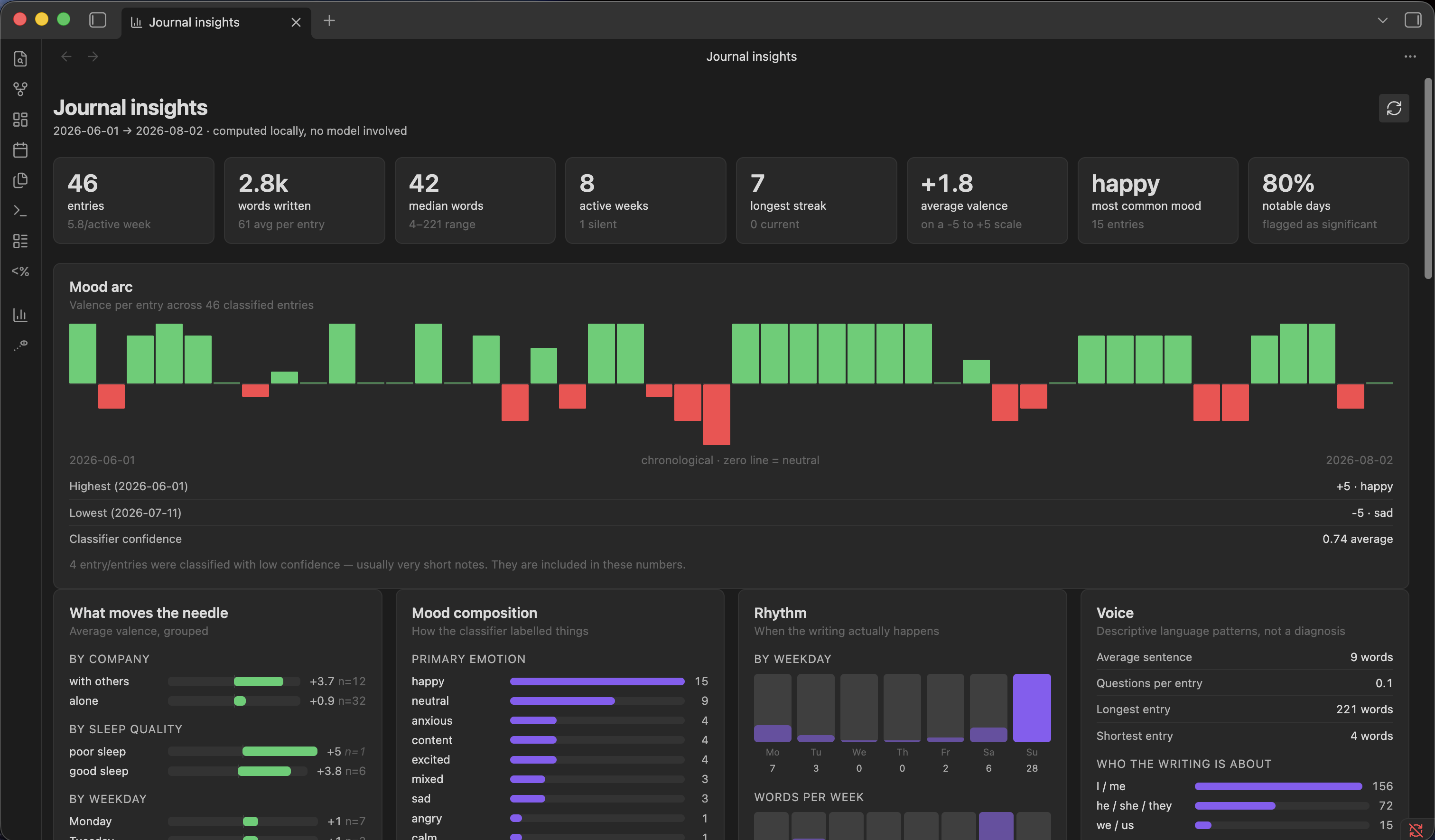
A ribbon icon opens a dashboard that is computed entirely locally - no model involved, so it works with the server down. It covers corpus stats (entry counts, word distributions, streaks, silent weeks), writing rhythm by weekday and week, tag-derived themes and a people leaderboard, distinctive vocabulary, and outlier entries.
Where mood data exists it adds a valence arc over time and - the part that actually earns its place - valence grouped by context: alone versus with others, by sleep quality, by weekday, by energy level. Group averages always show their sample size, and thin groups are marked, because these slices get small fast and a two-entry average is anecdote.
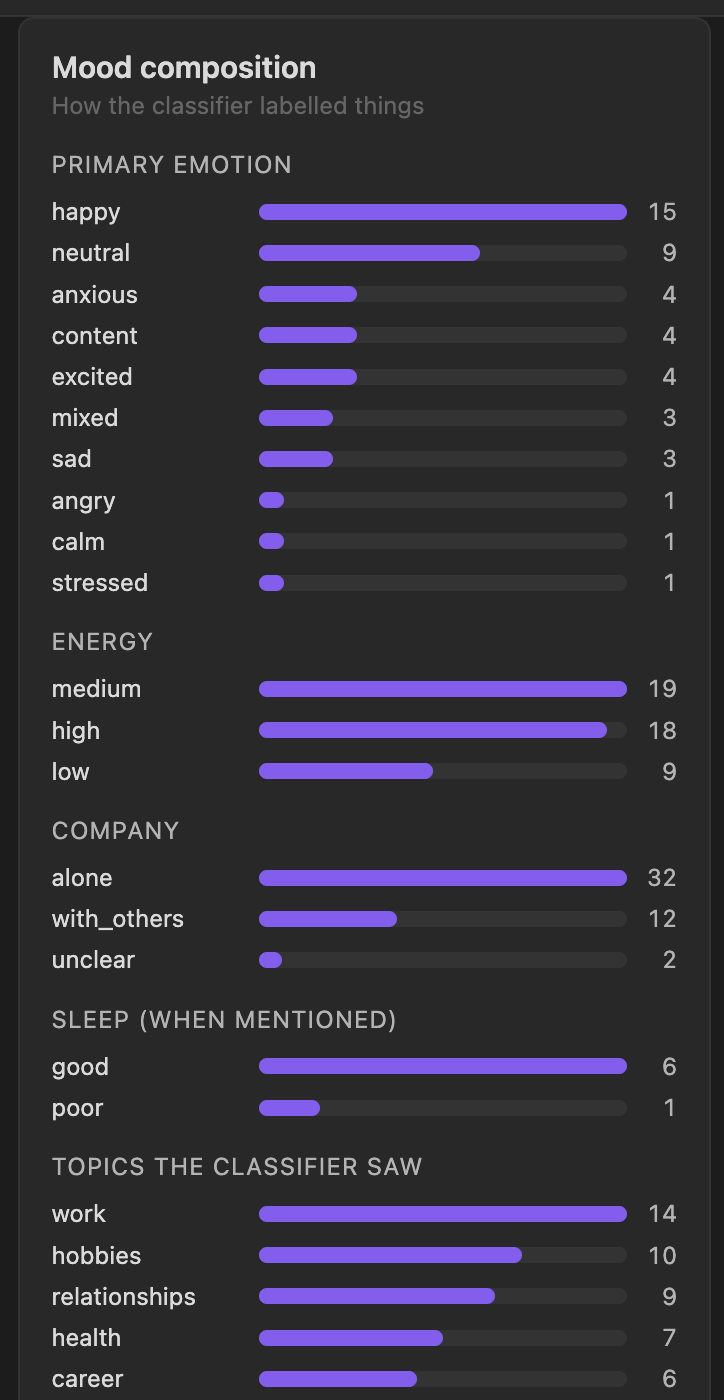
One optional section, Portrait, makes a single LLM call to write a reflection grounded in those measured numbers plus stored memory. It's cached and only regenerates when asked.
Want the internals?
Discovery rules, the rollup/tracking mechanics, the memory system, edge cases — none of that is needed to use the plugin, so it lives in ARCHITECTURE.md instead of here.
For plugin developers
Search results and similarity scores are powered by semantic analysis of your plugin's README. If your plugin isn't appearing for searches you'd expect, try updating your README to clearly describe your plugin's purpose, features, and use cases.