Conflict Manager
approvedby Armen Abrahamyan
Review and resolve sync conflicts from any cloud service. - This plugin has not been manually reviewed by Obsidian staff.
★ 1 stars↓ 461 downloadsUpdated 2mo agoMIT
Obsidian Conflict Manager
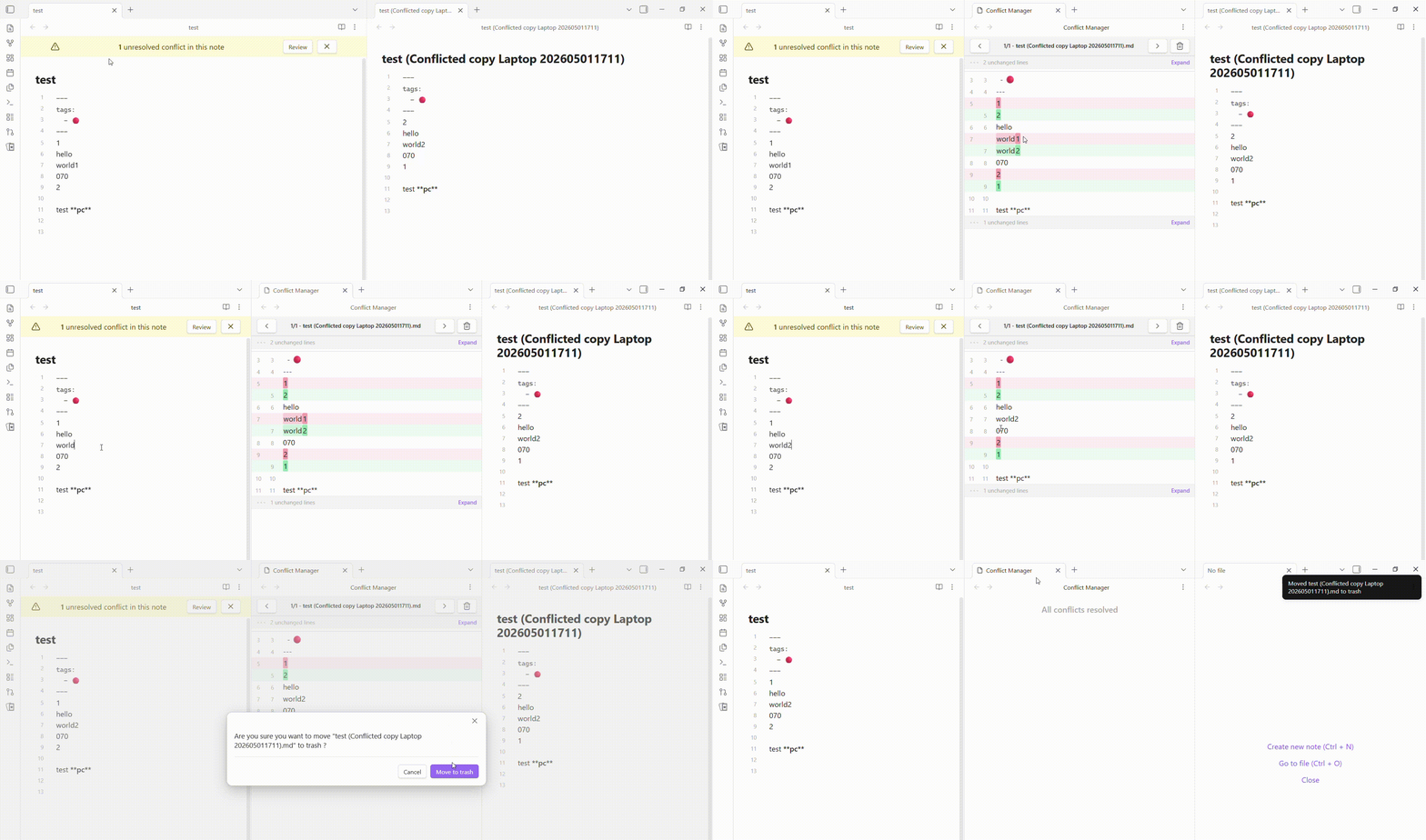 A simple plugin for conflict resolution. No more hunting through your file system. Just open your file, hit Review, and Resolve.
Features
- Alert Banner: A top banner alerts you that your current file contains unresolved sync conflicts.
- Diff Viewer: Review differences between the original file and conflict files using an intuitive split-pane layout.
- Status Bar Indicator: Quickly view the status of conflicts in the vault.
Installation
- Open Settings > Community plugins in Obsidian.
- Find Conflict Manager.
- Select Install, then Enable.
FAQ
When copying and pasting multiple lines in Obsidian, an extra line break is inserted.
Go to Settings > Editor > Convert pasted HTML to Markdown and toggle it off.
Releasing
- Update the version in
manifest.json,package.jsonandversions.json. - Commit the change:
git commit -m "chore: prepare version <current_version>" git push origin main - Create and push the tag:
git tag -a <current_version> -m "<current_version>" git push origin <current_version> - Wait for the release workflow to finish.
- Open the main page of the repository and select Releases in the right sidebar.
- Select Edit (pencil icon) next to the draft release.
- Add release notes, then select Publish.
Contributing
If you have any issues/suggestions, please open an issue on the repository. If you'd like to contribute to the code, please fork the repository and submit a pull request.
For plugin developers
Search results and similarity scores are powered by semantic analysis of your plugin's README. If your plugin isn't appearing for searches you'd expect, try updating your README to clearly describe your plugin's purpose, features, and use cases.