by thisiselijah
Forked from chetachiezikeuzor/Highlightr-Plugin
A maintained and customized fork of the Highlightr plugin by chetachi.
Obsidian Content Highlight Plugin

This is an active fork of chetachi's original Highlightr Plugin. For details on the original features, demo, and changelog, please reference the original repo.
What's New in 3.0.0
Hand-drawn Margin Annotations ✍️
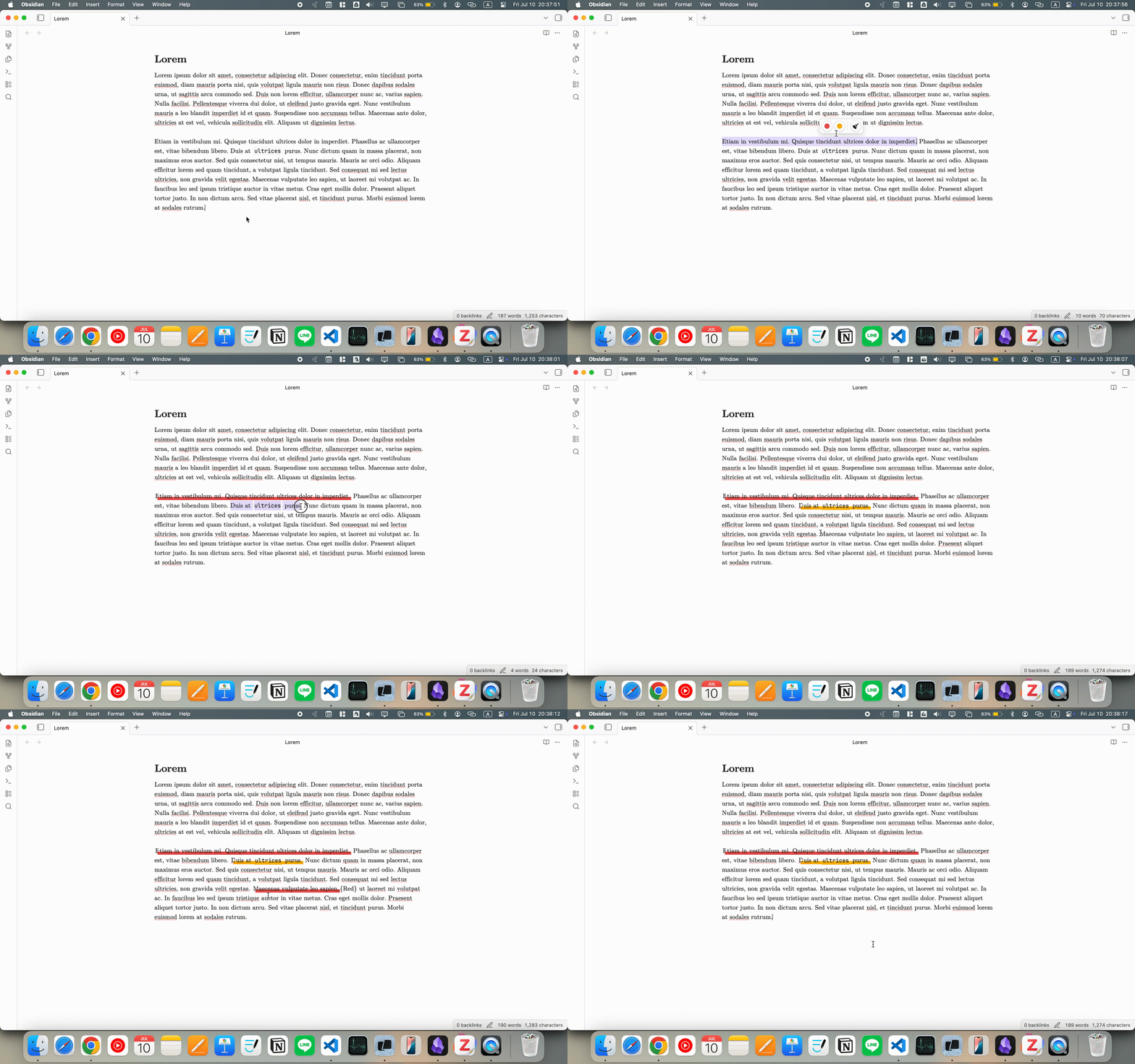
Attach a note to any colored highlight. The plugin writes the note in the free space around the highlight and connects it with a hand-drawn arrow, like notes scribbled in the margin of a book. Annotations work in both Live Preview and Reading mode.
- Plain Markdown syntax: An annotation is stored in the highlight itself, e.g.
==text=={Red|your note}. It moves with your notes through sync, version control, and copy-paste, and stays readable without the plugin. - Easy to add or edit: Place the cursor inside a colored highlight, then use any of these:
- the Annotate highlight button on the floating toolbar
- the right-click menu
- the command palette
- Automatic placement: The plugin looks at where text sits on screen and chooses a spot that is close but not cramped. It uses margins, the ends of short lines, and the gaps between paragraphs. Highlights near the edge of the text prefer the margin on that side.
- Arrows that stay out of the way: Arrows are routed through blank space, so they don't run along a line of text (no strikethrough look). They cross a paragraph in one direction only, and they don't cross each other or run over other notes.
- Stable layout: Annotations are only re-arranged when an annotation is added or changed. Clicking into a highlight, scrolling, or typing elsewhere leaves them where they are.
New Settings
- Annotation arrow direction: The arrowhead can point from the note to the highlight, from the highlight to the note, both ways, or not at all (line only).
- Annotation randomness: Varies each annotation's distance, side, arrow curve, stroke, and tilt so the page looks hand-annotated. Each annotation keeps its own look across redraws. Set it to 0% for a uniform look.
Notes
- Annotations need a colored highlight (
=={Color}), not a plain==text==highlight. - A note can't contain
}or line breaks; the annotation editor removes them. - Avoid annotations inside tables, because
|separates table cells. - In Reading mode, Markdown inside a note is shown as plain text.
What's New in 2.0.0
This fork has been completely overhauled from the ground up to provide a robust, fast, and native Obsidian experience.
Core Optimizations & Features:
- Native Markdown Syntax (
==text=={Color}): Replaced the invasive<mark>HTML injection with clean, native Markdown highlighting. Your notes remain highly legible in raw text and stay fully compatible with Obsidian's core parser. - Modern Floating Menu: The floating toolbar has been redesigned with sleek, customizable circular buttons. It now tracks your selection perfectly, appearing only when needed to keep your workflow fast and uninterrupted.
- Smart Eraser Tool 🧹: The highlight removal logic is now incredibly intelligent. You no longer need to perfectly select a highlight to remove it. Simply place your cursor anywhere inside a highlight, or drag across multiple overlapping highlights, and click the erase button to cleanly strip the formatting.
Demo
Installation
Download the necessary files and place them within your Obsidian plugins folder, or install via the Obsidian community plugin store if available.
Star History
License
This project is licensed under the MPL-2.0 License.
For plugin developers
Search results and similarity scores are powered by semantic analysis of your plugin's README. If your plugin isn't appearing for searches you'd expect, try updating your README to clearly describe your plugin's purpose, features, and use cases.