Daily note creator
approvedby mario-holubar
Automatically creates missing daily notes
Daily note creator
Do you want Obsidian to create your daily notes automatically, without opening the daily note on startup, and including days that you haven't opened the vault? Then this is the plugin for you!
It acts as an alternative to Auto Journal. Auto Journal also has backfill functionality and comes with more features such as monthly notes, but also enforces a certain folder structure.
Daily note creator is designed to be an add-on to the daily notes core plugin, rather than a replacement, and will use the settings you defined there to create missing notes.
Features
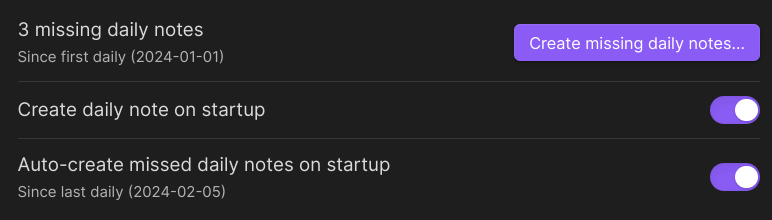
Create daily note on startup lets you disable the built-in open daily note on startup option. This is useful if you want to open the vault on your last open note, or your homepage.
Auto-create missed daily notes on startup will fill in daily notes for days that you didn't open the vault. If this is more than a week, it will ask for confirmation.
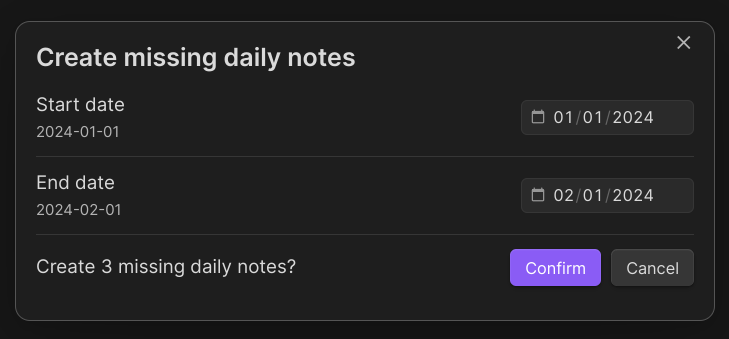
Create missing daily notes is a command you can trigger anytime to open a pop-up window that lets you fill in missed notes for any range of time. Use this if you want to fill in some missing days in the past.
Known issues
As of right now, the plugin will misbehave if your daily notes are organized in a folder structure (e.g. YYYY/MM/DD) or if they have text other than the date in the filename (e.g. 2023-12-31 New Year's Eve). Both of these problems are caused by the underlying obsidian-daily-notes-interface package and have open issues: #21, #27. I will update this plugin once these are resolved.
For plugin developers
Search results and similarity scores are powered by semantic analysis of your plugin's README. If your plugin isn't appearing for searches you'd expect, try updating your README to clearly describe your plugin's purpose, features, and use cases.