by ott3r07
Syntax highlighting for GDB, pwndbg, GEF and PEDA output in code blocks.
Debugger Output Highlight
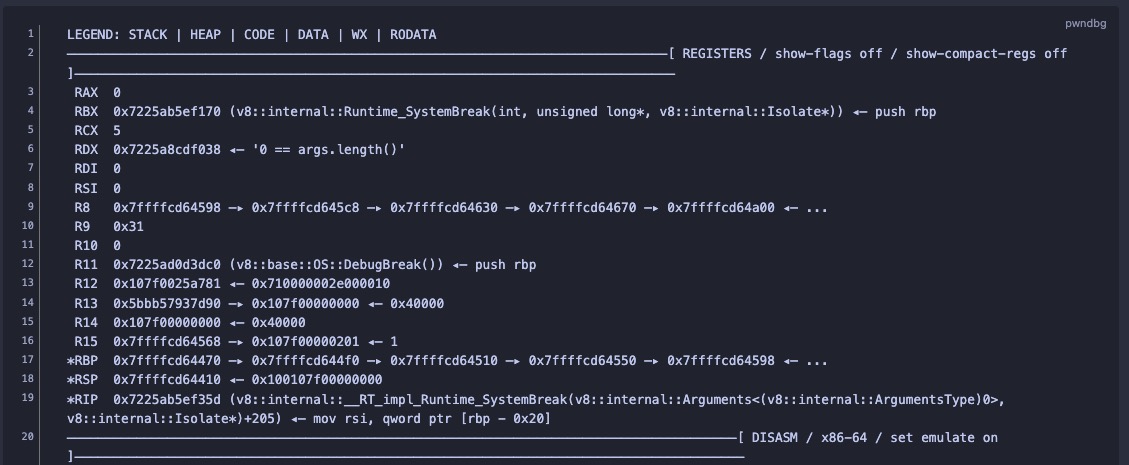
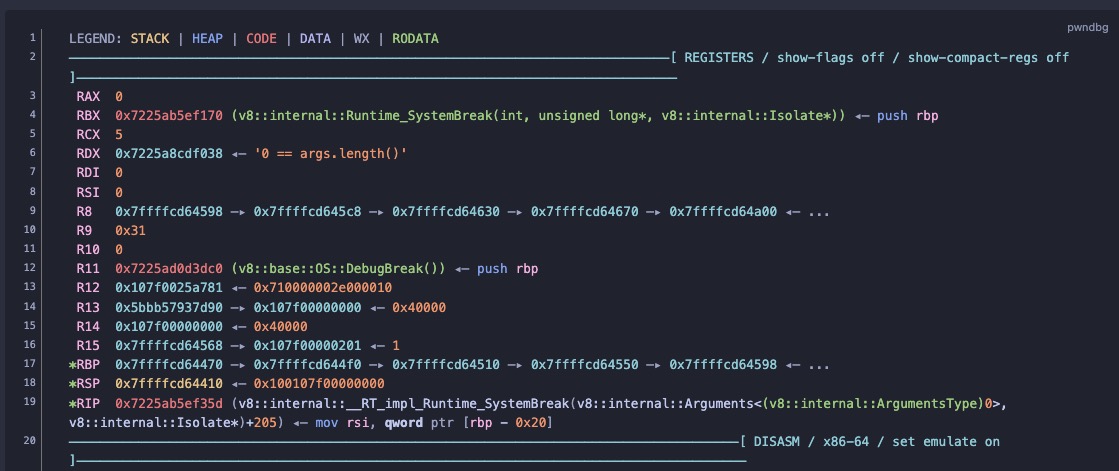
Syntax highlighting for pasted GDB, pwndbg, GEF and PEDA output in Obsidian code blocks.
Before (Obsidian's default code block)
After
```pwndbg
pwndbg> context
LEGEND: STACK | HEAP | CODE | DATA | WX | RODATA
─────────────[ REGISTERS / show-flags off / show-compact-regs off ]─────────────
*RAX  0x5555555572fb (main) ◂— endbr64
...
```
Languages: gdb, pwndbg, gef, peda (aliases gdb-pwndbg, gdb-gef, gdb-peda).
Each tool grammar also understands plain GDB output (breakpoint hits, x/, bt, p, signals, …).
What it recognises
- prompts and commands, section banners, legends
- registers (changed-register markers, EFLAGS set/clear), disassembly (current-instruction markers, branch taken/not taken,
<sym+off>, Intel / AT&T / aarch64) - telescope / stack / dereference chains (
—▸,◂—,→,-->), strings, annotations vmmap,checksec,got, heap chunks and bins,hexdump,search, pattern/cyclic output, messages ([+],[*],[!])- old and current formats of each tool (e.g. GEF decimal vs hex symbol offsets, pwndbg
RWX→WXlegend)
Copy/paste damage is tolerated: tabs turned into spaces, trailing spaces, CRLF, NBSP, uniformly indented pastes.
Address colours (stack / heap / code / data) are only used when the text itself proves the kind
(e.g. rsp label, heap chunk header, disassembly row, function-pointer type). Plain-text output has
lost the debugger's colours, so everything else is shown as a neutral address rather than a guess.
How it works in Obsidian
- Reading view: the grammars are registered with Obsidian's own Prism, so the native code block (copy button, theme) is kept.
- Live Preview / source mode: CodeMirror 6 mark decorations — blocks stay editable.
- Works inside callouts, blockquotes and list items. Desktop and mobile.
Colours follow your theme (--color-red, --color-blue, …). Override any of them with a CSS snippet:
body { --dbg-address-stack: #e5c07b; --dbg-address-code: #e06c75; }
See styles.css for the full list of --dbg-* variables.
Using the grammars elsewhere (blogs, Docusaurus, …)
The grammars in src/grammars/ are plain Prism grammars with standard aliases (keyword, number,
string, …), so they look reasonable with any Prism theme:
import Prism from "prismjs";
import { LANGUAGES } from "./src/grammars/index.ts";
Object.assign(Prism.languages, LANGUAGES);
The token contract is documented in src/grammars/TOKENS.md.
Install
Until it is listed in Obsidian's community plugins, either:
- BRAT: install the BRAT plugin, then
Add beta plugin →
ott3r07/obsidian-debugger-highlight. BRAT also keeps it updated. - Manually: download
main.js,manifest.jsonandstyles.cssfrom the latest release into<vault>/.obsidian/plugins/debugger-highlight/. - From source:
npm install && npm run install-vault -- "/path/to/your/vault".
Then enable Debugger Output Highlight under Settings → Community plugins.
Development
npm install
npm run dev     # watch build → main.js
npm test        # node --test (grammar, fence-scanner and core tests)
node scripts/hl.ts pwndbg path/to/output.txt          # render in the terminal
node scripts/hl.ts pwndbg --stats path/to/output.txt  # lines no rule matched
The format specifications, adversarial reviews and real captures the grammars were built and
tested against (pwndbg 2026.10, GEF 2021.10–2026, PEDA, GDB 15; about 26 MB) live on the separate
research branch, so a normal checkout stays small:
git clone --single-branch https://github.com/ott3r07/obsidian-debugger-highlight.git   # plugin code only
git fetch origin research && git archive origin/research research | tar -x   # optional: ./research
With ./research present, the tests also verify that every quoted sample line exists in its source.
License
MIT
For plugin developers
Search results and similarity scores are powered by semantic analysis of your plugin's README. If your plugin isn't appearing for searches you'd expect, try updating your README to clearly describe your plugin's purpose, features, and use cases.