Deck To Anki
中文文档:README.zh.md
Overview
Deck To Anki is an Obsidian community plugin that turns notes into Anki decks via AnkiConnect. Write cards in Obsidian (heading trees, lists, single-file cards, or filename-as-front), preview and select them in the sync panel, then push, update, or delete notes in Anki. Optional backlinks jump back to the source note, heading, or block.
Features
- Notes as cards — author Q&A cards in Obsidian without a separate card editor
- Five parse modes —
head/list/card/title/file - Reversible templates — built-in
ob-deck-basic++for flipped review - Rich content — images, math, tables, fenced code (Prism highlighting), and tags
- Wiki links & embeds —
[[note]]and![[media]]support - Backlinks — open the source in Obsidian from Anki (ObURI / Advanced URI)
- Image compression — optional compress-on-sync (vault files unchanged)
Requirements: Obsidian ≥ 1.7.2, Anki + AnkiConnect.
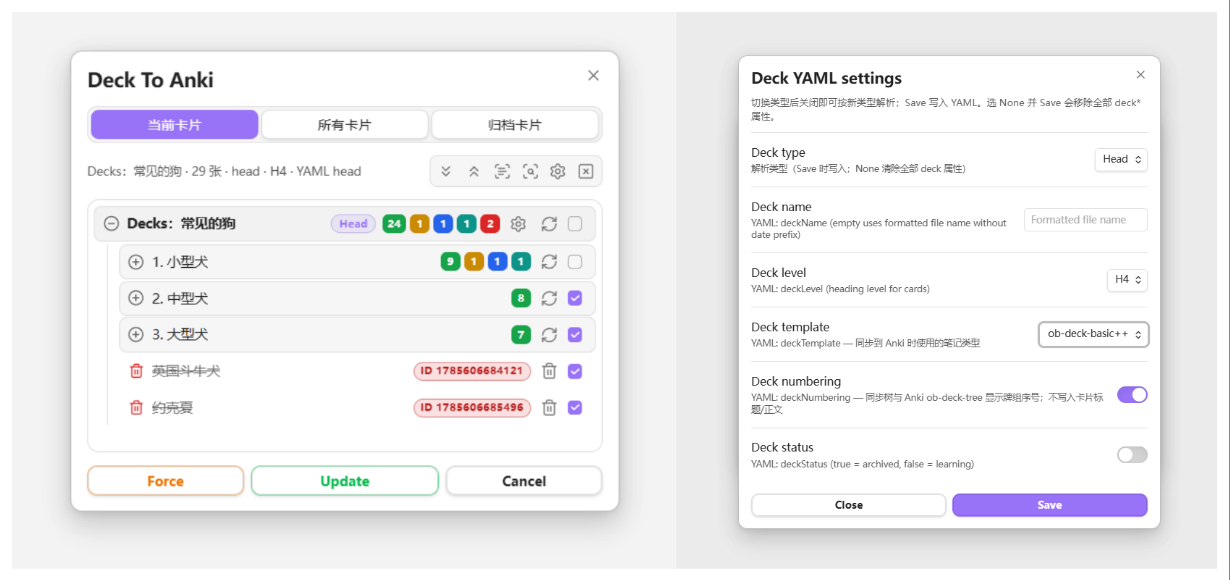
Quick start
Prerequisites
- Install and enable the Deck To Anki plugin
- Install and run Anki with AnkiConnect (default
http://127.0.0.1:8765)
Suggested AnkiConnect config:
{
    "apiKey": null,
    "apiLogPath": null,
    "ignoreOriginList": [],
    "webBindAddress": "127.0.0.1",
    "webBindPort": 8765,
    "webCorsOriginList": [
        "http://localhost",
        "app://obsidian.md"
    ]
}
Open the sync panel
- Click the Anki ribbon icon, or
- Run the command Deck To Anki
Preview parsed cards, select what to sync, check differences against Anki, then run Update / Force. You can copy examples/Deck-To-Anki-演示.md into your vault for a quick trial.
Sync panel
Open the panel from the ribbon or the Deck To Anki command.
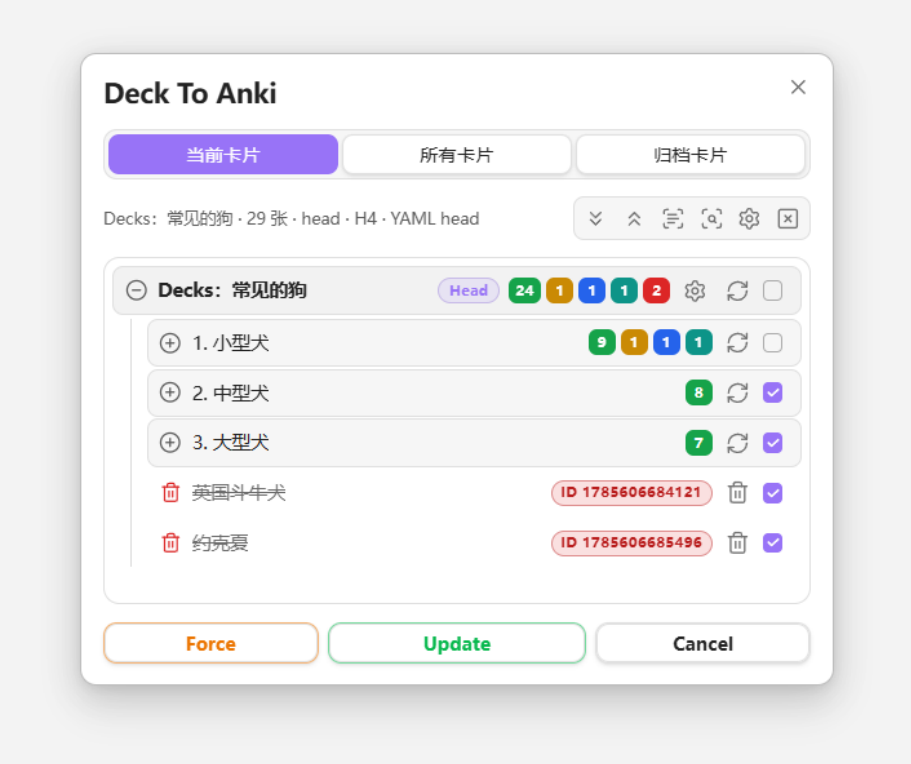
- Current cards: parse the active note
- All cards / Archived cards: scan notes with
deckTypeinside the configured scan scope - Toolbar: expand/collapse, select all, check, refresh, Force, Update
- Row actions: preview, deck YAML settings, sync one card, checkbox
Check-related options live under Settings → Sync → Check.
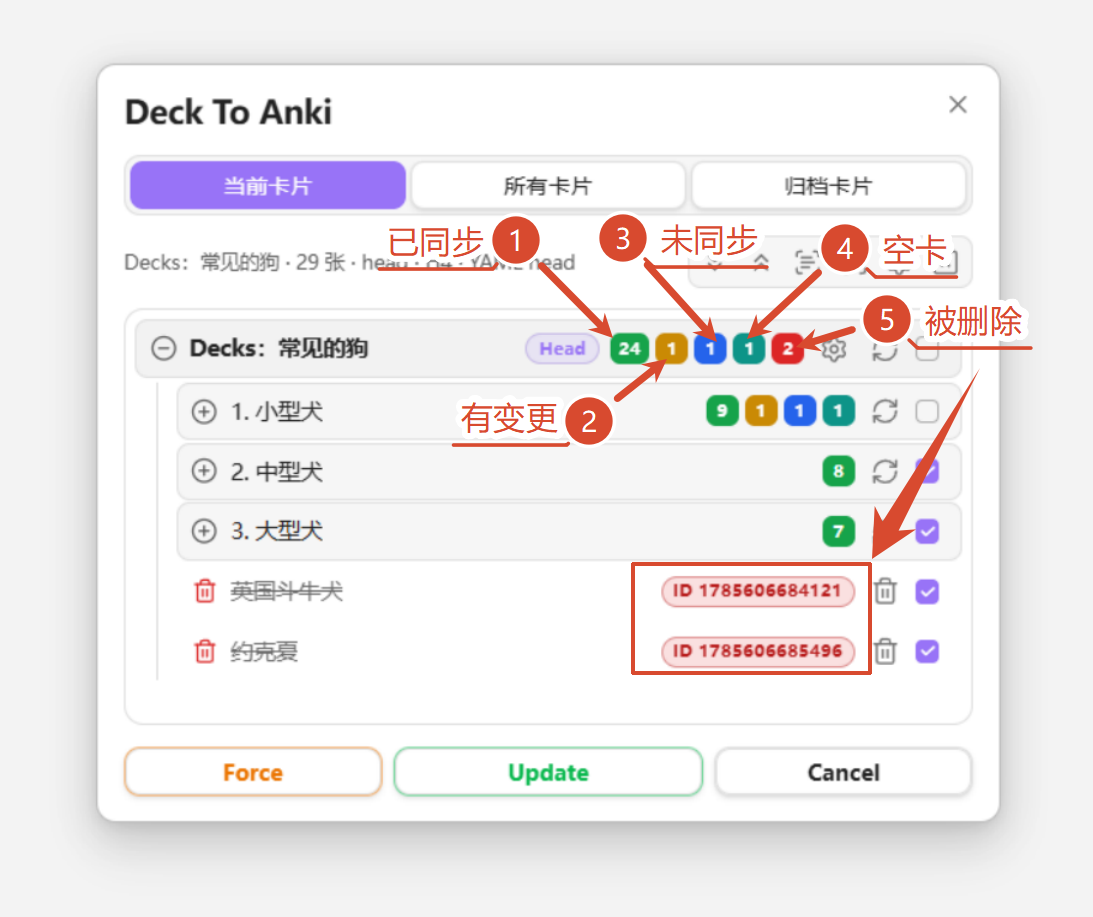
Check status colors
| Status | Color | Meaning |
|---|---|---|
| Synced | 🟩 green | Matches Anki |
| Modified | 🟥 red | Local differs from Anki |
| Unsynced | 🟨 yellow | Not yet pushed to Anki |
| Anki only | 🟦 blue | Present in Anki, missing locally |
| empty | 🩵 cyan | Empty back (unchecked by default after parse) |
| Unchecked | 🩶 gray | Not compared with Anki yet |
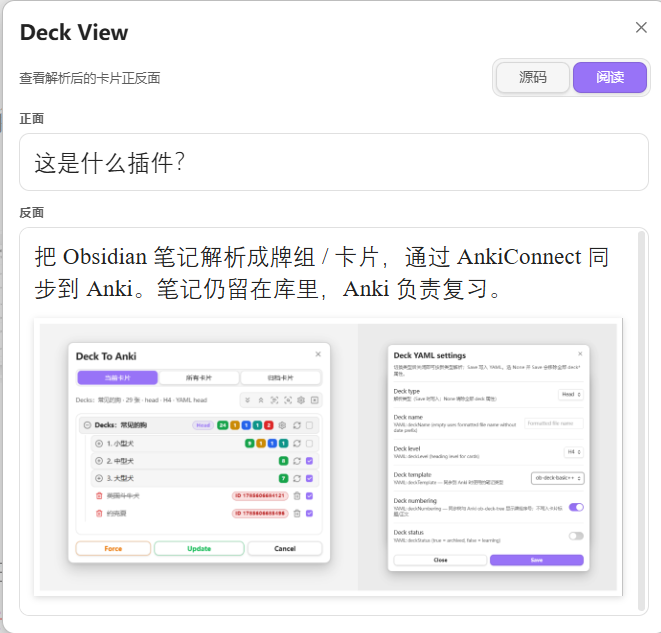
Card preview
Use the Deck View button on a card row to preview the rendered card.
Parse modes
| Mode | Description | Note id location |
|---|---|---|
| Head (default) | Heading at the configured level is the front; body is the back. A lone --- line can split front/back further. | <!--ID: n--> |
| List | Top-level list item is the front; indented content is the back (one indent level removed). | Trailing ^deckID on the list line |
| Card | After YAML, a lone --- splits front/back; one card per note. | YAML deckID |
| Title | Filename is the front; body after YAML is the back; one card per note. | YAML deckID |
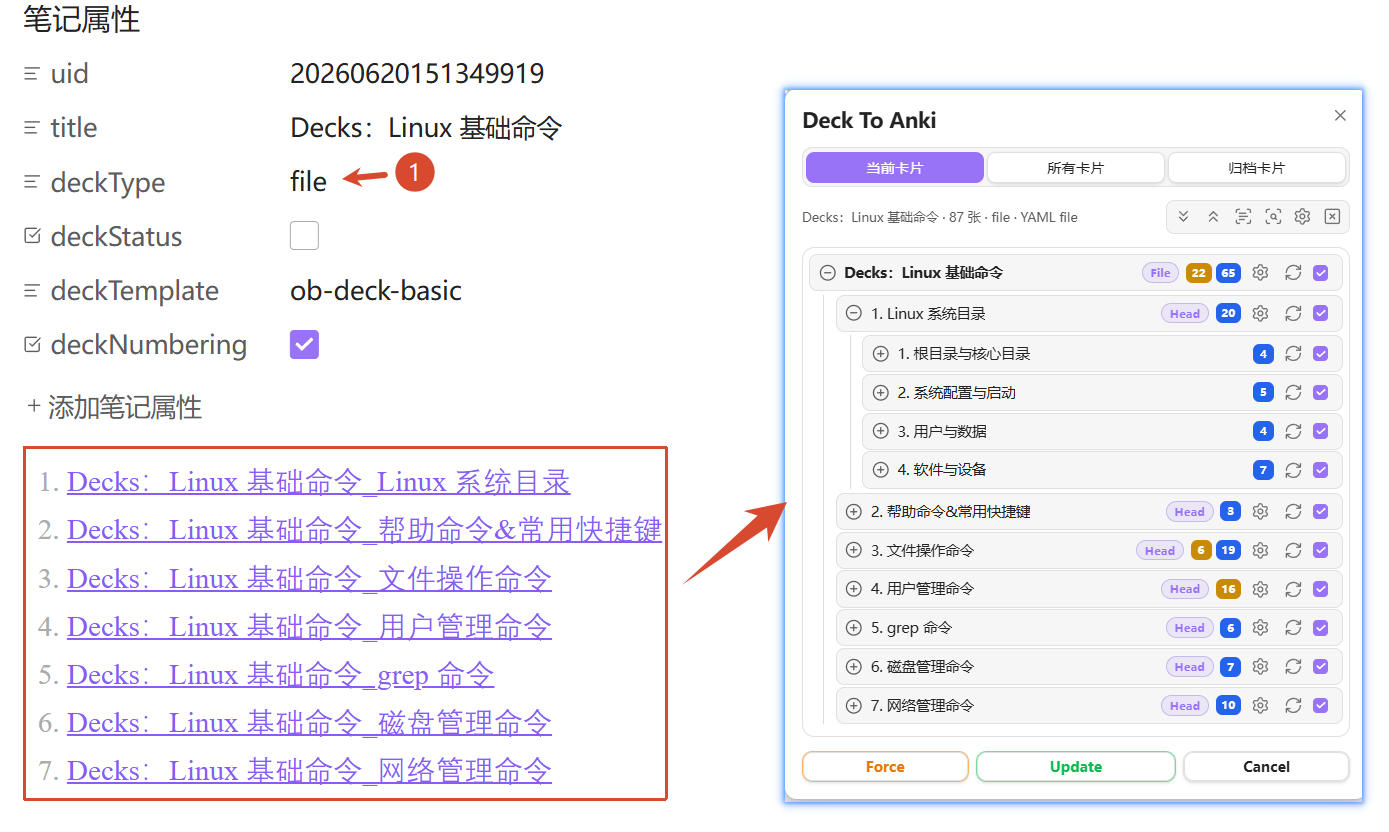
| File | Parent note organizes child notes via wiki links; children parse as head/list/card/title. | Depends on child mode |
File mode is for chapter-style decks. Nested File mode is not supported (a child note cannot itself use File mode):
Deck YAML properties
Deck settings are stored in note YAML and can be edited from the deck row settings panel:
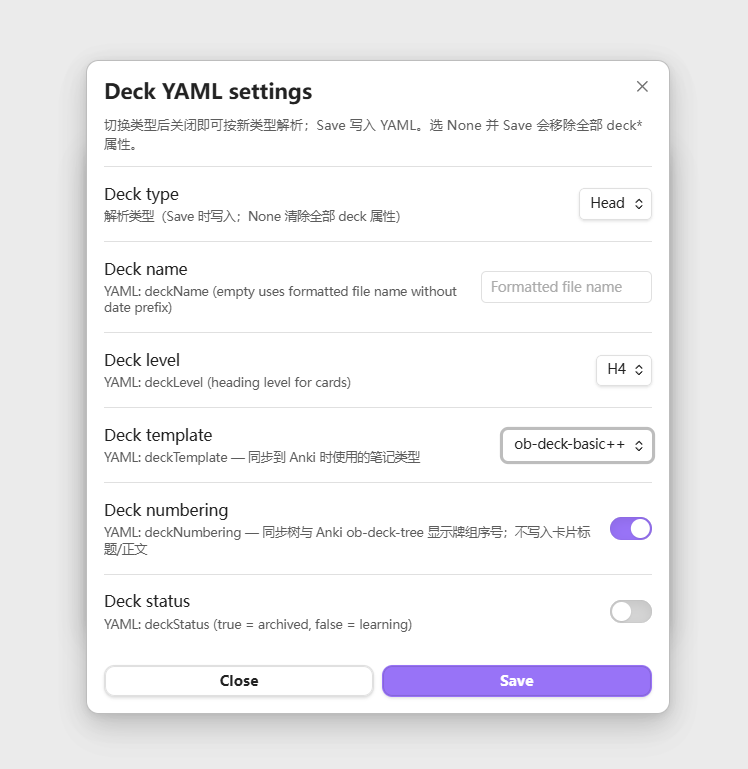
| Field | Description |
|---|---|
deckType | head / list / card / title / file |
deckName | Display name (optional) |
deckLevel | Head: heading level used as card front (1–6) |
deckStatus | false studying; true archived |
deckFile | File mode: parent index note |
deckTemplate | Anki note type id |
deckNumbering | Whether to sync deck numbering into the tree field |
deckID | Card / Title mode: Anki note id |
Settings
- General: default parse mode, heading level, wiki links, Deck View, scan scope
- Sync: AnkiConnect URL, deck numbering, check options, image compression
- Fields: tags / backlink / deck-tree fields and backlink scheme
- Templates: built-in and custom Anki card templates (Front / Back / CSS)
General
Under Settings → General (per-note YAML can override):
- Default deck mode —
head/list/card/title/file(default Head) - Default heading level — used in Head mode when
deckLevelis absent (default H4) - Parse wiki links — convert
[[links]]into clickable backlinks (does not affect![[media]]) - Deck View default — source / reading
Scan scope (All / Archive tabs only):
- Include folders — empty = entire vault; multi-select, includes subfolders
- Ignore folders — exclude from results
- Tag filter — keep notes with any listed tag;
ankialso matchesanki/deck
Sync
Requires Anki + AnkiConnect (default http://127.0.0.1:8765).
- AnkiConnect URL
- Status checks — auto-check when opening panels / selecting cards; optionally require a check before sync
- Image compression — compress uploads only; vault files stay untouched; adjustable quality and cache clear
Templates
Defaults include ob-deck-basic and reversible ob-deck-basic++. Customize Front / Back HTML and CSS.
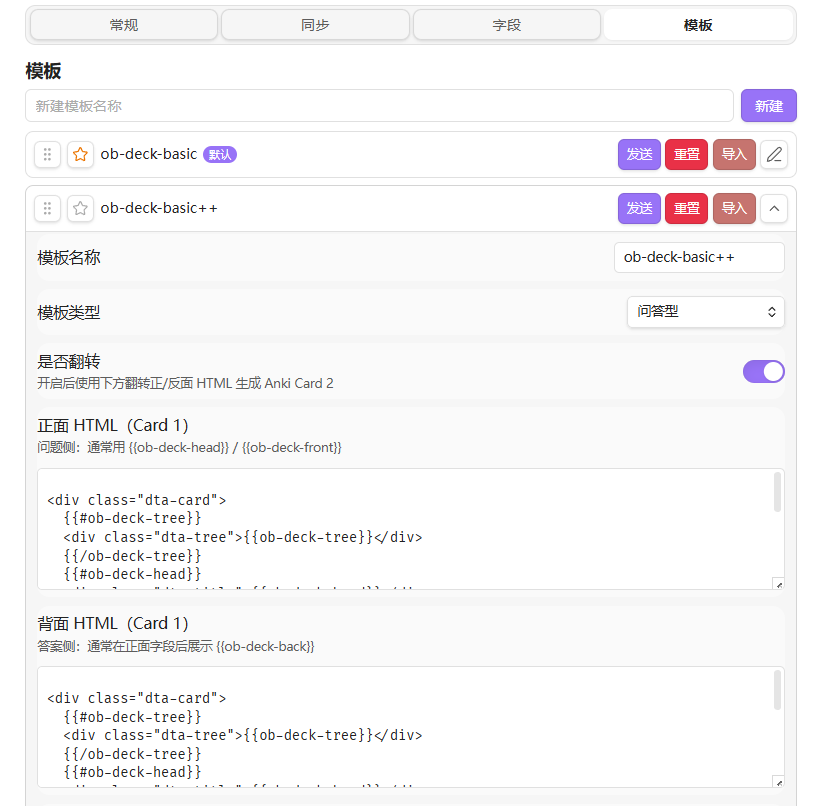
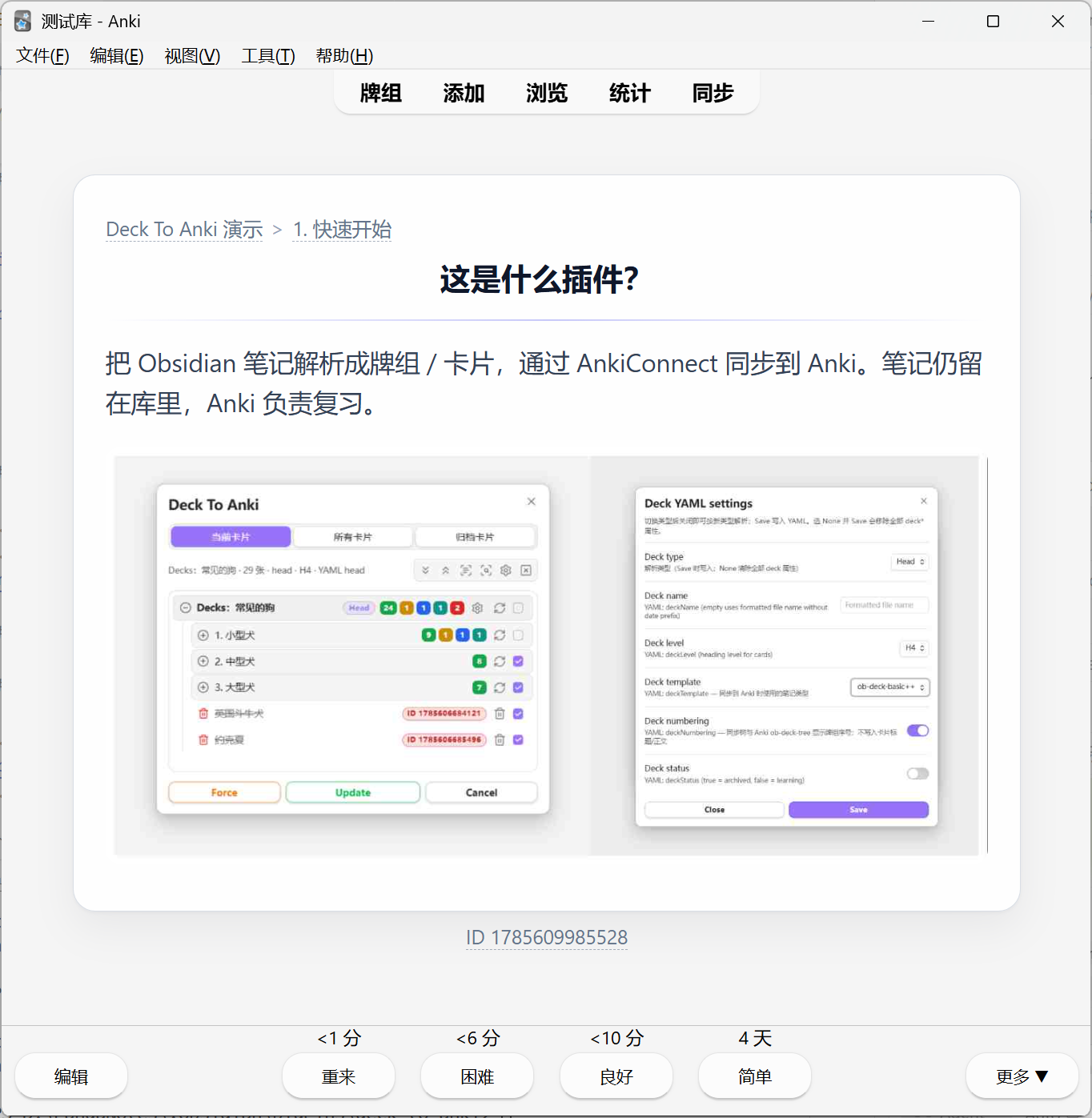
Default look in Anki:
Fields
Under Settings → Fields:
- Sync tags — write
ob-deck-tagsand sync Anki note tags - Card backlink — write
ob-deck-backlink(Head → heading, List → block, Card → file) - Deck tree — write
ob-deck-tree; optional clickable crumbs - Backlink scheme —
none/oburi/aduri(Advanced URI)
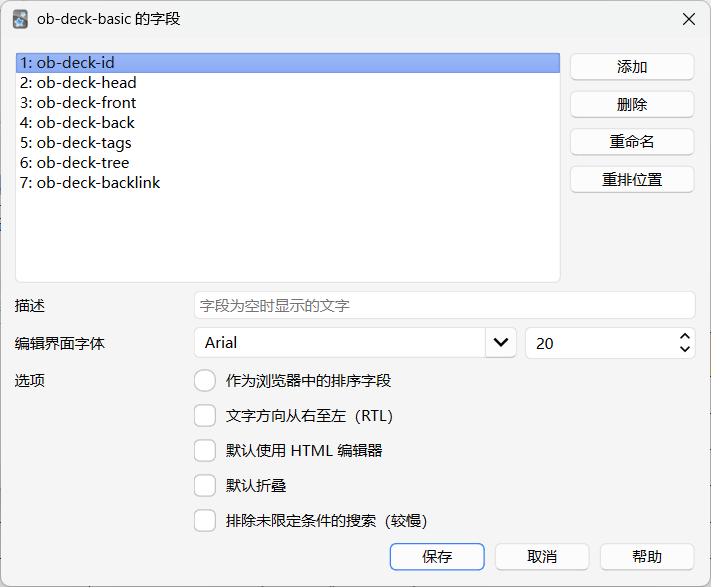
| Field | Description |
|---|---|
| ob-deck-id | Note identity field (first model field for AnkiConnect) |
| ob-deck-head | Card title / navigation heading; stored separately from front body |
| ob-deck-front | Front body |
| ob-deck-back | Back body |
| ob-deck-tags | Obsidian tags; can sync as Anki tags |
| ob-deck-tree | Deck path crumbs |
| ob-deck-backlink | Backlink to the Obsidian card (heading / block / file) |
Commands
| Command | Action |
|---|---|
| Deck To Anki | Open the sync modal |
| Open sync sidebar | Open the sync sidebar view |
| Clear all deckIDs in current file | Remove deck IDs from the active note |
| Clear all deckIDs and deck YAML in current file | Remove deck IDs and deck YAML properties |
Install
BRAT
Add this repository with BRAT:
PandaNocturne/obsidian-deck-to-anki
Manual
- Download the latest release from Releases
- Place
main.js,manifest.json, andstyles.cssin:
<Vault>/.obsidian/plugins/deck-to-anki/
- Reload Obsidian and enable Deck To Anki under Settings → Community plugins
Build from source
npm install
npm run build
Artifacts: main.js, manifest.json, styles.css at the plugin root.
Development
npm install
npm run dev    # watch build
npm run build  # production build
npm run lint
Release checklist:
- Bump
version/minAppVersioninmanifest.json npm version <new>(updatesversions.json)npm run buildgit push origin <tag>gh release create <tag> main.js manifest.json styles.css
License
See LICENSE in the repository.
For plugin developers
Search results and similarity scores are powered by semantic analysis of your plugin's README. If your plugin isn't appearing for searches you'd expect, try updating your README to clearly describe your plugin's purpose, features, and use cases.