DeepHarness
approvedby 陈景帅
Chat with a DeepSeek Harness agent inside your vault: it runs bash, edits files, and searches the web to work on your notes. - This plugin has not been manually reviewed by Obsidian staff.
DeepHarness — DeepSeek Harness for Obsidian
中文版 · English
A Claudian-style AI assistant plugin for Obsidian: it calls DeepSeek Harness directly from the side panel. Send a task to the chat window and the DSH agent works in your vault as its working directory, using its full toolset (bash, file read/write, web search, subagents, …) autonomously.
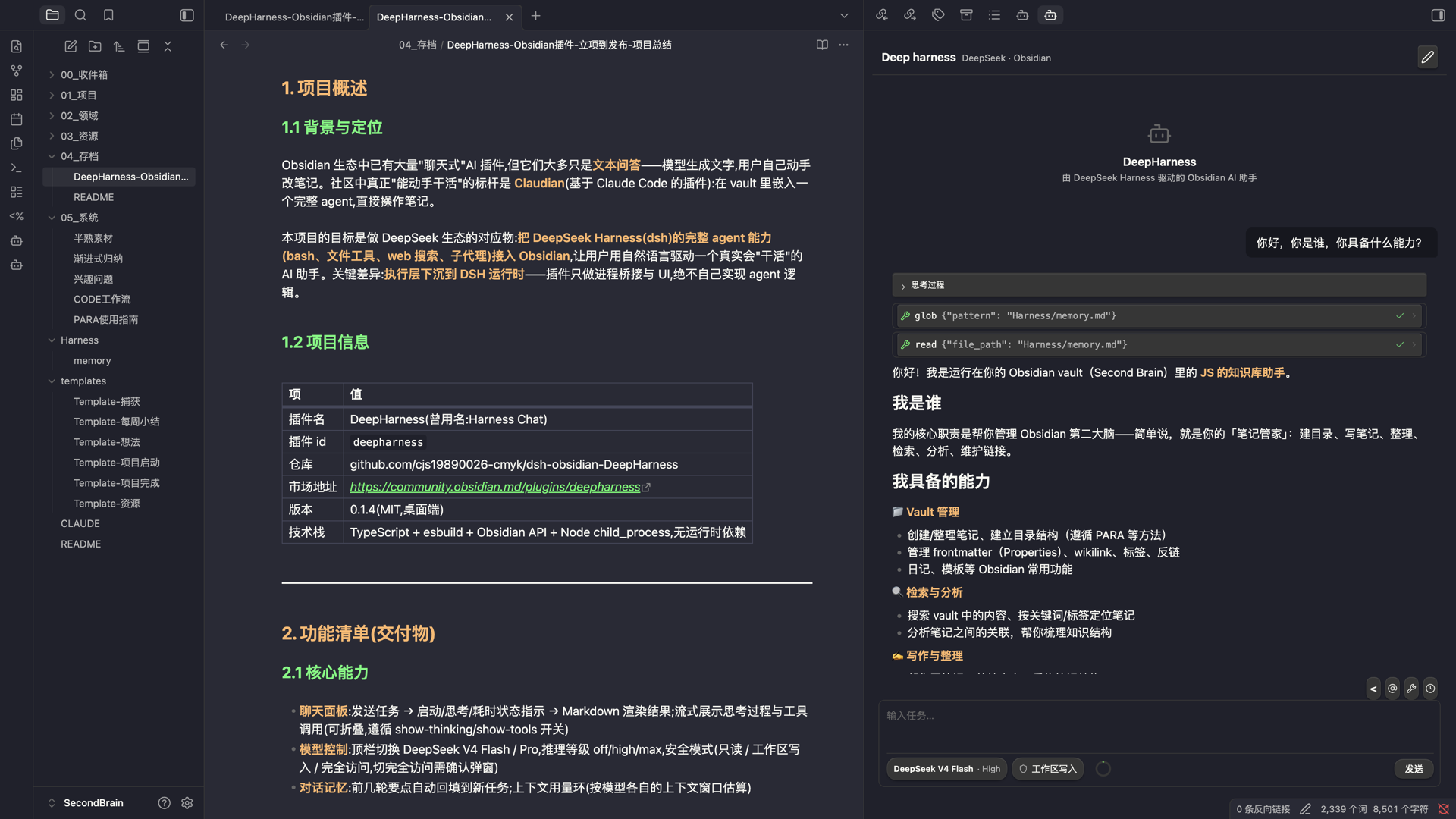
Feature showcase — send a task in the side panel, and the DeepSeek Harness agent works in your vault.
Design document:
DESIGN.md. This repo was designed based on an analysis of Enigmora/claudian; the key difference is that execution is pushed down to the DSH runtime — the plugin only bridges the process and renders the UI.
How it works
Obsidian plugin ──spawn──▶ dsh --profile headless --patch <vault.yml> "<task>"
                            │ cwd = vault root
                            │ DSH_HOME = ~/.dsh (reuses your credentials/model config)
                            ▼
                    DeepSeek Harness agent
                    bash │ file tools │ web_search │ subagents …
Verified locally: dsh --profile headless "use bash to run pwd and ls…" works end-to-end.
Prerequisites
-
Install the DSH CLI:
npm i -g @deepseek-ai/dsh -
Configure model credentials (either one):
- DSH web (Models page) writes
~/.dsh/.credentials.yaml - Or export the
DEEPSEEK_API_KEYenvironment variable
- DSH web (Models page) writes
-
Click "Run check" on the plugin settings page to confirm
dshis detected.
Installation
From the Obsidian community plugin market (recommended)
- Open Obsidian → Settings → Community plugins.
- Turn off Restricted mode if needed.
- Click Browse, then search for DeepHarness.
- Click Install, then Enable.
- Open DeepHarness settings and run the Check button to verify
dshis detected.
From GitHub Release / source (development)
npm install
npm run build
# Copy into your vault:
cp -r dist /path/to/vault/.obsidian/plugins/deepharness/
After enabling the plugin, click the bot icon in the left ribbon to open the chat panel.
Features
- 💬 Chat panel: send a task → status indicator (starting / thinking / elapsed) → Markdown-rendered result
- 🧠 Model list you own: the model dropdown is fed by an editable list in the settings, so a model DeepSeek shipped after this plugin release can be added by typing its id — no plugin update needed. Entries can be added or removed at any time, and the built-in ones can be deleted too. An Import from DSH button pulls in the ids your own DSH settings declare, only when you press it. Defaults to
deepseek-flash(DeepSeek's rolling alias on the official API) - ⚙️ Reasoning effort (Thinking): switch off / high / max in the toolbar
- Written to the plugin-owned DSH_HOME (
dsh-home/directory) via theagent-default-modelconfig; credentials are symlinked from~/.dsh— the global DSH settings are never polluted
- Written to the plugin-owned DSH_HOME (
- ⏹ Stop button (SIGTERM) and a timeout fallback (default 10 minutes)
- 📝 Conversation memory: key points from earlier turns are automatically refilled into new tasks
- 🕘 Session history: conversations are archived per session; the history panel supports resume / pin / rename / note. The current session is atomically persisted after every turn — sessions that were not archived when Obsidian quit/crashed are restored into history on next launch, so nothing is lost
- 📋 Copy / Save as note in one click; UI text is selectable
- 🔗 Reference current note: the quote icon in the toolbar above the input inserts the note you are reading — if you have text selected in the note, the selection is inserted as a quoted block (auto-truncated with a source line); without a selection it inserts a bare wikilink (modeled after Claudian's New conversation)
- @ Mention notes: type
@in the input box to search and reference any note in the vault — live title/path matching, inserted as[[path]](scoped by the "Working directory" setting) - ⚙️ Command: "Process current note"
- 🗂 Generated vault persona (
.obsidian/plugins/deepharness/generated/vault.yml) instructs the agent to use wikilinks and ask before destructive operations; freely editable - 🩺 Environment check + diagnostics: reports
dsh, Node.js and the three paths the plugin must write, and gives a concrete remedy for each failure (install command, which path to fix, or the usual sync-folder / permission causes). A failing check can produce a copyable report you can hand to any assistant to diagnose - 🔄 Update check: shows whether a newer release exists. The plugin never downloads or installs updates itself — that stays with Obsidian, so the store's review and signed releases are never bypassed
- 🌐 i18n UI (English / 中文)
Settings
| Setting | Default | Description |
|---|---|---|
| dsh binary path | auto-detect | Empty = PATH |
| Node.js path | auto-detect | The plugin runs the dsh script with node directly (bypasses the shebang issue under Obsidian's restricted PATH) |
| DSH_HOME | ~/.dsh | Credentials/config root |
| Plugin API key | empty | DeepSeek API key used ONLY by this plugin (separate from the desktop app); empty = reuse desktop credentials |
| Model provider | DeepSeek official API | deepseek-official = DeepSeek official API; opencode-go = OpenCode Go subscription (OpenAI-compatible, https://opencode.ai/zen/go/v1) |
| Working directory | vault root | Relative subfolder to scope the agent |
| Task timeout | 600s | Auto-stops the run when exceeded |
| Conversation memory | on | Context refill |
| Tool execution mode | default (native) | native / code / both (tool backend, not a file sandbox) |
| Model | deepseek-flash | Selected from the editable Model list below it; add any model id to use a model newer than this plugin release |
| Model list | 4 built-in ids | The models offered in the dropdowns. Add or delete any id; Import from DSH appends the ids your own DSH settings declare, only when pressed |
| Reasoning effort | high | off / high / max; switchable from the toolbar |
| Security mode | workspace write | read-only / workspace write / full access |
| Show thinking | on | Collapsible thinking block before the answer |
| Show tool calls | on | Shows tool invocations (bash, file ops) as they run |
| History entries | 50 | Max sessions kept in the history panel; oldest removed first |
| Custom persona | empty | Extra instructions appended to the agent system prompt |
Security
- The agent's file tools are scoped to the vault; however the bash tool runs with user-level permissions (headless has no file sandbox by default), so the persona rules require the agent not to modify files outside the vault and to ask before destructive operations
- Credentials go through existing DSH configuration by default (the plugin collects nothing); optionally you can set a plugin-only API key, which is stored in the local plugin data file and injected as an environment variable at run time — never shared with the desktop app
- All child processes are terminated when the plugin unloads
- The only request the plugin makes on its own behalf is the update check, and only when you press it: it asks the public GitHub releases API for this repository's latest version. No telemetry, and the diagnostic report contains no credentials
Roadmap
- Phase 2 (mostly done): streaming output, tool-call logs, persistent session history
- Remaining: file-modification diff confirmation
- Phase 3: batch processing of vault notes, long-term memory (
Harness/memory.md), run history
See DESIGN.md section 8.
License
MIT
For plugin developers
Search results and similarity scores are powered by semantic analysis of your plugin's README. If your plugin isn't appearing for searches you'd expect, try updating your README to clearly describe your plugin's purpose, features, and use cases.