by siulved54
Inline dice rolls you click to reroll, in Live Preview and Reading view, with full dice notation, a roll dialog and a roll history. Reads Dice Roller notes.
Dice Rolls
Roll dice right inside your notes. Write a formula in inline code that starts
with dice: and it turns into its result. Click the result to roll again.
The goblin attacks: `dice: 1d20+4` to hit, `dice: 1d6+2` slashing damage.
Ability scores: `dice: 4d6dl1` `dice: 4d6dl1` `dice: 4d6dl1`
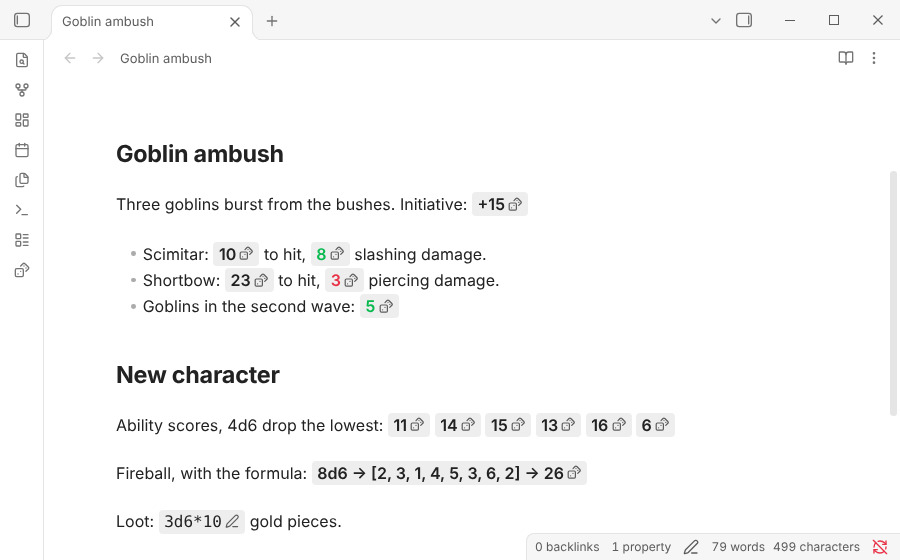
It works in Live Preview and in Reading view, on desktop and on mobile. Hover over a result to see the formula and every die rolled. Put the cursor inside a roll to edit its formula. A roll keeps its result while you edit around it; it changes only when you click it.
Coming from Dice Roller
This plugin reads the dice formulas of
Dice Roller, with the same dice:
syntax, modifiers and flags, so notes written for it roll the same way.
Settings → Import from Dice Roller copies your saved formulas.
What is different:
- No surprise rewrites of your notes. A
dice-mod:roll writes its result into the note only when you click it, or when you run Write the results of dice-mod rolls in this note. Either way it is one change that one undo takes back, and it is refused if the note changed in the meantime. - Custom ranges include both ends.
1d[3,5]rolls 3, 4 or 5, and so does1d[3-5]. A list of three or more numbers, such as1d[1,3,5], is a die with exactly those faces. - A roll history in the sidebar, with the note each roll came from, and a dialog to roll any formula without writing it into a note.
- Clear errors. A formula that cannot be rolled stays visible, underlined, with the reason in its tooltip.
Not included: section, table, tag, line and Dataview rollers (dice: [[Note]],
dice: #tag), narrative dice and 3D dice. Those codes stay as plain code, so
you can keep Dice Roller installed for them.
Formulas
| Formula | What it rolls |
|---|---|
1d20, d20 | One twenty-sided die. |
3d6+2 | Three six-sided dice plus 2. Use + - * / ^ and parentheses. |
d%, 4d% | Percentile dice (d100). |
4dF | Fudge/Fate dice: −1, 0 or +1 each. |
1d[3,5], 1d[3-5] | A die from 3 to 5. |
1d[1,3,5] | A die with exactly these faces. |
1d66% | One d6 per digit, read together: 11 to 66 (Traveller's d66). |
1dS | Fantasy AGE stunt dice: 3d6, with stunt points on doubles. |
(1d4)d6 | Roll 1d4 to decide how many d6 to roll. |
3d | Faces left out: 100 by default (change it in settings). |
1d20+dex | A number from the note's properties (dex: 2) or an inline field (dex:: 2). |
attack | A saved formula, by name. |
Modifiers
Add them right after the dice. A number after a modifier is optional and defaults to 1.
| Modifier | Example | What it does |
|---|---|---|
| Keep highest | 2d20kh, 2d20k, 4d6kh3 | Keeps the highest n dice (advantage). |
| Keep lowest | 2d20kl | Keeps the lowest n dice (disadvantage). |
| Drop lowest | 4d6dl1 | Drops the lowest n dice. |
| Drop highest | 4d6dh1 | Drops the highest n dice. |
| Explode | 1d6!, 1d6!3, 1d6!i | A die showing its highest face rolls one more die, once, n times or until it stops (i, up to 100). |
| Explode and combine | 1d6!! | The same, adding the new dice into the one that exploded. |
| Reroll | 2d6r, 2d6r2, 2d6ri | Rerolls a die showing its lowest face, once, n times or until it stops. |
| Sort | 4d6s, 4d6sd | Shows the dice in ascending or descending order. |
| Unique | 3d6u | Rerolls duplicates until every die differs. |
Explode and reroll take conditions: 1d6!>=5 explodes on 5 and 6,
2d6r<3 rerolls 1s and 2s, 1d4r<2>3 rerolls 1s and 4s.
Counting successes
A condition right after the dice counts each die that meets it as one success.
| Formula | What it counts |
|---|---|
5d10>7 | Dice above 7. Also >=, <, <=, = and =! (not equal). |
4d6=1=6 | Dice showing 1 or 6. |
5d10>=8-=1 | Dice of 8 or more, minus one for each 1. |
3d6>1d6 | Dice above a d6 rolled once. |
Flags
Add flags after the formula with |, such as dice: 1d20+5|signed|nodice.
| Flag | What it does |
|---|---|
|nodice, |dice | Hides or shows the dice button. |
|form, |noform | Shows the formula and the dice with the result, or the total alone. |
|avg | Starts at the average instead of a roll. |
|none | Shows nothing until clicked. |
|text(Dexterity save) | Shows this text instead of the result; the result is in the tooltip. |
|signed | Shows +3 instead of 3. |
|round, |ceil, |floor, |noround | Rounding of results with decimals. |
|paren | Shows the formula in parentheses after the result. |
Writing a result into the note
dice-mod: 3d100 + 12 shows the formula with a pencil button. Click it and
the code is replaced by the result, as Dice Roller writes it:
3d100 + 12 -> [75, 20, 75] + 12 -> 182. With |noform, or the setting off,
only the total is written. dice+: and dice-: roll like dice:.
Commands
| Command | What it does |
|---|---|
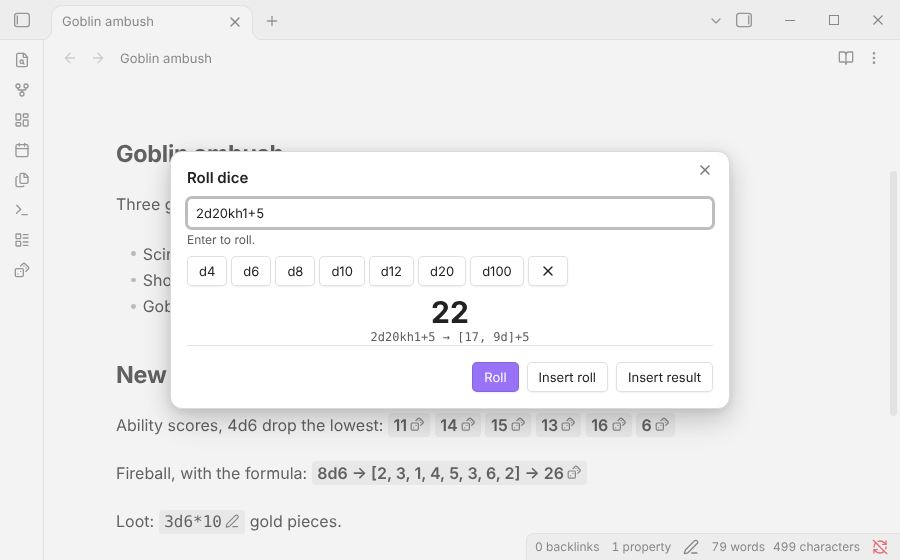
| Roll dice… | Opens a dialog: type a formula, or build one with the d4–d100 buttons, and roll. In a note, insert the roll or its result at the cursor. |
| Open roll history | Shows every roll in the right sidebar, newest first, with its dice and the note it came from. Roll again, edit or copy any of them. |
| Insert inline dice roll | Turns the selected formula into a dice: roll, or inserts dice: 1d20 ready to edit. |
| Write the results of dice-mod rolls in this note | Rolls every dice-mod: code in the note and writes the results, in one undo step. |
| Reroll every dice roll in this note | Rolls everything in the note again. |
None has a hotkey by default; assign them in Settings → Hotkeys.
Settings
- Show a dice button next to each result.
- Show the formula with the result, such as
2d6+3 → [3, 4]+3 → 10. - Rounding of results with decimals: two decimals (the default), round, round up or round down.
- Plus sign on positive results.
- Faces of a die written without them: 100 by default, as in Dice Roller.
- Write the formula and the dice with
dice-mod:, and Escape Markdown in what it writes so[75, 20]does not read as a link. - Add rolls from notes to the history, and how many rolls to keep.
- Saved formulas: give a formula a name, such as
attackfor1d20+5, and use the name alone (dice: attack) or inside a formula (dice: attack + 2).
Installation
In Obsidian, open Settings → Community plugins → Browse and search for "Dice Rolls".
More plugins by Siulved54
| Plugin | What it does | Source |
|---|---|---|
| Shared Blocks | Write a block of text once and reuse it in any note. Edit the source and every reference re-renders live. | shared-blocks |
| Text Case and Cleanup | Change case, make camelCase or slugs, sort lines and remove duplicates, and repair text pasted out of a PDF, without touching code or URLs. | text-format |
| Typography as You Type | Curly quotes, dashes and ellipses as you type, kept out of code and maths, with Backspace to take one back. | smart-typography-plugin |
| Section Numbering | Number headings as an outline (1, 1.1, 1.2) and keep every link to them working when they renumber. | section-numbering |
| Spreadsheet to Table | Paste cells from Excel or Google Sheets as a Markdown table with a real header, insert CSV files, and copy tables back out. | spreadsheet-to-table |
| Hybrid Line Numbers | Relative and hybrid line numbers for Vim-style jumps, where a folded section counts as one line. | hybrid-line-numbers |
| List Item Callouts | Colour a single list item as a callout by starting it with a character such as &, ! or ?. | list-item-callouts |
| Folder Counts | See how many notes or files each folder holds, right in the file explorer, with a vault total and folder exclusions. | folder-counts |
| Note Reading Time | Reading time of the current note or your selection in the status bar, optionally saved to a property. | note-reading-time |
| Task Rollover | Roll unfinished tasks from your last daily note into today's when it is created, with a real undo. | task-rollover |
| Zoom Into Section | Zoom into a heading or list item to see only it and its contents, with a breadcrumb bar to climb back out. | zoom-into-section |
| Link Title on Paste | Paste a web address and get a Markdown link with the page's title, fetched in the background and undone in one step. | link-title-on-paste |
| Update Radar | Checks your installed community plugins for updates in the background, shows what changed, and flags the ones that look abandoned. | community-update-checker |
| Dataview to Bases | Convert Dataview queries into Bases blocks, and see which queries in your vault can be converted. | dataview-to-bases |
| Line Editing Commands | Duplicate, join, sort and reverse lines, insert blank lines and jump to a line number, with multi-cursor support. | line-editing-commands |
| Note Mover Rules | Move notes into folders by ordered rules on tags, properties, titles and paths, with a preview before any bulk move. | note-mover-rules |
| Tab History | Keeps each tab's back and forward history across restarts, and adds commands to move, maximize and close tabs. | tab-history |
| URL Cards | Shows web addresses as cards with title, description and image, and reads existing cardlink blocks. | url-cards |
| Vim Config | Loads a vimrc-style file from your vault so your key mappings and editor commands are ready when vim mode starts. | vim-config |
| Task Archive | Moves completed tasks, with their sub-items, into an archive section or note. | task-archive |
| Revisit Later | Link the current note into a future daily note, with a date typed in plain English, so it comes back when you want to review it. | revisit-later |
| Explorer Colors Plus | Color files and folders in the file explorer, with a palette, cascading to children, and import from File Color. | explorer-colors-plus |
| Book Lookup | Create book notes from Open Library or Google Books, with cover images, ISBN search and Book Search compatible templates. | book-lookup |
| Web Search Menu | Search the web for selected text or the note title from the right-click menu, with engines you define. | web-search-menu |
| Word Lookup | Look up any word in a sidebar dictionary with definitions, phonetics, synonyms and antonyms, or create a note for it. | word-lookup |
| Quick Translate | Translate the selection or a whole note into another language with no account, keeping links, code and front matter untouched. | quick-translate |
All of them are in the community directory: Settings -> Community plugins -> Browse, then search for the name.
For plugin developers
Search results and similarity scores are powered by semantic analysis of your plugin's README. If your plugin isn't appearing for searches you'd expect, try updating your README to clearly describe your plugin's purpose, features, and use cases.