Disciples Journal
approvedby Scott Tomaszewski
Embed Bible references and passages in your notes and read the Bible.
Disciples Journal - Bible Verse Reference Plugin for Obsidian
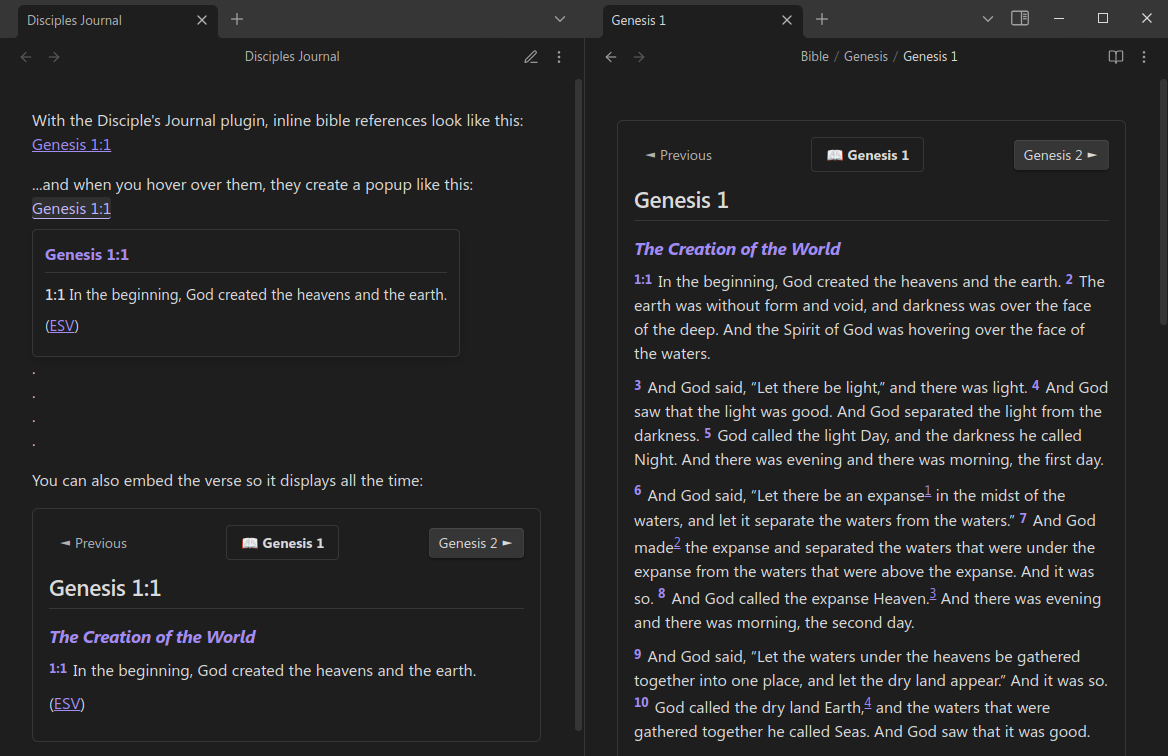
This plugin enhances your Bible study and journaling in Obsidian by rendering Bible verse references and passages directly in your notes.
Features
Inline Verse References
Type a Bible reference in an inline code block:
`Genesis 1:1`
The plugin transforms it into a reference with enhanced features:
- Hover over the reference to see a popup with the verse text
- The popup remains visible even when you move your cursor onto it
- Click the reference inside the popup's heading to open or create a chapter note, which automatically scrolls to the verse
Full Passage Rendering
For longer passages, use a code block with the "bible" language specifier:
```bible
Genesis 1:1-10
```
This renders the entire passage directly in your note.
Enhanced ESV HTML Format
The plugin supports ESV's HTML formatted passages with:
- Proper typesetting for poetic passages
- Section headings
- Footnotes and cross-references
- Special formatting (like Words of Christ)
Download on Demand
With an ESV API token, the plugin automatically downloads Bible passages:
- Enter your ESV API token in settings
- Enable "Download on Demand"
- Referenced passages are downloaded automatically
- Downloaded content is saved locally for future use
Organized Content Structure
Bible content is saved in an organized folder structure:
Bible/ESV/
  ├── Genesis/
  │   ├── Genesis 1.md
  │   ├── Genesis 2.md
  │   └── ...
  ├── Exodus/
  │   ├── Exodus 1.md
  │   └── ...
  └── ...
You can customize this path in settings.
Supported Reference Formats
The plugin supports various Bible reference formats:
- Single verses:
Genesis 1:1,John 3:16 - Verse ranges:
Genesis 1:1-10,John 3:16-18 - Entire chapters:
Genesis 1,Psalm 23 - Multi-chapter passages:
Matthew 5:3-7:29 - Books with spaces:
1 Corinthians 13:4-7,Song of Solomon 2:1
Settings
Access plugin settings in Settings → Disciples Journal:
-
Display Settings:
- Toggle inline verse and full passage rendering
- Show/hide navigation for verse references
- Hide footnotes in rendered passages
- Hide footnotes in hover preview popups
- Customize verse font size
-
Bible Version Settings:
- Currently supports English Standard Version (ESV)
-
Bible Content Vault Path:
- Specify where chapter files are saved (default:
Bible/ESV)
- Specify where chapter files are saved (default:
-
ESV API Settings:
- Enter your token from api.esv.org
- Enable/disable automatic downloading
Installation
From Obsidian Community Plugins
- In Obsidian, go to Settings → Community plugins → Browse
- Search for "Disciples Journal"
- Click Install, then Enable
Manual Installation
- Download the latest release from the releases page
- Extract to your Obsidian plugins folder:
.obsidian/plugins/ - Enable the plugin in Obsidian's community plugins settings
Getting an ESV API Token
To use download-on-demand:
- Go to api.esv.org and create an account
- Log in and create a new API key
- Copy the token and paste it into the plugin settings
Scripture Copyright
Scripture quotations marked "ESV" are from the ESV® Bible (The Holy Bible, English Standard Version®), copyright © 2001 by Crossway, a publishing ministry of Good News Publishers. Used by permission. All rights reserved.
Feedback and Contributions
For issues or suggestions, please open an issue on GitHub.
License
This project is licensed under the MIT License - see the LICENSE file for details.
For plugin developers
Search results and similarity scores are powered by semantic analysis of your plugin's README. If your plugin isn't appearing for searches you'd expect, try updating your README to clearly describe your plugin's purpose, features, and use cases.