Double-Click Image Opener
approvedby atman-33
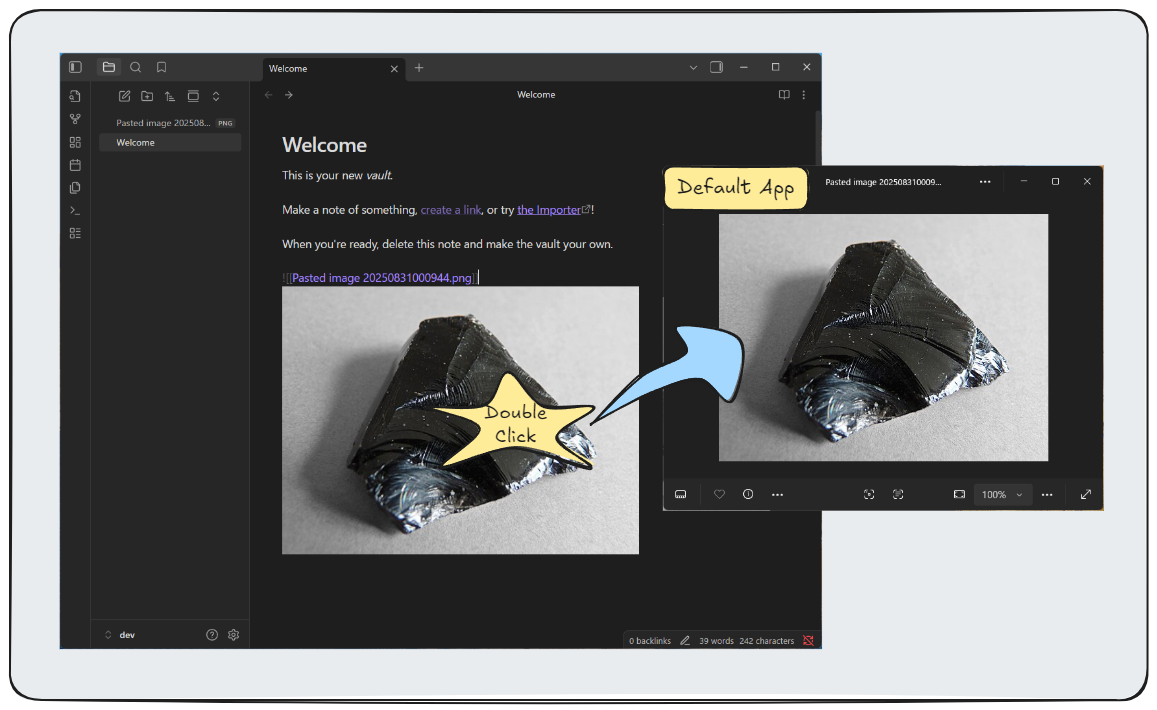
Open images with your system's default application by double-clicking.
★ 4 stars↓ 540 downloadsUpdated 7mo agoMIT
Double-Click Image Opener
A lightweight Obsidian plugin that allows you to open images in your default system application by double-clicking them.
Features
- Double-click any image to open it in your default system image viewer
- Works across all view modes (Reading, Live Preview, Source)
- Supports all common image formats (PNG, JPG, GIF, WebP, SVG, etc.)
- Cross-platform support (Windows, macOS, Linux)
How to Use
- Install and enable the plugin in Obsidian settings
- Double-click any image in your vault
- The image opens in your default system image viewer
Installation
From Obsidian Community Plugins
- Open Obsidian Settings
- Go to Community Plugins
- Search for "Double-Click Image Opener"
- Install and enable the plugin
Manual Installation
- Download the latest release
- Extract files to
.obsidian/plugins/double-click-image-opener//.obsidian/plugins/double-click-image-opener/ + +- main.js +- manifest.json +- styles.css - Enable the plugin in settings
Settings
- Show success notifications: Display notification when image opens (optional)
Access via: Settings → Community Plugins → Double-Click Image Opener
Troubleshooting
Images don't open?
- Check that the plugin is enabled
- Verify the image file exists
- Ensure you have a default image viewer set
Permission errors?
- Check file permissions
- Try opening the image manually first
License
MIT License - see LICENSE file for details.
For plugin developers
Search results and similarity scores are powered by semantic analysis of your plugin's README. If your plugin isn't appearing for searches you'd expect, try updating your README to clearly describe your plugin's purpose, features, and use cases.