by Murat Mayadağ
Two-way Google Drive sync for your Obsidian vault on desktop and mobile. Picks up files other apps put in the folder, keeps both versions on conflict and confirms deletions. No telemetry.
Drive Bridge












Two-way sync between your Obsidian vault and a Google Drive folder, on desktop and mobile. Unlike plugins that only see the files they created, Drive Bridge picks up every file in the folder, so notes from other apps, AI assistants, scripts or teammates show up like any other note.
- Nothing silently lost: conflicting edits are merged or kept side by side, and large deletions stop and ask.
- Your own Google OAuth client: files move only between your device and your Google Drive, with no server in between.
- No telemetry, no analytics and no code downloaded at runtime.
[!WARNING] Back up your vault first. Two-way sync can overwrite or delete files on either side.
How it fits together
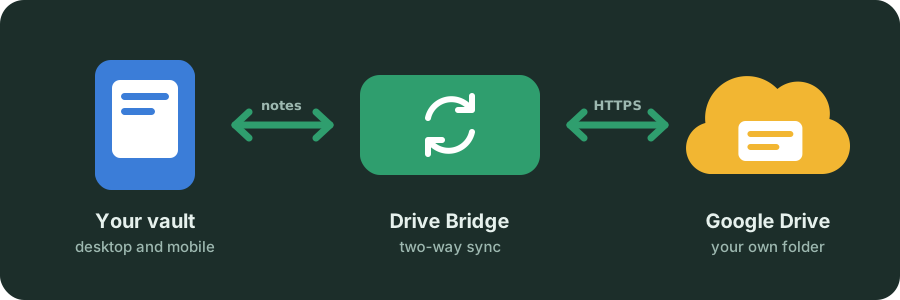
Drive Bridge keeps your vault and one Google Drive folder in step, on every device you install it on. How other tools get notes into the folder is up to them and Drive's sharing settings. Seeing more also means more can go wrong, so safety comes first.
Features
Two-way sync · Sees every file · Nothing silently lost · Easy setup · Recovers on its own · Private by design
Install
Install Drive Bridge from the Obsidian Community directory, or in Obsidian: Settings → Community plugins → Browse, search for Drive Bridge, then Install and Enable.
To try pre-releases before they reach the directory, use BRAT; the steps are in TECHNICAL.md.
Set up
- Create a Google Cloud OAuth client (Desktop app) with the Drive API enabled.
- On each device, open Google account in Drive Bridge settings, enter the client ID and secret, press Sign in with Google, and paste back the address the browser ends on. No terminal needed; a token from rclone works too.
- Pick a Drive folder and run your first sync.
Step-by-step instructions and the reasoning behind each choice are in TECHNICAL.md.
Privacy
The only requests Drive Bridge makes are to Google, and to a webhook URL if you set one yourself. It collects no usage statistics, has no analytics or crash reporting, and never touches the clipboard. Setup links to the Google Cloud Console, GitHub and the coffee page open in your browser; the plugin sends nothing to them. Details, including every address the plugin calls, in PRIVACY.md.
Support
If the plugin saves you a headache, you can star it on GitHub or buy me a coffee. The settings link to both at the bottom; they open in the browser and the plugin sends nothing. Contributions of code and bug reports are welcome too, see CONTRIBUTING.md.
Drive safe :) 
License
Author
For plugin developers
Search results and similarity scores are powered by semantic analysis of your plugin's README. If your plugin isn't appearing for searches you'd expect, try updating your README to clearly describe your plugin's purpose, features, and use cases.