by 69jesse
Easy, uncompromising Git sync for your vault, on desktop and mobile.
Easy Git Sync
Sync your Obsidian vault with a GitHub repository, on desktop and mobile.
- Runs entirely inside Obsidian, phones included: no git or other app required.
- Edits from different devices merge line by line. Where two touch the same line, both versions stay in the note, one tap to keep either.
- Nothing is lost: an edit beats a deletion, and every version stays in the history.
- An ordinary git repository, one commit per sync, named after the device and what changed.
Setup
- Install Easy Git Sync from Community plugins and open its settings.
- Press Create token on GitHub. The form opens filled in: under Repository access, pick your vault's repository (an empty private one is fine), then generate the token and copy it.
- Paste it into Access token, press Choose to pick the repository, then Start syncing. You see what will be uploaded, downloaded and merged before anything happens.
Do the same on your other devices. The token is kept in Obsidian's keychain on each device and never synced.
If the vault and the repository both already have notes, you choose: merge them, make the vault a copy of the repository, or the other way round. Files that get replaced go to Obsidian's trash first.
Turn the Git plugin off on devices that use Easy Git Sync. It waits until it is.
Conflicts
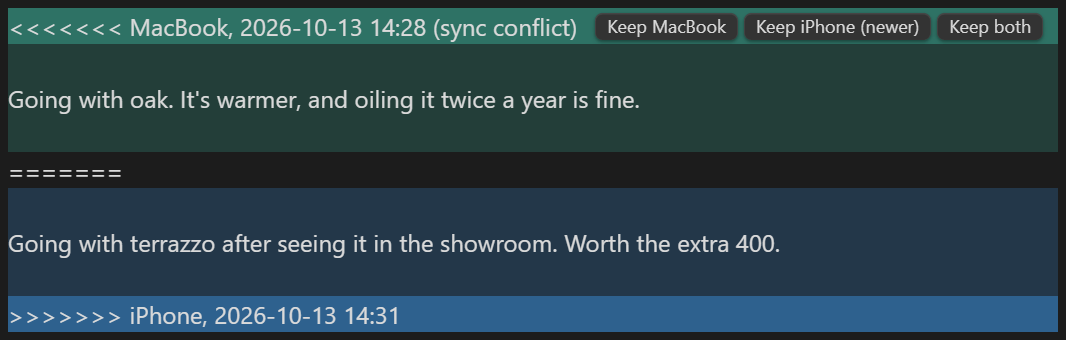
The block is ordinary git conflict markers, so any editor or git tool can read it too. Resolve all sync conflicts with the newer version settles every block at once.
Privacy
Easy Git Sync needs a GitHub account and connects only to GitHub: api.github.com, and codeload.github.com for the first download of a large repository. It sends your vault to the repository you pick and nowhere else, and has no telemetry.
On desktop, if the vault folder is itself a clone of the same repository, it runs git in that folder to keep the clone up to date.
Limits
- GitHub only, for now. Other hosts may follow if there is demand.
- Files over 100 MB are not synced, since GitHub refuses them.
- Two files whose names differ only in capital letters cannot both exist on most devices; the second is skipped with a notice.
For plugin developers
Search results and similarity scores are powered by semantic analysis of your plugin's README. If your plugin isn't appearing for searches you'd expect, try updating your README to clearly describe your plugin's purpose, features, and use cases.