English Text Interpreter
approvedby julioagh
Contextual interpretation of selected English text powered by a local LLM (Ollama). Explains meaning, tone, cultural context and intent. - This plugin has not been manually reviewed by Obsidian staff.
English Text Interpreter
Obsidian plugin for contextual interpretation of selected English text, powered by a local LLM via Ollama. No data leaves your machine.
Demo
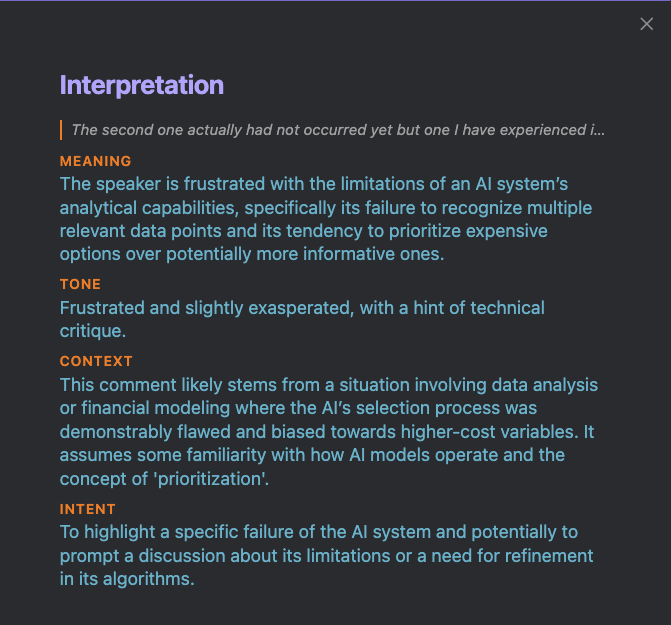

What it does
Select any English text in your notes and run Interpret selected text from the Command Palette. A panel opens with four dimensions:
| Field | Description |
|---|---|
| Meaning | What the text actually means in context — not a literal translation |
| Tone | Emotional register and attitude (formal, sarcastic, polite but firm, etc.) |
| Context | Cultural, idiomatic, or situational background needed to fully understand it |
| Intent | What the writer is trying to achieve (inform, warn, persuade, joke, etc.) |
Output language is configurable (Spanish, English, Portuguese, French, German).
Requirements
- Ollama running locally
- A pulled model (default:
gemma3:4b)
ollama pull gemma3:4b
Installation
From Obsidian Community Plugins (recommended)
- Open Settings → Community plugins → Browse
- Search for English Text Interpreter
- Install and enable
Manual
- Download
main.js,manifest.json, andstyles.cssfrom the latest release - Copy them to
.obsidian/plugins/english-text-interpreter/inside your vault - Enable the plugin in Settings → Community plugins
Settings
| Setting | Default | Description |
|---|---|---|
| Ollama endpoint | http://localhost:11434 | URL where Ollama is running |
| Model | gemma3:4b | Any model pulled in Ollama (e.g. gemma3:12b, llama3.2) |
| Interpretation language | Spanish | Language for the interpretation output |
Usage
- Select English text in any note (at least 5 characters)
- Open the Command Palette (
Ctrl/Cmd + P) - Run English Text Interpreter: Interpret selected text
- Read the interpretation panel
License
For plugin developers
Search results and similarity scores are powered by semantic analysis of your plugin's README. If your plugin isn't appearing for searches you'd expect, try updating your README to clearly describe your plugin's purpose, features, and use cases.