by alei
Read local ebooks with progress, bookmarks, excerpts, and research notes, with optional online translation. 在本地阅读电子书,支持进度、书签、摘录、研究笔记与可选的在线翻译。
EzReader
English (this file) · 中文 → README.zh-CN.md
Read local ebooks in Obsidian — progress tracking, highlights, research notes, optional online translation.
Quick Start
- Download
main.js,manifest.json,styles.cssfrom the latest release into<Vault>/.obsidian/plugins/ez-reader/. - Settings → Community plugins → enable EzReader.
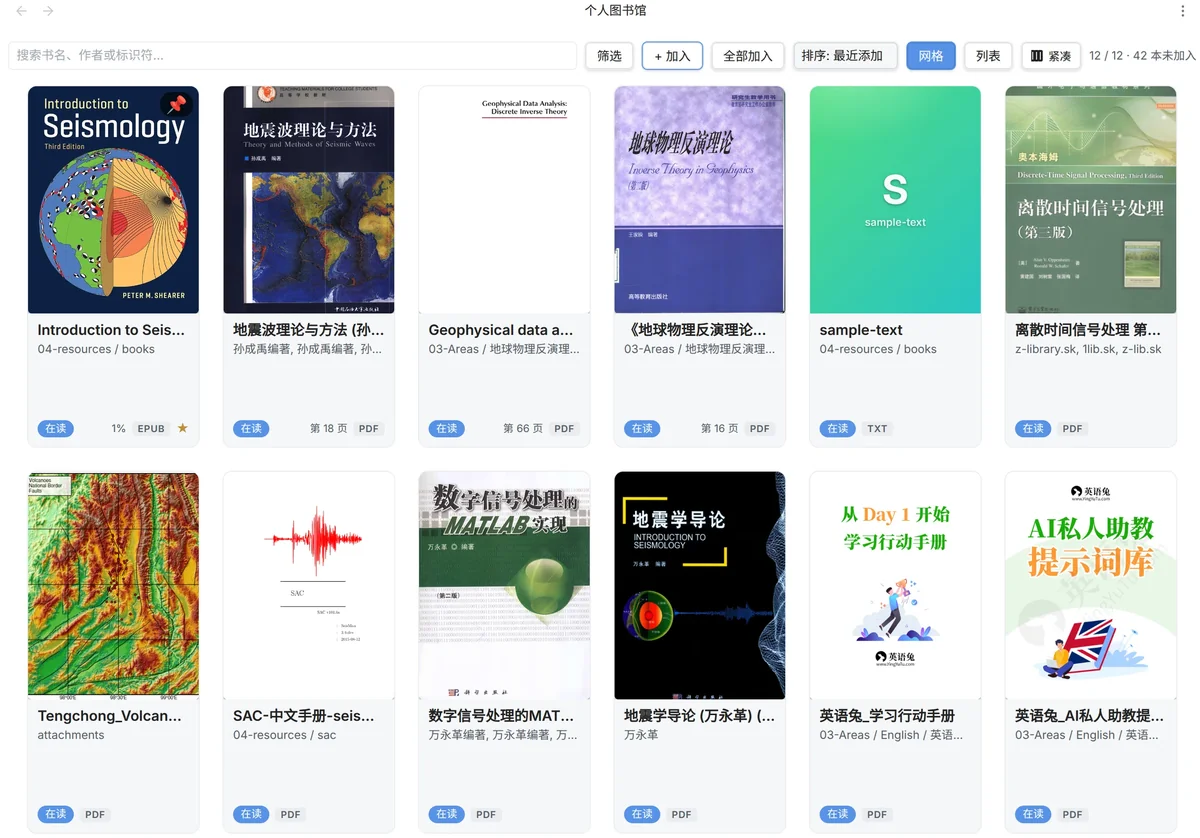
- Click the 📚 ribbon icon (or run "EzReader: Open Shelf"). Pick a few EPUB / PDF / TXT / MOBI files and add them.
- Click any cover to read. Select text → a menu pops up after 180 ms with Thought / Excerpt / Translate / Copy. Press
?inside the reader for the full shortcut list.
Features
Multi-format reading — EPUB (foliate-js), PDF (Obsidian's built-in viewer with a custom overlay for highlights + selection menu), TXT (paragraph-aware pagination), MOBI / AZW3 (per-chapter pages via @lingo-reader/mobi-parser).
Goodreads-style shelf — grid / list views, sortable, filterable (status / language / format / progress / recently opened), pinnable, cover cache. Click a status pill to cycle Not started → Reading → Finished → Abandoned.
WeRead / Apple Books feel — appearance modal (font 60–200 %, line height, margin, theme system/light/dark/sepia, paginated/scrolled), immersive mode on tablet, page-turn animation, touch-swipe, floating selection menu with shortcut labels printed under each button.
Markdown-native annotations — bookmarks, excerpts, and thoughts are saved as .md files inside your Vault. Excerpts get Obsidian block IDs (^ex-uuid) so any note can backlink with [[book-note#^<excerptId>]].
Quick actions — H saves an excerpt with no modal, B adds a bookmark with auto-label Chapter · %, Shift+H opens the modal flow for note + tags, Shift+T writes a free-form thought or translates (context decides).
6 translation providers — Youdao / DeepL / Google Cloud / MyMemory (free, no key) / OpenAI-compatible (DeepSeek, Zhipu, Qwen, OpenAI) / Anthropic-compatible (e.g. MiniMax). Pick one and translate selection in EPUB / TXT / MOBI as a side drawer, or in PDF as a small draggable popover.
Book details modal — right-click any book on the shelf → 📖 Book details → see publisher / publication date / language / ISBN / page count / format / size / file path, current reading progress, total reading time, last-30-days bar chart (per-day minutes with hover tooltip), reading streak 🔥, and the 10 most recent reading sessions. Copy the book's wiki-link with one click.
Real reading-time tracking — counts only when you're actively reading (active leaf + tab visible + window focused + interacted within the last 30 s). Idle leaves after 30 s of no input — no more inflated totals when you walk away.
Keyboard shortcuts — full keyboard navigation everywhere. TOC panel: ↑↓ to move, ←/→ to expand/collapse, Enter to jump, with visited/current/unvisited progress dots persisted across sessions.
Format-specific notes
EPUB
Powered by foliate-js 1.0.1 (with a customElements patch). Two-page / scroll modes. Last position auto-restored.
For the best PDF reading experience, install obsidian-pdf-plus. It is a much more capable PDF reader (annotations, search, outline, page jump, etc.) than EzReader's thin overlay. Heads-up: PDF++ replaces Obsidian's built-in PDFView DOM, so EzReader's PDF overlay features below do not work alongside it — pick one or the other.
EzReader itself defers to Obsidian's built-in pdf view — standard [[path.pdf]] links work out of the box. A transparent overlay adds (only when no third-party PDF plugin is active):
- Selection menu with the same Thought / Excerpt / Translate / Copy actions as EPUB.
- Translation popover anchored to the selection, with draggable header (clamped to viewport). Has Copy + Change-target-language + × buttons.
- Floating 📝 button → bookmarks / excerpts list with one-click jump back. The button itself is draggable — its position is persisted per book via
localStorage, so it stays where you put it across Obsidian restarts. - Highlight echo — reopen a PDF and yellow highlight rectangles are drawn on each page by text-anchor matching.
- Auto-attach on restart — when Obsidian restores previously open PDF leaves, the overlay attaches automatically (no more "PDF translations don't work after restart").
- PDF highlight click → notes — clicking an existing PDF highlight opens the notes sidebar, jumps to that excerpt, and enters inline note edit mode.
TXT / MOBI / AZW3
Three plain / chapter-text formats share PagedTextSession — same selection / highlight / theme UX as EPUB. TXT must be UTF-8 (no GBK auto-detection).
Keyboard Shortcuts
| Action | Key | Action | Key |
|---|---|---|---|
| Previous page | ← / PageUp | Toggle notes sidebar | S |
| Next page | → / PageDown | Toggle TOC | T |
| Quick highlight | H (bare) | Toggle immersive | Shift+F |
| Quick bookmark | B (bare) | Show help | ? |
| Excerpt (modal) | Shift+H | Close panel | Esc |
| Translate / Thought | Shift+T | Copy selection | C |
prev / next / translate / highlight / toggleSidebar / toggleToc are remappable in Settings. Inside the TOC panel: ↑↓ Home End ←→ Enter Space Esc.
Translation
The only feature that touches the network, and only when you actively click the button. We send only the selected fragment, never the file or surrounding context. Configuration lives in your local data.json. The plugin uses Obsidian's requestUrl to bypass the renderer CSP.
| Provider | Free quota | Needs | Notes |
|---|---|---|---|
| Youdao | 100 chars / month | appKey + appSecret | Stable inside mainland China |
| DeepL | 500 K chars / month (:fx key) | API key | High quality |
| Google Cloud Translation v3 | 500 K chars / month | service-account JSON | Card on file |
| MyMemory | 10 K chars / IP / day | nothing | Truly zero signup |
| OpenAI-compatible | your balance | baseUrl + key + model | DeepSeek / Zhipu / Qwen / OpenAI |
| Anthropic-compatible | your balance | baseUrl + key + model | e.g. MiniMax (https://api.minimax.cn/anthropic) |
Default target language is zh-CN. Switching providers wipes the old key (formats are not interchangeable).
Installation
From a GitHub release (recommended)
Download the three files from Releases into <Vault>/.obsidian/plugins/ez-reader/. Open Obsidian → enable EzReader in Community plugins.
From source
pnpm install --frozen-lockfile
pnpm run build   # produces main.js / styles.css / manifest.json
cp main.js styles.css manifest.json /path/to/<Vault>/.obsidian/plugins/ez-reader/
Requires Node.js ≥ 22.13 and pnpm ≥ 11.9.
FAQ
PDF opens but no notes sidebar / no selection menu?
A third-party plugin (PDF++ etc.) is taking over Obsidian's PDFView and changing its DOM, so EzReader's overlay cannot attach. Check for [ez-reader] handleProtocol: PdfOverlay not found in the console. Reading still works — page jumps fall back to setEphemeralState / openLinkText("#page=N"). We recommend keeping PDF++ for the better PDF experience and accepting that EzReader's PDF overlay won't fire there; temporarily disable PDF++ to test the overlay.
Opening a large MOBI freezes the UI for 2 – 5 s?
@lingo-reader/mobi-parser's createParser is a synchronous decompressor. Tracked as P1 polish — next version moves it to a Web Worker. Files under 5 MB are fine.
TXT shows mojibake?
EzReader only reads UTF-8. Re-encode GBK / GB18030 files as UTF-8 (VSCode / Notepad++) before importing. decodeText runs strict UTF-8 → GB18030 → permissive UTF-8 as a fallback for some GBK files.
Translation says "API key not configured"?
By design — we never silently send text to a default endpoint. Pick a provider in Settings → EzReader → Translation and fill the key. See PRIVACY.md.
Progress doesn't sync to my Android tablet?
Syncthing excludes .obsidian/ by default — including data.json. Configure Syncthing to also sync <Vault>/.obsidian/plugins/ez-reader/data.json. Notes + book info + reading-session logs live in <Vault>/ezreader/ (a Vault-root folder) so they sync automatically.
Where do my old v0.2.x notes go?
v0.3.0 unifies everything under <Vault>/ezreader/:
ezreader/notes/<title>-<id>.md     ← excerpts + thoughts (was: ezreader-notes/阅读笔记/)
ezreader/info/<title>-<id>.md      ← book metadata (YAML frontmatter)
ezreader/sessions/<title>-<id>.jsonl ← per-session reading log
First launch auto-migrates your old ezreader-notes/阅读笔记/*.md into ezreader/notes/<title>-<id>.md and writes migratedToV030: true to data.json. To re-run, set migratedToV030: false manually and restart Obsidian.
Reading time looks lower than v0.2.x?
That's expected. v0.2.x counted leaf-active time, so leaving the reader open while you walked away would inflate the total. v0.3.0 stops counting after 30 s of no input (no mouse / key / scroll / touch / wheel) or when the tab is hidden or the window loses focus. The trade-off: numbers are honest, but you'll need to actually interact for it to count.
Will upgrading wipe my data?
No. Upgrading only swaps main.js + manifest.json + styles.css. All state lives in data.json with optional schema fields and safe fallbacks.
How do I uninstall?
Delete <Vault>/.obsidian/plugins/ez-reader/. To preserve data, back up data.json + data/covers/ first.
Known Limitations
Click to expand
- Scanned PDFs have no text layer (no OCR).
- Cross-page PDF selections save as two separate highlights.
- PDF "back to source" link lands on the right page but may need a small scroll to align (no subpath offset support in Obsidian PDFView yet).
- Large MOBI files block the main thread for 2 – 5 s (known issue).
- Cross-page TXT excerpts not supported (single-page rendering).
- Android untested.
- AZW declared but no reader yet.
- GBK / GB18030 TXT files need manual re-encoding to UTF-8.
- Translation providers see whatever you select — keep sensitive content out of selections.
- Reading-time tracking needs active interaction (mouse / keyboard / scroll / touch). It auto-pauses after 30 s of no input, when you switch tabs, or when Obsidian loses window focus. This is more accurate than v0.2.x (which only tracked leaf-active time and over-counted idle time) but means you have to actually interact for it to count.
- Reading-session log grows over time — every flush appends one JSON object to
<Vault>/ezreader/sessions/<title>-<id>.jsonl. At realistic reading rates (~50 sessions/day), the file is ~5 KB/day, ~2 MB/year. We currently read the whole file on every book-details modal open; if you have years of heavy reading and notice slowness, that's the cause. (P1: cache sessions in memory.)
Privacy
- Source files are read-only — never copied, moved, or deleted.
- All state (bookmarks, excerpts, favorites, progress, settings, cover cache index) lives in
<Vault>/.obsidian/plugins/ez-reader/data.json. - Cover images cache into
<Vault>/.obsidian/plugins/ez-reader/data/covers/. - Per-book annotations (notes), per-book metadata (info), and per-book reading-session logs go under
<Vault>/ezreader/(auto-created on first save — nomkdirneeded). Dataview / full-text search can read these directly. Reading-session logs are append-only JSONL — no personal content, only{startedAt, endedAt, durationMs, progressStart, progressEnd, chapter}. - Translation is the only outbound network action, and only on explicit user action.
Architecture
Strict core / adapters / ui port-and-adapter layers. core/ is pure logic with no Obsidian imports; adapters/ wraps Obsidian / foliate / mobi-parser / translation providers; ui/ is DOM rendering. Tests cover only core/ (tests/core/*.test.ts, 388 / 388 passing).
Development
pnpm test           # 388 / 388 unit tests
pnpm run build      # type-check + esbuild bundle
pnpm run dev        # watch mode (Obsidian-side reload required)
Change locally, verify in your vault, then git commit && git push. The release workflow (.github/workflows/release.yml) builds and uploads the three plugin files on every tag.
License
MIT © alei37. Third-party components retain their respective licenses — see LICENSES/.
中文版 README.zh-CN.md · 详细变更 CHANGELOG.md
For plugin developers
Search results and similarity scores are powered by semantic analysis of your plugin's README. If your plugin isn't appearing for searches you'd expect, try updating your README to clearly describe your plugin's purpose, features, and use cases.