by zyk
Lay out a family tree on a canvas: a shared people library, several layouts, one generation per row, snap-to-grid cards, compact and centre, a kinship calculator, themes, Markdown export and JSON backups.
Family Tree Canvas
English · 简体中文
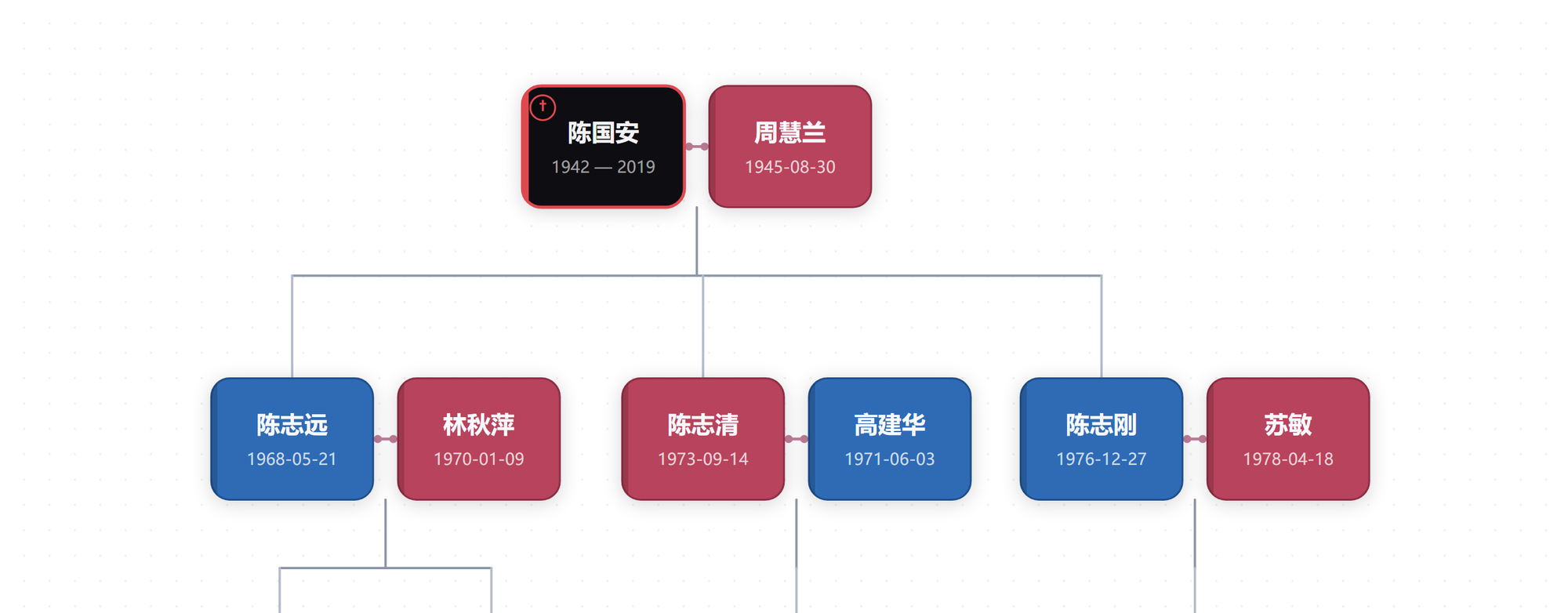
Draw a family tree by hand on an Obsidian canvas — cards, one generation per row, and no note per person required.
Why this one
Most genealogy plugins work backwards from your notes: they read relations out of properties or links, then generate the diagram. That assumes every relative already has a note, with the right fields spelled the right way — and the picture can only show what those fields can express.
This one starts from an empty canvas instead.
| Note-driven plugins | Family Tree Canvas | |
|---|---|---|
| Where relations live | note properties and links | the plugin's own graph.json |
| A note per person | required | not required — link one only if you want to |
| Where a card goes | computed from the data | you drag it; rows snap themselves |
| Getting started | set up a property schema first | right-click, type a name, done |
- No notes required. A person is a card, and a name is enough. Birth, death, sex, a note link — all optional. No folder convention, no frontmatter, no relation IDs to invent. Link a note when one exists; leave the rest as names only, and your vault stays exactly as it was.
- Add people by clicking, not by typing. Right-click a card → add child, father, mother, spouse or sibling. Right-click the empty canvas → add a person, or pick someone already in the people library. That is the whole workflow.
- You place the cards. Drag sideways, release, and the card settles into a generation row. Position is data you control, so remarriage, adoption, a child raised by grandparents, or a branch you only know two generations of all fit — no auto-layout has to compromise on your behalf.
- What you see is the current tree. Every edit redraws immediately. There is no "generate" step and nothing to keep in sync.
Features
- One people library, many layouts. The same people can appear in a whole-family layout, a "my household" layout and a "grandpa's branch" layout. Each person is stored once: fix a name or a birth date anywhere and every layout follows.
- Snap to rows. Drag a card sideways freely; drop it and it lands in a generation row. Empty rows are cleaned up when you compact.
- Compact and center. A tidy-tree pass: children line up under their parents, the tree tightens, parents sit centered over their children. Run it again and nothing changes.
- Swap a couple. Flip a husband and wife left/right from the right-click menu, and the subtree below follows.
- Retype a relation. Add a parent to someone who already has two, disconnect a wrong parent–child or spouse line, and the connectors redraw — including the shared drop line couples use for their children.
- Kinship calculator. Pick two people and it names the relationship in Chinese (称呼) — 公公, 大姨子, 堂侄女 — and lists the chain it walked. Relatives up to 8 steps away are covered, with a searchable person picker.
- Themes. Six presets, plus full customisation: male / female / unspecified card colours, card text, the deceased's fill and border, parent–child and spouse line colours, line width. Hover and selection borders are derived automatically so they stay visible on light cards.
- Export to Markdown. Turn a layout into a readable note: one section per generation, marriages and siblings spelled out, links to whichever people have notes.
- Backups. One click writes a timestamped JSON containing the people library and every layout to a folder you choose. Restore from a list; a safety copy of the current state is taken first.
- English and 简体中文. Switch in settings; the whole interface follows.
Install
Once published, search for Family Tree Canvas in Settings → Community plugins → Browse.
Until then, install manually:
- Download
main.js,manifest.jsonandstyles.cssfrom the latest release. - Put the three files in
<your vault>/.obsidian/plugins/family-tree-canvas/. - Reload Obsidian and enable Family Tree Canvas in Settings → Community plugins.
Usage
- Run Open family tree from the command palette, or click the network icon in the ribbon.
- Right-click an empty spot → Add person. Type a name; everything else can stay blank.
- Grow the tree from the card: right-click → Add child / father / mother / spouse / sibling. People already in the library can be pulled in with Add from people library.
- Arrange by dragging. Couples can be flipped with Swap sides with "…".
- When the layout drifts, hit Compact and center; Undo last compaction puts it back.
Where the data lives
| File | Contents |
|---|---|
.obsidian/plugins/family-tree-canvas/graph.json | The people library and every layout |
.obsidian/plugins/family-tree-canvas/data.json | Plugin settings |
The backup folder you choose (default family/家谱备份) | Timestamped JSON backups |
Your notes are only ever pointed at — the plugin never creates, renames or rewrites them.
Uninstalling the plugin deletes its folder, including graph.json. Export a backup first — that's what the download icon in the toolbar is for.
Privacy
No network requests, no telemetry, no accounts. Everything stays in your vault, and the plugin works fully offline.
Development
npm install
npm run build   # bundles src/ into main.js
npm run dev     # rebuild on change
Source lives in src/:
| File | Role |
|---|---|
src/main.js | Plugin entry: commands, backup/restore, settings tab |
src/view.js | The canvas view: pan, zoom, drag, snapping, toolbar |
src/layout.js | Layout computation, connector geometry, tidy-tree compaction |
src/model.js | Data model v4, people library, layouts, persistence |
src/modals.js | Person editor, layouts manager, kinship, backup, theme dialogs |
src/kinship.js | Relationship path search and Chinese kinship naming |
src/theme.js | Theme presets, colour derivation, CSS variable output |
src/i18n.js | English / Chinese strings |
src/backup.js | Backup envelope format, parsing, formatting |
License
MIT — see LICENSE.
For plugin developers
Search results and similarity scores are powered by semantic analysis of your plugin's README. If your plugin isn't appearing for searches you'd expect, try updating your README to clearly describe your plugin's purpose, features, and use cases.