File Ignore
approvedby chenfeng
Controls file indexing by managing dot prefixes on files/folders to truly hide/exclude them, providing a .gitignore-like experience.
File Ignore
An Obsidian plugin that controls indexing by adding or removing dot prefixes on files and folders, providing a pattern-based ignore workflow for large vaults.



File Ignore renames files and folders on disk. Review the rename preview before applying changes.
Motivation
I built File Ignore while using Obsidian to write in a Next.js blog repository. Indexing its /node_modules directory made the vault slow to open.
Because Obsidian skips dot-prefixed hidden files and folders during indexing, File Ignore lets you toggle dot prefixes on matching paths to exclude them from indexing while keeping them on disk.
Common vault issues
When your vault contains code repositories, build artifacts, or large non-note directories:
- Slow startup and indexing: Obsidian attempts to index every file, resulting in slow launch times and high resource usage.
- Cluttered search and graph: Results in global search and nodes in graph view become overwhelmed with dependency files and build caches.
- Built-in exclusion limits: Obsidian's native "Excluded files" setting does not always prevent indexing overhead for massive folder trees.
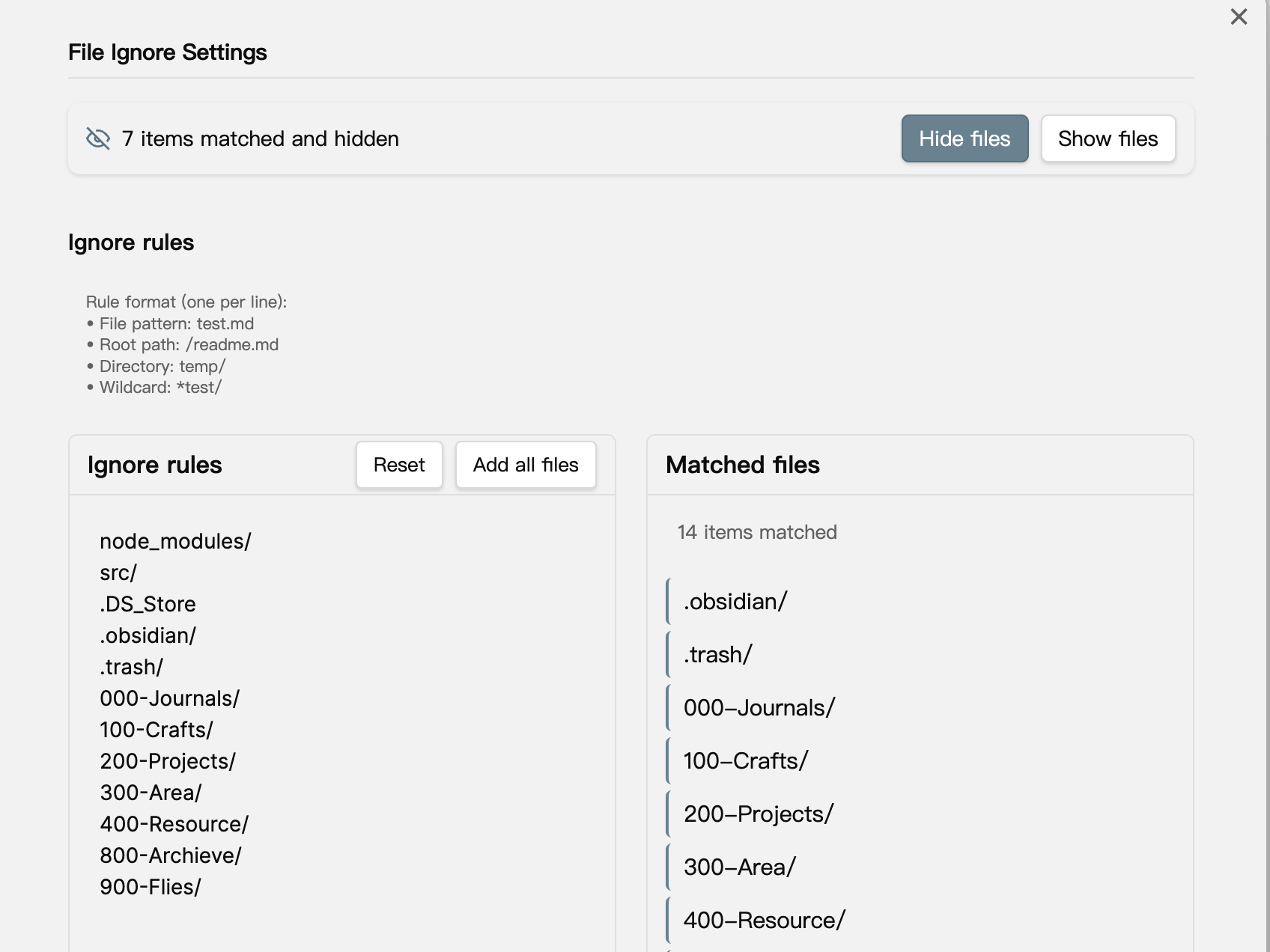
Features
- Rule-based filtering: Define path patterns to identify files and folders to ignore.
- Hide files: Adds a leading dot (
.) to matching paths, hiding them from Obsidian's index. - Show files: Removes the leading dot prefix, restoring visibility in Obsidian.
- Batch preview and plan: Generates a rename plan and displays a preview before renaming paths on disk.
- Safety checks and recovery: Skips protected folders, aborts on name collisions, and includes a recovery action to undo interrupted batches.
Usage
Matching Rules
File Ignore supports basic path-matching patterns:
- Specific file:
test.md - Root directory file:
/readme.md - Entire folder:
temp/ - Wildcard matching:
*test/(e.g.,/_build/,/cache*/)
Note: Patterns are simple path rules, not full .gitignore specifications.
Operations
After configuring rules in the plugin settings:
- Click "Hide Files": Builds a rename plan, displays a preview, and adds a
.prefix to matching files and folders. - Click "Show Files": Builds a rename plan, displays a preview, and removes the
.prefix from matching files and folders. - If a batch is interrupted, click Recovery in settings to safely revert already-renamed files.
Configuration
Open Obsidian and navigate to Settings → Community plugins → File Ignore to configure ignore rules.
Installation
- Open Settings → Community plugins in Obsidian.
- Turn Restricted mode off if prompted.
- Click Browse.
- Search for File Ignore.
- Click Install, then click Enable.
Tips
Pair File Ignore with the Show-Hide-Files plugin if you need to view or manage dot-prefixed files directly inside Obsidian's file explorer.
Safety and Limitations
- Disk renaming: File Ignore renames items on your filesystem. It is not an Obsidian internal filter or virtual exclude API.
- Protected directories: The plugin automatically skips critical directories, including
.obsidian/,.git/, and.trash/. - Collision avoidance: If a destination path already exists (for example, if both
foo.mdand.foo.mdexist), the rename aborts and writes an audit log instead of overwriting existing data. - Hierarchy handling: When a parent folder is scheduled for renaming, its child items are skipped to avoid redundant operations.
- Undo and recovery: The latest batch operation is saved to disk so interrupted operations can be rolled back from the settings page.
- Audit trail: Every rename records a
[file-ignore][audit]entry in the developer console.
Debugging and Troubleshooting
- Open Settings → Community plugins → File Ignore.
- Turn on Debug logging.
- Open the developer console via View → Toggle Developer Tools and select the Console tab.
- Review
[file-ignore][audit]entries for batch details, skipped paths, and errors. - Turn off Debug logging when finished.
Support
If you encounter issues or have suggestions, please open an issue on the GitHub repository.
Built by chenfeng. Alongside Obsidian plugins, I develop focused Mac utilities, including Command Reopen, which restores minimized windows on Cmd+Tab.
You can also support development on Buy Me A Coffee.
License
This project is licensed under the MIT License. See the LICENSE file for details.
For plugin developers
Search results and similarity scores are powered by semantic analysis of your plugin's README. If your plugin isn't appearing for searches you'd expect, try updating your README to clearly describe your plugin's purpose, features, and use cases.