by kh4f
Enhance the file explorer with custom sorting, pinning, and hiding.
★ 222 stars↓ 106,588 downloadsUpdated 24d agoMIT
🗃️ Flexplorer


Obsidian File Explorer Enhancer
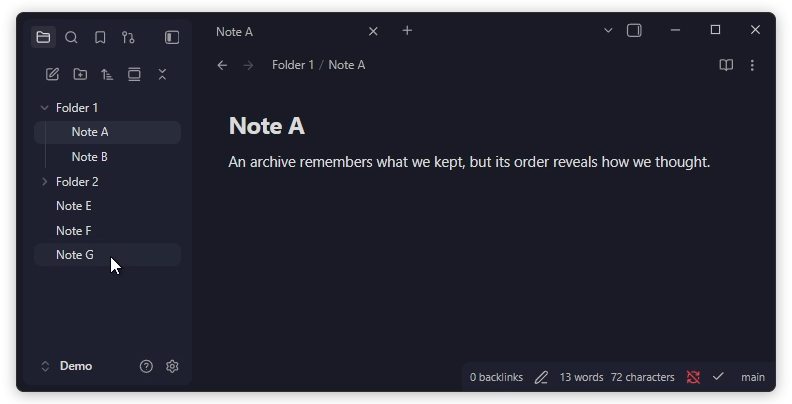
✨ Features
- Custom sorting: manually arrange items via drag-and-drop
- Per-folder sorting: use a different sorting mode for each folder
- Pinning: keep important files at the top
- Hiding: hide irrelevant files manually or by pattern
- Mobile support: works the same way on mobile
📥 Install
- Via the Obsidian Community: https://community.obsidian.md/plugins/flexplorer
- Using the BRAT plugin:
Add Beta Plugin→kh4f/flexplorer - Manually: download
manifest.json,main.js,styles.cssintovault/.obsidian/plugins/flexplorer/
🕹️ Usage
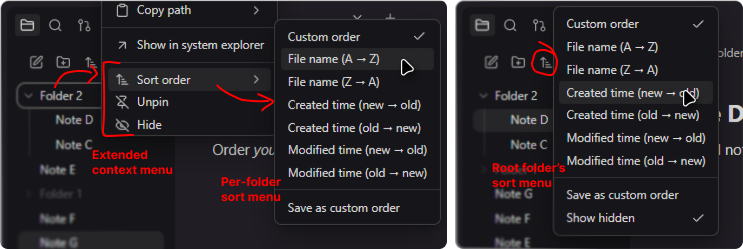
- Per-folder sorting: for regular folders, select
Sort orderfrom the context menu. For the root folder, use theChange sort orderbutton at the top of the file explorer. - Custom sorting: select
Custom orderfor the folder, then drag and drop items to rearrange them. On touch devices, long-press an item first. - Pinning: select
Pin/Unpinfrom an item's context menu. - Hiding: select
Hide/Unhidefrom an item's context menu, or configureHide patternsin the plugin settings. To reveal all hidden items, selectShow hiddenfrom the root folder's sort menu.
💖 Credits
- Inspiration: Obsidian Bartender, Custom File Explorer sorting, File Explorer++
- Code contributions: @Mara-Li, @michalgregor, @MichalNawrocik
- Bug reports & feature requests: @AE-SAY-WAY, @Mara-Li, @Azmoinal, @Anonym0usPlayer, @Zweikeks, @SublimePeace, @MinYu5263, @73mtq, @RainyGrass, @elfmedy, @clarenceehsu, @toya-co, @Succubyte, @akshatg, and others
For plugin developers
Search results and similarity scores are powered by semantic analysis of your plugin's README. If your plugin isn't appearing for searches you'd expect, try updating your README to clearly describe your plugin's purpose, features, and use cases.