Folder Bases
approvedby Scott Tomaszewski
Open a folder's associated Base by clicking it in the file explorer, like Folder Notes but for Bases. - This plugin has not been manually reviewed by Obsidian staff.
Folder Bases
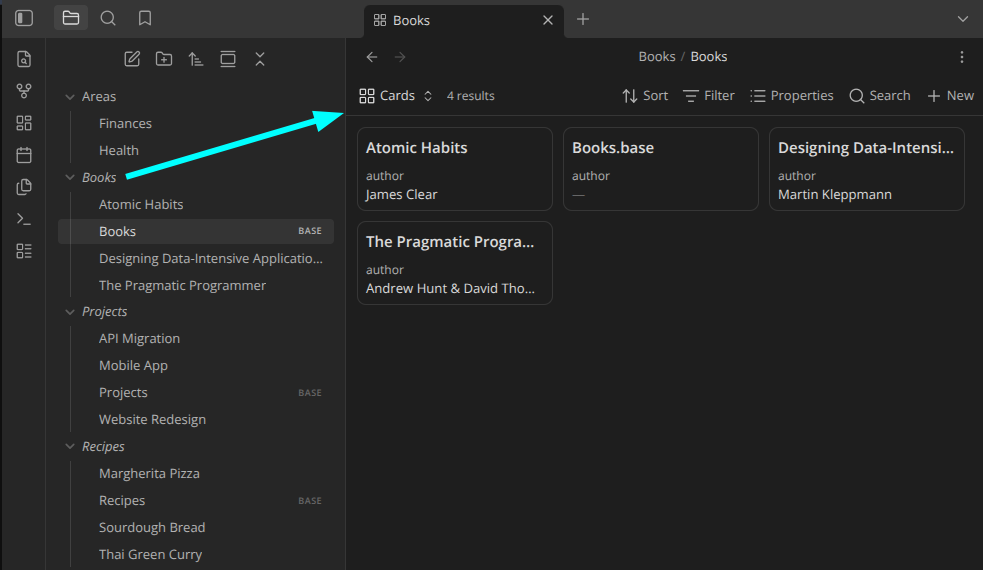
Open a folder's associated Base by clicking it
in the file explorer — like the Folder Notes community plugin, but for .base
files instead of notes.
Features
- Click a folder to open its base (plain click or modifier + click — configurable).
- Configurable base filename, with
{{folder_name}}/{{folder_path}}tokens (default: a same-named.baseinside the folder). - Optionally create a base from a template on modifier + click when none exists.
- Scope which folders respond with an exclude/include filter (glob patterns, optional subfolder matching).
- The collapse chevron always expands/collapses, so normal folder navigation is never lost.
- Right-click a folder for Open folder base / Create folder base.
Install (from source)
devbox run build      # type-check + bundle to main.js
# or: devbox run dev  # watch mode
devbox run test       # run the unit tests
Then enable Folder Bases in Settings → Community plugins. To use in another
vault, copy manifest.json, main.js, and styles.css into
<vault>/.obsidian/plugins/folder-bases/.
Releasing
devbox run release <version> bumps the version in manifest.json,
package.json, and versions.json, builds, commits, pushes, and creates a
GitHub release with main.js, manifest.json, and styles.css attached:
devbox run release 1.0.1 # or: just release 1.0.1
Requires a clean working tree and gh authenticated to the repo. Use a plain
semver version with no leading v (Obsidian tags omit it). The release promotes
the changelog's Unreleased section to the new version header and uses it as
the GitHub release notes, so keep CHANGELOG.md up to date as
you work.
Documentation
Known limitations
- The click listener is attached to the main window's document. If you move the file explorer into a popout window, clicks there are not yet intercepted.
License
For plugin developers
Search results and similarity scores are powered by semantic analysis of your plugin's README. If your plugin isn't appearing for searches you'd expect, try updating your README to clearly describe your plugin's purpose, features, and use cases.