by Wandermyz
Sync notes with GitHub or GitHub Enterprise Server through the GitHub REST API, with no Git binary required. Signs in with OAuth device flow, so it works with enterprise SSO and on mobile, including iOS.
GitHub Enterprise Sync


An Obsidian plugin that syncs notes with a GitHub repository — including GitHub Enterprise Server — over the GitHub REST API. There is no Git implementation in JavaScript and no native code, so it works on mobile, including Obsidian on iOS.
Status: early. Sync is bi-directional: it pulls changes from GitHub and pushes local edits back as ordinary commits, with incremental updates, integrity verification, conflict copies, and automatic syncing.
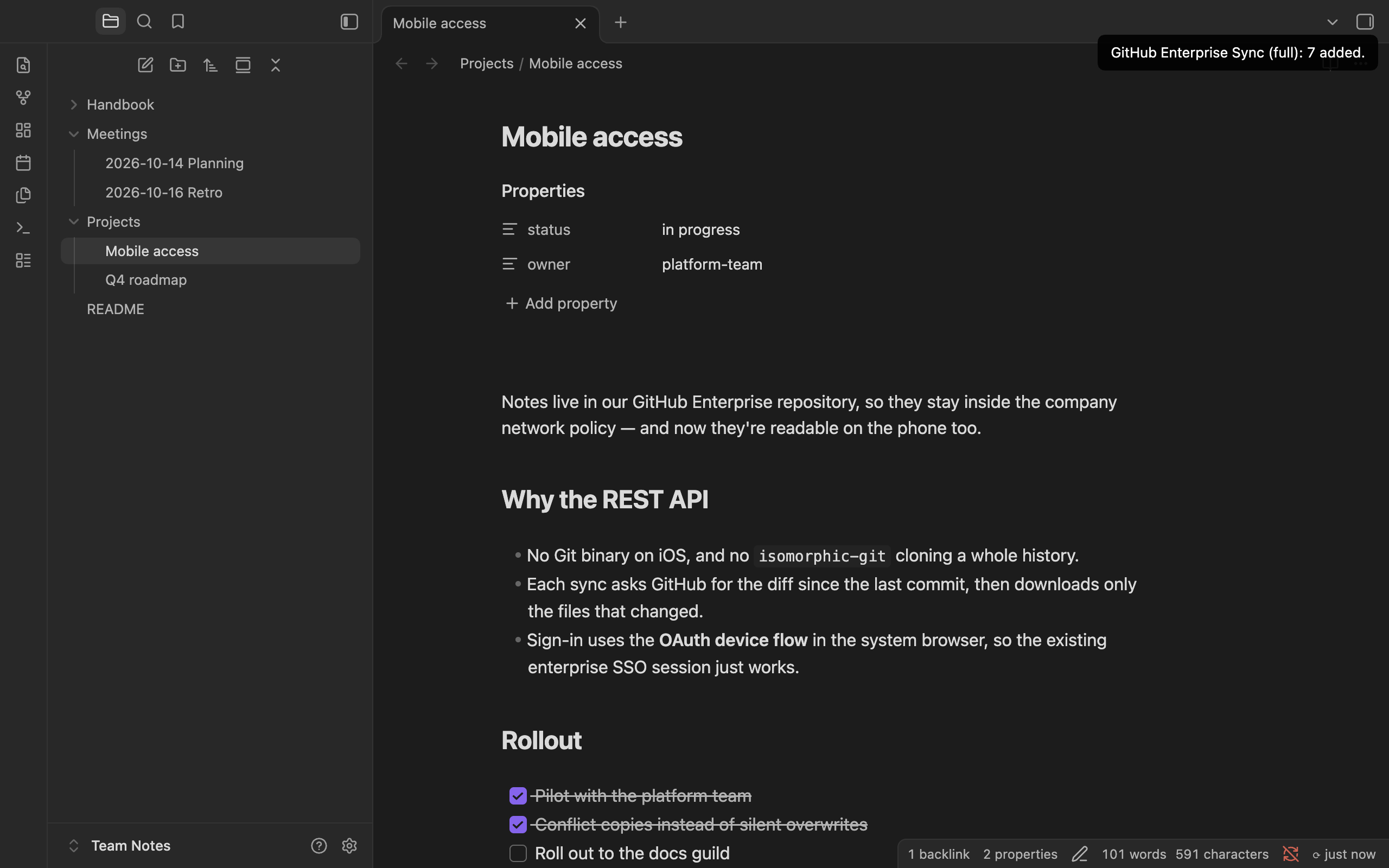
| Phone | Settings | Sign-in |
|---|---|---|
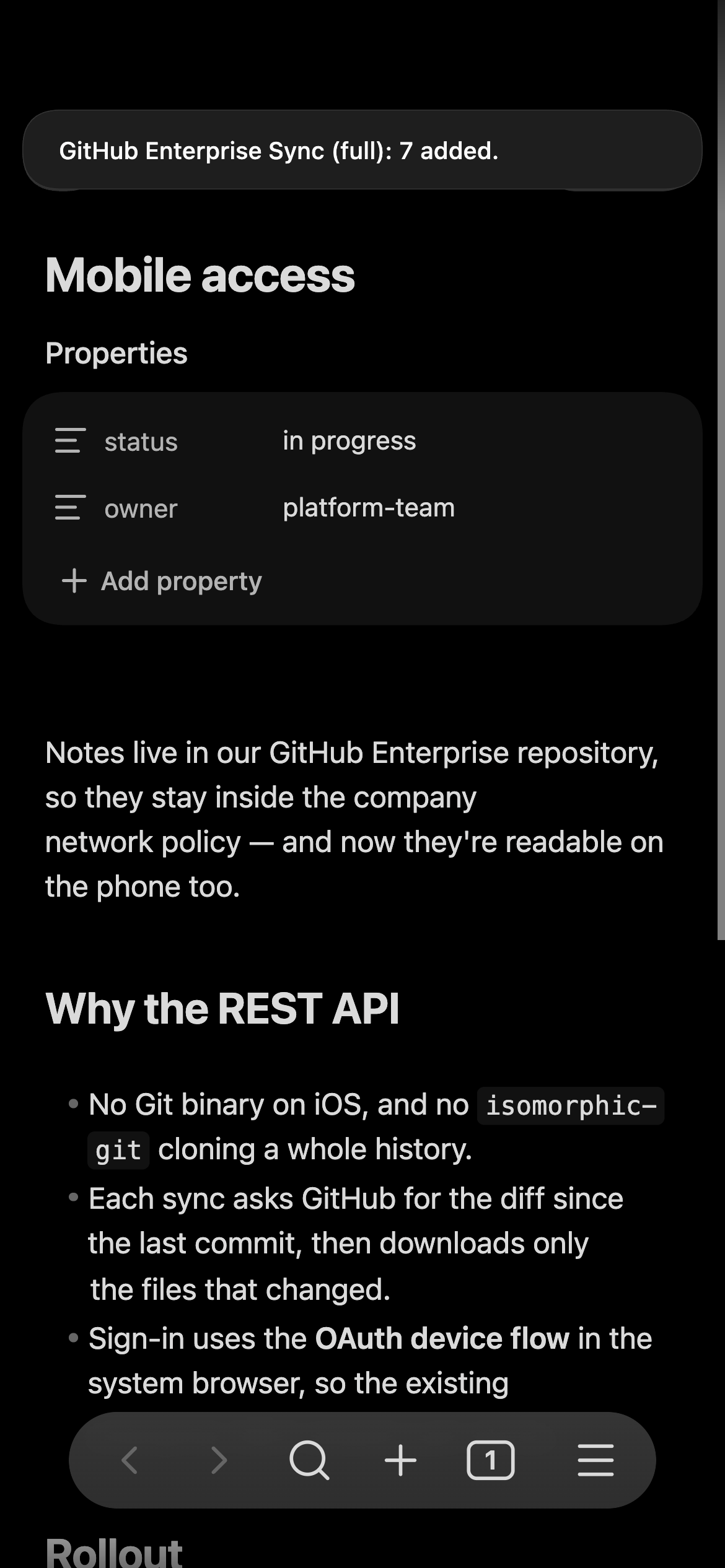 | 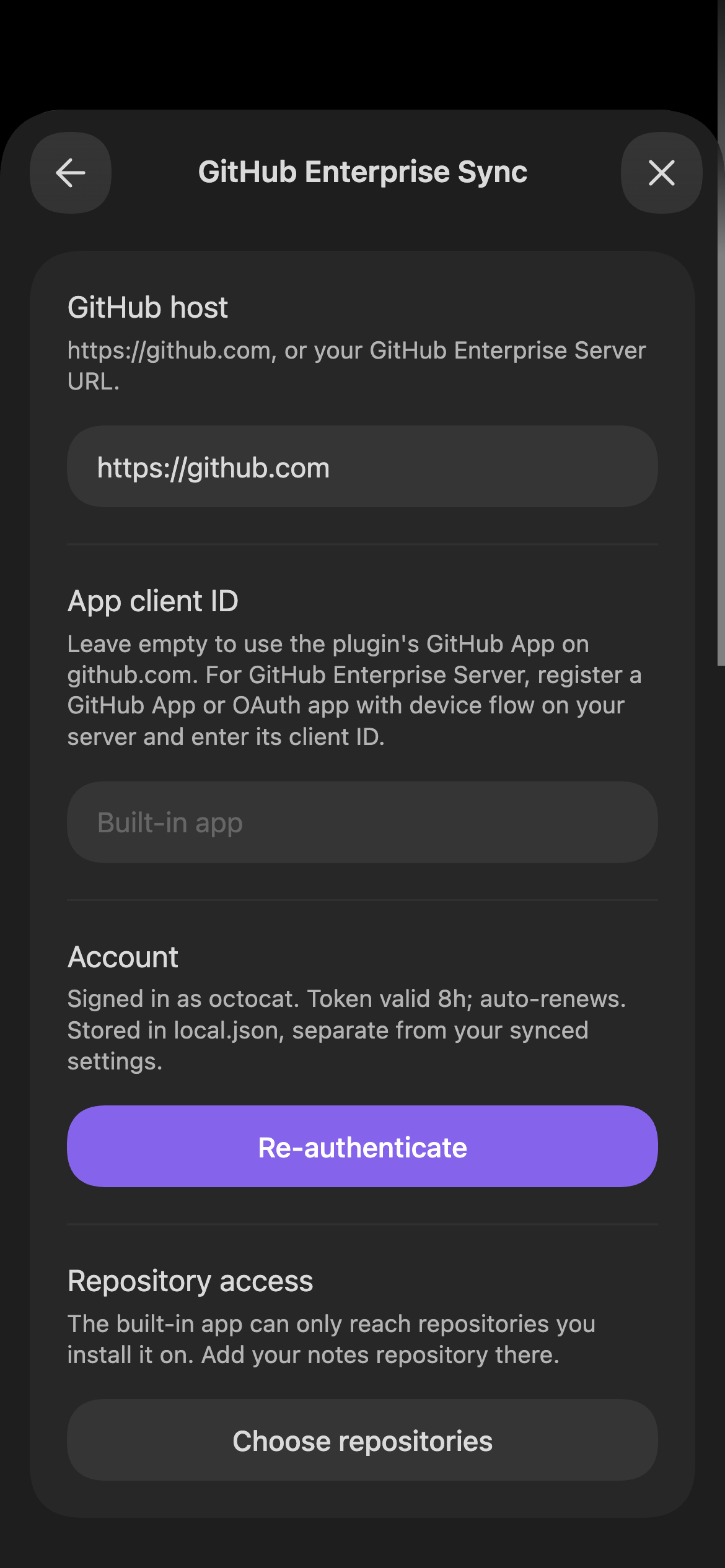 | 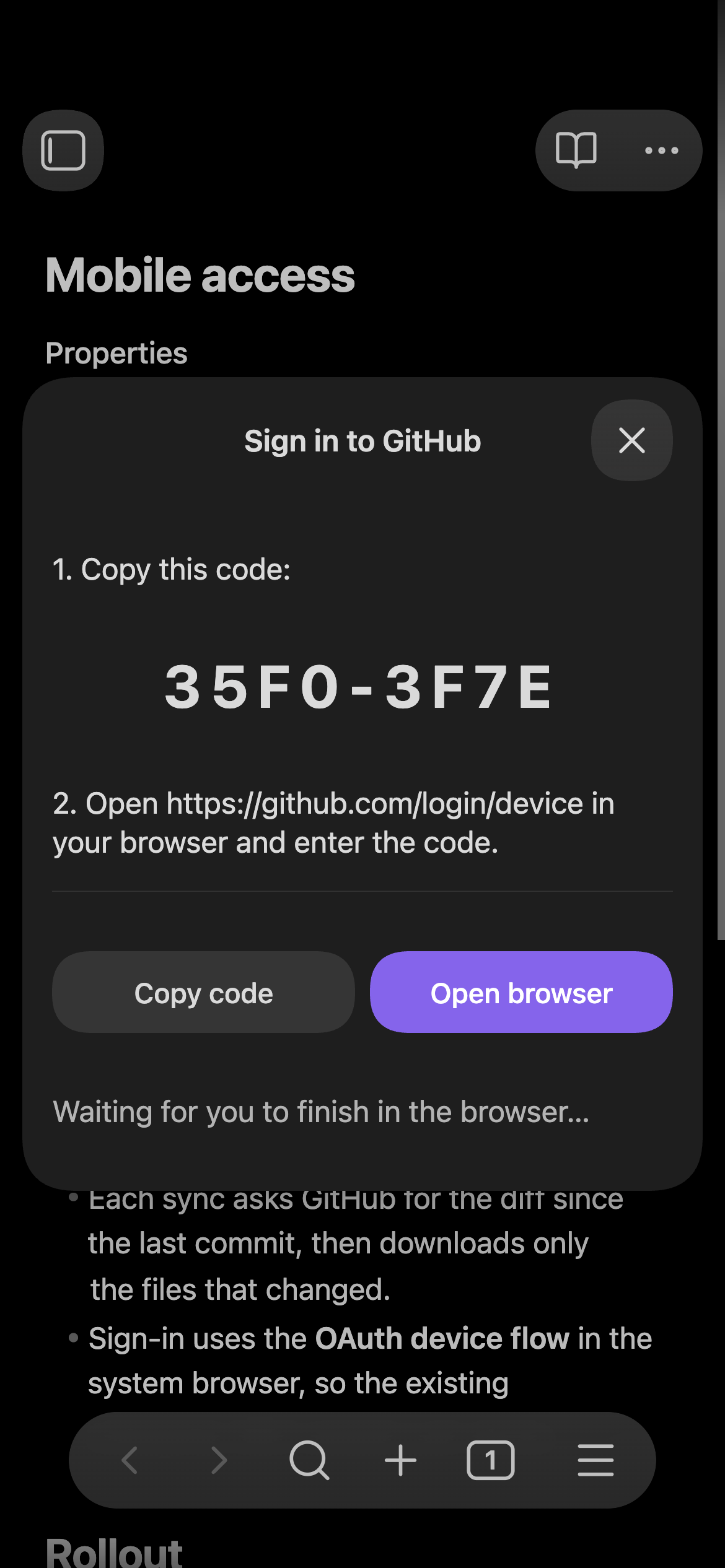 |
Why this exists
Obsidian's own sync isn't always an option — some notes live in repositories
that can't leave a particular GitHub instance. The existing Git plugins shell
out to a real Git binary or bundle isomorphic-git, neither of which is a good
fit on iOS. This plugin talks to the REST API instead, so the only thing it
needs is HTTPS.
How it works
Authentication: OAuth device flow
Obsidian on iOS has no usable redirect target for a normal authorization-code
flow, and embedding a web view to collect SSO credentials is both fragile and a
bad idea. The device
flow
avoids both: the plugin shows a short code, window.open hands the URL to the
device's own browser (Safari on iOS), and the plugin polls GitHub until you
finish. Any SSO session already present in that browser is reused.
There is no embedded web view anywhere in this codebase.
If the app issues expiring user tokens (GitHub Apps do by default), the device flow returns an
access token valid ~8 hours plus a refresh token valid ~6 months. Every API
call goes through validAccessToken(), which exchanges the refresh token when
the access token is within five minutes of expiry. GitHub rotates the refresh
token on each use, so both halves of the response are persisted together —
dropping the new refresh token would strand the plugin at the next renewal.
Once the refresh token itself lapses, you sign in again. With non-expiring
tokens, expires_in is absent and the refresh path is simply never taken. The
refresh always goes to the app that issued the token, so changing App client
ID later doesn't break renewal of an existing sign-in.
Incremental sync
The plugin records the commit SHA it last synced, plus the blob SHA of every file it wrote. On the next run it asks GitHub to compare that commit against the branch head and turns the resulting file list into writes and deletes, fetching only the blobs that actually changed. Renames delete the old path; removals delete the file.
It falls back to a full tree walk when the comparison can't be trusted:
- the stored base commit no longer exists (force-push, or garbage collected),
- the histories have diverged,
- more than 300 files changed — GitHub silently truncates the file list at that point, and a truncated diff would leave the vault quietly incomplete.
Blobs are fetched by SHA rather than by path, so a branch that moves mid-sync can't hand back bytes belonging to a different commit than the one being applied.
Pushing local changes
Every sync pulls first, then pushes. Pushing uses the Git Data API, which is how a Git client would build a commit if it spoke HTTP instead of the wire protocol:
- each changed file is uploaded as a blob (
POST /git/blobs, base64, so images and PDFs survive intact); - one tree is created on top of the current head's tree (
POST /git/treeswithbase_tree), listing only the changed paths — a deletion is an entry withsha: null; - one commit is created pointing at that tree (
POST /git/commits); - the branch is moved to it (
PATCH /git/refs/heads/{branch}withforce: false).
The whole push is therefore a single ordinary commit that any Git client can
read. force: false makes step 4 a compare-and-swap: if another device pushed
in the meantime, GitHub rejects it with 422, the plugin pulls again and retries
rather than overwriting the other device's work.
Local changes are found by hashing the files on disk and comparing against the blob SHAs recorded at the last sync — no filesystem watching, no timestamps. Pushing is skipped entirely when the preceding pull didn't fully verify, since in that state a file missing locally is indistinguishable from a file deleted locally.
As a further guard, a push that would remove more than 10% of the synced files is refused with a notice rather than executed. A vault that failed to mount or a mistyped folder setting looks exactly like "the user deleted everything".
Conflicts
When a file changed both locally and remotely since the last sync, nothing is discarded. The remote version takes the canonical path, and your local bytes are written beside it as
My Note (conflict 2026-08-23 14.05 mobile-a3f2).md
That copy is a normal vault file, so the next push uploads it too — both
versions then exist on every device, and you resolve the conflict by editing and
deleting, the same way Obsidian Sync handles it. The device label is generated
once per device and kept in local.json.
Integrity verification
After each file is written, it is read back from the vault and hashed as a Git
blob — SHA1("blob " + byteLength + "\0" + bytes) — which is exactly the SHA
GitHub already publishes for that blob. Verification therefore costs one local
hash and no extra network request. A mismatch is reported and that file's SHA is
not recorded, so the next sync fetches it again.
The stored commit pointer only advances when every file verified and nothing was skipped. Otherwise the next sync would compute its diff from a commit the vault doesn't actually match, and the missing files would never be noticed again.
What it won't touch
- Files you edited locally since the last sync are never overwritten: the remote version lands at the canonical path and yours is preserved as a conflict copy (see above). If the copy can't be written, the remote update is skipped instead.
- Anything under the vault's config folder (
.obsidian/by default, or wherever you've moved it) is refused in both directions, so a repository can't overwrite your plugin configuration — and your configuration, including thelocal.jsonholding your access token, is never pushed..trash/and.git/are skipped when pushing for the same reason.
Network use and privacy
This plugin talks to exactly one remote service: the GitHub instance you configure — github.com or your own GitHub Enterprise Server. It needs that connection to sign you in and to read and write the repository you sync with.
- Account required. You need a GitHub (or GitHub Enterprise) account with access to the repository. On github.com, sign-in goes through the plugin's GitHub App, Obsidian GitHub Enterprise Sync, which can only reach the repositories you install it on. On Enterprise Server you use an app registered there (see Setup).
- What is sent. OAuth requests to
<host>/login/device/codeand<host>/login/oauth/access_token, and GitHub REST API requests toapi.github.com(or<host>/api/v3) that read and write the configured repository: the files in the synced folder and commit metadata. - No telemetry, no third parties. Nothing is sent anywhere other than the GitHub host you configure. There are no analytics, ads, or tracking.
- Clipboard: write only, on request. The sign-in dialog's Copy code button puts the one-time device code on the clipboard so you can paste it into GitHub. That is the plugin's only clipboard use; it never reads the clipboard.
- Credentials stay on the device. Tokens are stored in the plugin's
local.jsonand never synced or committed (see Where state is stored).
Signing in opens GitHub's device-authorization page in your system browser. The plugin never sees your password.
Setup
github.com
- In Obsidian, open Settings → GitHub Enterprise Sync and set
Repository to the
owner/repoholding your notes. Leave App client ID empty. - Under Repository access, press Choose repositories and install the app on that repository. It asks only for read and write access to file contents.
- Press Sign in, copy the code, tap Open browser, and authorize.
For repositories owned by an organization, an owner of that organization installs the app (or approves your request to).
GitHub Enterprise Server
An app registered on github.com doesn't exist on your server, so register one there — once for everyone at your company is enough:
- On your server, go to Settings → Developer settings → GitHub Apps → New GitHub App (or the same under an organization's settings).
- Check Enable Device Flow, uncheck Webhook → Active, and under Repository permissions set Contents to Read and write. No callback URL, client secret, or private key is needed.
- Install it on the repositories to sync, and copy its Client ID.
Then set GitHub host to your server (https://github.example.com), paste
the client ID into App client ID, and sign in. An OAuth app with device
flow enabled works too; for one of those, Scopes (default repo read:org)
controls its access.
All settings
| Setting | Value |
|---|---|
| GitHub host | https://github.com, or your Enterprise Server URL |
| App client ID | empty for the built-in app on github.com; your app's client ID on Enterprise Server |
| Scopes | OAuth apps only |
| Repository | owner/repo to sync from |
| Branch | empty for the repository's default branch |
| Remote folder | sync only this subfolder of the repo; empty for the whole repo |
| Vault folder | where files land in the vault; empty for the vault root |
Automatic sync
- Sync on startup — runs shortly after Obsidian finishes loading (deferred so it doesn't compete with initial indexing).
- Periodic sync — runs on a timer while Obsidian is open, at a configurable interval.
Both are full bi-directional syncs, the same as pressing Sync now.
Background runs stay quiet unless something changed. Failures, integrity mismatches, conflicts, and refused pushes always raise a notice.
Commands
- Sync now — pull, then push
- Full resync (rebuild from scratch) — ignores stored state and walks the whole tree, then pushes as usual
- Sign in to GitHub (device flow)
- Verify GitHub access — calls
/user, lists a repo root, reads a file - Sign out of GitHub
Verifying without Obsidian
node scripts/device-flow-test.mjs <client_id> owner/repo [https://github.example.com]
Runs the identical request sequence from a terminal — useful to confirm an app registered on Enterprise Server is configured correctly before installing the plugin.
Tests
tests/unit/ covers sync planning — the decisions the engine makes about an API
response — with a stub client and no network. It's fast and needs no
configuration:
npm test
End-to-end tests
tests/e2e/ exercises the real engine against a real GitHub repository. There
are no mocks: src/sync.ts and src/github.ts are bundled through esbuild with
obsidian aliased to a Node shim, so the code under test is the code that
ships, and every request goes to the live API.
Configuration lives in .env.e2e, which is gitignored — it names a repository
the tests will push to and delete from:
cp .env.e2e.example .env.e2e   # then fill in E2E_REPO and E2E_CLIENT_ID
npm run test:e2e:login         # once, interactively — opens a device code
npm run test:e2e               # thereafter, non-interactive
test:e2e:login runs the device flow and caches the token in .e2e-token.json
(also gitignored, mode 600). Later runs reuse it, refreshing automatically when
it expires; both halves are re-persisted because GitHub rotates refresh tokens.
test:e2e never prompts — it fails with instructions if no usable token is
cached, so it stays usable from CI or a non-interactive shell.
Use a throwaway repository. The tests commit, force the branch forward, and
delete paths. They confine themselves to a per-run e2e/<id>/ folder and remove
it afterwards, so parallel runs don't collide, but the token needs repo scope
and nothing stops a bug from reaching further.
Covered: first full sync, incremental edit/add/delete, a no-op sync, pushing new and edited and deleted files, a second device pulling what the first pushed, concurrent-push race detection, a both-sides edit producing a conflict copy that then pushes, the mass-deletion guard refusing, and the config folder never being materialized from the repo.
Tests in the Obsidian app
tests/app/ runs the built plugin inside the real Obsidian desktop app. It
creates a scratch vault, installs main.js, manifest.json, and styles.css
there, launches Obsidian with a remote-debugging port, and drives it over the
DevTools protocol. The tests use commands, the vault API, notices, the settings
tab, and the sign-in modal, against the same repository and cached token as
tests/e2e/.
npm run test:app              # desktop, then an emulated phone
npm run test:app -- mobile    # one mode only
npm run screenshots           # regenerate docs/screenshots/
"Mobile" is Obsidian's own app.emulateMobile at phone size. It covers
Platform.isMobile and the phone layout, but not iOS networking or the iOS file
system — that still needs a real device.
This quits and relaunches Obsidian. Only the scratch vault is open while it
runs; obsidian.json is restored and Obsidian reopened normally afterwards.
macOS only.
Continuous integration
.github/workflows/ci.yml runs on every push to main and on pull requests:
| Job | Runner | What |
|---|---|---|
| Build, lint, unit tests | Ubuntu | npm run build, npm run lint (Obsidian's own ESLint rules, as used by the community directory review), npm test |
| Sync engine against GitHub | Ubuntu | npm run test:e2e |
| Plugin inside Obsidian | macOS | installs the latest Obsidian release, then npm run test:app; on failure, its screenshots are kept as an artifact for 7 days |
The last two need credentials for the test repository, configured in the repository's Settings → Secrets and variables → Actions:
| Name | Kind | Value |
|---|---|---|
E2E_TOKEN | secret | A fine-grained token limited to the test repository, with Contents: read and write |
E2E_REPO | variable | owner/repo of the test repository |
E2E_CLIENT_ID | variable | The client ID of the app that issued E2E_TOKEN (the plugin's GitHub App, Iv23licEZx8RvafEllsg, or your own) |
Without E2E_TOKEN — including on pull requests from forks — those jobs skip
instead of failing. Locally, the same variables override .env.e2e, and
E2E_TOKEN replaces the cached device-flow token.
Releasing
- Bump
versioninmanifest.jsonandpackage.json, and add the version toversions.jsonwith itsminAppVersion. - Commit, then tag that commit with the bare version and push the tag:
git tag 0.3.1 && git push origin 0.3.1. .github/workflows/release.ymlchecks the tag against the manifest, builds, lints, tests, attestsmain.js,manifest.json, andstyles.css, and creates a draft release with them attached. Edit the notes and publish.
Every release asset carries a signed build-provenance attestation, so you can check it was built from this repository by this workflow:
gh attestation verify main.js --repo wandermyz/obsidian-github-sync
Build and install
npm install
npm run build     # produces main.js
npm run dev       # watch mode
npm run deploy    # build, then copy into plugins-dev-vault/
For a manual install, copy main.js, manifest.json, and styles.css into
<vault>/.obsidian/plugins/github-enterprise-sync/ and enable the plugin under
Settings → Community plugins.
On mobile, BRAT is the easiest route: install BRAT, then add this repository as a beta plugin.
Local test vault
plugins-dev-vault/ is a gitignored Obsidian vault for testing. Open it as a
vault ("Open folder as vault"), turn off Restricted Mode, and enable the plugin.
After a redeploy, toggle the plugin off and on to load the new build.
It is gitignored deliberately: once you sign in, the access token is written to
.obsidian/plugins/github-enterprise-sync/local.json inside that vault. To deploy
elsewhere:
node scripts/deploy-dev.mjs /path/to/other/vault
Where state is stored
The plugin writes two files into
<vault>/.obsidian/plugins/github-enterprise-sync/:
| File | Contents | Safe to sync/commit? |
|---|---|---|
data.json | Settings: host, client ID, scopes, repo, branch, folders, auto-sync options | Yes |
local.json | OAuth access and refresh tokens, the per-device sync state, and this device's label | No |
The split exists so you can keep your configuration in version control while
excluding the credential. Add to the vault's .gitignore:
.obsidian/plugins/github-enterprise-sync/local.json
local.json also holds the last synced commit and the blob SHA of every file
written. That is per-device by nature: copying it to another machine would make
that machine believe it already holds files it has never downloaded, and it
would skip them indefinitely. Deleting the file is always safe — the next sync
does a full rebuild.
The tokens are stored in plaintext, the same as every Obsidian plugin's
credentials. If the vault syncs somewhere and local.json isn't excluded, the
token goes with it.
Layout
src/
  auth.ts             device flow: request code, poll for token, refresh, host resolution
  deviceFlowModal.ts  sign-in UI; opens the system browser only
  github.ts           REST client: user, tree, compare, blobs, and the Git Data write API
  gitHash.ts          git blob SHA-1 and base64, used for integrity checks and uploads
  sync.ts             sync engine: plan (incremental or full), apply, verify, push
  storage.ts          local.json: token + per-device sync state, kept out of data.json
  main.ts             plugin entry, commands, settings, auto-sync timers
scripts/
  device-flow-test.mjs  standalone CLI check
  deploy-dev.mjs        copy build into a vault
tests/e2e/
  run.mjs            the test cases, against a real repo
  login.mjs          one-time interactive device-flow sign-in
  config.mjs         .env.e2e loading and the cached-token lifecycle
  obsidian-shim.mjs  Node stand-ins for requestUrl, the vault adapter, Platform
  load-engine.mjs    esbuild bundle of src/ with `obsidian` aliased to the shim
tests/unit/
  plan.test.mjs      offline planning tests against a stub client
License
For plugin developers
Search results and similarity scores are powered by semantic analysis of your plugin's README. If your plugin isn't appearing for searches you'd expect, try updating your README to clearly describe your plugin's purpose, features, and use cases.