Github PR Tracker
approvedby David Monnom
Track and manage GitHub pull request reviews directly from Obsidian. - This plugin has not been manually reviewed by Obsidian staff.
Github PR Tracker
An Obsidian plugin that tracks GitHub pull requests in a sidebar panel. Keep an eye on your open reviews without leaving your notes.
The CI feature is optimized for custom CI pipelines that report their status to github.
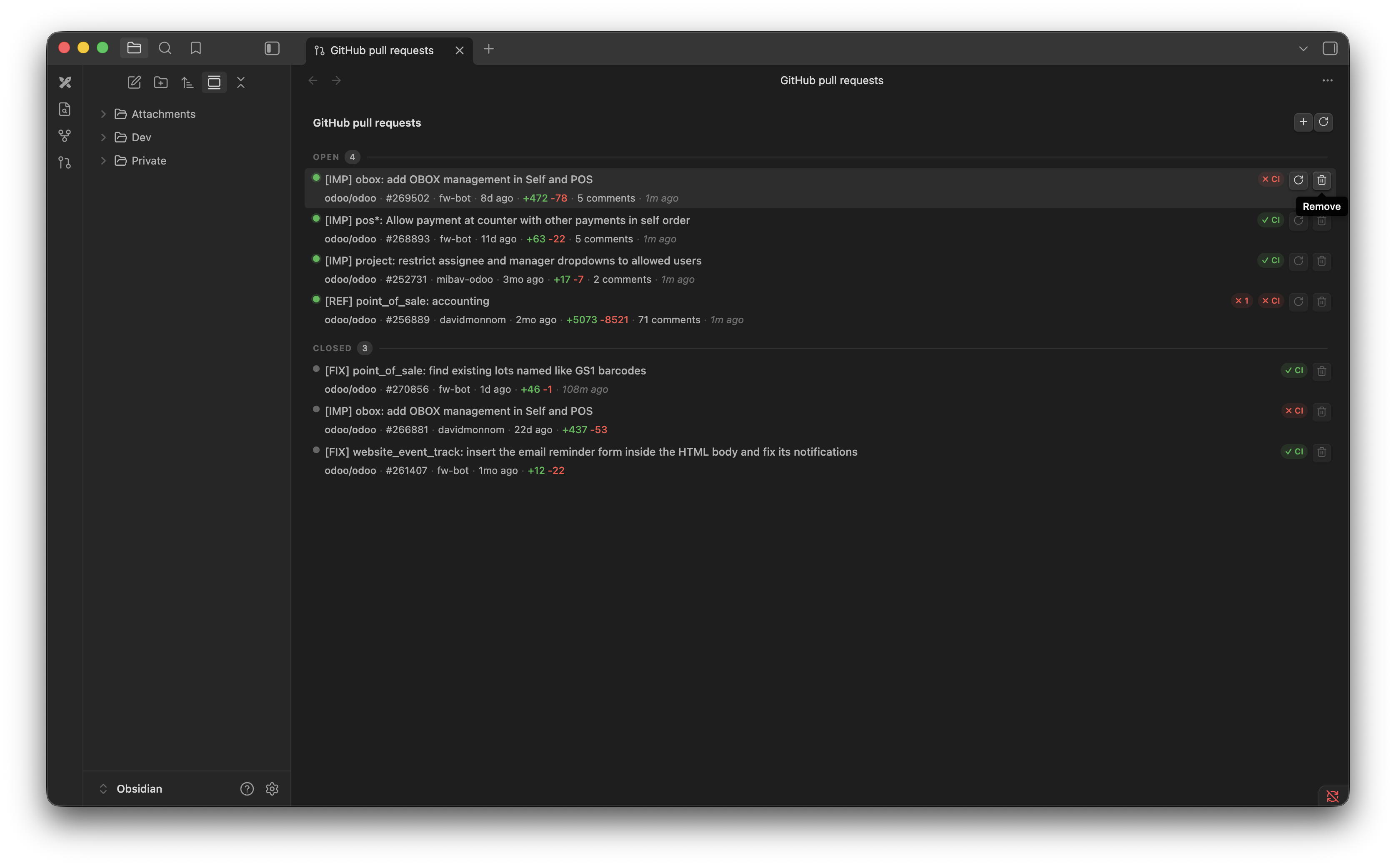
Features
- Sidebar panel — dedicated view listing all tracked PRs, grouped by status (Open / Closed / Failed) or by repository
- Per-PR details — title, repo, PR number, author, target branch, diff stats, and last updated at a glance
- Tag badges — a leading
[FIX],[IMP],[ADD], etc. title prefix (Odoo/conventional-commit style) is pulled out into a colored badge - Review pills — shows the dominant review state (approved / changes-requested / pending) inline
- Reviewer list — all reviewers with their status (
✓ approved,✗ changes requested,○ pending) are shown in the PR's meta row - CI status — displays the combined commit status from your CI system (success / failure / pending), optimised for custom pipelines that report via the GitHub Commit Statuses API
- Search, sort, and group — filter by title, repo, author, or target branch; sort by last updated, author, repository, or CI status; group by status or repository
- Collapsible sections — collapse any section to hide its PRs while keeping the count visible; your sort, group, and collapse choices are remembered between sessions
- Pinned PRs — pin any PR to keep it at the top of the list in its own Pinned section, regardless of sort or group; pins persist across sessions
- Sync status — the view header shows how long it's been since the oldest open PR was refreshed
- Quick actions — add or refresh all PRs from the view's title bar; refresh, pin, or remove individual PRs from each row
- Secure token storage — GitHub personal access token is stored in the system keychain via Obsidian's secret storage, never written to disk
Usage
Paste any GitHub PR URL in the format https://github.com/owner/repo/pull/123. Query params, fragments, and trailing slashes are all normalised — the same PR won't be added twice.
- Add a PR with the
+button in the view's title bar (top right). - Refresh all open PRs with the rotate icon in the view's title bar.
- Refresh a single PR with the rotate icon on its row (open PRs only).
- Pin / unpin a PR with the pin icon on its row — pinned PRs appear in a dedicated section at the top.
- Remove a PR from tracking with the trash icon on its row.
- Filter the list by typing in the search bar at the top of the panel.
- Sort or group the list with the two dropdowns next to the search bar.
- Collapse a section by clicking its header.
Closed PRs are kept in the list for reference but are never auto-refreshed.
For plugin developers
Search results and similarity scores are powered by semantic analysis of your plugin's README. If your plugin isn't appearing for searches you'd expect, try updating your README to clearly describe your plugin's purpose, features, and use cases.