HiLighter
approvedby PandoraReads
A powerful highlight note manager with multi-color annotations, AI-assisted notes, and smart review - This plugin has not been manually reviewed by Obsidian staff.
HiLighter - Obsidian Highlight Note Management Tool


HiLighter is an Obsidian plugin focused on highlight note management. It transforms highlighted content into manageable note cards with support for multiple color annotations, AI-powered analysis, and intelligent search features, making your note organization more efficient. 中文
✨ Core Features
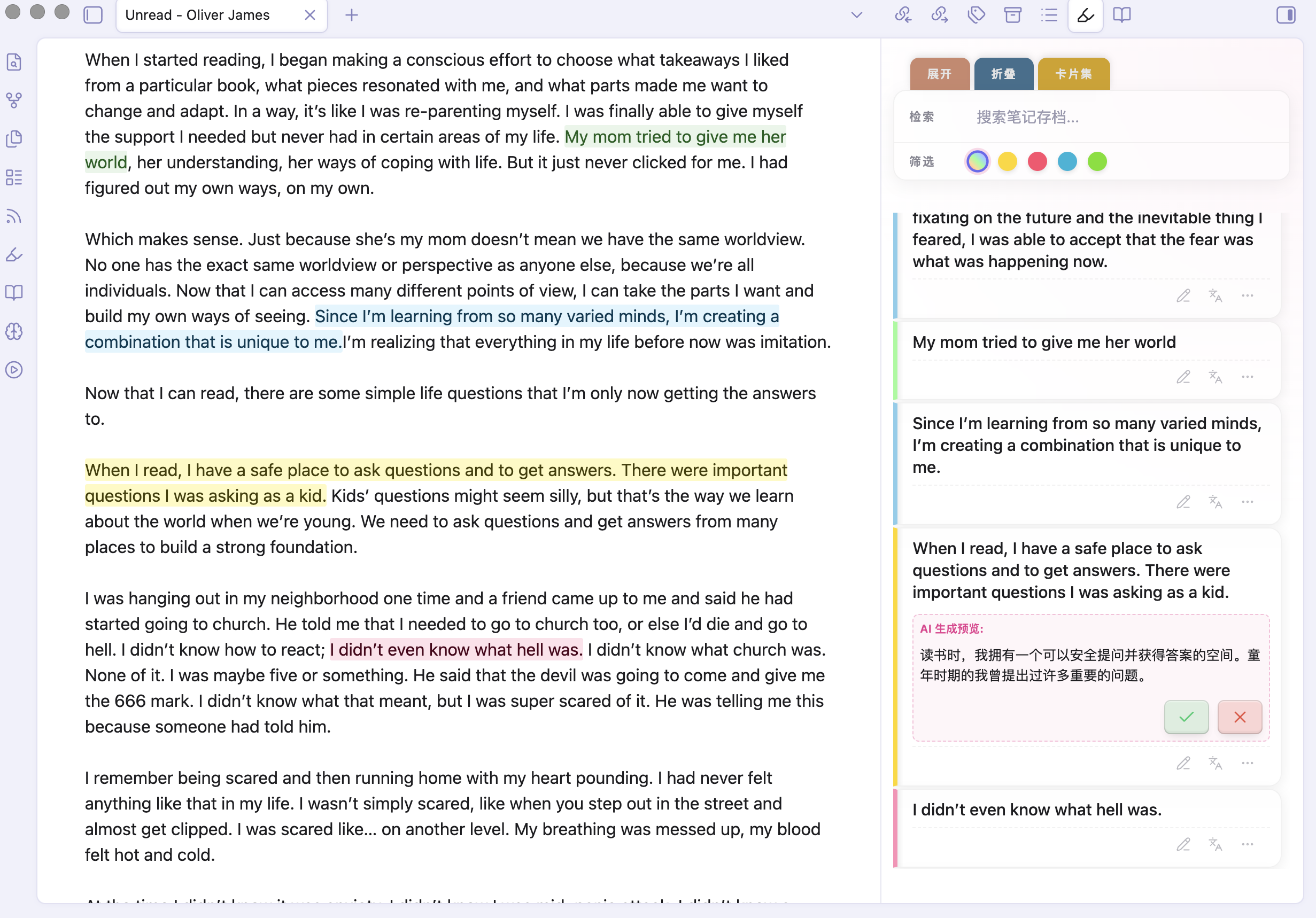
🎨 Highlight Note Cards Management
- Sidebar Management: Aggregates
<mark>highlighted content from current document or entire library, supporting instant navigation to original text via card click. - Multi-Dimensional Filtering:
- Color Filter: Quick categorization by four highlight colors: yellow, pink, blue, and green.
- Keyword Search: Real-time filtering of note content via top search bar.
- AI-Powered Intelligence:
- AI Translation (Languages): One-click precise translation of highlighted sentences.
- AI Research (Microscope): Comes with multiple built-in research prompt templates (philosophical analysis, concise summary, critical analysis) and supports custom research prompts — freely add, edit, and switch between prompts to suit different deep reading scenarios.
- Flexible Interaction:
- Quick Edit: Click pencil icon to directly edit notes on cards with auto-adjusting height.
- Tag System: Support for custom tags with built-in intelligent recommendation algorithm.
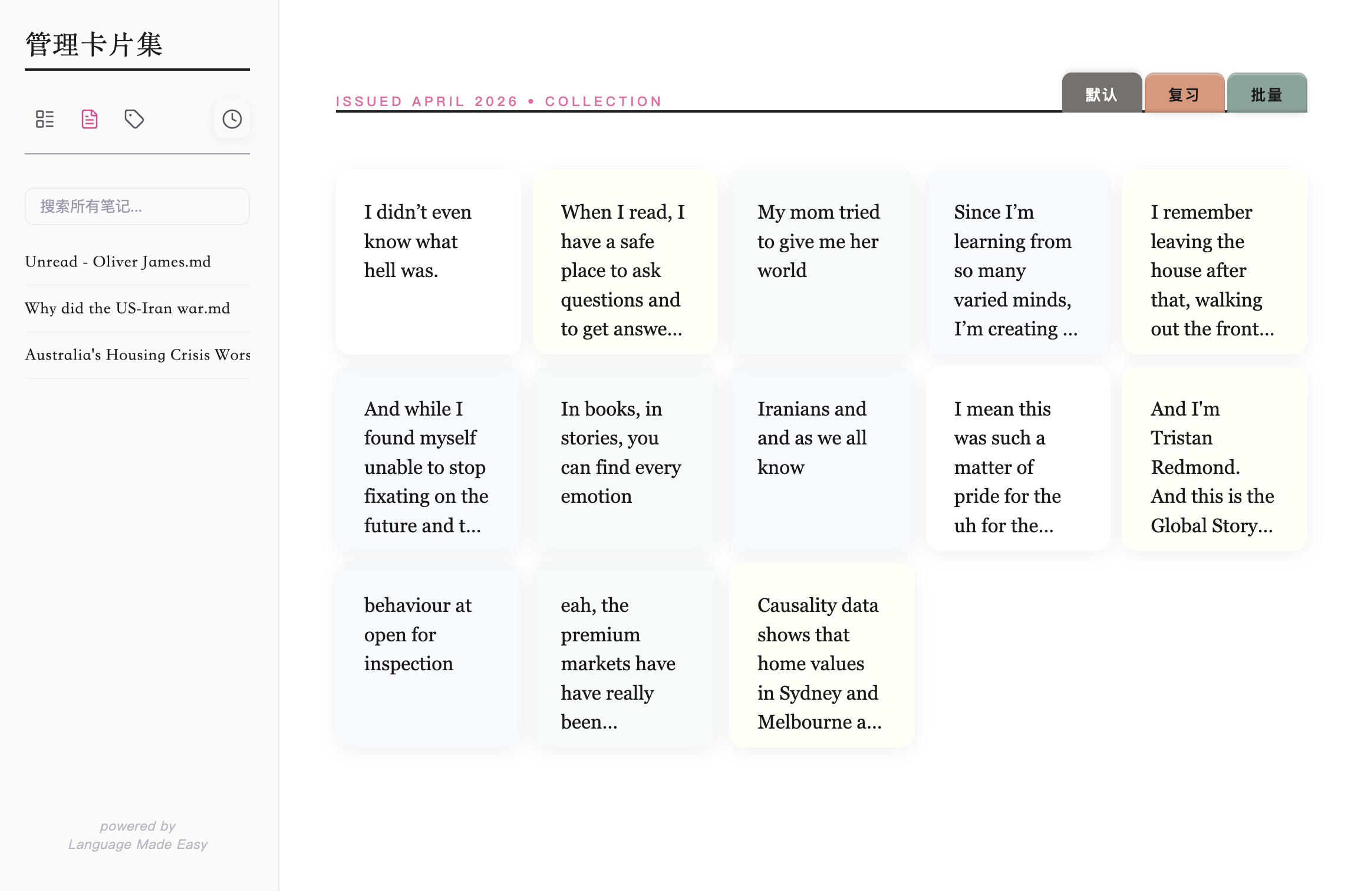
- Card Collection Navigation: One-click switch to full-screen "Card Studio" mode for centralized inspiration management.
- Note Card Management:
- Locate Original Text: Click a card to instantly jump to the highlighted position in the source note for quick context recovery.
- Classification Tags: Add tags to each card for organized categorization, with support for batch tag operations.
- Batch Deletion: Enter batch mode to multi-select cards and delete them in one click for efficient cleanup.
- Review Mode: Shuffle cards randomly for review and consolidation, with an archive option for mastered content.
🚀 Quick Start
Installation
- Manual Installation (Recommended):
- Obtain the latest version's three main files:
main.js,manifest.json, andstyles.css. - Place them in your vault folder:
.obsidian/plugins/hilighter/. - Enable the plugin in Settings > Third-party plugins.
- Obtain the latest version's three main files:
- Community Plugins (Coming Soon): Search for
HiLighterin the Obsidian Community Plugins market and install.
Basic Configuration
- AI LLM API (Important): To use AI Translation and AI Research features, configure an AI LLM API in plugin settings. Supports mainstream providers including DeepSeek, Google Gemini, and Volcano Engine (Ark).
- Ribbon Icon: You can control whether to display the sidebar highlight notes icon in settings.
🛠 Development & Build
Developers are welcome to contribute to improving this project!
- Requirements: NodeJS (v16+)
- Install Dependencies:
npm install - Development Mode:
npm run dev - Production Build:
npm run build
❤️ Support & Feedback
If you enjoy this plugin, you can show your support through:
- Follow Official Account: 潘多拉的数字花园 (Pandora's Digital Garden)
- Multi-Platform Support: Also available on Weibo, Xiaohongshu (Little Red Book), and Knowledge Planet under the same name
- Contact & Feedback: Feel free to add VX: PandoraReads
"Let highlighted notes become the catalyst for inspiration." — HiLighter
For plugin developers
Search results and similarity scores are powered by semantic analysis of your plugin's README. If your plugin isn't appearing for searches you'd expect, try updating your README to clearly describe your plugin's purpose, features, and use cases.