hledger Dashboard
approvedby Omar Mekky
Full financial dashboard for hledger journals - This plugin has not been manually reviewed by Obsidian staff.
hledger Dashboard


Full financial dashboard for hledger journals, inside Obsidian.
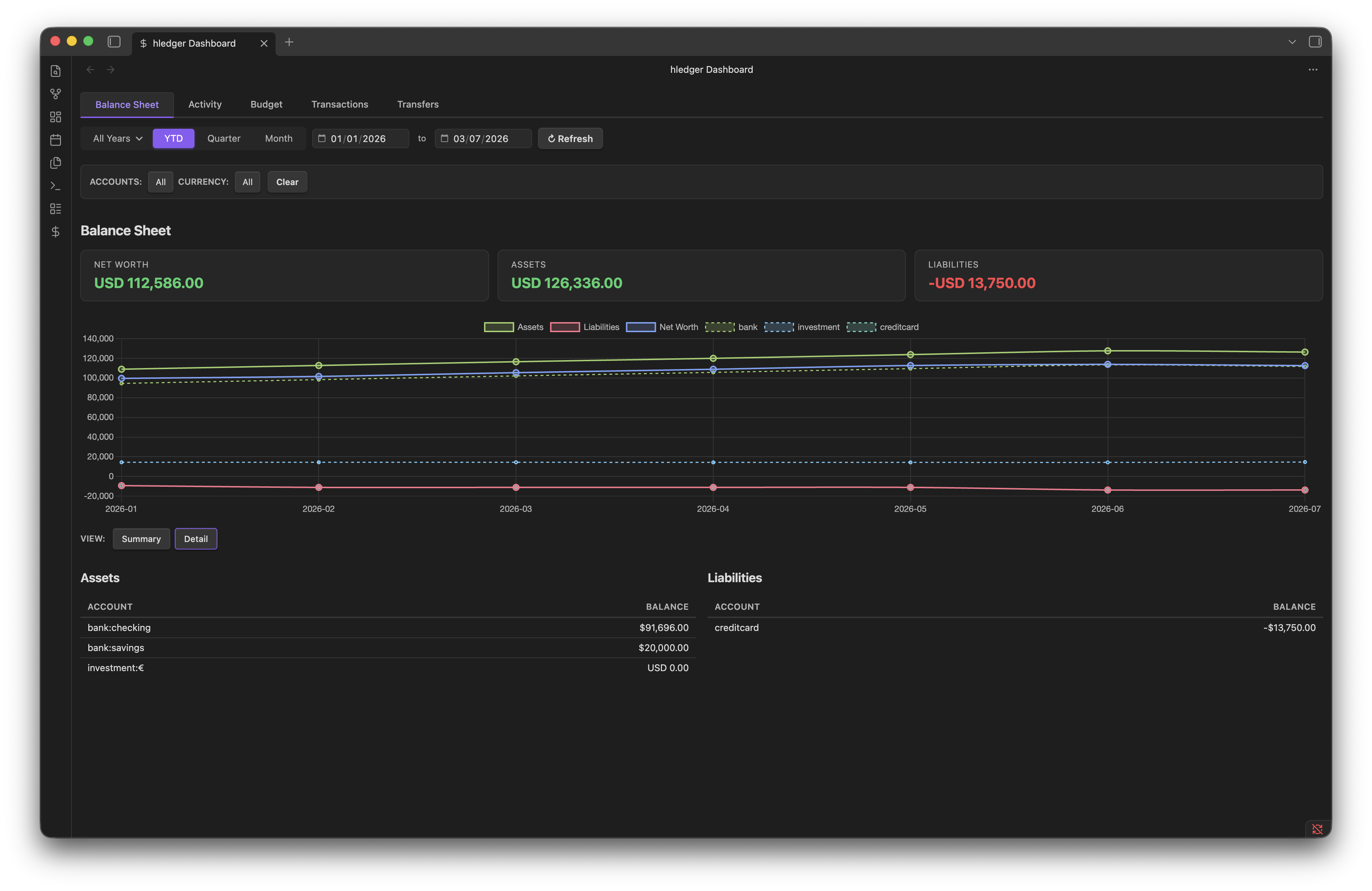
Table of Contents
- Features
- Requirements
- Installation
- Quick Start
- Dashboard Tabs
- Settings
- Period Controls
- Currency Display
- Budget Setup
- Transfers Setup
- Privacy
- Contributing
- License
Features
| Tab | Description |
|---|---|
| Balance Sheet | Net worth, assets, liabilities KPIs + multi-month trend chart + summary/detail tables with price conversion |
| Activity | Income vs expenses KPIs, monthly trend chart, expense breakdown (doughnut + table, groups or atomic), income breakdown |
| Budget | Budget vs actual KPIs, bar chart, per-category table with remaining & % used, forecast projection into future months |
| Transactions | Searchable, sortable, paginated register with inflow/outflow/net KPIs, expense/income/liabilities doughnut charts, credit/debit filter |
| Transfers | Track movements between accounts (equity:transfer), monthly volume bar chart, history with direction filter (in/out) |
Requirements
- Obsidian Desktop (requires
child_process/ shell access) - hledger 1.52+ installed and available on PATH
Installation
Manual
- Download the latest release from the releases page.
- Extract
main.js,manifest.json,styles.cssintoyour-vault/.obsidian/plugins/hledger-dashboard/. - Enable the plugin in Settings → Community plugins.
- Open Settings → hledger Dashboard and configure the journal file path.
Community Store
Install directly from Settings → Community plugins → Browse and search for "hledger Dashboard".
BRAT (optional — early access / pre-release)
Use this if you want to try the latest unreleased changes between official releases. Requires the BRAT plugin.
- Install BRAT via Settings → Community plugins → Browse.
- Add the repository
cousine/hledger-dashboardvia Add a beta plugin. - Enable hledger Dashboard in Community plugins.
Quick Start
- Enable the plugin and click the $ icon in the ribbon bar (or run
Open hledger Dashboard). - A setup card with step-by-step guidance appears:
- Click Open Settings to configure your Journal file path and Target currency.
- Click Refresh to load your dashboard once configured.
- Just exploring? Click Load sample journal on the setup card — the plugin writes a sample dataset (USD + EUR, ~2.5 years) to your vault root and loads the dashboard immediately.
Dashboard Tabs
Balance Sheet
- KPIs: Net Worth, Assets, Liabilities (in target currency)
- Chart: Multi-month line chart of assets, liabilities, and net worth trends
- Tables: Side-by-side assets & liabilities with Summary (depth 1) / Detail (leaf accounts) toggle
- Stock accounts: Accounts with non-currency commodities are converted using market prices
Activity
- KPIs: Income, Expenses, Net for the selected period
- Trend: Monthly income vs expenses line chart (appears for multi-month periods)
- Breakdown: Expense doughnut chart + sortable table with Groups / Atomic views and percentage of total
- Income: Income sources table (clicking expense rows navigates to the Transactions tab filtered by that account)
Budget
- KPIs: Budget, Actual, Remaining totals
- Chart: Bar chart comparing budget vs actual per category
- Table: Per-category rows with Budget, Actual, Remaining, % Used
- Forecast: Projected asset & expense monthly trends using past actuals + budget assumptions. Requires periodic transactions (
~ monthly) in your journal
Transactions
- KPIs: Inflow, Outflow, Net
- Breakdown doughnuts: Expenses, Income, Liabilities by category (Tier 2 or Tier 3)
- Filters: Type (All / Credit / Debit), description search, account pattern, currency
- Table: Date, Description, Account (clickable to filter), Type (clickable), Amount — all columns sortable. Paginated
Transfers
- KPIs: Total Volume, Transfer Count, Average Amount
- Chart: Monthly transfer volume bar chart
- Table: Date, Description, Account, Direction (In / Out), Amount — with direction filter. Uses
equity:transferpostings as transfer markers
Settings
| Setting | Description |
|---|---|
| hledger binary path | Path to the hledger executable (default: hledger via PATH). Click Test to verify |
| Journal file | Path to your .journal file, relative to vault root. Click Browse to pick from vault files |
| Target currency | Default currency for converted totals (e.g. USD, EUR). Used for hledger -X |
| Known currencies | Comma-separated currency symbols treated as cash accounts (not stock) in the Balance Sheet (default: USD, $, EUR, GBP) |
| Uncategorized account | Account pattern for uncategorized transactions (e.g. equity:uncategorized) |
| Page size | Number of rows per page in tables |
| Default period | Default dashboard view on open (Month / Quarter / YTD) |
| Filter shortcuts | Named filter presets that appear as quick-select chips in the filter bar |
Period Controls
Toggle between Month, Quarter, and YTD views using the toolbar buttons. Use the dropdown to select a reference month. The year picker switches to an annual view.
Currency Display
- Accounts are shown in their native currency (multi-commodity support)
- The target currency setting controls the conversion currency for
-Xqueries and converted totals - Price conversion uses market prices (
Pdirectives) in your journal. For Balance Sheet stock accounts, prices from the journal's price list are applied
Budget Setup
Define budget targets using hledger's periodic transaction syntax. These go directly in your journal:
~ monthly from 2024-01-01
    (expenses:essentials:housing)       $1,500.00
    (expenses:essentials:groceries)       $400.00
    (expenses:leisure:dining)             $350.00
The Budget tab runs hledger balance --budget to match actual transactions against these targets. See sample.journal for a complete example.
Transfers Setup
The Transfers tab identifies inter-account transfers by looking for equity:transfer postings. To mark a transfer:
2024-01-27 * Transfer to savings
    assets:bank:savings           $500.00
    assets:bank:checking         $-500.00
    equity:transfer
An equity:transfer posting on a transaction marks all other postings as legs of a transfer. Both the source and destination accounts appear in the Transfers tab.
Privacy
This plugin processes all data locally on your machine. It shells out to your hledger binary and reads your journal file directly. No data is sent over the network — there are zero HTTP requests.
Contributing
Contributions welcome! main is a protected branch — all changes go through pull requests.
Prerequisites
- Node.js 26 — matched automatically via
.nvmrc(nvm use) - pnpm 11+ — enable with
corepack enable pnpm - hledger 1.52+ — only required for integration tests
Setup
git clone https://github.com/cousine/hledger-dashboard.git
cd hledger-dashboard
nvm use
pnpm install
Development
pnpm run dev    # esbuild watch mode with inline sourcemaps → main.js
pnpm run build  # production bundle → main.js
Testing
pnpm run lint                           # lint + format (auto-fix)
pnpm run lint:check                     # lint check (CI mode, no fixes)
pnpm run typecheck                      # TypeScript type checking
pnpm run version:check                  # verify package.json / manifest.json / versions.json are in sync
pnpm run test:run                       # unit tests
pnpm run test:coverage                  # unit tests + coverage report
RUN_INTEGRATION=1 pnpm run test:run     # + smoke tests against real hledger binary
Integration tests use sample.journal and require hledger on PATH.
Code Style
- Linting & formatting: Biome handles both —
pnpm run lintauto-fixes,pnpm run lint:checkverifies in CI - TypeScript: Strict mode is enabled (
strict: true) - Conventions: single quotes, 2-space indent, semicolons, trailing commas, 100-char width
Table of Contents
The table of contents is auto-generated with doctoc. After adding or renaming sections, regenerate it:
pnpm run toc
CI runs pnpm run toc:check to verify the TOC is up to date — the check fails if it's stale.
Obsidian Plugin Workflow
To test changes live in Obsidian, symlink the repo into a vault's plugins folder:
ln -s /absolute/path/to/hledger-dashboard /absolute/path/to/vault/.obsidian/plugins/hledger-dashboard
With pnpm run dev watching, reload Obsidian (Cmd/Ctrl+R) after each rebuild to pick up changes.
Pull Request Workflow
- Branch from
main(feature/...,fix/...,docs/..., etc.) - Ensure
pnpm run lint:check && pnpm run typecheck && pnpm run version:check && pnpm run test:runpasses locally before pushing - Open a PR against
main - CI runs version check, lint, typecheck, tests, and coverage — all checks must pass before merge
- Keep branches focused; one logical change per PR
Commit Messages
This project follows Conventional Commits:
| Type | Use for |
|---|---|
feat | New features |
fix | Bug fixes |
test | Test additions or changes |
refactor | Code restructuring (no behavior change) |
docs | Documentation |
chore | Tooling, deps, maintenance |
perf | Performance improvements |
Example: feat: add CSV export to transactions tab
PR titles should follow the same format (used as the squash-merge commit message).
License
MIT — see LICENSE.
For plugin developers
Search results and similarity scores are powered by semantic analysis of your plugin's README. If your plugin isn't appearing for searches you'd expect, try updating your README to clearly describe your plugin's purpose, features, and use cases.