by TheronWang
A home dashboard and project pages built from plain notes: an activity feed, session notes that carry tasks forward, and an update format that coding agents can write to.
Home Project Manager
A home dashboard and project pages for Obsidian, built from plain Markdown notes.
Track every project in one place, keep meetings from losing tasks, and let coding agents report their progress into your vault.



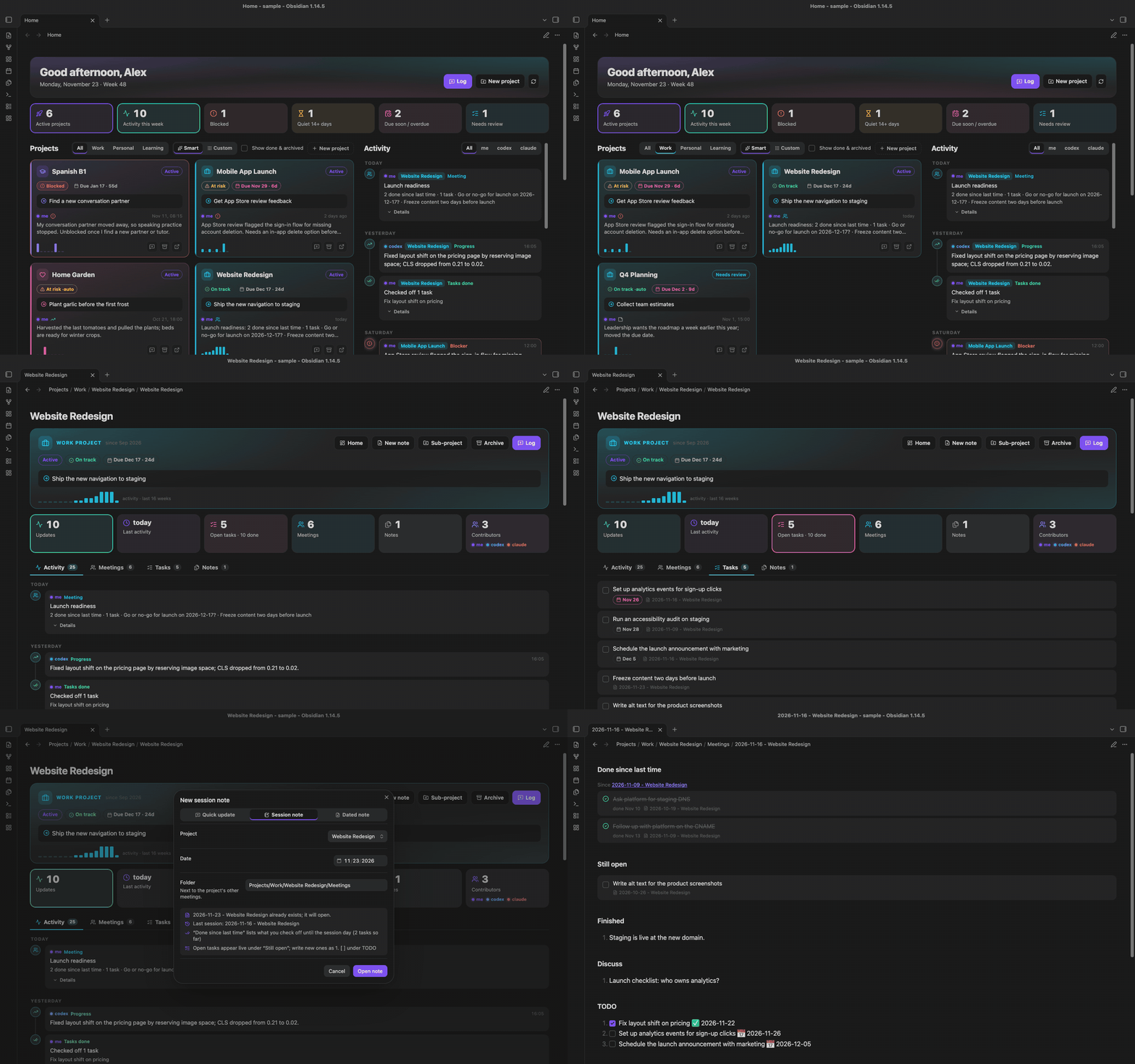
Every screenshot comes from the sample vault; all people and projects in it are fictional.
Contents
- Features
- Quick start
- Try the sample vault
- Installation
- How it works
- Code blocks
- Commands
- Settings
- Logging from coding agents
- FAQ
- Contributing
Features
- 🏠 Home dashboard: every project as a card, with health, due dates and an 8-week activity sparkline. Projects that have gone quiet are flagged, and one feed shows what happened across your whole vault.
- 📁 Project pages: each project gets Activity, Meetings, Tasks and Notes tabs, plus quick stats such as open tasks and last activity.
- 🗓️ Session notes that carry tasks forward: a new meeting note lists, live, every task checked off since the last meeting and everything still open. You never retype last week's TODO list.
- ✅ Finished tasks count as activity: checking off a task shows up in the feed and the charts, so real progress isn't hidden inside old notes.
- 🤖 Built for coding agents: updates are small Markdown files in a documented format. Claude Code, Codex or any script can log progress with the included
log-update.sh. - 📦 Archive and restore: close a project as done or stopped, and its folder moves to your archive. Links keep working.
- 🔓 No lock-in: no database and no hidden state. Uninstall the plugin and every note is still plain, readable Markdown.
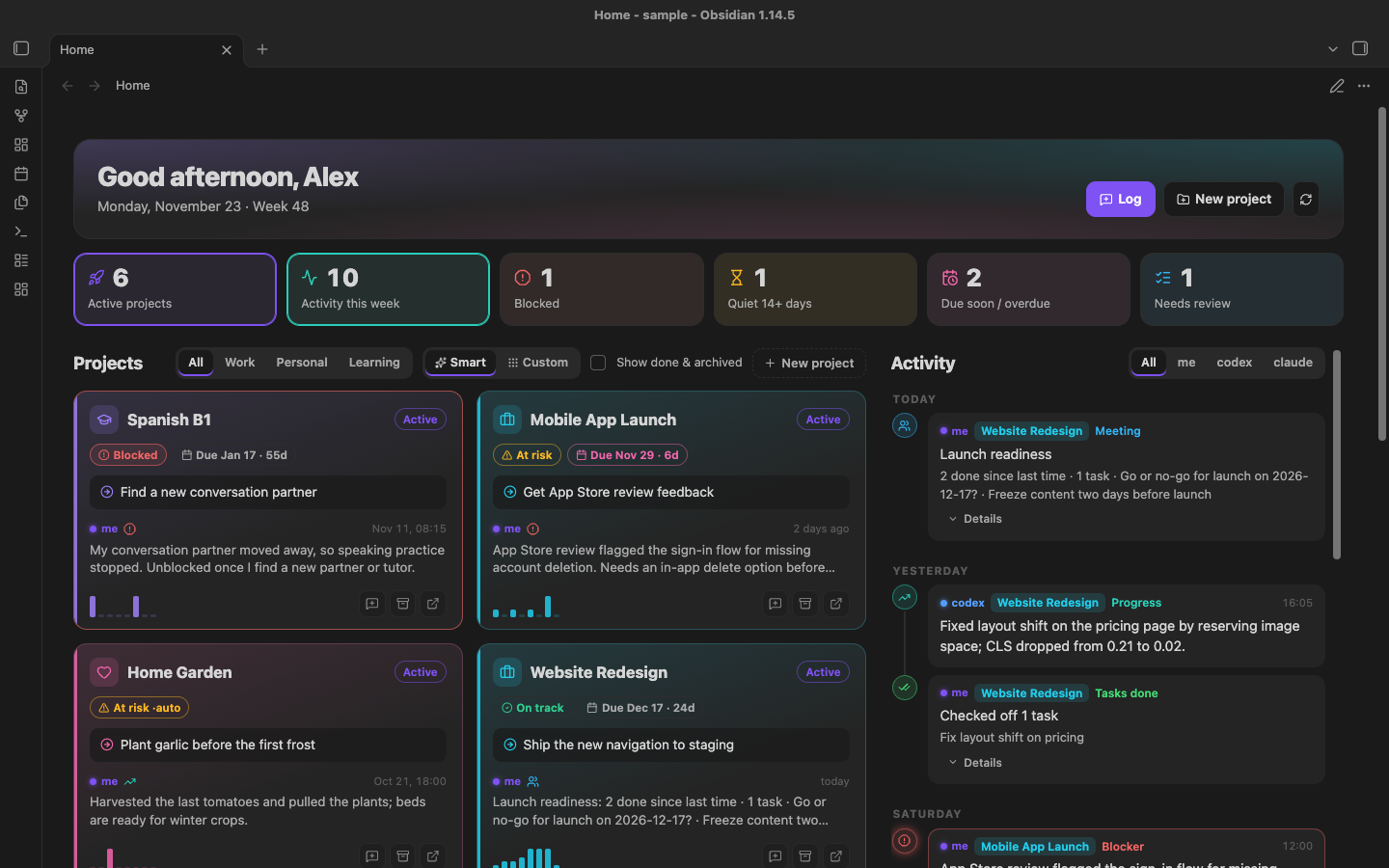 | 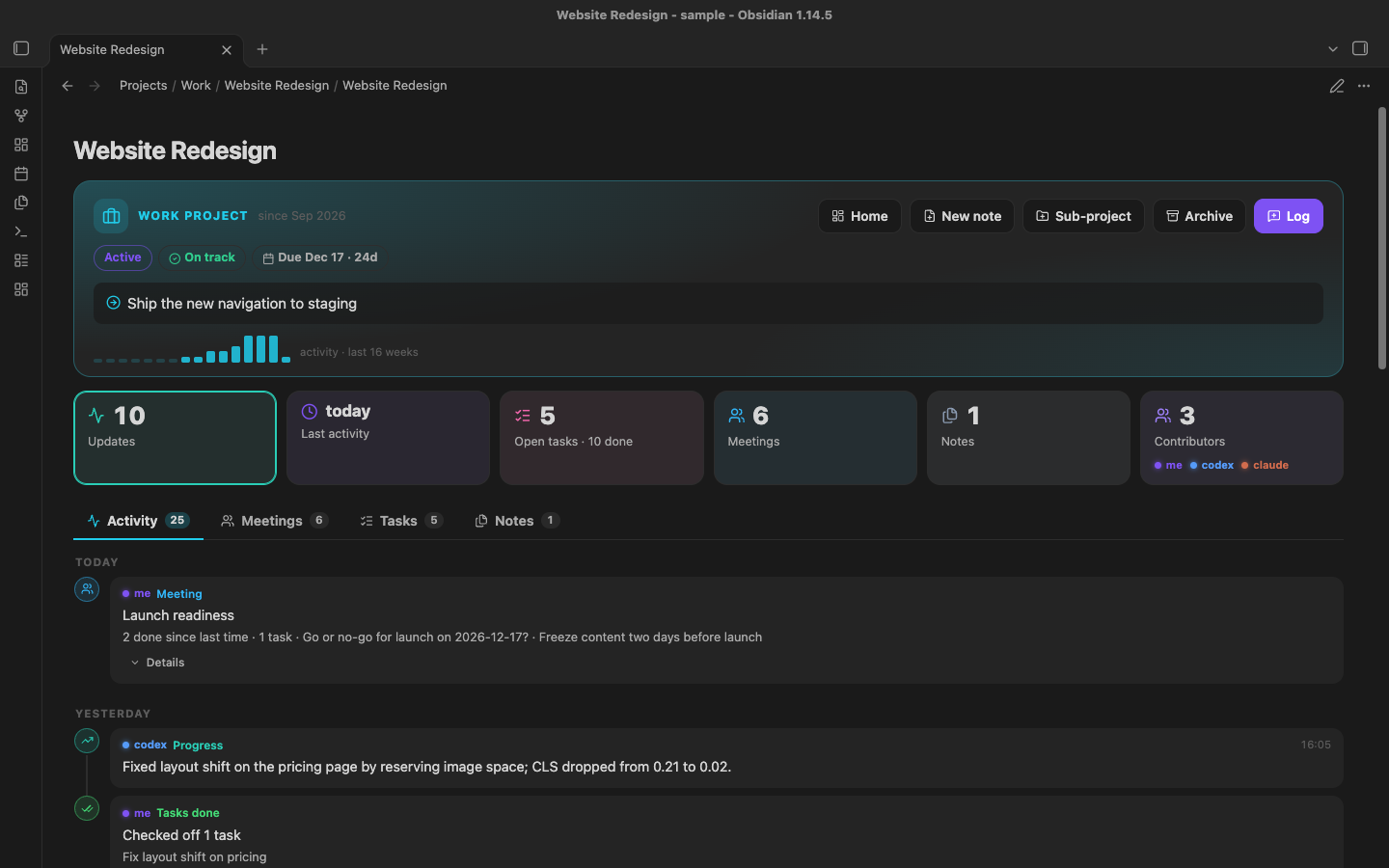 |
| Home dashboard: every project, flags and one feed | Project page: stats, activity and tabs |
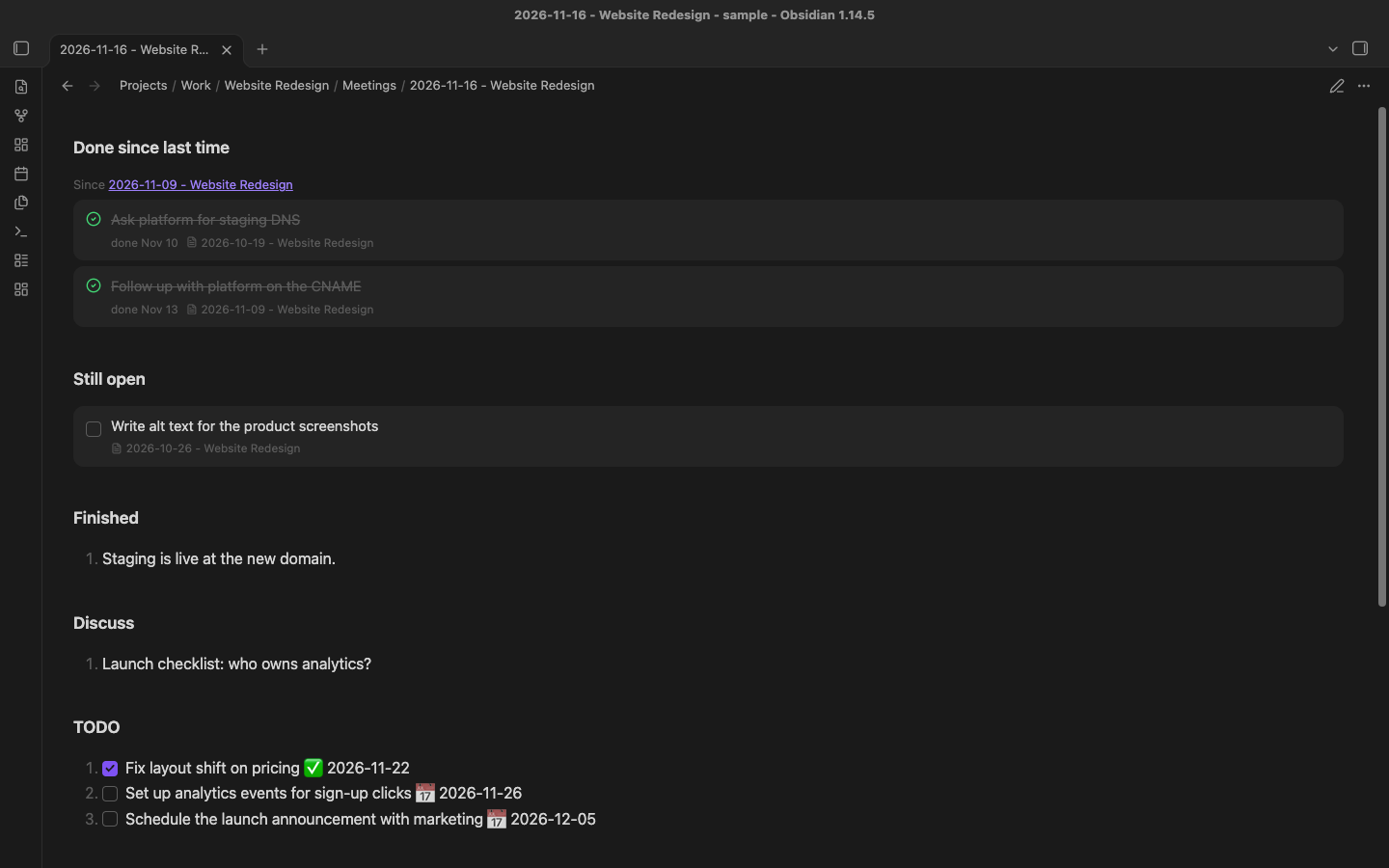 | 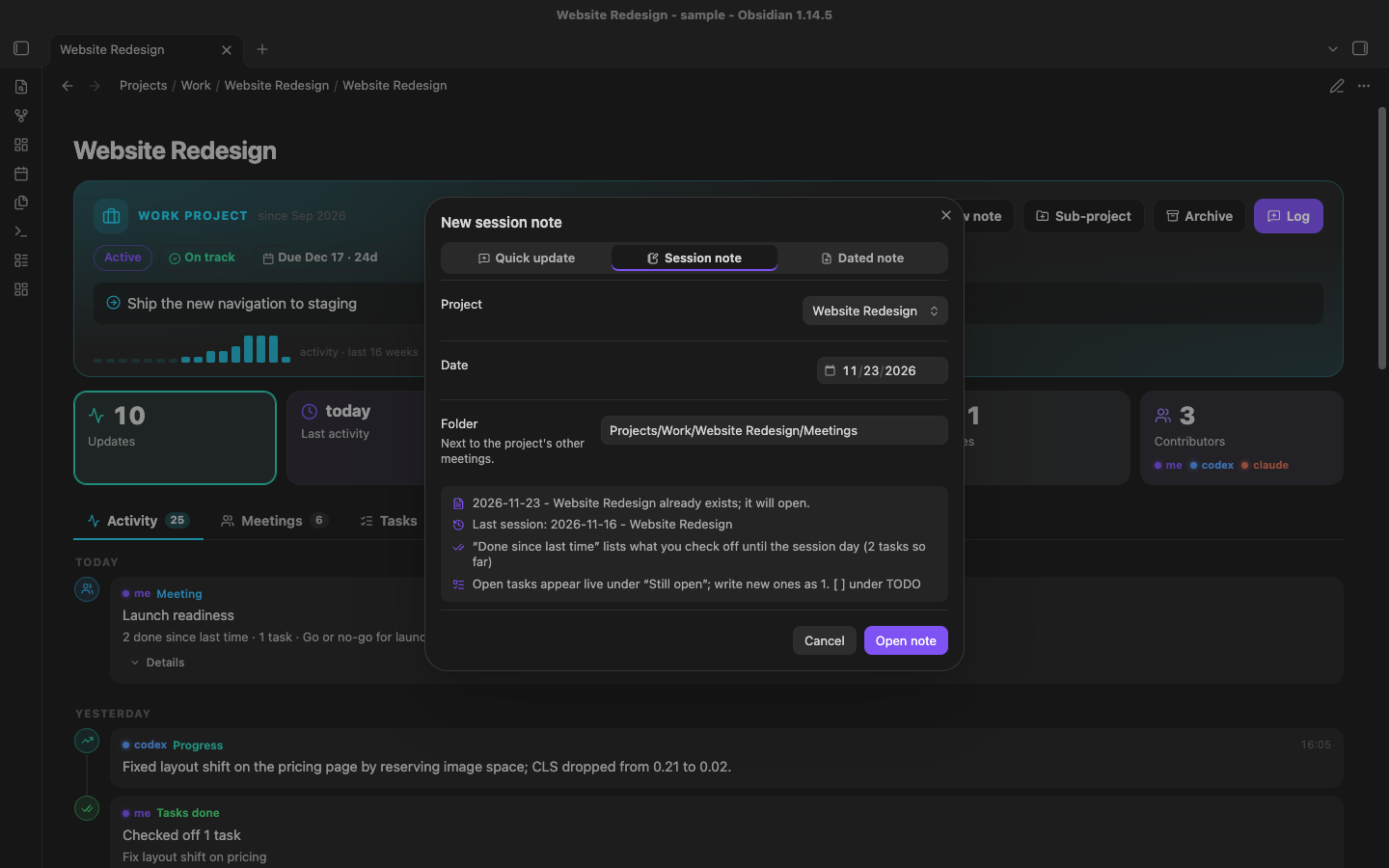 |
| Session note: live "Done since last time" and "Still open" | Log dialog: quick update, session note or dated note |
Quick start
- Install and enable the plugin (see Installation).
- Run Open home dashboard from the command palette. It creates
Home.mdwith the dashboard in it. - Click New project, give it a name and an area. The plugin creates
Projects/<Area>/<Name>/and a hub note. - Click Log on the project card:
- Quick update for a one-line progress note;
- Session note for a meeting;
- Dated note for a report or write-up.
- Open Settings → Home Project Manager to match your own folders and areas.
Already have projects? Add type: project to the frontmatter of each project's main note, and they appear on the dashboard.
Try the sample vault
The sample/ folder is a small vault with seven fictional projects, a few months of updates from me, claude and codex, weekly meetings and an archived project. It's the quickest way to see what the plugin does before pointing it at your own notes.
git clone https://github.com/TheronWang/home-project-manager.git
cd home-project-manager
node scripts/build-sample.mjs   # refreshes the dates and installs the plugin into sample/
Then in Obsidian choose Open another vault → Open folder as vault, pick sample/, trust the vault when asked, and open Home.
[!NOTE] The dates in
sample/are relative to the last timebuild-sample.mjsran. Run it again whenever you want "today" to be today.
Installation
From Community plugins
[!NOTE] The plugin is waiting to be added to the community list. Until then, use BRAT or install manually.
Open Settings → Community plugins → Browse, search for Home Project Manager, then choose Install and Enable.
With BRAT (beta)
- Install and enable BRAT.
- Run BRAT: Add a beta plugin for testing and enter
TheronWang/home-project-manager. - Enable Home Project Manager under Community plugins.
Manually
- Download
main.js,manifest.jsonandstyles.cssfrom the latest release. - Put them in
<your vault>/.obsidian/plugins/home-project-manager/. - Reload Obsidian and enable the plugin under Community plugins.
How it works
Everything the plugin shows comes from frontmatter and file names, so you can create and edit any of these notes by hand.
Projects
A project is a hub note with type: project, in a folder named after the project. Everything inside that folder belongs to the project.
---
type: project
status: active                        # active | needs-review | paused | done | archived
area: work                            # one of the areas in settings
due: 2026-12-01                       # optional
health: on-track                      # optional: on-track | at-risk | blocked
next_action: "Send the draft to Sam"  # optional, one line
parent: "[[Bigger Project]]"          # optional, makes this a sub-project
---
Add a project-panel block to the hub note to turn it into a project page:
```project-panel
```
A note with type: program groups related projects. Its page combines the activity of all the projects in its folder.
Updates
An update is one short note in the project's Updates/ folder, named YYYY-MM-DD HHmm - <author>.md:
---
type: update
project: "[[My Project]]"
date: 2026-10-19T14:30
author: me
kind: progress
---
Finished the config audit; the learning-rate schedule differed between runs.

- [ ] Compare the re-run against the old baseline 📅 2026-10-22
| Field | Values |
|---|---|
kind | progress · milestone · blocker · decision · note |
author | any lowercase name, such as me, claude, codex or sam. Each author gets a color. |
| body | the first line is the headline shown in the feed; anything after it is detail |
Session notes
Log → Session note creates YYYY-MM-DD - <Project>.md in the nearest Meetings/ folder at or above the project. If that folder is organised by term (2026-Fall, 2027-Spring), the note goes into the current term's subfolder. The default template has five sections:
| Section | What it holds |
|---|---|
| Done since last time | A live list of tasks checked off between the previous session and this one |
| Still open | A live, checkable list of the project's open tasks |
| Finished | Work that wasn't on any TODO list |
| Discuss | Topics for the meeting |
| TODO | New tasks, written as checkboxes |
[!TIP] Never copy a TODO forward. Leave it in the note where you wrote it, and check it off there when it's done. The next session note lists it under Done since last time automatically.
Notes you already have named YYYY-MM-DD - <Project name> count as meetings too, with no changes needed.
Dated notes
Log → Dated note creates a plain YYYY-MM-DD - <Title>.md note, such as a report, reading notes or a write-up. It appears in the feed and the Meetings tab, but doesn't count as a meeting.
Finished tasks
A task checked off with a ✅ YYYY-MM-DD date appears in the feed as "Checked off N tasks" and counts toward the activity charts. The Tasks plugin adds that date automatically when you check a task.
Archiving
Archive marks a project done (completed) or archived (stopped), records start, end and archived_from, and moves its folder to <Archive folder>/<Area>/<Name>. Restore moves it back. Obsidian updates links on move, so nothing breaks.
Code blocks
| Block | Put it in | Shows |
|---|---|---|
home-panel | any note | The full dashboard. Options: name: Alex, feed: 25 |
project-panel | a project hub note | The project page with tabs |
project-updates | a project hub note | Only the project's timeline |
project-done | a session note | Tasks checked off since the previous session |
project-tasks | a session note | The project's open tasks |
Commands
| Command | What it does |
|---|---|
| Open home dashboard | Opens your Home note, creating it if needed. Also on the ribbon. |
| Log update | Writes a quick update for the current project |
| New session note | Creates today's meeting note for the current project |
| New dated note | Creates a dated report or write-up |
| New project | Creates a project folder and hub note |
| New sub-project of current project | Creates a project inside the open one |
| Archive current project | Closes the open project and moves it to the archive |
The "current project" is the open hub note, or the project named in the open note's project: field.
Settings
| Setting | Default | What it does |
|---|---|---|
| Your name | (empty) | Shown in the greeting |
| Home note | Home.md | The note Open home dashboard opens |
| Projects folder | Projects | Where new projects are created |
| Archive folder | Archive/Projects | Where archived projects go |
| Ignored folders | Templates | Notes here are never read as projects, updates or meetings |
| Updates / Meetings subfolder | Updates / Meetings | Folder names the plugin creates and looks for |
| Areas | Work, Personal, Learning | Name, folder, Lucide icon and color for each area |
| Quiet after | 14 days | An active project with no activity for this long is flagged |
| Due soon | 14 days | How far ahead due dates are flagged |
| Old tasks | 60 days | Undated tasks in notes older than this are folded in Still open |
| Group meetings by | Auto | By term or by month. Auto uses terms when term folders exist. |
| Terms | Spring 01-07, Summer 05-11, Fall 08-15, Winter 12-10 | Term names and start dates (MM-DD) |
| Session note template | built in | Body of new session notes. {{date}} and {{project}} are filled in. |
Logging from coding agents
scripts/log-update.sh writes an update note from the command line, so an agent can report progress without opening Obsidian:
scripts/log-update.sh "My Project" progress claude "Added retry logic to the uploader; tests pass."
scripts/log-update.sh --list   # list project names
It finds the vault by walking up to the nearest .obsidian/, or uses $VAULT if it's set, and reads folder names from the plugin's settings. To call it from anywhere, link it onto your PATH:
ln -s "$PWD/scripts/log-update.sh" ~/.local/bin/vault-log
Then tell your agent about it in its instructions file (CLAUDE.md, AGENTS.md, …):
When you finish a meaningful piece of work, record it with
`VAULT=~/Notes vault-log "<Project>" <progress|milestone|blocker|decision|note> <your-name> "<one-sentence headline>"`.
Run `vault-log --list` for project names. Never edit or delete existing notes.
FAQ
Do I need Dataview or Tasks?
No. The plugin reads your notes directly. Tasks is recommended, because the done dates it adds (✅ 2026-11-20) are what make finished tasks show up as activity and in Done since last time.
Will it change my existing notes?
Only when you ask. The plugin creates new notes (projects, updates, session and dated notes), toggles the task line you click, and edits a project's frontmatter when you archive or restore it. Apart from that, it never touches what you've written.
My folders aren't called Projects. Is that a problem?
No. Projects are found by type: project anywhere in the vault. The folder settings only decide where new and archived projects go.
Does it work on mobile?
It isn't desktop-only and uses no desktop APIs, but it hasn't been tested much on phones yet. Bug reports are welcome.
I don't use semesters. How are meetings grouped?
By month. Term grouping only applies when your meetings folder has term subfolders such as 2026-Fall, or when you set Group meetings by to Term.
Contributing
Issues and pull requests are welcome. Before working on a large change, please open an issue to discuss it first.
Development. The plugin is a single CommonJS file with no build step:
- Clone the repo into
<test vault>/.obsidian/plugins/home-project-manager/. - Edit
main.jsorstyles.css. - Reload Obsidian, or use Hot Reload.
Releasing.
- Bump
versioninmanifest.jsonand add it toversions.json. - Push a tag with the same version:
git tag 0.1.1 && git push origin 0.1.1. - The release workflow attaches
main.js,manifest.jsonandstyles.cssto the GitHub release.
License
MIT © Theron
For plugin developers
Search results and similarity scores are powered by semantic analysis of your plugin's README. If your plugin isn't appearing for searches you'd expect, try updating your README to clearly describe your plugin's purpose, features, and use cases.