by yi011
Preview and customize your Obsidian notes, then export them as shareable HTML pages while preserving their styles, images, and diagrams.
HTML Export Preview
English | 简体中文
Turn your styled Obsidian notes into HTML pages you can preview, adjust, and share.
Keep the look of your rendered notes without writing HTML or CSS. Check the page, fine-tune the layout, then export it for people who don't use Obsidian.
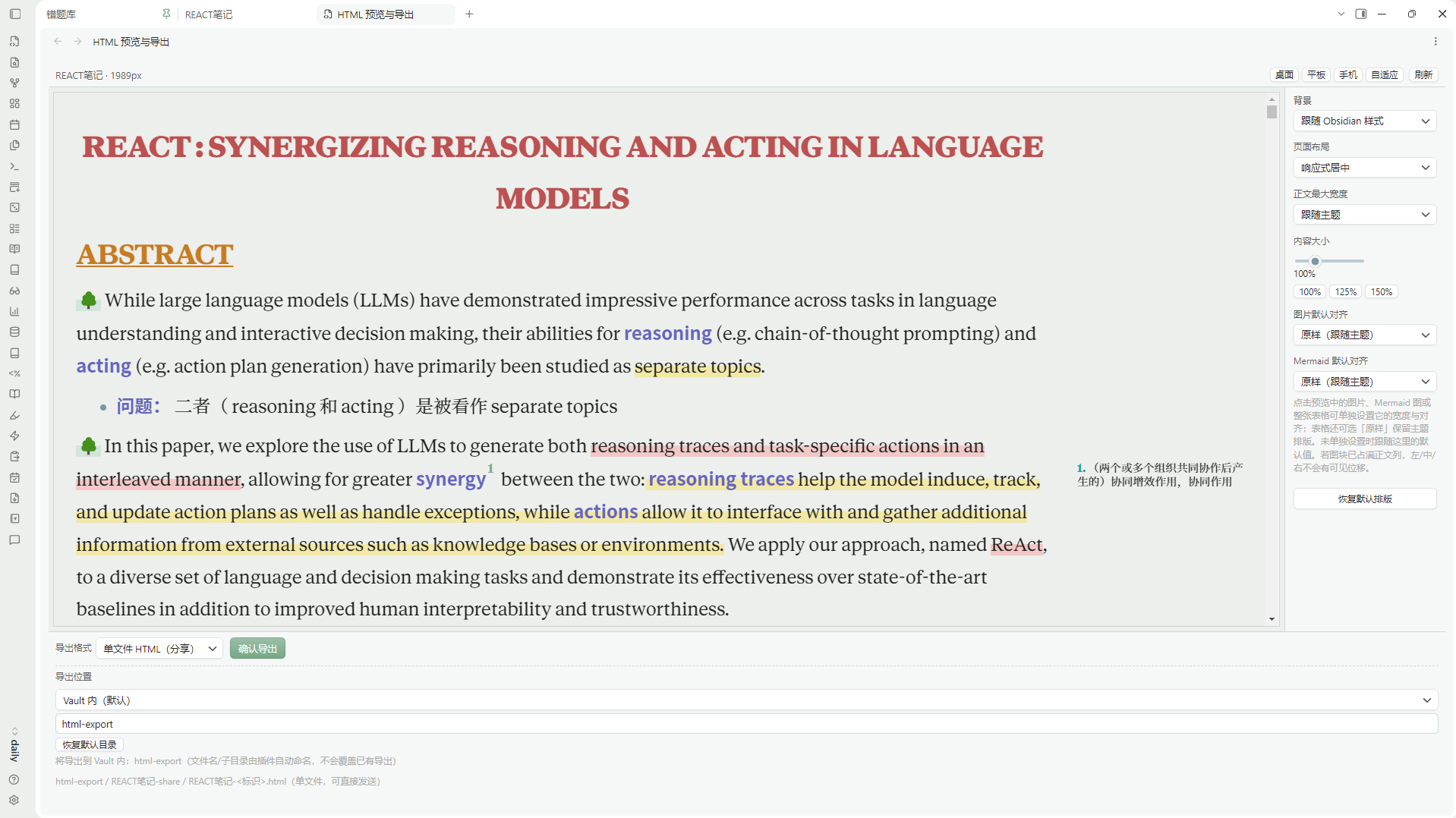
Live preview and layout controls inside Obsidian. The plugin interface is currently mainly in Chinese.
Why use it?
- Keep your note's appearance. Capture the rendered Reading View, including supported theme styles, CSS snippets, images, Mermaid diagrams, highlights, and Side Notes.
- Adjust before exporting. Preview desktop, tablet, and phone widths; change the page layout or click an image, Mermaid diagram, or table to adjust its size and alignment.
- Share without changing your note. Export a self-contained HTML file or an HTML + assets folder. Layout changes apply to the exported page, not your original Markdown.
- Choose where to save. Export inside or outside your vault, with confirmation before replacing an existing file.
Installation
Recommended — Obsidian community plugins
- Open Settings → Community plugins → Browse in Obsidian.
- Search for HTML Export Preview.
- Install and enable the plugin.
Manual installation: Download main.js, manifest.json, and styles.css from the latest GitHub Release. Place them in your vault's .obsidian/plugins/html-export-preview/ folder, reload Obsidian, and enable the plugin. When updating manually, keep your existing data.json.
How to use
- Open a note and launch HTML Export Preview from the command palette or its ribbon icon.
- Check the preview. Use the right-hand panel to adjust the page and individual images, Mermaid diagrams, or tables.
- Choose Single-file HTML or Resource folder, select a destination, and export.
Updates
| Date (UTC) | Version | What's changed |
|---|---|---|
| 2026-11-08 | 0.1.2 | Fixed theme CSS containing embedded SVG styles appearing as text in the preview or single-file exports (including the Border theme case). |
| 2026-11-07 | 0.1.1 | Improved preview selection highlighting compatibility and added bilingual documentation. |
| 2026-11-07 | 0.1.0 | Initial release: HTML preview, layout adjustments, and two export formats. |
See Releases for version details.
Limitations
- Desktop only. Requires Obsidian 1.15.0 or later.
- Exports are based on Reading View, not the Live Preview editor. Some theme effects, interactive content, and cross-note links may not carry over exactly.
- Remote fonts or styles may require internet access during export; their hosts may receive standard request metadata. The plugin does not send telemetry or your notes to its author.
- The plugin's in-app interface is currently mainly in Chinese.
Feedback
Found a bug or have an idea? Open a GitHub Issue. Include your plugin version, Obsidian version, theme name, and steps to reproduce. Please remove private note content from screenshots.
For developers
Source code is available under the MIT License. To build and test locally:
npm ci
npm run typecheck
npm test
npm run build
Release files are available under GitHub Releases. Maintainer: 1569y.
For plugin developers
Search results and similarity scores are powered by semantic analysis of your plugin's README. If your plugin isn't appearing for searches you'd expect, try updating your README to clearly describe your plugin's purpose, features, and use cases.