Illuminator
approvedby tiezjin
Automatically removes white backgrounds from images on paste and converts them to optimized WebP. Perfect for maintaining legibility and visual harmony in light-themed vaults. - This plugin has not been manually reviewed by Obsidian staff.
Illuminator
📝 Changelog / 更新日志
English
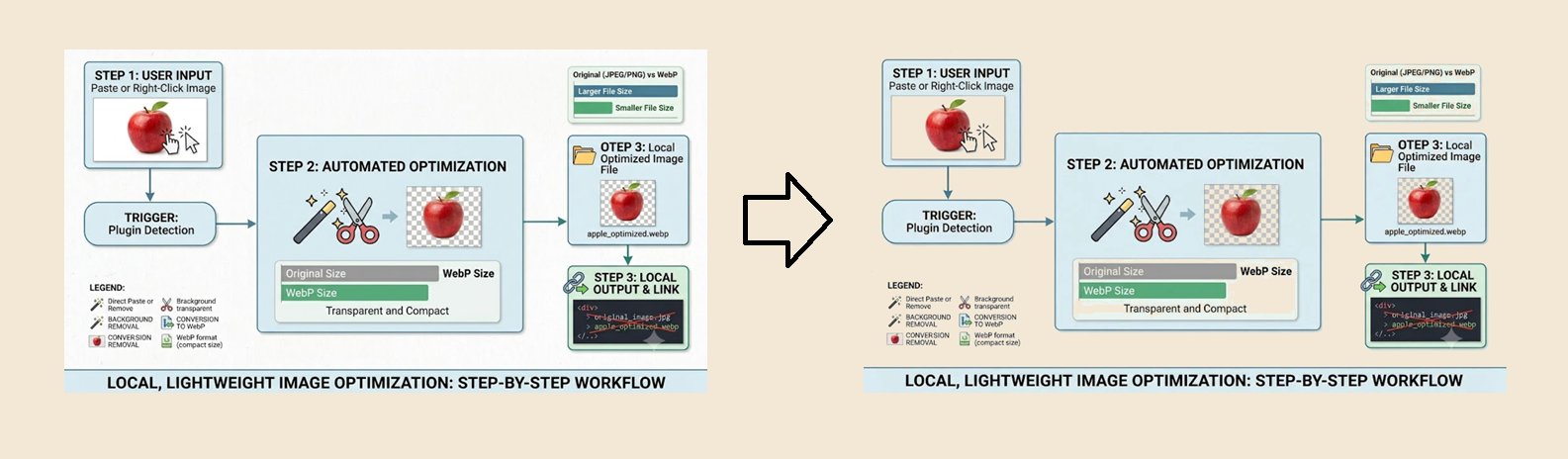
Illuminator is a local, lightweight plugin that removes white backgrounds from images, converts them into compact WebP format, and automatically updates links when you paste images or right-click them in the file panel.
🚀 How to Use
Two ways to use this plugin:
- Auto Mode (Paste): Images are automatically processed when pasted into notes.
- Manual Mode (Right-Click): Right-click any image in the file panel and select "Illuminator."
Both modes support:
- Adjustable white removal threshold
- Output format selection (PNG or WebP)
- Custom naming — set a pattern or disable it in settings
💡 Tips
- Best used in Obsidian's Light Mode or with custom backgrounds (e.g., warm yellow, soft green).
- ⚠️ In Dark Mode, pure black text may become hard to read after white background removal.
- ⚠️ This process permanently modifies image data. Keep backups if needed.
🛠 How It Works
- RGB Thresholding: Pixels brighter than your chosen setting become 100% transparent.
- 100% Local & Private: All processing happens in a Web Worker on your machine. No data ever leaves your vault.
简体中文
Illuminator 是一款本地轻量级插件,可去除图片白色背景,转换为 WebP 格式,并在粘贴或右键点击图片时自动更新链接。
🚀 如何使用
两种使用方式:
- 自动模式(粘贴): 粘贴图片时自动处理。
- 手动模式(右键): 在文件面板中右键图片,选择 "Illuminator"。
两种模式均支持:
- 可调节的白色去除阈值
- 输出格式选择(PNG 或 WebP)
- 自定义命名 — 可设置命名模板或禁用
💡 提示
- 建议在 Obsidian 浅色模式或自定义背景色(如暖黄、淡绿)下使用。
- ⚠️ 暗黑模式下,去除白色背景后的纯黑色文字可能难以辨认。
- ⚠️ 此操作会永久修改图片数据,如有需要请提前备份。
🛠 工作原理
- RGB 阈值处理: 亮度高于设定值的像素变为完全透明。
- 100% 本地运行: 所有处理在本地 Web Worker 中完成,数据绝不离开你的仓库。
Deutsch
Illuminator ist ein lokales, leichtgewichtiges Plugin, das weiße Hintergründe entfernt, Bilder in WebP konvertiert und beim Einfügen oder Rechtsklick Links automatisch aktualisiert.
🚀 Anwendung
Zwei Nutzungsmöglichkeiten:
- Auto-Modus (Einfügen): Bilder werden beim Einfügen automatisch verarbeitet.
- Manueller Modus (Rechtsklick): Rechtsklick auf ein Bild im Datei-Panel und „Illuminator“ wählen.
Beide Modi unterstützen:
- Einstellbaren Schwellenwert für die Weißentfernung
- Auswahl des Ausgabeformats (PNG oder WebP)
- Individuelle Bildbenennung — mit Muster oder deaktivierbar
💡 Tipps
- Am besten geeignet für den Light Mode von Obsidian oder mit individuellen Hintergrundfarben.
- ⚠️ Im Dark Mode kann schwarzer Text nach der Weißentfernung schwer lesbar sein.
- ⚠️ Die Bildänderungen sind dauerhaft. Bitte bei Bedarf Backups anlegen.
🛠 Funktionsweise
- RGB-Schwellenwert: Pixel heller als der eingestellte Wert werden zu 100 % transparent.
- 100 % Lokal & Sicher: Die Verarbeitung erfolgt im Web Worker auf deinem Rechner. Keine Daten verlassen dein Vault.
Changelog
1.0.1 → 1.1.2
ENG Custom naming when pasting — set a pattern or name each image individually.
🇨🇳 新增粘贴时自定义命名 — 可设置模板或单独命名。
🇩🇪 Benutzerdefinierte Benennung beim Einfügen — Muster oder individuelle Namen.
Created with the assistance of AI to solve a problem that was bothering me.
For plugin developers
Search results and similarity scores are powered by semantic analysis of your plugin's README. If your plugin isn't appearing for searches you'd expect, try updating your README to clearly describe your plugin's purpose, features, and use cases.