Immich Journal
approvedby fcandi
Insert photos taken on a daily note's date from a self-hosted Immich server, resized, captioned, and linked back to Immich. - This plugin has not been manually reviewed by Obsidian staff.
Immich Journal
An Obsidian plugin that inserts photos from your self-hosted Immich server into your daily notes — resized, captioned, and linked back to Immich.
Status: early development. Not yet released as a Community Plugin. Install via BRAT (see below) to try it now.
Features
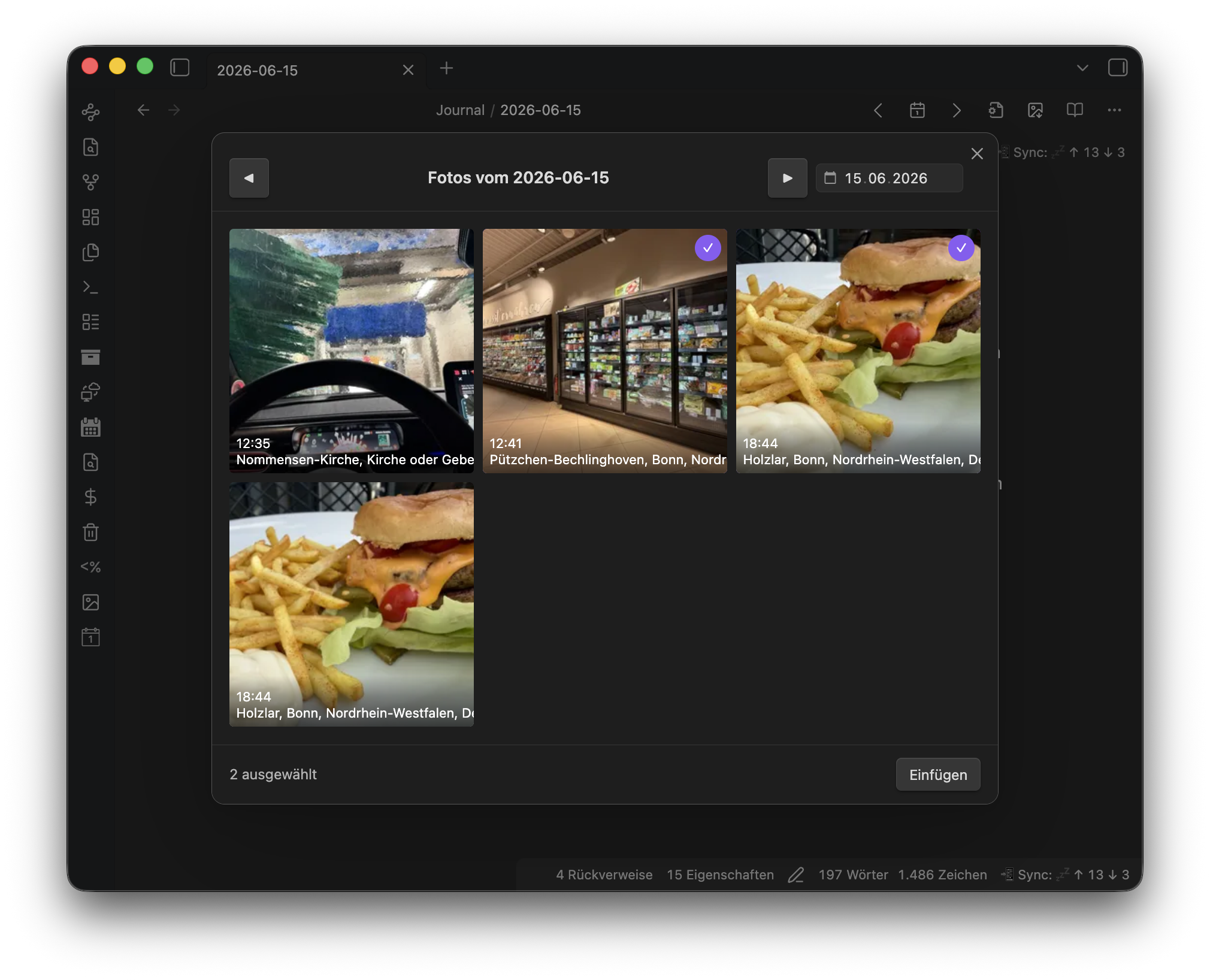
- One command opens a picker with all photos taken on the current daily note's date
- Date is detected from the note title (configurable format) or a frontmatter field — and when neither resolves, the picker simply opens on the most recent day that has photos
- Multi-select in the grid, then insert all chosen photos below each other — at the cursor position, at the top of the note (after frontmatter), or at the bottom (configurable)
- Photos are saved as resized local copies — the longest edge is scaled down to a configurable maximum (default 800 px), never upscaled, JPEG quality 0.85 — so your vault stays small and the original never leaves Immich
- Simple embed presets (markdown linked to Immich, markdown without link, wikilink) — the photo's Immich description automatically becomes the caption line, and an empty caption is omitted entirely, no dangling formatting
- Or full control via a custom template with Immich metadata variables
(
{{description}},{{time}},{{city}},{{country}},{{camera}},{{people}},{{filename}}, …) - Each inserted photo links back to the original asset in your Immich web UI
- Works on desktop and mobile — including setups where Immich is only reachable through a VPN such as Tailscale
- Localized UI: English, German, Spanish, French, Japanese, Chinese
Requirements
- A self-hosted Immich server you can reach from the device running Obsidian
- An Immich API key with at least the
asset.readandasset.viewpermissions
Setup
- In Immich, go to Account Settings → API Keys and create a new key. Grant it
asset.readandasset.view. A key that is scoped too narrowly will authenticate fine but fail with 403 Forbidden as soon as the plugin tries to load a thumbnail — the built-in "Test connection" button in the plugin settings checks a real thumbnail fetch, not just a lightweight ping, specifically to catch this. - In Obsidian, open Settings → Immich Journal and fill in:
- Server URL — e.g.
https://immich.example.com(no trailing slash) - API key — the key from step 1
- Server URL — e.g.
- Click Test connection. You should see a success message; if not, see Troubleshooting below.
- Run the "Insert photos from Immich for this day" command from a daily note (or via the ribbon icon), select photos, and insert.
Troubleshooting
| Result | Meaning |
|---|---|
| Success | Server reachable, key valid, thumbnail fetch works |
| Network error | Server URL unreachable — check the URL, and on mobile check your VPN connection |
| Unauthorized (401) | API key missing or invalid |
| Forbidden (403) | Key is valid but lacks a required scope — recreate it with asset.read + asset.view |
Settings reference
| Group | Setting | Default | Notes |
|---|---|---|---|
| Connection | Server URL | (empty) | e.g. https://immich.example.com |
| API key | (empty) | Stored in plain text in data.json, per Obsidian's standard plugin-data behavior | |
| Test connection | — | Verifies reachability, auth, and a real thumbnail fetch | |
| Insert | Insert position | At cursor | At cursor, top of note (after frontmatter), or bottom of note |
| Photo embed | Markdown, linked to Immich | Presets: markdown linked to Immich / markdown without link / wikilink — or a custom template | |
| Custom template | []({{immichUrl}})*{{description}}* | Only shown for the custom preset; lines that render empty are omitted | |
| Max edge length (px) | 800 | Longest side of the inserted image; portrait and landscape scaled the same way; never upscales | |
| JPEG quality | 0.85 | Applied when re-encoding the downscaled image | |
| Attachment folder | attachments/immich/{{year}}/ | Supports date placeholders | |
| File name template | {{date}}_immich_{{assetIdShort}} | Includes the asset ID so re-inserting the same photo reuses the existing file instead of duplicating it | |
| Daily note | Title date format | YYYY-MM-DD | Moment.js format used to parse the note title |
| Frontmatter fallback field | (empty) | Used if the title doesn't parse, e.g. created | |
| Display | Grid columns | 3 | Applies on desktop and mobile alike |
| Language | Auto | Follows Obsidian's locale; can be forced to English, German, Spanish, French, Japanese, or Chinese |
Works great with Tailscale / VPN
The most common self-hosted Immich setup is a server reachable only inside a private network or VPN (Tailscale, WireGuard, etc.), not on the public internet. Immich Journal works well with this:
- All requests go through Obsidian's
requestUrl()API, so there is no CORS configuration to worry about on the Immich side, on desktop or mobile. - On iPhone/iPad, make sure your VPN (e.g. the Tailscale app) is connected before using the plugin. Without it, the server is simply unreachable.
- If the server can't be reached, the plugin shows a clear error instead of hanging — check your VPN connection first.
Installation
Not yet available in the Community Plugins directory. Until it passes community review, install it via BRAT (Beta Reviewer's Auto-update Tool):
- Install the BRAT plugin from Community Plugins.
- In BRAT's settings, add this repository:
https://github.com/fcandi/obsidian-immich-journal - Enable Immich Journal in your installed plugins list.
Immich version compatibility
Immich Journal deliberately uses only three stable, long-standing Immich API endpoints, to stay resilient against the fast pace of Immich's development:
POST /api/search/metadata— find photos taken on a given dayGET /api/assets/{id}/thumbnail?size=thumbnail|preview— load grid thumbnails and the higher-resolution image used for the resized insert- The web UI deep link pattern
{server}/photos/{assetId}— no API call, just a URL
If a future Immich release changes these, please open an issue with your server version.
Development
-
npm run dev— esbuild in watch mode, emitsmain.jsinto the repo root on every change. -
One-time setup: symlink this repo into your test vault's plugins folder, e.g.:
ln -s ~/DEV/obsidian-immich-journal "<vault>/.obsidian/plugins/immich-journal"Enable the plugin in Obsidian, then reload Obsidian (or use a hot-reload plugin) after each change to pick up the new
main.js. -
npm run build— production build. -
npx tsc --noEmit— type-check without emitting. -
npx vitest run— run the unit test suite.
License
For plugin developers
Search results and similarity scores are powered by semantic analysis of your plugin's README. If your plugin isn't appearing for searches you'd expect, try updating your README to clearly describe your plugin's purpose, features, and use cases.