inREFens
approvedby Eryk J.
Find references/citations to publications of Jehovah's Witnesses and link them to wol.jw.org - This plugin has not been manually reviewed by Obsidian staff.


in(REF)ens – Obsidian plugin
inrefens (n.): The ongoing act of bringing a publication reference into the text — of adducing a cited source and binding it to the note. From Latin in- ("into") + referre ("to carry back, to refer") + -ens (present participle).
A publication citation parser and linker for Obsidian. Find references to publications of Jehovah's Witnesses and link them to wol.jw.org. Inferre et ligare ("To bring in and bind").
Security and Privacy
See SECURITY.
Features
-
Automatic citation detection – Publication citations are automatically detected in both Reading View and Live Preview (Edit mode), and updated as you type. Recognized roots include The Watchtower (
w,ws,wp), Awake! (g), Kingdom Ministry (km), Meeting Workbook (mwb), Insight on the Scriptures (it-1,it-2), and hundreds of books, brochures, tracts, and online article series. -
Interactive links – Every detected citation becomes a clickable link. Clicking opens the result of the search for the citation on wol.jw.org.
-
Flexible citation forms – Accepts a wide range of user-written variants:
- Glued or separated years:
w15 2/15,w 15 2/15,w2015 2/15,w 4/2026 - Month/day in either order:
w15 2/15,w15 15/2 - Optional page ranges:
w26.4 12-15,be 30-32 - Hyphenated or non-hyphenated roots:
it-1 450,it1 450 - Titles in reference works:
it-1 Abraham,it-1 "Abraham"
- Glued or separated years:
-
Multi-language support – Links open in your chosen language on wol.jw.org.
- Supported languages: ASL, Cebuano, Chinese (Simplified Mandarin), Danish, Dutch, English, Estonian, Finnish, French, German, Haitian Creole, Hungarian, Italian, Japanese, Korean, Norwegian, Polish, Portuguese (Brazil and Portugal), Romanian, Russian, Spanish, Swedish, Tagalog, Ukrainian
-
Configurable link color – Choose from presets or enter a custom hex value. Changing the color requires restarting Obsidian.
-
Desktop and mobile support
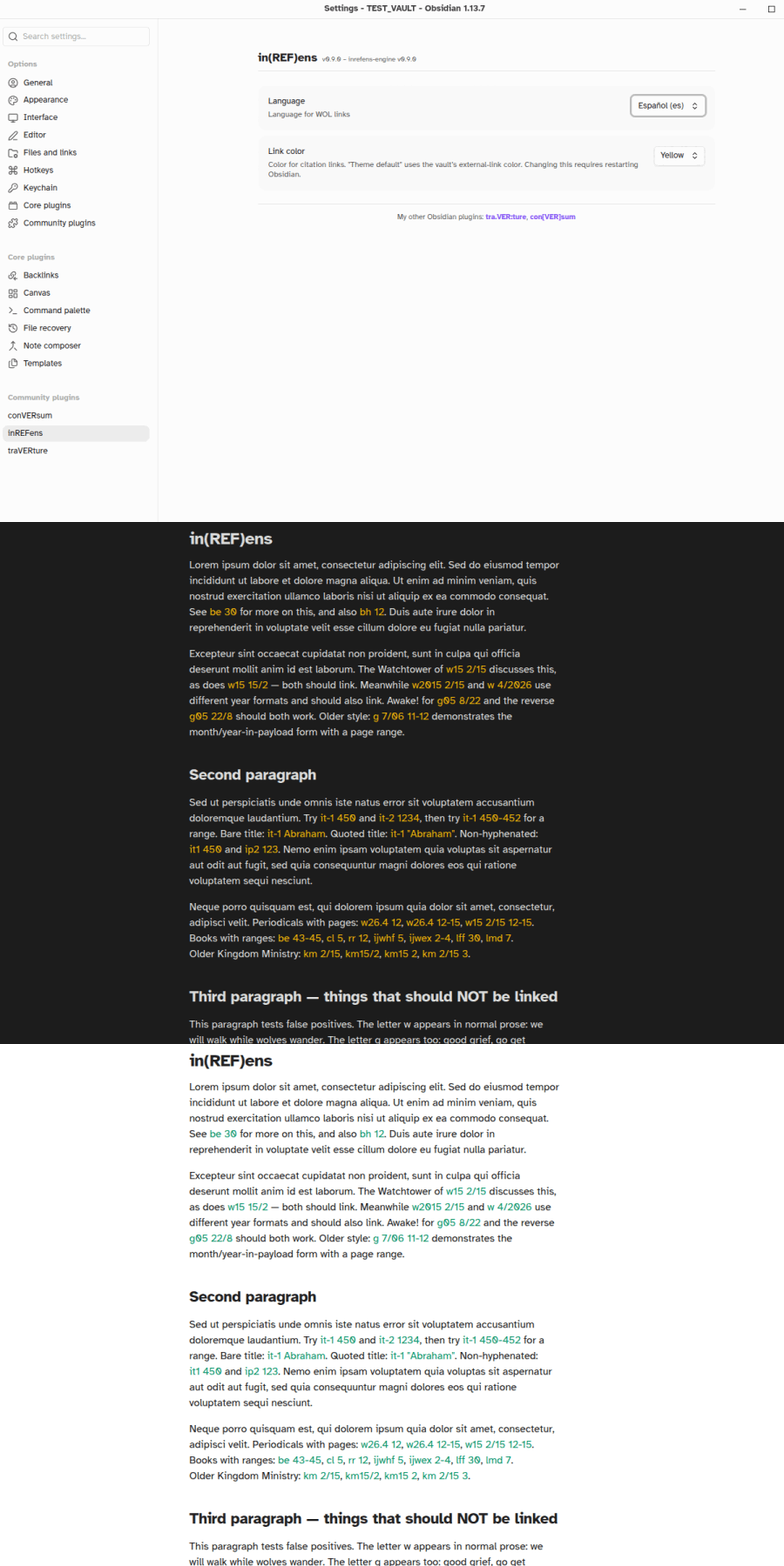
Settings
- Language – Language for wol.jw.org links
- Link color – Color for citation links. "Theme default" uses the vault's external-link color. Presets and a custom hex option are provided. Changing this requires restarting Obsidian.
Known Limitations
-
Citations split by inline markup are not detected. For example,
w26.**4** 12(with bold inside the citation) will not link, because the markup splits the text into separate nodes. Write the citation without inline markup (w26.4 12) or apply the markup around the whole citation (**w26.4 12**). -
If you encounter a publication root that doesn't link, please open an issue.
Performance
Detection runs on visible text only and is fast even on large documents. Changing the language in settings reloads the parsing engine, which may take a moment on mobile.
Installation & Updating
- In your vault's
.obsidian/plugins/directory, make a directory (folder) calledinrefens, if you don't already have one - Download main.js, styles.css, manifest.json
- If not already enabled, enable the plugin in Obsidian Settings → Community plugins
- Configure the language in the plugin settings (if installing for the first time); defaults to English
Feedback, etc.
Feel free to get in touch and post any issues and/or suggestions.
My other Obsidian plugins:
- con[VER]sum: GitHub repo, Obsidian Community
- tra.VER:ture: GitHub repo, Obsidian Community
For plugin developers
Search results and similarity scores are powered by semantic analysis of your plugin's README. If your plugin isn't appearing for searches you'd expect, try updating your README to clearly describe your plugin's purpose, features, and use cases.