Integrated Archive
approvedby 0libote
Archive notes instead of deleting them, with optional archive metadata. - This plugin has not been manually reviewed by Obsidian staff.
Integrated Archive
Integrated Archive moves files out of active work without treating them as disposable.
Features
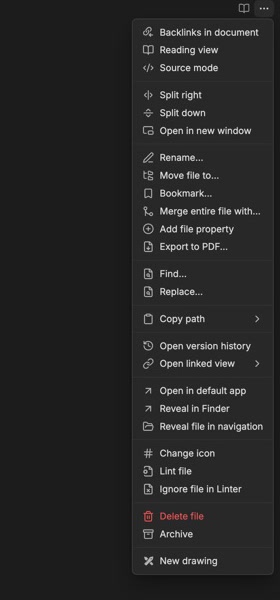
- Archive current file command and optional file-menu action.
- Restore archived files to their original locations, or undo the latest available archive operation.
- Archive or restore multiple selected files at once.
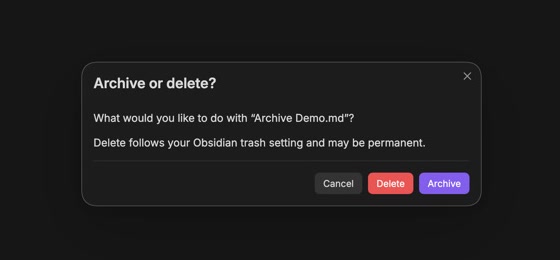
- Choose whether Delete asks each time, archives automatically, or uses Obsidian’s normal delete flow.
- The optional prompt offers Archive / Delete / Cancel. Delete follows your configured Obsidian trash setting and may be permanent.
- Configurable archive folder with optional original folder structure.
- Optional archive tag and archived, created, and last-edited frontmatter dates.
- Collision-safe names such as
note (1).md; existing files are never overwritten. - Files already inside the archive use Obsidian's normal delete flow.
- Existing created and last-edited properties are preserved by default.
Use
Right-click a file and select Archive, or run Integrated Archive: Archive current file from the command palette. Configure the folder, delete prompt, tag, property names, folder structure, and date format under Settings → Integrated Archive.
Right-click an archived file and select Restore from archive, or run Integrated Archive: Restore current file from archive. Restores return files to their recorded original paths, reverse metadata added or replaced by that archive operation, and use collision-safe names if those paths are occupied. Integrated Archive: Undo last archive restores the newest archived file that is still available.
The plugin works locally inside your vault. It has no network access, accounts, telemetry, or external services.
Install
Integrated Archive requires Obsidian 1.13 or later.
Community plugins
Once Integrated Archive is listed in the Obsidian Community Plugins directory:
- Open Settings → Community plugins.
- Select Browse, search for Integrated Archive, and select Install.
- Select Enable.
Manual installation
- Download
main.jsandmanifest.jsonfrom the latest GitHub release. - Create
<vault>/.obsidian/plugins/integrated-archive/. - Copy both downloaded files into that folder.
- Reload Obsidian, then enable Integrated Archive under Settings → Community plugins.
Install for development
bun install
bun run build
Copy manifest.json and main.js into:
<vault>/.obsidian/plugins/integrated-archive/
Then enable Integrated Archive under Settings → Community plugins.
Run bun run dev while developing and bun run check before committing.
bun run check verifies release versions, type-checks and bundles the plugin, runs the official Obsidian ESLint rules, and executes the test suite.
Release
Bump package.json, manifest.json, and versions.json together, then push a tag with that exact version and no v prefix:
bun run bump 0.2.0
bun run check
git add package.json manifest.json versions.json
git commit -m "Release 0.2.0"
git tag 0.2.0
git push origin main 0.2.0
GitHub Actions verifies the version, builds the plugin, and creates a release containing the files Obsidian needs.
License
For plugin developers
Search results and similarity scores are powered by semantic analysis of your plugin's README. If your plugin isn't appearing for searches you'd expect, try updating your README to clearly describe your plugin's purpose, features, and use cases.