by Fedor Kupryakov
Sync Kindle highlights with Calibre and read EPUB books side-by-side with your notes.
Kindle Calibre Sync
Desktop Obsidian plugin for syncing Kindle highlights and personal notes into your Obsidian vault and Calibre library, with an embedded side-by-side EPUB reader.
Supports legacy Kindle USB drives (My Clippings.txt), modern MTP Kindle firmware (ksdk_annotation_v1.db + .kfx), Kindle Desktop / Mobile Notebook HTML exports (.html via Notebook -> Export), and offline syncing via local files and cached snapshots — without Python.
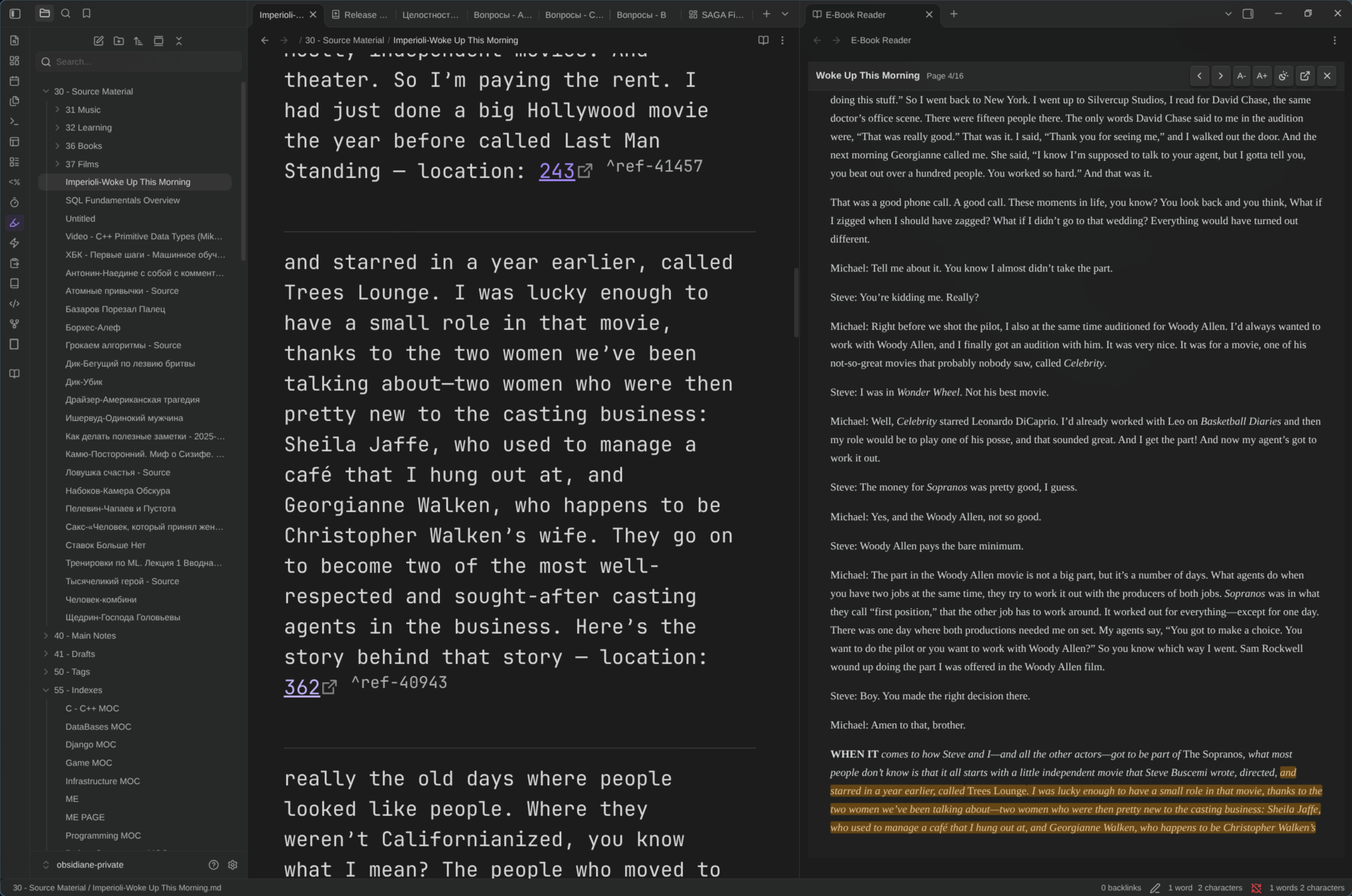
How It Works
Connect your Kindle (or save .html exports from Kindle for Mac / PC) and trigger sync from the left ribbon (Sync Kindle highlights with Calibre) or Command Palette:
- Detect Kindle sources: Checks connected USB Mass Storage Kindles, MTP Kindles, Kindle Notebook
.htmlexport folders, configured local paths, and cached snapshots, or prompts you to select.txt,.db, or.htmlfiles manually. - Parse, clean & merge highlights: Extracts highlights and attached notes from
My Clippings.txt,ksdk_annotation_v1.db(resolving KFX locations in TypeScript), and Kindle.htmlexports. Progressive typing/edit logs recorded by Kindle on the same location are collapsed to the latest edit and merged without duplicates. - Prepare EPUBs in Calibre: Matches books in Calibre's
metadata.db. Matched books without an.epubcopy are queued and converted automatically viaebook-convert, then registered inmetadata.db. - Index CFIs & inject annotations: Calculates exact EPUB CFI coordinates in memory (
sql.js-fts5+jszip) and optionally writes annotations back into Calibre'smetadata.db. - Update vault notes: Resolves your highlights folder (by existing
kindle-title/kindle-bookIdfrontmatter orKindle Highlights/), createsAuthor-Title.mdnotes, repairs previously stacked edit-log notes, and appends unseen highlights with deep links ([location](calibre://view-book/.../EPUB?open_at=epubcfi(...))). - Read side-by-side: Clicking any location link opens the book directly in a split
ePub.jspane scrolled to the exact quote.
Supported Kindle Sources
| Firmware / Mode | Source Files | Transport / Fallback |
|---|---|---|
| Legacy USB Mass Storage | documents/My Clippings.txt | Linux (/run/media, /media, /mnt), macOS (/Volumes), Windows (D:–Z:) |
| Modern MTP Firmware (including Scribe / recent Kindles) | system/ksdk/.annotations/*/ksdk_annotation_v1.db + .kfx | Linux GVFS (gvfs-mtp) / gio, Calibre MTP driver (calibre-debug), or libmtp |
| Kindle Desktop / Mobile App (macOS, Windows, iOS/Android) | Notebook .html files (Notebook -> Export) | Multi-file import command (Import Kindle Desktop / App export (.html)) or auto-scanned export folder (Kindle Exports/) |
| Mixed / Transitioning Devices | My Clippings.txt + ksdk_annotation_v1.db + .html | Automatically merged and deduplicated with personal notes preserved |
| Offline / Kindle Disconnected | Local My Clippings.txt, .html + ksdk_annotation_v1.cache.db | Configured paths, ~/, ~/Documents, ~/Downloads, ~/Desktop, vault root, and plugin cache |
Each live USB/MTP sync saves a local snapshot of ksdk_annotation_v1.db as .obsidian/plugins/kindle-calibre-sync/ksdk_annotation_v1.cache.db so later syncs continue working when the Kindle is unplugged.
Automatic EPUB Queue & Reader
- Sync-time conversion queue: Books matched in Calibre without an EPUB format are automatically converted via Calibre's
ebook-convertCLI (.fb2,.fb2.zip,.azw3,.mobi,.rtf,.docx,.html,.htm,.xhtml,.txt,.odt,.lit,.prc,.kfx), registered underEPUBinmetadata.db, and indexed before Markdown links are generated. - On-demand link recovery: Clicking an old
search:or non-EPUB deep-link converts or picks up the EPUB with single-flight deduplication, indexes all highlights in memory anddata.json, upgrades the note's links in place, registersEPUBinmetadata.db, and opens the reader on that quote. - Side-by-side reader controls: Light / Dark / Sepia themes, font scaling (
A-/A+), arrow-key page navigation, active amber highlight + passive yellow highlights across the book, and an Open in Calibre button.
Close desktop Calibre while syncing or converting so SQLite does not hold a lock on
metadata.db. Ifmetadata.dbis busy, Markdown updates and reading still complete and a non-fatal warning notice is shown.
Installation
- Community Plugins: In Obsidian go to Settings → Community plugins → Browse, search for Kindle Calibre Sync, install, and enable.
- BRAT: Add
divohub/kindle-calibre-syncin the BRAT plugin settings. - Manual: Download
main.js,manifest.json, andstyles.cssfrom Releases into<vault>/.obsidian/plugins/kindle-calibre-sync/.
Requirements
- Desktop Obsidian
>= 1.0.0(isDesktopOnly: true). - A Calibre library containing
metadata.db(auto-detected from Calibre config or~/Calibre Library,~/Documents/Calibre Library). - Optional: Calibre's
ebook-convertCLI onPATH/ standard install location for automatic conversion of non-EPUB formats. - Optional for MTP on modern Kindle firmware: GVFS/GIO (
gvfs-mtp),libmtp, or Calibre'scalibre-debugCLI.
Settings
All fields are optional; leave them blank to use automatic detection:
- Calibre library path: Custom folder containing Calibre
metadata.db. - Highlights folder: Vault folder for book notes (auto-detects existing folders with
kindle-titleorkindle-bookIdfrontmatter, otherwise defaults toKindle Highlights). - Legacy clippings file path: Explicit
My Clippings.txtpath used when no Kindle is attached. - Kindle annotation DB path (
ksdk_annotation_v1.db): Explicit path to an offlineksdk_annotation_v1.dbor cached DB copy. - Kindle Notebook HTML path or folder: Optional
.htmlfile or folder containingNotebook -> Exportfiles saved from Kindle for Mac / PC (also auto-scans<vault>/Kindle Exportsand~/Documents/Kindle Exports). - Inject highlights into Calibre: Toggle writing highlights and personal notes into Calibre's
metadata.db. - Open reader side-by-side: Toggle opening
calibre://view-book/...links inside Obsidian's embedded reader instead of forwarding to the OS handler.
Legacy Python CLI
For headless automation without Obsidian open, the repository retains the standalone Python CLI scripts (kindle_sync.py, clippings_parser.py, calibre_adapter.py, obsidian_exporter.py):
pip install -r requirements.txt
python3 kindle_sync.py --watch
Example config.json for the standalone Python CLI
{
  "vault_path": "/path/to/your/ObsidianVault",
  "highlights_folder": "Kindle Highlights",
  "calibre_library_path": "~/Calibre Library",
  "calibre_library_id": "Calibre_Library",
  "clippings_file_relpath": "documents/My Clippings.txt",
  "inject_calibre_annotations": true
}
For plugin developers
Search results and similarity scores are powered by semantic analysis of your plugin's README. If your plugin isn't appearing for searches you'd expect, try updating your README to clearly describe your plugin's purpose, features, and use cases.