by swiSwift
Zero-configuration, LAN-only, two-way sync for Obsidian. Your desktop serves the vault; phones and tablets are pure clients. No account, no cloud, no relay, and nothing to type.
LAN Sync / 局域网同步
| English | 中文 |
|---|---|
| Zero-configuration, LAN-only, two-way sync for Obsidian. Your desktop serves the vault; phones and tablets are pure clients. No account, no cloud, no relay, and nothing to type. | 零配置、仅在局域网内工作的 Obsidian 双向同步插件。电脑做服务端,手机/平板做纯客户端;不需要账号、云端或中转,也不需要填任何东西。 |
| Not affiliated with Obsidian. Tested on Windows (desktop) + Android (mobile); iOS is untested. | 与 Obsidian 官方无关。已在 Windows 桌面端 + Android 手机端验证,iOS 未测试。 |
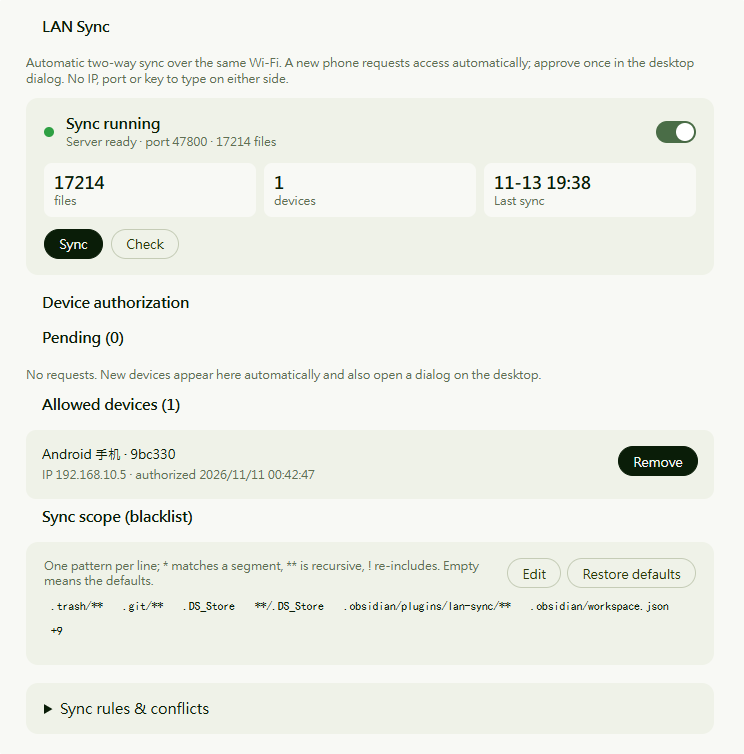
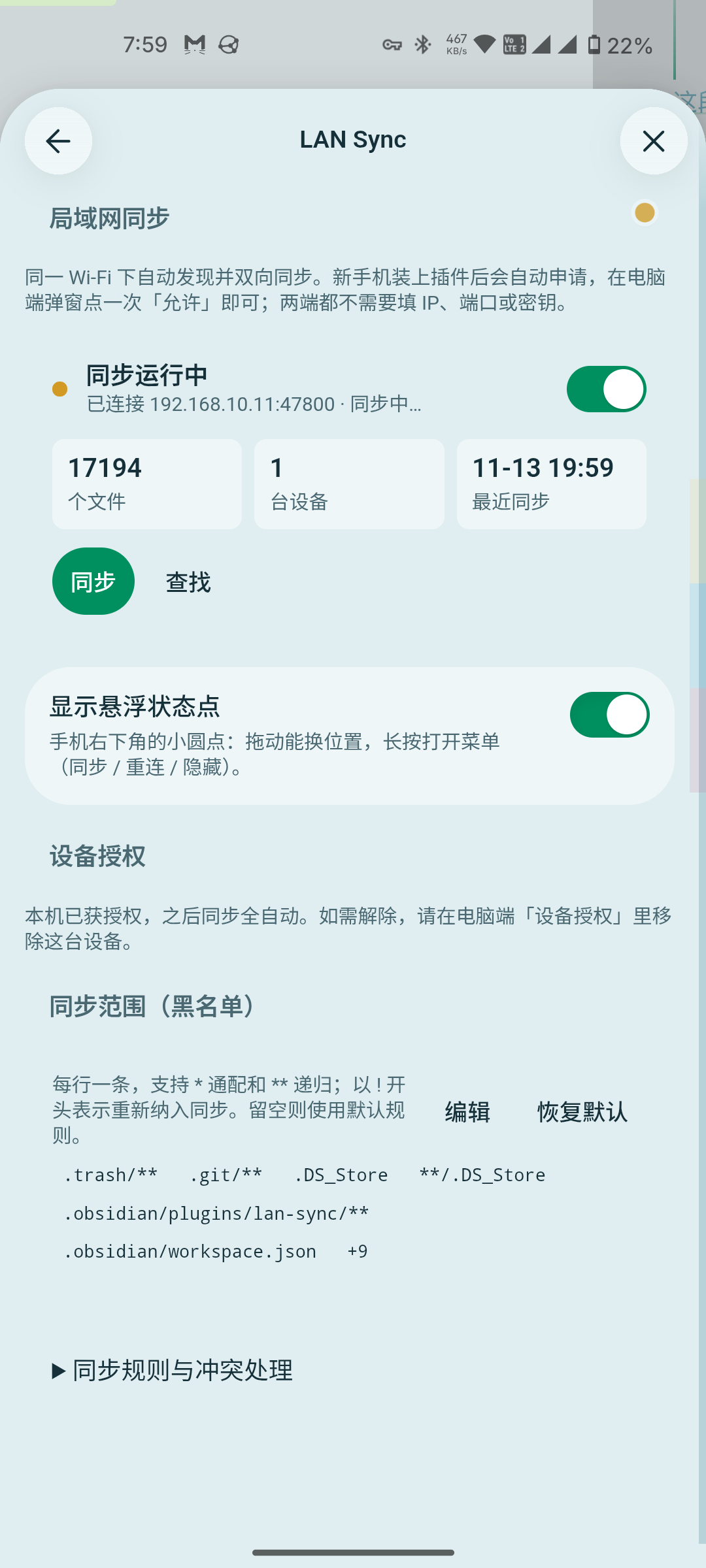
Settings on desktop and mobile · 电脑端与手机端的设置页
Features / 功能
| English | 中文 |
|---|---|
| Zero-input pairing — a new phone requests access automatically; the desktop shows a dialog, click Allow & sync once. No IP, port, PIN or key on either side. | 零输入配对 — 新手机自动申请,电脑端弹窗点一次「允许并同步」即可;两端都不用填 IP、端口、PIN 或密钥。 |
Automatic discovery — cached endpoint first, with a native requestUrl fallback when the mobile WebView blocks plain-HTTP fetch, then common LAN subnet scanning. | 自动发现 — 优先直连缓存地址(手机 WebView 拦截明文 fetch 时自动切原生 requestUrl),再扫描常见局域网网段。 |
Incremental by index — index.json on desktop, state.json / remote-index.json on mobile store hashes, rev and a change log. Restarts resume incrementally instead of re-hashing the whole vault. | 索引化增量 — 电脑 index.json、手机 state.json / remote-index.json 保存哈希、rev 与变更日志;重启后继续增量,不会全库重算。 |
Token authorization — every data request carries X-Lan-Sync-Token. Unpaired devices get 401 and cannot read, overwrite or delete anything. Devices can be revoked instantly. | 令牌鉴权 — 所有数据请求带 X-Lan-Sync-Token;未授权设备返回 401,读不到索引、改不了也删不了文件;可随时移除设备使令牌立即失效。 |
| Any file type — notes, canvases, bases, images, PDFs, audio, video and archives; no extension whitelist and no size cap. Text files are applied to an open editor as a minimal line-level edit, so the view does not reload or jump to the top, and unsaved edits are never overwritten. | 任意文件类型 — 笔记、画布、Base、图片、PDF、音视频、压缩包均可同步,没有扩展名白名单,也没有单文件大小上限;文本文件以「按行最小替换」的方式写进已打开的编辑器,不会整篇重载、不会跳回顶部,也不会覆盖还没保存的内容。 |
| Status at a glance — The desktop status bar shows only a colored dot and the file count; right-click it to sync now, pause/resume, or turn the dot into a draggable overlay. On mobile the dot floats at the bottom-right (drag to move, long-press for the menu). Both pulse while files are being transferred. | 状态一眼可见 — 电脑状态栏只显示色点和文件数;右键可立即同步、暂停/恢复,或把圆点改成可拖动的悬浮点。手机端是右下角悬浮圆点(拖动换位置,长按出菜单)。两端在传文件时圆点都会跳动。 |
| Editable sync scope — A blacklist instead of a fixed whitelist: the settings tab lists the default rules and lets you add or remove paths. | 可编辑的同步范围 — 用黑名单而不是固定白名单:设置页列出默认规则,可自行增删路径。 |
| No restart to toggle — Turning sync on or off starts or stops the server / client immediately. | 开关即时生效 — 开启或关闭同步会立刻启动或停止服务,不需要重启 Obsidian。 |
Conflict handling — when both sides edit the same file, the desktop merges them three-way; only genuinely overlapping lines become colored callouts (blue = the other device, orange = this device) inside the note, with the older content kept in the plugin's history/. No xxx.conflict-*.md copies are created. | 冲突处理 — 两端同时修改同一文件时由电脑端做三方合并;只有真正重叠的片段才会在正文里插入彩色 callout(蓝色 = 来自另一端,橙色 = 本机版本),旧内容存进插件目录的 history/,不再生成 xxx.conflict-*.md 副本。 |
| Bilingual UI — the interface follows the Obsidian display language (Chinese / English) automatically. No language setting exists. | 双语界面 — 界面自动跟随 Obsidian 显示语言(中文 / English),无需任何语言设置。 |
How it works / 工作原理
| English | 中文 |
|---|---|
Obsidian on desktop has Node, so it runs a small HTTP server on ports 47800–47802, backed by an in-memory index and a persisted change log. | 桌面端 Obsidian 有 Node,因此在 47800–47802 端口起一个轻量 HTTP 服务,背后是内存索引与落盘的变更日志。 |
Mobile has no Node and cannot listen on a port, so it is a pure client: it discovers the desktop, polls /changes, and pulls / pushes only the files that differ. | 手机端没有 Node、不能监听端口,因此只做纯客户端:发现电脑、轮询 /changes,只拉取/推送有差异的文件。 |
Reconciliation compares path + size + mtime first and re-hashes only changed files with SHA-256; content that is already identical is never rewritten. | 对账先比对 path + size + mtime,只对变化文件重算 SHA-256;内容相同就不写盘,避免无意义的 mtime 抖动与两端回环。 |
onload() returns immediately; indexing, vault scanning and discovery run in the background so mobile Obsidian never reports "plugin took too long to load". | onload() 立即返回,索引、扫库、网络发现全部后台执行,手机端不会报「插件加载时间过长」。 |
Install / 安装
| English | 中文 |
|---|---|
Install on both devices. The plugin never syncs its own folder (.obsidian/plugins/lan-sync/), so each side keeps its own copy and must be updated by hand. Other plugins, themes and snippets do sync. | 两端都要安装。插件不会同步自己的目录(.obsidian/plugins/lan-sync/),所以每端各留一份、升级时各自替换;其它插件、主题与片段则会同步。 |
From a GitHub Release: download main.js and manifest.json into <vault>/.obsidian/plugins/lan-sync/, then reload Obsidian and enable the plugin. | 从 GitHub Release 下载 main.js 与 manifest.json,放入 <库>/.obsidian/plugins/lan-sync/,重载 Obsidian 并启用插件。 |
| Once published: Settings → Community plugins → browse → search for LAN Sync → Install → Enable. | 上架之后:设置 → 社区插件 → 浏览 → 搜索 LAN Sync → 安装 → 启用。 |
There is no build step and no dependency installation: main.js is the whole plugin. | 无需构建、无需安装依赖,main.js 就是完整插件。 |
First sync / 首次同步
| English | 中文 |
|---|---|
| Open Obsidian on the desktop with the vault you want to serve, and connect the phone to the same Wi-Fi. | 在电脑上打开要同步的库,并让手机连到同一 Wi-Fi。 |
| The phone finds the server and sends a pairing request automatically. A dialog appears on the desktop — click Allow & sync if it is your own device. | 手机会自动找到服务并发出配对申请,电脑端弹出窗口;确认是自己的设备后点「允许并同步」。 |
| The phone receives its token automatically and starts syncing. Nothing needs to be typed, and later restarts / Wi-Fi changes require no action. | 手机自动拿到令牌并开始同步;全程无需输入,之后重启或换 Wi-Fi 也不用再操作。 |
The first run builds an index of all files; later runs are incremental. Keep state.json and remote-index.json on the phone — deleting them forces a full re-scan. | 首次会建立全库索引,之后都是增量。请保留手机端的 state.json 与 remote-index.json,删掉会导致全量重扫。 |
Sync scope / 同步范围
The scope is a blacklist: everything in the vault syncs unless a rule excludes it. Settings → Sync scope shows the rules and lets you add or remove lines; removing a rule starts syncing that path again. / 同步范围是黑名单:默认整个库都同步,只有命中规则的路径被排除。设置 → 同步范围 会列出这些规则,也可以自行增删;删掉一条规则,对应路径就会重新开始同步。
| Type | English | 中文 |
|---|---|---|
| Synced | All notes: .md, .canvas, .base, .excalidraw | 所有笔记:.md、.canvas、.base、.excalidraw |
| Synced | Any attachment: images, PDFs, audio, video, zip (no extension whitelist, no size cap) | 任意附件:图片、PDF、音视频、zip 等二进制(不限制扩展名,也没有单文件大小上限) |
| Synced | Ordinary .json / .js / .css files inside the vault | 库里的普通 .json / .js / .css 等文件 |
| Synced | .obsidian/plugins/<id>/ code, manifest.json, styles.css (except lan-sync itself and data.json) | .obsidian/plugins/<id>/ 的代码、manifest.json、styles.css(不含 lan-sync 自身与 data.json) |
| Synced | .obsidian/themes/ and .obsidian/snippets/ | .obsidian/themes/ 与 .obsidian/snippets/ |
| Excluded | Machine state: workspace*.json, cache/, appearance.json, hotkeys.json, community-plugins.json, core-plugins.json | 机器状态:workspace*.json、cache/、appearance.json、hotkeys.json、community-plugins.json、core-plugins.json |
| Excluded | Plugin settings (plugins/*/data.json) and this plugin's own files: data.json, index.json, state.json, remote-index.json, debug.log, history/ | 插件设置(plugins/*/data.json)与本插件自身文件:data.json、index.json、state.json、remote-index.json、debug.log、history/ |
| Excluded | .trash/ (trashed files are not pulled back) and .git/ | .trash/(删除进回收站的文件不会被拉回来)与 .git/ |
| Excluded | Temp files starting with ~ or ending in .tmp / .part | ~ 开头的临时文件,以及 .tmp / .part |
Extensions only affect how a file is written, not whether it syncs. A nested folder named .obsidian (not at the vault root) is still synced. Plugin and theme files sync as whole packages and only move forward in version (manifest.version); changes need an Obsidian reload to take effect. Plugin data.json stays per-device on purpose: merging it two-way is how settings get corrupted.
扩展名只决定写入方式,不是同步白名单;库根以外、子目录里同名的 .obsidian 文件夹仍会被同步。插件与主题整包同步,且只允许 manifest.version 升不降;改完需重载 Obsidian 才生效。插件的 data.json 刻意按设备保留:双向合并它正是配置被写坏的原因。
Security / 安全
| English | 中文 |
|---|---|
/ping exposes only the app id, vault id, auth flag and readiness — never the file list or revision. | /ping 只返回应用标识、库 ID、鉴权标志与就绪状态,不暴露文件列表或版本号。 |
/index, /changes, /file, /merge and /delete all require an authorized device token; unpaired devices on the same Wi-Fi receive 401. | /index、/changes、/file、/merge、/delete 全部需要已授权设备的令牌;同一 Wi-Fi 下的陌生设备只会收到 401。 |
| Tokens are bound to the desktop vault id. Removing a device in Settings → Device authorization invalidates its token immediately; the phone then re-requests access automatically. | 令牌绑定电脑端库 ID。在「设置 → 设备授权」移除设备后令牌立即失效,手机端会自动重新申请。 |
The allowed-device list lives on the desktop in data.json and is never synced to other devices. | 已授权设备列表只存在电脑端 data.json,不会同步到其它设备。 |
Limitations / 限制
| English | 中文 |
|---|---|
| Both devices must be on the same LAN and the desktop Obsidian must stay open. There is no cloud relay or remote access. | 两端必须在同一局域网,且电脑端 Obsidian 要保持打开;没有云端中继,也不能远程访问。 |
No full version history (only conflict losers are kept in history/), no end-to-end encryption, and no include-list selective sync — the scope is a blacklist (exclusions only). This is a two-way mirror, not a backup. | 没有完整版本历史(只把冲突落败方留在 history/)、没有端到端加密,也没有「只同步指定文件夹」的白名单模式 —— 同步范围只有黑名单(只能排除)。这是双向镜像,不是备份方案。 |
| Text files larger than 2 MB are not merged three-way; the newer version wins outright. | 超过 2 MB 的文本文件不做三方合并,直接以较新的一方为准。 |
| Plugin code, themes and snippets sync, but plugin settings and Obsidian's own settings files do not; reload Obsidian after those files change. | 插件代码、主题与片段会同步,但插件设置和 Obsidian 自身的设置文件不同步;这些文件变化后需重载 Obsidian。 |
| iOS is untested. Not an official Obsidian plugin. | iOS 未测试;非 Obsidian 官方插件。 |
Troubleshooting / 故障排查
| Symptom | What to check / 处理办法 |
|---|---|
| Computer not found / 找不到电脑 | Same Wi-Fi, desktop Obsidian open, firewall allowing 47800–47802; run the Find computer again command on the phone. / 同一 Wi-Fi、电脑端 Obsidian 已打开、防火墙放行 47800–47802;手机端执行「重新查找电脑」命令。 |
| No pending device / 待确认里没有设备 | Check the phone's pairing status in settings; on the desktop run Review pending devices. / 在手机设置页查看配对状态;电脑端执行「处理待确认的设备」。 |
| Stuck on "Building index…" / 一直显示「首次建立索引…」 | Only the first run hashes the whole vault. Do not delete state.json / remote-index.json; if they are gone, allow one full scan. / 仅首次会全库哈希。不要删 state.json / remote-index.json;若已删除,请等待一次全量扫描完成。 |
401 or authorization lost / 401 或授权失效 | Remove the device on the desktop and allow it again, or clear pairToken on the phone to re-pair. / 在电脑端移除该设备后重新允许,或清掉手机端 pairToken 重新配对。 |
| Deleted files come back / 删除的文件又出现 | Fixed in 0.1.0; make sure both devices run 0.1.0 or newer. / 0.1.0 已修复,请确认两端都是 0.1.0 或更新版本。 |
| Synced text disappears, or the note jumps to the top / 同步过来的文字消失、笔记跳顶 | Fixed in 0.1.1; make sure both devices run 0.1.1 or newer. / 0.1.1 已修复,请确认两端都是 0.1.1 或更新版本。 |
| Text appears in reading view only after switching notes / 阅读视图要切换笔记才看到新内容 | Fixed in 0.1.1; preview views are re-rendered after a remote write. / 0.1.1 已修复,远端写入后会主动刷新阅读视图。 |
Development / 开发
| English | 中文 |
|---|---|
No bundler: main.js is the source. Validate with node --check main.js. | 无打包步骤,main.js 即源码;用 node --check main.js 做语法检查。 |
The bilingual dictionary is the I18N constant at the top of main.js; each entry is [Chinese, English] and the language is detected from Obsidian at runtime. | 双语字典是 main.js 顶部的 I18N 常量,每项为 [中文, English],运行时按 Obsidian 语言自动选择。 |
A release contains main.js and manifest.json; the tag must match manifest.json version exactly. | Release 只包含 main.js 与 manifest.json,tag 必须与 manifest.json 的版本号完全一致。 |
License / 许可
For plugin developers
Search results and similarity scores are powered by semantic analysis of your plugin's README. If your plugin isn't appearing for searches you'd expect, try updating your README to clearly describe your plugin's purpose, features, and use cases.