by aneesh-mulye
Review your notes with an LLM that sees only what you share: proofread, flag hard-to-parse sentences and fact-check, with every edit approved hunk by hunk.
Lektor
A chat in Obsidian's sidebar for working on your writing with a language model. It runs on a local model (Ollama, LM Studio, llama.cpp…), or on Claude Code or Codex with the subscription you already have.
Two rules hold everywhere:
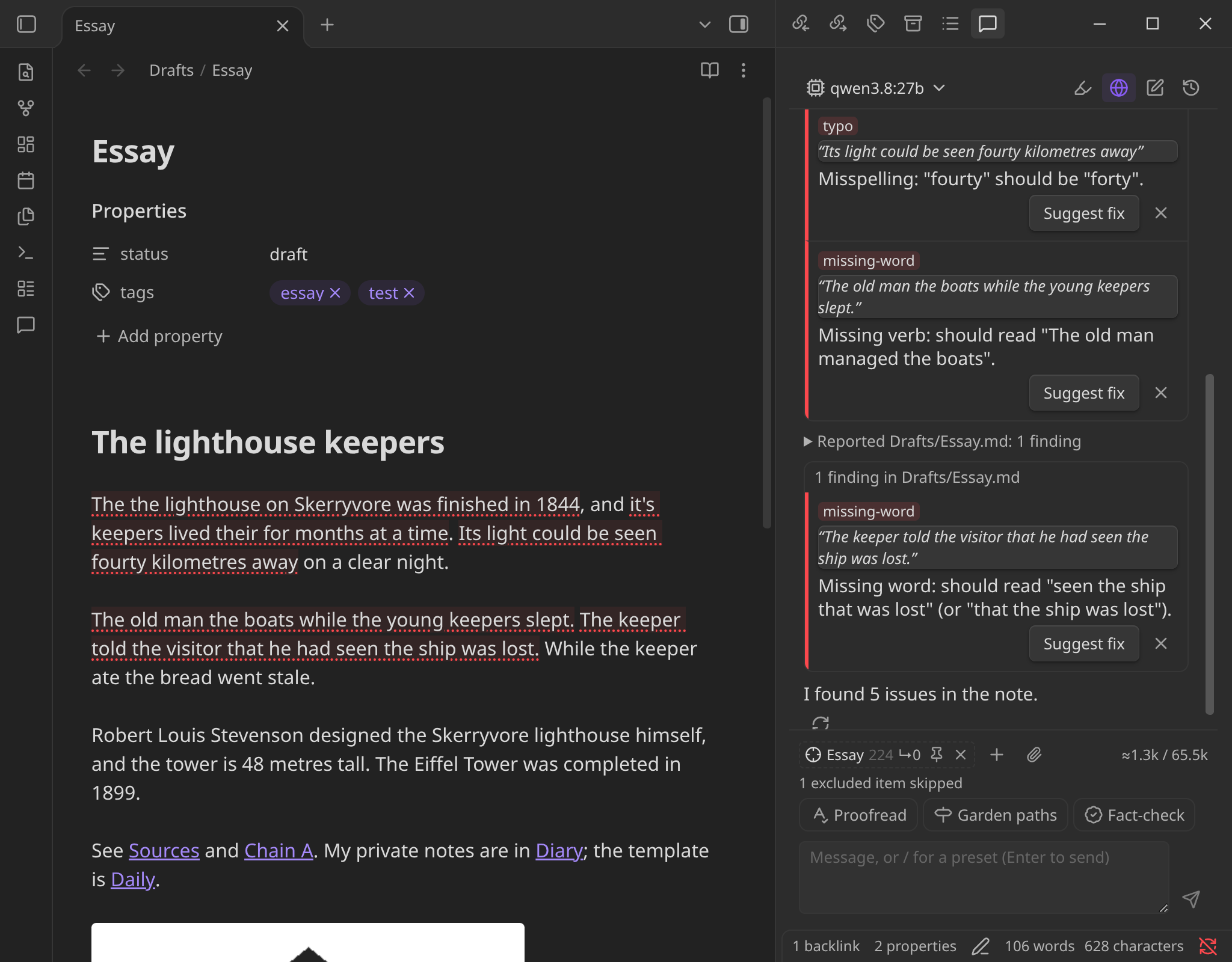
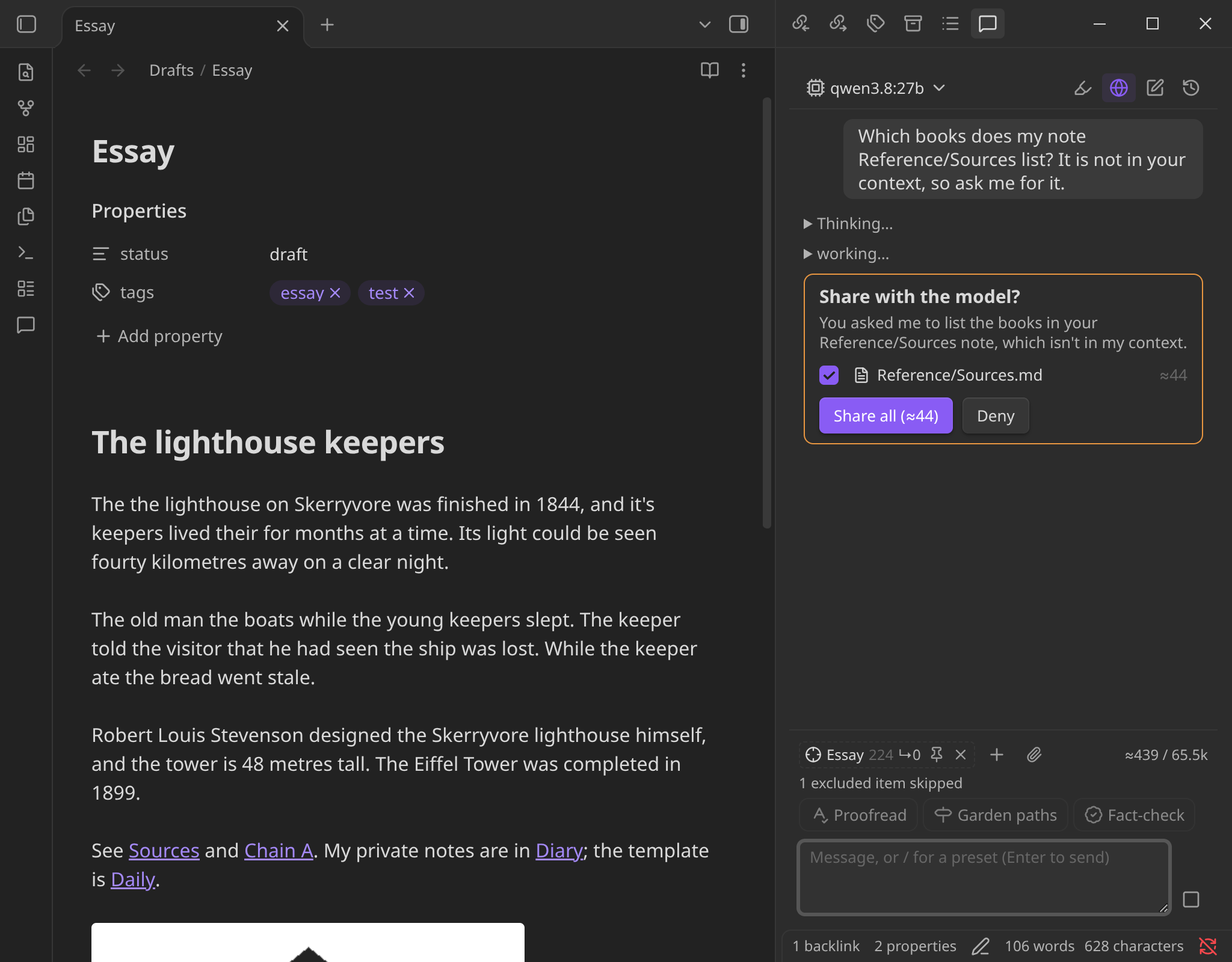
- It sees only what you give it. The model gets the notes, selections and files shown as chips above the message box, and nothing else. If it needs more, it asks, and you decide.
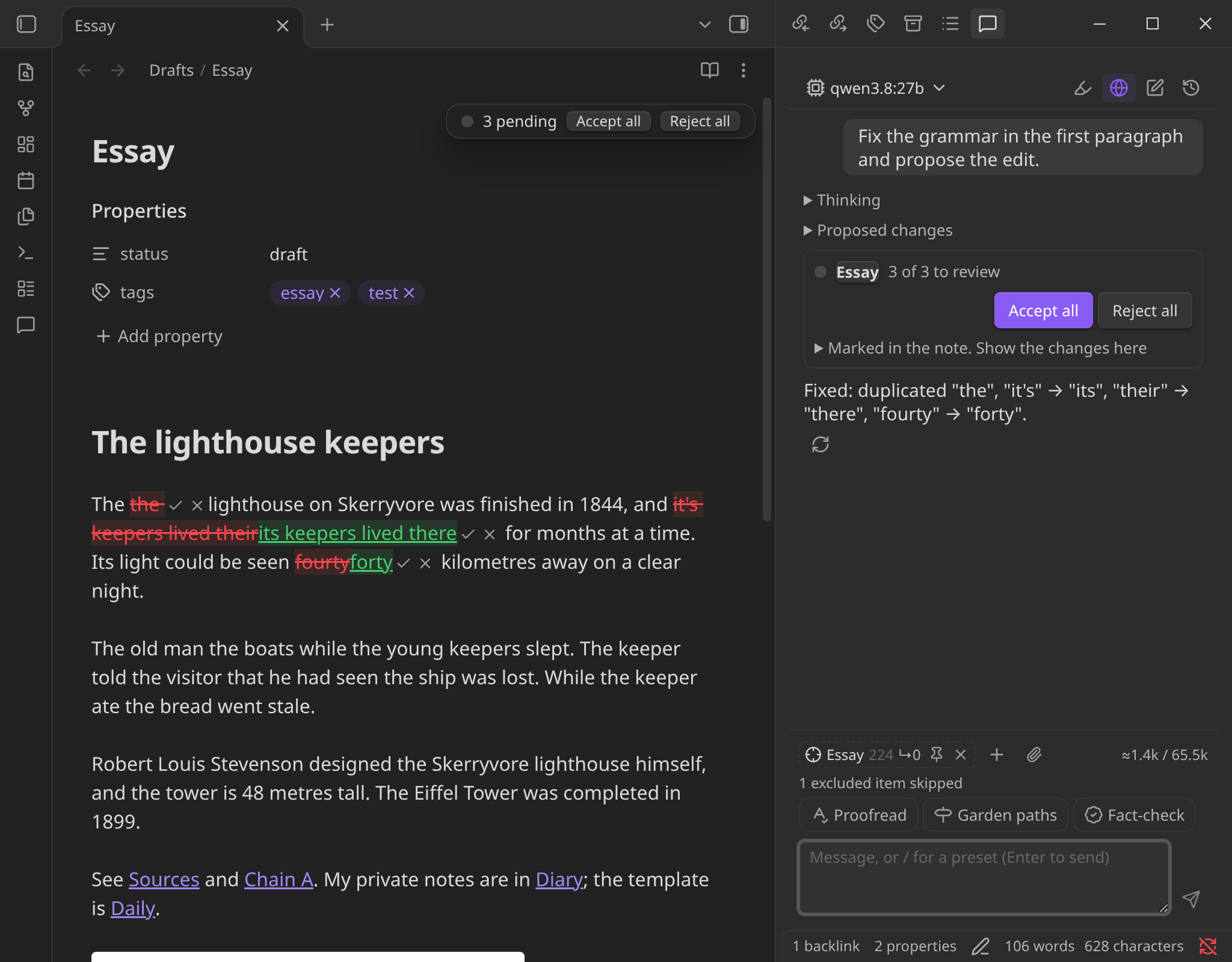
- It changes nothing without you. Every edit it proposes is shown as a diff, and nothing in your vault changes until you accept a change, hunk by hunk. There is no setting that applies changes automatically.
Privacy and network use
What the model sees and changes
- The model sees only the context you attach: the chips above the message box. When it asks for more, you choose what to share, if anything.
- Nothing in your vault changes until you accept a proposed change, hunk by hunk.
Network use
Lektor itself connects only to:
- the model servers you set up: Ollama or another local server, or any OpenAI- or Anthropic-compatible URL you enter, to send your messages and the context you attached;
- the web search provider you choose, if any (Tavily, Exa, Brave, SearXNG or DuckDuckGo), only for searches the model makes;
- web pages the model fetches, for example while fact-checking; pages that didn't come from a search, your messages or your notes need your approval first.
When you turn on Claude Code or Codex, those programs contact Anthropic's or OpenAI's services themselves, as they do when you use them directly, including for their own web searches. While one of them is answering, Lektor listens on 127.0.0.1 (a random port, with a token for that reply) so the program can call Lektor's tools; nothing outside your computer can reach it.
There is no telemetry and no analytics, no update checks, and no other network calls.
Accounts
Core features work with a local model and no account.
- Claude Code needs Claude Code installed and signed in with a Claude subscription; replies count against your plan.
- Codex needs the Codex CLI installed and signed in with a ChatGPT plan; replies count against your plan.
- Tavily, Exa and Brave search need an account and API key from that service; SearXNG needs a server address; DuckDuckGo needs neither.
- Endpoints may need an API key, depending on the server.
Keys are kept in Obsidian's secret storage, not in Lektor's settings file.
Files outside the vault
- Programs. Lektor runs the
claudeandcodexprograms installed on your computer (from your PATH, or a path you set). That is why it works on desktop only. - Temporary folders. For each reply it creates a private folder in the system's temporary folder (
lektor-…), with an empty working folder for the program, so the program never runs in your vault, plus the files that run needs: Lektor's fixed instructions, how to reach Lektor's tools, and for Codex its model list and any images you attached. The folder is removed when the reply ends. For Codex, one empty working folder serves the whole Obsidian session and is removed when Lektor unloads. - Sign-in. Each program signs in by itself, from its own files: Claude Code from its stored login, Codex from your
~/.codex. Lektor never reads, copies or sends your sign-in or any token. For Codex, Lektor tells it to ignore its settings, MCP servers and other configuration there and to keep its state and logs in the temporary folder; Codex may still refresh its own list of models in~/.codex. - Chats and settings are kept in Lektor's own folder inside your vault's configuration folder. Chat history records which notes were sent (paths and hashes), not their contents, unless you turn on full transcripts; replies themselves are kept and may quote your notes. When you delete a note, Lektor offers to delete the chats that sent it.
What Lektor's code can reach
These limits are enforced by Lektor's own lint rules and tests.
-
The file system (Node's
fs). Used only by the Claude Code and Codex bridges, in one module (src/core/cli/fs.ts). It does only these things:- creates
lektor-…folders in the system's temporary folder; - writes the files described above;
- checks that the working folder is empty;
- removes those folders;
- checks that the
claudeorcodexprogram exists.
It never reads a file's contents. Your notes are read only through Obsidian's vault API.
- creates
-
Programs (Node's
child_process). Used only by the bridges, in one module (src/core/cli/spawn.ts), and only once you turn a bridge on. It starts the installedclaudeorcodexprogram directly, never through a shell, with a fixed list of arguments (built insrc/core/cli/claude/args.tsandsrc/core/cli/codex/args.ts). It also runs those programs' own version and information commands. Nothing else is ever run. -
The vault. Lektor lists file names, not contents, for three things: resolving links, offering notes and folders when you add context, and keeping excluded folders out. A note's contents are read only when it is in your context (the chips above the message box), or when the model asks for it and you share it. Your notes change only when you accept a proposed change; Lektor's own chats and settings are kept in its plugin folder.
What it does
- Chat about your notes. Add the current note, a selection, a folder or an attachment as context. Linked notes can come along to a depth you choose. Excluded folders (and Obsidian's own excluded files) are never sent.
- Asks before it reads more. When a model wants a note you didn't give it, a card shows exactly what it asked for; share some, all or none.
- Proposes edits you review. Changes appear in the sidebar as a diff, or inline in the note with ✓ and ✕ on each hunk. Or, in Prose mode, the model just describes them. If you edit the note meanwhile, pending changes are re-anchored, and any that no longer fit are listed rather than applied.
- Presets. Proofread, Garden paths (sentences that lead the reader astray) and Fact-check are built in; write your own with a prompt, tools and a model. Findings are underlined in the note, with "Suggest fix" on each.
- Web search, if you want it. Tavily, Exa, Brave, SearXNG or DuckDuckGo, with caps per message. Pages that didn't come from a search, your messages or your notes need your approval before they're fetched. Claude Code and Codex search with their own tools by default, as in their own apps, and the chat says so.
- AI edit history. Every change you accepted is logged per note, including undo and redo in the editor.
Models
- Ollama at any address (local by default).
- OpenAI- or Anthropic-compatible endpoints: LM Studio, vLLM, llama.cpp, gateways, or a cloud API with your own key.
- Claude Code: the official
claudeCLI on this computer, signed in with your Claude subscription. Off until you turn it on. - Codex: the official
codexCLI on this computer, signed in with your ChatGPT plan. Off until you turn it on.
Claude Code and Codex run locked down. Each runs in an empty temporary folder outside your vault, with its file and shell tools off and its own settings, hooks and MCP servers ignored, and it gets only Lektor's tools for your notes. Before the first chat each day, Lektor checks this on the installed version: if the CLI can read a file it shouldn't, or has a tool it shouldn't, the bridge stays off. Lektor never reads or copies your sign-in; it starts the CLI, which signs in by itself.
Getting started
- Open the sidebar with the ribbon icon or the command Lektor: Open sidebar.
- Choose a model in the header. To use Ollama, install it and pull a model; for an endpoint, Claude Code or Codex, set it up in Lektor's settings first.
- Open a note: it's added as context. Ask something, or click a preset below the message box.
Every action is also in the command palette under "Lektor". None has a default hotkey; bind the ones you like in Settings → Hotkeys.
Licence and credits
AGPL-3.0-or-later; see LICENSE. Bundled packages and their licences are listed in THIRD_PARTY.md.
Lektor's design drew on two MIT-licensed Obsidian plugins: LLM Hub (running CLI models from Obsidian, and serving tools to them over MCP) and Smart Composer (reviewing proposed edits block by block). Lektor contains no code from either.
For plugin developers
Search results and similarity scores are powered by semantic analysis of your plugin's README. If your plugin isn't appearing for searches you'd expect, try updating your README to clearly describe your plugin's purpose, features, and use cases.