List to table converter
approvedby paddomanno
Convert a list (or multi-line text) to a table.
List to table converter plugin for Obsidian
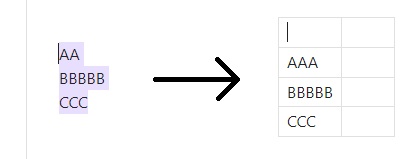
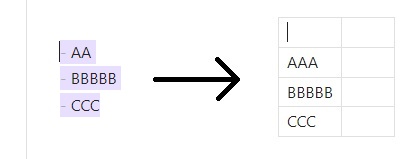
This plugin adds a simple command you can use to convert a list (lines of text / bullet list / nubmered list / checkboxes) to a table. It puts every line into a separate row of the table.
Usage
-
Select some lines (does not have to be exact, i.e. can include blank lines)
-
Open command palette (default:
Ctrl+PorCmd+P) -
Use this command to convert:
List to table converter: Convert list to table
Settings
Adjust your preferences for the resulting table here!
You can choose to generate an empty header row or not, and how many columns should be added after your content.
License
For plugin developers
Search results and similarity scores are powered by semantic analysis of your plugin's README. If your plugin isn't appearing for searches you'd expect, try updating your README to clearly describe your plugin's purpose, features, and use cases.